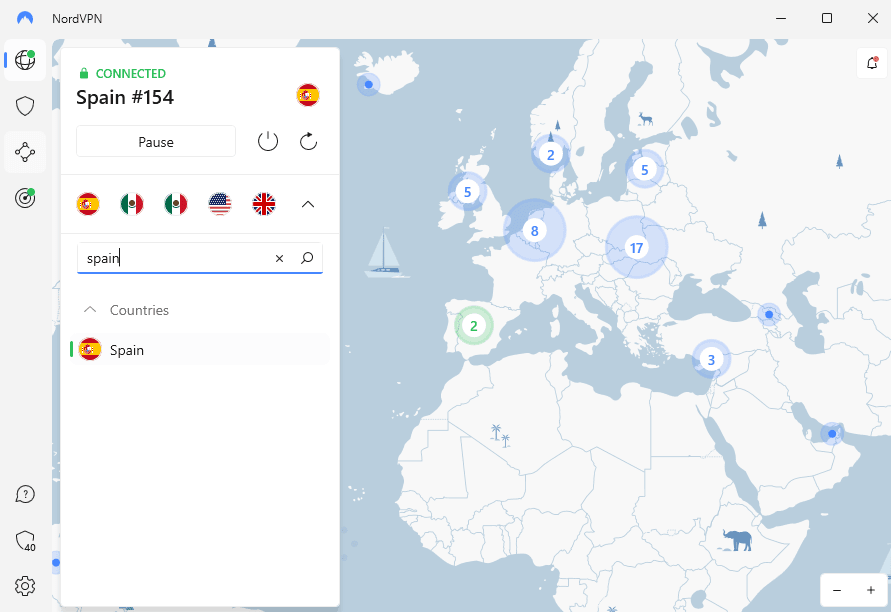
NordVPN is a reliable, budget-friendly VPN for the dark web.
NordVPN — the best VPN for Tor — claims the top spot on our list thanks to its suite of advanced security features. One of the standout features is double VPN, which directs your internet traffic through two VPN servers. This adds an extra layer of protection but at the expense of connection speed.
Onion Over VPN makes it even harder for anyone to trace your digital trail. The tool sends your traffic through a NordVPN server and random Tor servers. If you add a Tor browser into the mix, you’ll achieve a high level of privacy, but the connection speeds will be sluggish because the traffic has to pass through a maze of servers.

In addition to offering a large server network, NordVPN
has specialty servers like obfuscated servers.
NordVPN’s clean and intuitive UI makes it easy for beginners to figure it out in seconds. The brief description of how each feature works helps newbies easily navigate the app. We have a complete guide on how to use NordVPN for various purposes, including accessing the dark web.
NordVPN is one of the fastest VPNs out there, as it reaches near-unprotected speeds when connected to both near- and long-distance servers. Whether you want to download torrents, access academic research papers, upload large files or watch videos on social media mirror sites, you’ll enjoy an excellent experience.

NordVPN’s secure tunnel doesn’t leak your internet traffic.
In addition to the internet kill switch, NordVPN has an app kill switch, which lets you select the specific apps for which the kill switch takes effect. It also supports the following VPN protocols:
| Protocol | Encryption | Devices |
|---|---|---|
| OpenVPN | AES 256-bit | Windows Mac Linux Android iOS |
| NordLynx | ChaCha20 | Windows Mac Linux Android iOS |
| IKEv2 | AES 256-bit | Android iOS |
NordVPN’s monthly plan is still on the higher side of the VPN pricing spectrum. Thankfully, extended plans offer significant discounts — the best deal is the two-year plan, which costs $3.89 per month. Each plan comes with a 30-day money-back guarantee if you want to try the VPN risk-free. Learn more in our comprehensive NordVPN review.

Basic
Plus
Complete
Prime

Surfshark is one of the best dark web VPNs, with unlimited device connections.
Surfshark claims the second spot thanks to its excellent security, affordable pricing and unique features for dark web users. One such feature is “alternative ID,” which assigns you a unique profile to keep your identity and location concealed as you roam the risky underbelly of the internet.
Surfshark’s MultiHop (its version of double VPN) offers 12 preconfigured options. It also provides a dynamic MultiHop option, which lets you choose the entry and exit servers. Remember that the MultiHop feature prioritizes security over speed. With the dynamic MultiHop feature, you can select two geographically close servers to optimize performance.

Surfshark supports dynamic MultiHop connections.
Even though Surfshark’s UI has a lot going on, it’s well designed for ease of use. You don’t have to open the settings menu to access key features like the kill switch. Just click on the feature on the UI to open the configuration page.
Surfshark’s near-distance connection speeds are blazing fast, but the latency is annoyingly high. On long-distance connections, you’ll enjoy fast speeds most of the time. However, because of Surfshark’s inconsistency, the speeds can sometimes be unserviceable.

Surfshark prevents DNS leaks to enhance online privacy.
Surfshark also offers an internet kill switch. Keep in mind that the kill switch doesn’t affect any apps you add to the “bypasser” (Surfshark’s split tunneling feature). It also supports the following VPN protocols:
| Protocol | Encryption | Devices |
|---|---|---|
| OpenVPN | AES 256-bit | Windows Mac Linux Android iOS |
| WireGuard | ChaCha20 | Windows Mac Android iOS |
| IKEv2 | AES 256-bit | Mac Android iOS |
Surfshark is another budget-friendly VPN on this list. Though its monthly plan is expensive, the extended plans are much more affordable. The best deal is the two-year plan, which costs $1.99 per month. Each plan has a 30-day money-back guarantee in case you need more time to make a decision. Learn more in our full Surfshark review.

Surfshark Starter
Surfshark One
Surfshark One+

In addition to being apt for dark web use, ExpressVPN
unblocks all streaming platforms.
ExpressVPN is one of the most secure VPNs thanks to solid protocols and encryption that ensure no dark web activity can be traced back to you. It also uses perfect forward secrecy (PFS) to protect encrypted traffic from future attacks. PFS changes encryption keys regularly, so even if authorities get a key, they can’t decipher all of the Tor traffic.
In addition, ExpressVPN servers run on TrustedServer technology, which wipes data with every reboot. If authorities seize a VPN server (which happened in Turkey in 2017) to investigate your dark web activities, they won’t find any data or Tor browsing history.
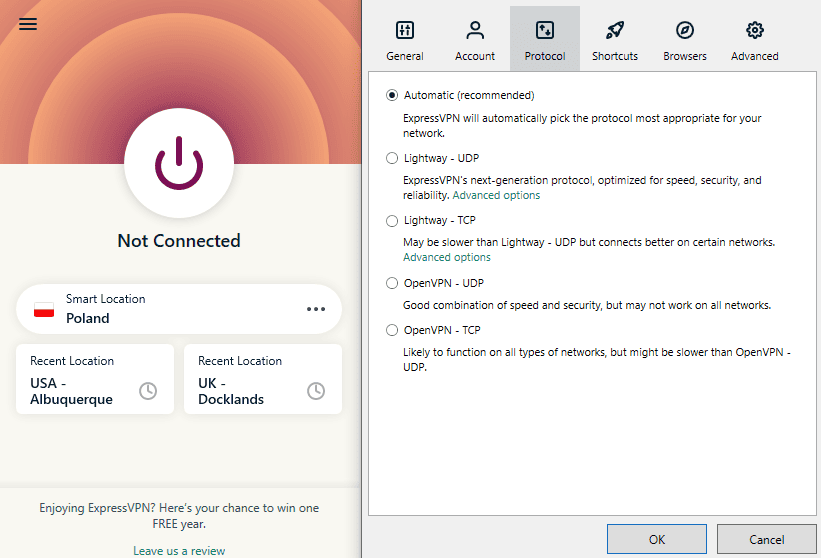
It’s easy to tweak VPN settings for maximum Tor connection security.
ExpressVPN’s intuitive desktop and mobile user interfaces flatten the learning curve for all users, including total beginners. The features are easily accessible in the settings menu and clearly labeled for ease of use. Finding an optimal server is easy with the search function.
ExpressVPN delivers blazing-fast connection speeds. Our latest automated speed test results show that the provider reached 94% of unprotected local speeds and over 80% of unprotected long-distance speeds. Whether downloading torrents on an Onion BitTorrent site or uploading large files on SecureDrop, you’ll enjoy a fast experience.

ExpressVPN offers secure Tor connections thanks to
the built-in DNS leak protection feature.
ExpressVPN offers a kill switch, which cuts your internet connection if the VPN connection fails. This and DNS leak protection prevent accidental leaks that could reveal your identity or location. In addition, ExpressVPN offers the following VPN protocols:
| Protocol | Encryption | Devices |
|---|---|---|
| OpenVPN | AES 256-bit | Windows Mac Linux Android |
| Lightway | ChaCha20 AES 256-bit | Windows Mac Linux Android iOS routers |
| IKEv2 | AES 256-bit | Mac iOS |
ExpressVPN’s two-year plan costs $3.49 per month. There’s a 30-day money-back guarantee if you want to take it for an obligation-free spin. Learn more in our full ExpressVPN review.

ExpressVPN Basic
ExpressVPN Advanced
ExpressVPN Pro

Proton VPN is the best free VPN for safely accessing onion sites.
Proton VPN made the cut largely because of its dedicated Tor over VPN servers, available on the paid plan. The servers route your traffic via a Proton VPN server and a Tor network, making it difficult for anyone to associate the Tor traffic with a specific device or real IP address.
In addition, Proton VPN has a cluster of Secure Core servers. The provider owns and hosts these servers in Switzerland and Iceland — two countries with some of the best privacy laws. This, coupled with Proton VPN’s strict no-logs policy, guarantees that no details about your dark web activity will ever be leaked.

Proton VPN provides secure servers to
enhance user security and privacy.
Proton VPN’s desktop and mobile UI look cluttered because they display details about your connection. Thankfully, the UI design keeps everything well organized, and it’s easy for users to tinker with the key features.

We conducted a series of manual tests on a 10 Mbps connection. Proton VPN proved to be incredibly fast. During our testing, it reached over 91% and 95% of our unprotected download and upload speeds, respectively. Its latency increased by a measly 26%, which is excellent by VPN standards.

Proton VPN’s tunnel is watertight — it doesn’t leak your traffic.
In addition to the internet kill switch, Proton VPN offers a permanent kill switch that lets you access the internet only when the VPN is on. It also supports the following protocols:
| Protocol | Encryption | Devices |
|---|---|---|
| Smart protocol | AES 256-bit ChaCha20 | Windows Mac Android iOS |
| WireGuard | ChaCha20 | Windows Mac Android iOS |
| OpenVPN (UDP/TCP) | AES 256-bit | Windows Android Linux |
Proton VPN has a generous free plan that offers unlimited data and servers in five countries. However, it restricts access to vital features such as NetShield (malware and ad blocker), Tor over VPN and Secure Core servers.
The paid plan pricing is steep compared to other top-tier VPN providers. The best deal is the two-year plan, which costs $2.99 per month. Each plan offers a 30-day money-back guarantee. Learn more in our full Proton VPN review.

Proton VPN Plus
Proton Unlimited

Mullvad enhances anonymity, allowing you to access the dark web safely.
Mullvad places a high premium on anonymity, which is indispensable when accessing the dark web. Its unique account setup doesn’t require a name or an email address: When you sign up, you get a randomly generated number for login purposes. The provider also lets you pay via cash or cryptocurrency, so no identifying details are attached to your account.
In addition to the solid protocols and encryption standards, Mullvad has a feature called “lockdown mode.” This lockdown feature blocks your internet connection when you manually disconnect or quit the Mullvad app. This ensures that you access the dark web only when the VPN is on to enhance your security and privacy. You can read more on how Mullvad protects privacy when compared to our top pick in our Mullvad vs NordVPN comparison.

Mullvad has a few advanced security features.
Mullvad is easy to use partly because of its simplistic design and partly because the features are a bit bare. The features are well organized in the settings menu for easy access and come with descriptions of how they work to guide new users.
Mullvad is fast enough for casual browsing on the dark web. However, since it has inconsistent download speeds, it might not be the best for downloading files on the dark web. The upload speeds are more consistent and may suit users looking to upload files to dark websites.

Mullvad doesn’t leak your traffic.
Unlike other VPN services, Mullvad’s kill switch is built in, meaning you can’t turn it off. The provider supports two VPN protocols:
| Protocol | Encryption | Devices |
|---|---|---|
| OpenVPN | AES 256-bit | Windows Mac Android iOS |
| WireGuard | ChaCha20 | Windows Linux Mac Android iOS |
Mullvad offers a flat monthly rate of about $5 regardless of whether you sign up for a monthly, yearly or decade-long plan. You get a discount if you pay with cryptocurrency.
Mullvad is one of the cheapest options on a monthly scale, but extended plans are comparatively pricey. Mullvad doesn’t do a great job in terms of value for money due to its lack of features. Learn more in our full Mullvad review.

Mullvad

CyberGhost has one of the largest server networks.
CyberGhost has been knocked down to sixth place, not because its performance has deteriorated but because the rest of the pack has improved significantly. It’s still the best VPN for the dark web if you like VPN automation.
With “smart rules,” you can configure CyberGhost to connect to a predefined server on device startup. You can create another rule to have the VPN open your Tor browser — for example, when it establishes a connection. This prevents you from accessing the dark web without VPN protection.

CyberGhost offers advanced VPN automation features.
CyberGhost’s UI may take new users some getting used to because some features are tucked away in unintuitive places. For example, smart rules and privacy options aren’t on the settings page — you have to click the CyberGhost icon to find them at the bottom left.
Though CyberGhost is fast, it’s one of the most inconsistent performers. It can reach over 90% of unprotected speeds on near-distance connections, but the speeds can fall below 20% on its slowest days.

CyberGhost failed our DNS leak test.
CyberGhost’s automatic kill switch blocks internet traffic when you experience internet connectivity issues. The provider also supports solid protocols and is mostly secure and private. Sadly, we’ve had rare cases where it failed our DNS leak tests.
| Protocol | Encryption | Devices |
|---|---|---|
| OpenVPN | AES 256-bit | Windows Linux Android |
| WireGuard | ChaCha20 | Windows Linux Mac Android iOS |
| IKEv2 | AES 256-bit | Windows Mac iOS |
CyberGhost offers excellent value for your money, especially with long-term plans. Its two-year plan costs $2.19 per month, making it one of the best deals. There’s a one-day free trial on desktop and a seven-day free trial on mobile devices.
The monthly plan has a 14-day money-back guarantee, and long-term plans offer a generous 45-day money-back guarantee. Learn more in our full CyberGhost review.

CyberGhost Plans
When choosing a VPN for the dark web, pick one that prioritizes security and privacy. Other features such as speed and unlimited data may be important, especially if you want to engage in speed-intensive activity on the dark web. Here are some simple selection criteria:
You can use a free version as long as it’s from a reliable VPN provider. Remember that many free VPNs on mobile app stores aren’t designed with security and privacy in mind.
They don’t encrypt your traffic properly, leaving you exposed to threats such as malware, identity leaks and hacking. However, there are exceptions, such as Proton VPN, TunnelBear and Windscribe.
If you have to use a free VPN to access the dark web, we recommend using the free version of Proton VPN. It’s the best free VPN, with a kill switch, robust VPN protocols, AES 256-bit encryption and a no-logs policy. It also offers unlimited data, which is perfect for large files and torrent downloads.
Before we get started, install the VPN and Tor browser on your device.
Browse to nordvpn.com and grab a 76% discounted plan. You can claim a refund within 30 days so trying it out is risk-free.

Download and install the VPN client for your platform. Connect the VPN to a server and run a DNS leak test to confirm that you have the right IP address and that the provider isn’t leaking your traffic.

Open the Tor browser and connect to the Tor network to activate the first layer of protection. Click the shield icon at the top right of the browser and configure the Tor browser security level to suit your needs.

With the VPN and Tor browser, safely access any onion site.

There are several reasons why you need a VPN for the dark web:

A VPN hides your real IP address before the traffic enters the Tor network.
A VPN encrypts your traffic, hiding your real IP address before it enters the entry node to boost your privacy.
Remember that the Tor browser sends your traffic through a maze of volunteer-run nodes (servers). Though the onion websites you visit don’t receive any details about who you are, the Tor entry node does. If a bad actor or an authority figure is running the entry node, they can easily trace dark web activity back to you.
A Tor browser provides good levels of security, but bad actors can exploit its loopholes to trace dark web activity back to you. To be on the safe side, we recommend using a secure VPN in unison with the Tor browser. Also, make sure you’re aware of the difference between the dark web and the deep web.
NordVPN is the best dark web VPN, but if you need a cheaper option, Surfshark will suffice. Experience the power of NordVPN yourself, risk-free, with the assurance that you can get your money back within 30 days if you’re not completely satisfied.
Have you used a VPN for the dark web? Which VPN did you use? Which feature of the dark web VPN appealed to you the most? We’d like to hear about it, and as always, thank you for reading.
It’s not safe to browse the dark web without a VPN because your ISP can see your digital trail and may share the information if coerced or subpoenaed by authorities.
Onion routing isn’t better than a VPN because the Tor network comprises volunteer-run servers, and not all volunteers can be trusted.
Without a VPN, your ISP can see that you are browsing the dark web, though not necessarily exactly what you’re looking at.
Though the dark web is synonymous with criminal activity, it does have legitimate uses, such as combating censorship and communicating anonymously. Regardless of your motives, its sinister reputation calls for extra caution lest you fall into legal trouble. One of the best ways to protect yourself is to use the best VPN for the dark web.
In this guide, we’ll discuss the strengths and weaknesses of the top VPNs for dark web navigation. We reveal each provider’s security and privacy features to help you find an apt VPN whether you’re a lawyer, journalist, civil rights activist or casual dark web user.
02/19/2024
We rewrote the guide to reflect the most recent performance of the top six VPN services for the dark web.
10/01/2024 Facts checked
We refined the rankings to reflect evolving industry standards and user needs.
10/20/2025 Facts checked
We adjusted the article to include information on ExpressVPN’s new pricing plans.
NordVPN is our editor’s choice for best VPN for the dark web thanks to its fast speeds and excellent security and privacy. It offers solid protocols and AES 256-bit encryption to keep you secure and anonymous so no dark web activity is associated with your real IP address.
Keep reading to learn how the top dark web VPNs differ in terms of capability and pricing.


NordVPN is a reliable, budget-friendly VPN for the dark web.
NordVPN — the best VPN for Tor — claims the top spot on our list thanks to its suite of advanced security features. One of the standout features is double VPN, which directs your internet traffic through two VPN servers. This adds an extra layer of protection but at the expense of connection speed.
Onion Over VPN makes it even harder for anyone to trace your digital trail. The tool sends your traffic through a NordVPN server and random Tor servers. If you add a Tor browser into the mix, you’ll achieve a high level of privacy, but the connection speeds will be sluggish because the traffic has to pass through a maze of servers.
In addition to offering a large server network, NordVPN
has specialty servers like obfuscated servers.
NordVPN’s clean and intuitive UI makes it easy for beginners to figure it out in seconds. The brief description of how each feature works helps newbies easily navigate the app. We have a complete guide on how to use NordVPN for various purposes, including accessing the dark web.
NordVPN is one of the fastest VPNs out there, as it reaches near-unprotected speeds when connected to both near- and long-distance servers. Whether you want to download torrents, access academic research papers, upload large files or watch videos on social media mirror sites, you’ll enjoy an excellent experience.
NordVPN’s secure tunnel doesn’t leak your internet traffic.
In addition to the internet kill switch, NordVPN has an app kill switch, which lets you select the specific apps for which the kill switch takes effect. It also supports the following VPN protocols:
| Protocol | Encryption | Devices |
|---|---|---|
| OpenVPN | AES 256-bit | Windows Mac Linux Android iOS |
| NordLynx | ChaCha20 | Windows Mac Linux Android iOS |
| IKEv2 | AES 256-bit | Android iOS |
NordVPN’s monthly plan is still on the higher side of the VPN pricing spectrum. Thankfully, extended plans offer significant discounts — the best deal is the two-year plan, which costs $3.89 per month. Each plan comes with a 30-day money-back guarantee if you want to try the VPN risk-free. Learn more in our comprehensive NordVPN review.
Basic
Plus
Complete
Prime
Surfshark is one of the best dark web VPNs, with unlimited device connections.
Surfshark claims the second spot thanks to its excellent security, affordable pricing and unique features for dark web users. One such feature is “alternative ID,” which assigns you a unique profile to keep your identity and location concealed as you roam the risky underbelly of the internet.
Surfshark’s MultiHop (its version of double VPN) offers 12 preconfigured options. It also provides a dynamic MultiHop option, which lets you choose the entry and exit servers. Remember that the MultiHop feature prioritizes security over speed. With the dynamic MultiHop feature, you can select two geographically close servers to optimize performance.
Surfshark supports dynamic MultiHop connections.
Even though Surfshark’s UI has a lot going on, it’s well designed for ease of use. You don’t have to open the settings menu to access key features like the kill switch. Just click on the feature on the UI to open the configuration page.
Surfshark’s near-distance connection speeds are blazing fast, but the latency is annoyingly high. On long-distance connections, you’ll enjoy fast speeds most of the time. However, because of Surfshark’s inconsistency, the speeds can sometimes be unserviceable.
Surfshark prevents DNS leaks to enhance online privacy.
Surfshark also offers an internet kill switch. Keep in mind that the kill switch doesn’t affect any apps you add to the “bypasser” (Surfshark’s split tunneling feature). It also supports the following VPN protocols:
| Protocol | Encryption | Devices |
|---|---|---|
| OpenVPN | AES 256-bit | Windows Mac Linux Android iOS |
| WireGuard | ChaCha20 | Windows Mac Android iOS |
| IKEv2 | AES 256-bit | Mac Android iOS |
Surfshark is another budget-friendly VPN on this list. Though its monthly plan is expensive, the extended plans are much more affordable. The best deal is the two-year plan, which costs $1.99 per month. Each plan has a 30-day money-back guarantee in case you need more time to make a decision. Learn more in our full Surfshark review.
Surfshark Starter
Surfshark One
Surfshark One+
In addition to being apt for dark web use, ExpressVPN
unblocks all streaming platforms.
ExpressVPN is one of the most secure VPNs thanks to solid protocols and encryption that ensure no dark web activity can be traced back to you. It also uses perfect forward secrecy (PFS) to protect encrypted traffic from future attacks. PFS changes encryption keys regularly, so even if authorities get a key, they can’t decipher all of the Tor traffic.
In addition, ExpressVPN servers run on TrustedServer technology, which wipes data with every reboot. If authorities seize a VPN server (which happened in Turkey in 2017) to investigate your dark web activities, they won’t find any data or Tor browsing history.
It’s easy to tweak VPN settings for maximum Tor connection security.
ExpressVPN’s intuitive desktop and mobile user interfaces flatten the learning curve for all users, including total beginners. The features are easily accessible in the settings menu and clearly labeled for ease of use. Finding an optimal server is easy with the search function.
ExpressVPN delivers blazing-fast connection speeds. Our latest automated speed test results show that the provider reached 94% of unprotected local speeds and over 80% of unprotected long-distance speeds. Whether downloading torrents on an Onion BitTorrent site or uploading large files on SecureDrop, you’ll enjoy a fast experience.
ExpressVPN offers secure Tor connections thanks to
the built-in DNS leak protection feature.
ExpressVPN offers a kill switch, which cuts your internet connection if the VPN connection fails. This and DNS leak protection prevent accidental leaks that could reveal your identity or location. In addition, ExpressVPN offers the following VPN protocols:
| Protocol | Encryption | Devices |
|---|---|---|
| OpenVPN | AES 256-bit | Windows Mac Linux Android |
| Lightway | ChaCha20 AES 256-bit | Windows Mac Linux Android iOS routers |
| IKEv2 | AES 256-bit | Mac iOS |
ExpressVPN’s two-year plan costs $3.49 per month. There’s a 30-day money-back guarantee if you want to take it for an obligation-free spin. Learn more in our full ExpressVPN review.
ExpressVPN Basic
ExpressVPN Advanced
ExpressVPN Pro
Proton VPN is the best free VPN for safely accessing onion sites.
Proton VPN made the cut largely because of its dedicated Tor over VPN servers, available on the paid plan. The servers route your traffic via a Proton VPN server and a Tor network, making it difficult for anyone to associate the Tor traffic with a specific device or real IP address.
In addition, Proton VPN has a cluster of Secure Core servers. The provider owns and hosts these servers in Switzerland and Iceland — two countries with some of the best privacy laws. This, coupled with Proton VPN’s strict no-logs policy, guarantees that no details about your dark web activity will ever be leaked.
Proton VPN provides secure servers to
enhance user security and privacy.
Proton VPN’s desktop and mobile UI look cluttered because they display details about your connection. Thankfully, the UI design keeps everything well organized, and it’s easy for users to tinker with the key features.
We conducted a series of manual tests on a 10 Mbps connection. Proton VPN proved to be incredibly fast. During our testing, it reached over 91% and 95% of our unprotected download and upload speeds, respectively. Its latency increased by a measly 26%, which is excellent by VPN standards.
Proton VPN’s tunnel is watertight — it doesn’t leak your traffic.
In addition to the internet kill switch, Proton VPN offers a permanent kill switch that lets you access the internet only when the VPN is on. It also supports the following protocols:
| Protocol | Encryption | Devices |
|---|---|---|
| Smart protocol | AES 256-bit ChaCha20 | Windows Mac Android iOS |
| WireGuard | ChaCha20 | Windows Mac Android iOS |
| OpenVPN (UDP/TCP) | AES 256-bit | Windows Android Linux |
Proton VPN has a generous free plan that offers unlimited data and servers in five countries. However, it restricts access to vital features such as NetShield (malware and ad blocker), Tor over VPN and Secure Core servers.
The paid plan pricing is steep compared to other top-tier VPN providers. The best deal is the two-year plan, which costs $2.99 per month. Each plan offers a 30-day money-back guarantee. Learn more in our full Proton VPN review.
Proton VPN Plus
Proton Unlimited
Mullvad enhances anonymity, allowing you to access the dark web safely.
Mullvad places a high premium on anonymity, which is indispensable when accessing the dark web. Its unique account setup doesn’t require a name or an email address: When you sign up, you get a randomly generated number for login purposes. The provider also lets you pay via cash or cryptocurrency, so no identifying details are attached to your account.
In addition to the solid protocols and encryption standards, Mullvad has a feature called “lockdown mode.” This lockdown feature blocks your internet connection when you manually disconnect or quit the Mullvad app. This ensures that you access the dark web only when the VPN is on to enhance your security and privacy. You can read more on how Mullvad protects privacy when compared to our top pick in our Mullvad vs NordVPN comparison.
Mullvad has a few advanced security features.
Mullvad is easy to use partly because of its simplistic design and partly because the features are a bit bare. The features are well organized in the settings menu for easy access and come with descriptions of how they work to guide new users.
Mullvad is fast enough for casual browsing on the dark web. However, since it has inconsistent download speeds, it might not be the best for downloading files on the dark web. The upload speeds are more consistent and may suit users looking to upload files to dark websites.
Mullvad doesn’t leak your traffic.
Unlike other VPN services, Mullvad’s kill switch is built in, meaning you can’t turn it off. The provider supports two VPN protocols:
| Protocol | Encryption | Devices |
|---|---|---|
| OpenVPN | AES 256-bit | Windows Mac Android iOS |
| WireGuard | ChaCha20 | Windows Linux Mac Android iOS |
Mullvad offers a flat monthly rate of about $5 regardless of whether you sign up for a monthly, yearly or decade-long plan. You get a discount if you pay with cryptocurrency.
Mullvad is one of the cheapest options on a monthly scale, but extended plans are comparatively pricey. Mullvad doesn’t do a great job in terms of value for money due to its lack of features. Learn more in our full Mullvad review.
Mullvad
CyberGhost has one of the largest server networks.
CyberGhost has been knocked down to sixth place, not because its performance has deteriorated but because the rest of the pack has improved significantly. It’s still the best VPN for the dark web if you like VPN automation.
With “smart rules,” you can configure CyberGhost to connect to a predefined server on device startup. You can create another rule to have the VPN open your Tor browser — for example, when it establishes a connection. This prevents you from accessing the dark web without VPN protection.
CyberGhost offers advanced VPN automation features.
CyberGhost’s UI may take new users some getting used to because some features are tucked away in unintuitive places. For example, smart rules and privacy options aren’t on the settings page — you have to click the CyberGhost icon to find them at the bottom left.
Though CyberGhost is fast, it’s one of the most inconsistent performers. It can reach over 90% of unprotected speeds on near-distance connections, but the speeds can fall below 20% on its slowest days.
CyberGhost failed our DNS leak test.
CyberGhost’s automatic kill switch blocks internet traffic when you experience internet connectivity issues. The provider also supports solid protocols and is mostly secure and private. Sadly, we’ve had rare cases where it failed our DNS leak tests.
| Protocol | Encryption | Devices |
|---|---|---|
| OpenVPN | AES 256-bit | Windows Linux Android |
| WireGuard | ChaCha20 | Windows Linux Mac Android iOS |
| IKEv2 | AES 256-bit | Windows Mac iOS |
CyberGhost offers excellent value for your money, especially with long-term plans. Its two-year plan costs $2.19 per month, making it one of the best deals. There’s a one-day free trial on desktop and a seven-day free trial on mobile devices.
The monthly plan has a 14-day money-back guarantee, and long-term plans offer a generous 45-day money-back guarantee. Learn more in our full CyberGhost review.
CyberGhost Plans
When choosing a VPN for the dark web, pick one that prioritizes security and privacy. Other features such as speed and unlimited data may be important, especially if you want to engage in speed-intensive activity on the dark web. Here are some simple selection criteria:
You can use a free version as long as it’s from a reliable VPN provider. Remember that many free VPNs on mobile app stores aren’t designed with security and privacy in mind.
They don’t encrypt your traffic properly, leaving you exposed to threats such as malware, identity leaks and hacking. However, there are exceptions, such as Proton VPN, TunnelBear and Windscribe.
If you have to use a free VPN to access the dark web, we recommend using the free version of Proton VPN. It’s the best free VPN, with a kill switch, robust VPN protocols, AES 256-bit encryption and a no-logs policy. It also offers unlimited data, which is perfect for large files and torrent downloads.
Before we get started, install the VPN and Tor browser on your device.
Browse to nordvpn.com and grab a 76% discounted plan. You can claim a refund within 30 days so trying it out is risk-free.
Download and install the VPN client for your platform. Connect the VPN to a server and run a DNS leak test to confirm that you have the right IP address and that the provider isn’t leaking your traffic.
Open the Tor browser and connect to the Tor network to activate the first layer of protection. Click the shield icon at the top right of the browser and configure the Tor browser security level to suit your needs.
With the VPN and Tor browser, safely access any onion site.
There are several reasons why you need a VPN for the dark web:
A VPN hides your real IP address before the traffic enters the Tor network.
A VPN encrypts your traffic, hiding your real IP address before it enters the entry node to boost your privacy.
Remember that the Tor browser sends your traffic through a maze of volunteer-run nodes (servers). Though the onion websites you visit don’t receive any details about who you are, the Tor entry node does. If a bad actor or an authority figure is running the entry node, they can easily trace dark web activity back to you.
A Tor browser provides good levels of security, but bad actors can exploit its loopholes to trace dark web activity back to you. To be on the safe side, we recommend using a secure VPN in unison with the Tor browser. Also, make sure you’re aware of the difference between the dark web and the deep web.
NordVPN is the best dark web VPN, but if you need a cheaper option, Surfshark will suffice. Experience the power of NordVPN yourself, risk-free, with the assurance that you can get your money back within 30 days if you’re not completely satisfied.
Have you used a VPN for the dark web? Which VPN did you use? Which feature of the dark web VPN appealed to you the most? We’d like to hear about it, and as always, thank you for reading.
It’s not safe to browse the dark web without a VPN because your ISP can see your digital trail and may share the information if coerced or subpoenaed by authorities.
Onion routing isn’t better than a VPN because the Tor network comprises volunteer-run servers, and not all volunteers can be trusted.
Without a VPN, your ISP can see that you are browsing the dark web, though not necessarily exactly what you’re looking at.
Click Here For The Original Source.
NordVPN is a reliable, budget-friendly VPN for the dark web.
NordVPN — the best VPN for Tor — claims the top spot on our list thanks to its suite of advanced security features. One of the standout features is double VPN, which directs your internet traffic through two VPN servers. This adds an extra layer of protection but at the expense of connection speed.
Onion Over VPN makes it even harder for anyone to trace your digital trail. The tool sends your traffic through a NordVPN server and random Tor servers. If you add a Tor browser into the mix, you’ll achieve a high level of privacy, but the connection speeds will be sluggish because the traffic has to pass through a maze of servers.
In addition to offering a large server network, NordVPN
has specialty servers like obfuscated servers.
NordVPN’s clean and intuitive UI makes it easy for beginners to figure it out in seconds. The brief description of how each feature works helps newbies easily navigate the app. We have a complete guide on how to use NordVPN for various purposes, including accessing the dark web.
NordVPN is one of the fastest VPNs out there, as it reaches near-unprotected speeds when connected to both near- and long-distance servers. Whether you want to download torrents, access academic research papers, upload large files or watch videos on social media mirror sites, you’ll enjoy an excellent experience.
NordVPN’s secure tunnel doesn’t leak your internet traffic.
In addition to the internet kill switch, NordVPN has an app kill switch, which lets you select the specific apps for which the kill switch takes effect. It also supports the following VPN protocols:
| Protocol | Encryption | Devices |
|---|---|---|
| OpenVPN | AES 256-bit | Windows Mac Linux Android iOS |
| NordLynx | ChaCha20 | Windows Mac Linux Android iOS |
| IKEv2 | AES 256-bit | Android iOS |
NordVPN’s monthly plan is still on the higher side of the VPN pricing spectrum. Thankfully, extended plans offer significant discounts — the best deal is the two-year plan, which costs $3.89 per month. Each plan comes with a 30-day money-back guarantee if you want to try the VPN risk-free. Learn more in our comprehensive NordVPN review.
Basic
Plus
Complete
Prime
Surfshark is one of the best dark web VPNs, with unlimited device connections.
Surfshark claims the second spot thanks to its excellent security, affordable pricing and unique features for dark web users. One such feature is “alternative ID,” which assigns you a unique profile to keep your identity and location concealed as you roam the risky underbelly of the internet.
Surfshark’s MultiHop (its version of double VPN) offers 12 preconfigured options. It also provides a dynamic MultiHop option, which lets you choose the entry and exit servers. Remember that the MultiHop feature prioritizes security over speed. With the dynamic MultiHop feature, you can select two geographically close servers to optimize performance.
Surfshark supports dynamic MultiHop connections.
Even though Surfshark’s UI has a lot going on, it’s well designed for ease of use. You don’t have to open the settings menu to access key features like the kill switch. Just click on the feature on the UI to open the configuration page.
Surfshark’s near-distance connection speeds are blazing fast, but the latency is annoyingly high. On long-distance connections, you’ll enjoy fast speeds most of the time. However, because of Surfshark’s inconsistency, the speeds can sometimes be unserviceable.
Surfshark prevents DNS leaks to enhance online privacy.
Surfshark also offers an internet kill switch. Keep in mind that the kill switch doesn’t affect any apps you add to the “bypasser” (Surfshark’s split tunneling feature). It also supports the following VPN protocols:
| Protocol | Encryption | Devices |
|---|---|---|
| OpenVPN | AES 256-bit | Windows Mac Linux Android iOS |
| WireGuard | ChaCha20 | Windows Mac Android iOS |
| IKEv2 | AES 256-bit | Mac Android iOS |
Surfshark is another budget-friendly VPN on this list. Though its monthly plan is expensive, the extended plans are much more affordable. The best deal is the two-year plan, which costs $1.99 per month. Each plan has a 30-day money-back guarantee in case you need more time to make a decision. Learn more in our full Surfshark review.
Surfshark Starter
Surfshark One
Surfshark One+
In addition to being apt for dark web use, ExpressVPN
unblocks all streaming platforms.
ExpressVPN is one of the most secure VPNs thanks to solid protocols and encryption that ensure no dark web activity can be traced back to you. It also uses perfect forward secrecy (PFS) to protect encrypted traffic from future attacks. PFS changes encryption keys regularly, so even if authorities get a key, they can’t decipher all of the Tor traffic.
In addition, ExpressVPN servers run on TrustedServer technology, which wipes data with every reboot. If authorities seize a VPN server (which happened in Turkey in 2017) to investigate your dark web activities, they won’t find any data or Tor browsing history.
It’s easy to tweak VPN settings for maximum Tor connection security.
ExpressVPN’s intuitive desktop and mobile user interfaces flatten the learning curve for all users, including total beginners. The features are easily accessible in the settings menu and clearly labeled for ease of use. Finding an optimal server is easy with the search function.
ExpressVPN delivers blazing-fast connection speeds. Our latest automated speed test results show that the provider reached 94% of unprotected local speeds and over 80% of unprotected long-distance speeds. Whether downloading torrents on an Onion BitTorrent site or uploading large files on SecureDrop, you’ll enjoy a fast experience.
ExpressVPN offers secure Tor connections thanks to
the built-in DNS leak protection feature.
ExpressVPN offers a kill switch, which cuts your internet connection if the VPN connection fails. This and DNS leak protection prevent accidental leaks that could reveal your identity or location. In addition, ExpressVPN offers the following VPN protocols:
| Protocol | Encryption | Devices |
|---|---|---|
| OpenVPN | AES 256-bit | Windows Mac Linux Android |
| Lightway | ChaCha20 AES 256-bit | Windows Mac Linux Android iOS routers |
| IKEv2 | AES 256-bit | Mac iOS |
ExpressVPN’s two-year plan costs $3.49 per month. There’s a 30-day money-back guarantee if you want to take it for an obligation-free spin. Learn more in our full ExpressVPN review.
ExpressVPN Basic
ExpressVPN Advanced
ExpressVPN Pro
Proton VPN is the best free VPN for safely accessing onion sites.
Proton VPN made the cut largely because of its dedicated Tor over VPN servers, available on the paid plan. The servers route your traffic via a Proton VPN server and a Tor network, making it difficult for anyone to associate the Tor traffic with a specific device or real IP address.
In addition, Proton VPN has a cluster of Secure Core servers. The provider owns and hosts these servers in Switzerland and Iceland — two countries with some of the best privacy laws. This, coupled with Proton VPN’s strict no-logs policy, guarantees that no details about your dark web activity will ever be leaked.
Proton VPN provides secure servers to
enhance user security and privacy.
Proton VPN’s desktop and mobile UI look cluttered because they display details about your connection. Thankfully, the UI design keeps everything well organized, and it’s easy for users to tinker with the key features.
We conducted a series of manual tests on a 10 Mbps connection. Proton VPN proved to be incredibly fast. During our testing, it reached over 91% and 95% of our unprotected download and upload speeds, respectively. Its latency increased by a measly 26%, which is excellent by VPN standards.
Proton VPN’s tunnel is watertight — it doesn’t leak your traffic.
In addition to the internet kill switch, Proton VPN offers a permanent kill switch that lets you access the internet only when the VPN is on. It also supports the following protocols:
| Protocol | Encryption | Devices |
|---|---|---|
| Smart protocol | AES 256-bit ChaCha20 | Windows Mac Android iOS |
| WireGuard | ChaCha20 | Windows Mac Android iOS |
| OpenVPN (UDP/TCP) | AES 256-bit | Windows Android Linux |
Proton VPN has a generous free plan that offers unlimited data and servers in five countries. However, it restricts access to vital features such as NetShield (malware and ad blocker), Tor over VPN and Secure Core servers.
The paid plan pricing is steep compared to other top-tier VPN providers. The best deal is the two-year plan, which costs $2.99 per month. Each plan offers a 30-day money-back guarantee. Learn more in our full Proton VPN review.
Proton VPN Plus
Proton Unlimited
Mullvad enhances anonymity, allowing you to access the dark web safely.
Mullvad places a high premium on anonymity, which is indispensable when accessing the dark web. Its unique account setup doesn’t require a name or an email address: When you sign up, you get a randomly generated number for login purposes. The provider also lets you pay via cash or cryptocurrency, so no identifying details are attached to your account.
In addition to the solid protocols and encryption standards, Mullvad has a feature called “lockdown mode.” This lockdown feature blocks your internet connection when you manually disconnect or quit the Mullvad app. This ensures that you access the dark web only when the VPN is on to enhance your security and privacy. You can read more on how Mullvad protects privacy when compared to our top pick in our Mullvad vs NordVPN comparison.
Mullvad has a few advanced security features.
Mullvad is easy to use partly because of its simplistic design and partly because the features are a bit bare. The features are well organized in the settings menu for easy access and come with descriptions of how they work to guide new users.
Mullvad is fast enough for casual browsing on the dark web. However, since it has inconsistent download speeds, it might not be the best for downloading files on the dark web. The upload speeds are more consistent and may suit users looking to upload files to dark websites.
Mullvad doesn’t leak your traffic.
Unlike other VPN services, Mullvad’s kill switch is built in, meaning you can’t turn it off. The provider supports two VPN protocols:
| Protocol | Encryption | Devices |
|---|---|---|
| OpenVPN | AES 256-bit | Windows Mac Android iOS |
| WireGuard | ChaCha20 | Windows Linux Mac Android iOS |
Mullvad offers a flat monthly rate of about $5 regardless of whether you sign up for a monthly, yearly or decade-long plan. You get a discount if you pay with cryptocurrency.
Mullvad is one of the cheapest options on a monthly scale, but extended plans are comparatively pricey. Mullvad doesn’t do a great job in terms of value for money due to its lack of features. Learn more in our full Mullvad review.
Mullvad
CyberGhost has one of the largest server networks.
CyberGhost has been knocked down to sixth place, not because its performance has deteriorated but because the rest of the pack has improved significantly. It’s still the best VPN for the dark web if you like VPN automation.
With “smart rules,” you can configure CyberGhost to connect to a predefined server on device startup. You can create another rule to have the VPN open your Tor browser — for example, when it establishes a connection. This prevents you from accessing the dark web without VPN protection.
CyberGhost offers advanced VPN automation features.
CyberGhost’s UI may take new users some getting used to because some features are tucked away in unintuitive places. For example, smart rules and privacy options aren’t on the settings page — you have to click the CyberGhost icon to find them at the bottom left.
Though CyberGhost is fast, it’s one of the most inconsistent performers. It can reach over 90% of unprotected speeds on near-distance connections, but the speeds can fall below 20% on its slowest days.
CyberGhost failed our DNS leak test.
CyberGhost’s automatic kill switch blocks internet traffic when you experience internet connectivity issues. The provider also supports solid protocols and is mostly secure and private. Sadly, we’ve had rare cases where it failed our DNS leak tests.
| Protocol | Encryption | Devices |
|---|---|---|
| OpenVPN | AES 256-bit | Windows Linux Android |
| WireGuard | ChaCha20 | Windows Linux Mac Android iOS |
| IKEv2 | AES 256-bit | Windows Mac iOS |
CyberGhost offers excellent value for your money, especially with long-term plans. Its two-year plan costs $2.19 per month, making it one of the best deals. There’s a one-day free trial on desktop and a seven-day free trial on mobile devices.
The monthly plan has a 14-day money-back guarantee, and long-term plans offer a generous 45-day money-back guarantee. Learn more in our full CyberGhost review.
CyberGhost Plans
When choosing a VPN for the dark web, pick one that prioritizes security and privacy. Other features such as speed and unlimited data may be important, especially if you want to engage in speed-intensive activity on the dark web. Here are some simple selection criteria:
You can use a free version as long as it’s from a reliable VPN provider. Remember that many free VPNs on mobile app stores aren’t designed with security and privacy in mind.
They don’t encrypt your traffic properly, leaving you exposed to threats such as malware, identity leaks and hacking. However, there are exceptions, such as Proton VPN, TunnelBear and Windscribe.
If you have to use a free VPN to access the dark web, we recommend using the free version of Proton VPN. It’s the best free VPN, with a kill switch, robust VPN protocols, AES 256-bit encryption and a no-logs policy. It also offers unlimited data, which is perfect for large files and torrent downloads.
Before we get started, install the VPN and Tor browser on your device.
Browse to nordvpn.com and grab a 76% discounted plan. You can claim a refund within 30 days so trying it out is risk-free.
Download and install the VPN client for your platform. Connect the VPN to a server and run a DNS leak test to confirm that you have the right IP address and that the provider isn’t leaking your traffic.
Open the Tor browser and connect to the Tor network to activate the first layer of protection. Click the shield icon at the top right of the browser and configure the Tor browser security level to suit your needs.
With the VPN and Tor browser, safely access any onion site.
There are several reasons why you need a VPN for the dark web:
A VPN hides your real IP address before the traffic enters the Tor network.
A VPN encrypts your traffic, hiding your real IP address before it enters the entry node to boost your privacy.
Remember that the Tor browser sends your traffic through a maze of volunteer-run nodes (servers). Though the onion websites you visit don’t receive any details about who you are, the Tor entry node does. If a bad actor or an authority figure is running the entry node, they can easily trace dark web activity back to you.
A Tor browser provides good levels of security, but bad actors can exploit its loopholes to trace dark web activity back to you. To be on the safe side, we recommend using a secure VPN in unison with the Tor browser. Also, make sure you’re aware of the difference between the dark web and the deep web.
NordVPN is the best dark web VPN, but if you need a cheaper option, Surfshark will suffice. Experience the power of NordVPN yourself, risk-free, with the assurance that you can get your money back within 30 days if you’re not completely satisfied.
Have you used a VPN for the dark web? Which VPN did you use? Which feature of the dark web VPN appealed to you the most? We’d like to hear about it, and as always, thank you for reading.
It’s not safe to browse the dark web without a VPN because your ISP can see your digital trail and may share the information if coerced or subpoenaed by authorities.
Onion routing isn’t better than a VPN because the Tor network comprises volunteer-run servers, and not all volunteers can be trusted.
Without a VPN, your ISP can see that you are browsing the dark web, though not necessarily exactly what you’re looking at.
Though the dark web is synonymous with criminal activity, it does have legitimate uses, such as combating censorship and communicating anonymously. Regardless of your motives, its sinister reputation calls for extra caution lest you fall into legal trouble. One of the best ways to protect yourself is to use the best VPN for the dark web.
In this guide, we’ll discuss the strengths and weaknesses of the top VPNs for dark web navigation. We reveal each provider’s security and privacy features to help you find an apt VPN whether you’re a lawyer, journalist, civil rights activist or casual dark web user.
02/19/2024
We rewrote the guide to reflect the most recent performance of the top six VPN services for the dark web.
10/01/2024 Facts checked
We refined the rankings to reflect evolving industry standards and user needs.
10/20/2025 Facts checked
We adjusted the article to include information on ExpressVPN’s new pricing plans.
NordVPN is our editor’s choice for best VPN for the dark web thanks to its fast speeds and excellent security and privacy. It offers solid protocols and AES 256-bit encryption to keep you secure and anonymous so no dark web activity is associated with your real IP address.
Keep reading to learn how the top dark web VPNs differ in terms of capability and pricing.
NordVPN is a reliable, budget-friendly VPN for the dark web.
NordVPN — the best VPN for Tor — claims the top spot on our list thanks to its suite of advanced security features. One of the standout features is double VPN, which directs your internet traffic through two VPN servers. This adds an extra layer of protection but at the expense of connection speed.
Onion Over VPN makes it even harder for anyone to trace your digital trail. The tool sends your traffic through a NordVPN server and random Tor servers. If you add a Tor browser into the mix, you’ll achieve a high level of privacy, but the connection speeds will be sluggish because the traffic has to pass through a maze of servers.
In addition to offering a large server network, NordVPN
has specialty servers like obfuscated servers.
NordVPN’s clean and intuitive UI makes it easy for beginners to figure it out in seconds. The brief description of how each feature works helps newbies easily navigate the app. We have a complete guide on how to use NordVPN for various purposes, including accessing the dark web.
NordVPN is one of the fastest VPNs out there, as it reaches near-unprotected speeds when connected to both near- and long-distance servers. Whether you want to download torrents, access academic research papers, upload large files or watch videos on social media mirror sites, you’ll enjoy an excellent experience.
NordVPN’s secure tunnel doesn’t leak your internet traffic.
In addition to the internet kill switch, NordVPN has an app kill switch, which lets you select the specific apps for which the kill switch takes effect. It also supports the following VPN protocols:
| Protocol | Encryption | Devices |
|---|---|---|
| OpenVPN | AES 256-bit | Windows Mac Linux Android iOS |
| NordLynx | ChaCha20 | Windows Mac Linux Android iOS |
| IKEv2 | AES 256-bit | Android iOS |
NordVPN’s monthly plan is still on the higher side of the VPN pricing spectrum. Thankfully, extended plans offer significant discounts — the best deal is the two-year plan, which costs $3.89 per month. Each plan comes with a 30-day money-back guarantee if you want to try the VPN risk-free. Learn more in our comprehensive NordVPN review.
Basic
Plus
Complete
Prime
Surfshark is one of the best dark web VPNs, with unlimited device connections.
Surfshark claims the second spot thanks to its excellent security, affordable pricing and unique features for dark web users. One such feature is “alternative ID,” which assigns you a unique profile to keep your identity and location concealed as you roam the risky underbelly of the internet.
Surfshark’s MultiHop (its version of double VPN) offers 12 preconfigured options. It also provides a dynamic MultiHop option, which lets you choose the entry and exit servers. Remember that the MultiHop feature prioritizes security over speed. With the dynamic MultiHop feature, you can select two geographically close servers to optimize performance.
Surfshark supports dynamic MultiHop connections.
Even though Surfshark’s UI has a lot going on, it’s well designed for ease of use. You don’t have to open the settings menu to access key features like the kill switch. Just click on the feature on the UI to open the configuration page.
Surfshark’s near-distance connection speeds are blazing fast, but the latency is annoyingly high. On long-distance connections, you’ll enjoy fast speeds most of the time. However, because of Surfshark’s inconsistency, the speeds can sometimes be unserviceable.
Surfshark prevents DNS leaks to enhance online privacy.
Surfshark also offers an internet kill switch. Keep in mind that the kill switch doesn’t affect any apps you add to the “bypasser” (Surfshark’s split tunneling feature). It also supports the following VPN protocols:
| Protocol | Encryption | Devices |
|---|---|---|
| OpenVPN | AES 256-bit | Windows Mac Linux Android iOS |
| WireGuard | ChaCha20 | Windows Mac Android iOS |
| IKEv2 | AES 256-bit | Mac Android iOS |
Surfshark is another budget-friendly VPN on this list. Though its monthly plan is expensive, the extended plans are much more affordable. The best deal is the two-year plan, which costs $1.99 per month. Each plan has a 30-day money-back guarantee in case you need more time to make a decision. Learn more in our full Surfshark review.
Surfshark Starter
Surfshark One
Surfshark One+
In addition to being apt for dark web use, ExpressVPN
unblocks all streaming platforms.
ExpressVPN is one of the most secure VPNs thanks to solid protocols and encryption that ensure no dark web activity can be traced back to you. It also uses perfect forward secrecy (PFS) to protect encrypted traffic from future attacks. PFS changes encryption keys regularly, so even if authorities get a key, they can’t decipher all of the Tor traffic.
In addition, ExpressVPN servers run on TrustedServer technology, which wipes data with every reboot. If authorities seize a VPN server (which happened in Turkey in 2017) to investigate your dark web activities, they won’t find any data or Tor browsing history.
It’s easy to tweak VPN settings for maximum Tor connection security.
ExpressVPN’s intuitive desktop and mobile user interfaces flatten the learning curve for all users, including total beginners. The features are easily accessible in the settings menu and clearly labeled for ease of use. Finding an optimal server is easy with the search function.
ExpressVPN delivers blazing-fast connection speeds. Our latest automated speed test results show that the provider reached 94% of unprotected local speeds and over 80% of unprotected long-distance speeds. Whether downloading torrents on an Onion BitTorrent site or uploading large files on SecureDrop, you’ll enjoy a fast experience.
ExpressVPN offers secure Tor connections thanks to
the built-in DNS leak protection feature.
ExpressVPN offers a kill switch, which cuts your internet connection if the VPN connection fails. This and DNS leak protection prevent accidental leaks that could reveal your identity or location. In addition, ExpressVPN offers the following VPN protocols:
| Protocol | Encryption | Devices |
|---|---|---|
| OpenVPN | AES 256-bit | Windows Mac Linux Android |
| Lightway | ChaCha20 AES 256-bit | Windows Mac Linux Android iOS routers |
| IKEv2 | AES 256-bit | Mac iOS |
ExpressVPN’s two-year plan costs $3.49 per month. There’s a 30-day money-back guarantee if you want to take it for an obligation-free spin. Learn more in our full ExpressVPN review.
ExpressVPN Basic
ExpressVPN Advanced
ExpressVPN Pro
Proton VPN is the best free VPN for safely accessing onion sites.
Proton VPN made the cut largely because of its dedicated Tor over VPN servers, available on the paid plan. The servers route your traffic via a Proton VPN server and a Tor network, making it difficult for anyone to associate the Tor traffic with a specific device or real IP address.
In addition, Proton VPN has a cluster of Secure Core servers. The provider owns and hosts these servers in Switzerland and Iceland — two countries with some of the best privacy laws. This, coupled with Proton VPN’s strict no-logs policy, guarantees that no details about your dark web activity will ever be leaked.
Proton VPN provides secure servers to
enhance user security and privacy.
Proton VPN’s desktop and mobile UI look cluttered because they display details about your connection. Thankfully, the UI design keeps everything well organized, and it’s easy for users to tinker with the key features.
We conducted a series of manual tests on a 10 Mbps connection. Proton VPN proved to be incredibly fast. During our testing, it reached over 91% and 95% of our unprotected download and upload speeds, respectively. Its latency increased by a measly 26%, which is excellent by VPN standards.
Proton VPN’s tunnel is watertight — it doesn’t leak your traffic.
In addition to the internet kill switch, Proton VPN offers a permanent kill switch that lets you access the internet only when the VPN is on. It also supports the following protocols:
| Protocol | Encryption | Devices |
|---|---|---|
| Smart protocol | AES 256-bit ChaCha20 | Windows Mac Android iOS |
| WireGuard | ChaCha20 | Windows Mac Android iOS |
| OpenVPN (UDP/TCP) | AES 256-bit | Windows Android Linux |
Proton VPN has a generous free plan that offers unlimited data and servers in five countries. However, it restricts access to vital features such as NetShield (malware and ad blocker), Tor over VPN and Secure Core servers.
The paid plan pricing is steep compared to other top-tier VPN providers. The best deal is the two-year plan, which costs $2.99 per month. Each plan offers a 30-day money-back guarantee. Learn more in our full Proton VPN review.
Proton VPN Plus
Proton Unlimited
Mullvad enhances anonymity, allowing you to access the dark web safely.
Mullvad places a high premium on anonymity, which is indispensable when accessing the dark web. Its unique account setup doesn’t require a name or an email address: When you sign up, you get a randomly generated number for login purposes. The provider also lets you pay via cash or cryptocurrency, so no identifying details are attached to your account.
In addition to the solid protocols and encryption standards, Mullvad has a feature called “lockdown mode.” This lockdown feature blocks your internet connection when you manually disconnect or quit the Mullvad app. This ensures that you access the dark web only when the VPN is on to enhance your security and privacy. You can read more on how Mullvad protects privacy when compared to our top pick in our Mullvad vs NordVPN comparison.
Mullvad has a few advanced security features.
Mullvad is easy to use partly because of its simplistic design and partly because the features are a bit bare. The features are well organized in the settings menu for easy access and come with descriptions of how they work to guide new users.
Mullvad is fast enough for casual browsing on the dark web. However, since it has inconsistent download speeds, it might not be the best for downloading files on the dark web. The upload speeds are more consistent and may suit users looking to upload files to dark websites.
Mullvad doesn’t leak your traffic.
Unlike other VPN services, Mullvad’s kill switch is built in, meaning you can’t turn it off. The provider supports two VPN protocols:
| Protocol | Encryption | Devices |
|---|---|---|
| OpenVPN | AES 256-bit | Windows Mac Android iOS |
| WireGuard | ChaCha20 | Windows Linux Mac Android iOS |
Mullvad offers a flat monthly rate of about $5 regardless of whether you sign up for a monthly, yearly or decade-long plan. You get a discount if you pay with cryptocurrency.
Mullvad is one of the cheapest options on a monthly scale, but extended plans are comparatively pricey. Mullvad doesn’t do a great job in terms of value for money due to its lack of features. Learn more in our full Mullvad review.
Mullvad
CyberGhost has one of the largest server networks.
CyberGhost has been knocked down to sixth place, not because its performance has deteriorated but because the rest of the pack has improved significantly. It’s still the best VPN for the dark web if you like VPN automation.
With “smart rules,” you can configure CyberGhost to connect to a predefined server on device startup. You can create another rule to have the VPN open your Tor browser — for example, when it establishes a connection. This prevents you from accessing the dark web without VPN protection.
CyberGhost offers advanced VPN automation features.
CyberGhost’s UI may take new users some getting used to because some features are tucked away in unintuitive places. For example, smart rules and privacy options aren’t on the settings page — you have to click the CyberGhost icon to find them at the bottom left.
Though CyberGhost is fast, it’s one of the most inconsistent performers. It can reach over 90% of unprotected speeds on near-distance connections, but the speeds can fall below 20% on its slowest days.
CyberGhost failed our DNS leak test.
CyberGhost’s automatic kill switch blocks internet traffic when you experience internet connectivity issues. The provider also supports solid protocols and is mostly secure and private. Sadly, we’ve had rare cases where it failed our DNS leak tests.
| Protocol | Encryption | Devices |
|---|---|---|
| OpenVPN | AES 256-bit | Windows Linux Android |
| WireGuard | ChaCha20 | Windows Linux Mac Android iOS |
| IKEv2 | AES 256-bit | Windows Mac iOS |
CyberGhost offers excellent value for your money, especially with long-term plans. Its two-year plan costs $2.19 per month, making it one of the best deals. There’s a one-day free trial on desktop and a seven-day free trial on mobile devices.
The monthly plan has a 14-day money-back guarantee, and long-term plans offer a generous 45-day money-back guarantee. Learn more in our full CyberGhost review.
CyberGhost Plans
When choosing a VPN for the dark web, pick one that prioritizes security and privacy. Other features such as speed and unlimited data may be important, especially if you want to engage in speed-intensive activity on the dark web. Here are some simple selection criteria:
You can use a free version as long as it’s from a reliable VPN provider. Remember that many free VPNs on mobile app stores aren’t designed with security and privacy in mind.
They don’t encrypt your traffic properly, leaving you exposed to threats such as malware, identity leaks and hacking. However, there are exceptions, such as Proton VPN, TunnelBear and Windscribe.
If you have to use a free VPN to access the dark web, we recommend using the free version of Proton VPN. It’s the best free VPN, with a kill switch, robust VPN protocols, AES 256-bit encryption and a no-logs policy. It also offers unlimited data, which is perfect for large files and torrent downloads.
Before we get started, install the VPN and Tor browser on your device.
Browse to nordvpn.com and grab a 76% discounted plan. You can claim a refund within 30 days so trying it out is risk-free.
Download and install the VPN client for your platform. Connect the VPN to a server and run a DNS leak test to confirm that you have the right IP address and that the provider isn’t leaking your traffic.
Open the Tor browser and connect to the Tor network to activate the first layer of protection. Click the shield icon at the top right of the browser and configure the Tor browser security level to suit your needs.
With the VPN and Tor browser, safely access any onion site.
There are several reasons why you need a VPN for the dark web:
A VPN hides your real IP address before the traffic enters the Tor network.
A VPN encrypts your traffic, hiding your real IP address before it enters the entry node to boost your privacy.
Remember that the Tor browser sends your traffic through a maze of volunteer-run nodes (servers). Though the onion websites you visit don’t receive any details about who you are, the Tor entry node does. If a bad actor or an authority figure is running the entry node, they can easily trace dark web activity back to you.
A Tor browser provides good levels of security, but bad actors can exploit its loopholes to trace dark web activity back to you. To be on the safe side, we recommend using a secure VPN in unison with the Tor browser. Also, make sure you’re aware of the difference between the dark web and the deep web.
NordVPN is the best dark web VPN, but if you need a cheaper option, Surfshark will suffice. Experience the power of NordVPN yourself, risk-free, with the assurance that you can get your money back within 30 days if you’re not completely satisfied.
Have you used a VPN for the dark web? Which VPN did you use? Which feature of the dark web VPN appealed to you the most? We’d like to hear about it, and as always, thank you for reading.
It’s not safe to browse the dark web without a VPN because your ISP can see your digital trail and may share the information if coerced or subpoenaed by authorities.
Onion routing isn’t better than a VPN because the Tor network comprises volunteer-run servers, and not all volunteers can be trusted.
Without a VPN, your ISP can see that you are browsing the dark web, though not necessarily exactly what you’re looking at.
Click Here For The Original Source.
. NordVPN is a reliable, budget-friendly VPN for the dark web. NordVPN — the best VPN for Tor — claims the top spot on our list thanks to its suite of advanced security features. One of the standout features is double VPN, which directs your internet traffic through two VPN servers. This adds an extra layer of protection but at the expense of connection speed. Onion Over VPN makes it even harder for anyone to trace your digital trail. The tool sends your traffic through a NordVPN server and random Tor servers. If you add a Tor browser into the mix, you’ll achieve a high level of privacy, but the connection speeds will be sluggish because the traffic has to pass through a maze of servers. In addition to offering a large server network, NordVPN NordVPN’s clean and intuitive UI makes it easy for beginners to figure it out in seconds. The brief description of how each feature works helps newbies easily navigate the app. We have a complete guide on how to use NordVPN for various purposes, including accessing the dark web. NordVPN is one of the fastest VPNs out there, as it reaches near-unprotected speeds when connected to both near- and long-distance servers. Whether you want to download torrents, access academic research papers, upload large files or watch videos on social media mirror sites, you’ll enjoy an excellent experience. NordVPN’s secure tunnel doesn’t leak your internet traffic. In addition to the internet kill switch, NordVPN has an app kill switch, which lets you select the specific apps for which the kill switch takes effect. It also supports the following VPN protocols: NordVPN’s monthly plan is still on the higher side of the VPN pricing spectrum. Thankfully, extended plans offer significant discounts — the best deal is the two-year plan, which costs $3.89 per month. Each plan comes with a 30-day money-back guarantee if you want to try the VPN risk-free. Learn more in our comprehensive NordVPN review. Basic Plus Complete Prime Surfshark is one of the best dark web VPNs, with unlimited device connections. Surfshark claims the second spot thanks to its excellent security, affordable pricing and unique features for dark web users. One such feature is “alternative ID,” which assigns you a unique profile to keep your identity and location concealed as you roam the risky underbelly of the internet. Surfshark’s MultiHop (its version of double VPN) offers 12 preconfigured options. It also provides a dynamic MultiHop option, which lets you choose the entry and exit servers. Remember that the MultiHop feature prioritizes security over speed. With the dynamic MultiHop feature, you can select two geographically close servers to optimize performance. Surfshark supports dynamic MultiHop connections. Even though Surfshark’s UI has a lot going on, it’s well designed for ease of use. You don’t have to open the settings menu to access key features like the kill switch. Just click on the feature on the UI to open the configuration page. Surfshark’s near-distance connection speeds are blazing fast, but the latency is annoyingly high. On long-distance connections, you’ll enjoy fast speeds most of the time. However, because of Surfshark’s inconsistency, the speeds can sometimes be unserviceable. Surfshark prevents DNS leaks to enhance online privacy. Surfshark also offers an internet kill switch. Keep in mind that the kill switch doesn’t affect any apps you add to the “bypasser” (Surfshark’s split tunneling feature). It also supports the following VPN protocols: Surfshark is another budget-friendly VPN on this list. Though its monthly plan is expensive, the extended plans are much more affordable. The best deal is the two-year plan, which costs $1.99 per month. Each plan has a 30-day money-back guarantee in case you need more time to make a decision. Learn more in our full Surfshark review. Surfshark Starter Surfshark One Surfshark One+ In addition to being apt for dark web use, ExpressVPN ExpressVPN is one of the most secure VPNs thanks to solid protocols and encryption that ensure no dark web activity can be traced back to you. It also uses perfect forward secrecy (PFS) to protect encrypted traffic from future attacks. PFS changes encryption keys regularly, so even if authorities get a key, they can’t decipher all of the Tor traffic. In addition, ExpressVPN servers run on TrustedServer technology, which wipes data with every reboot. If authorities seize a VPN server (which happened in Turkey in 2017) to investigate your dark web activities, they won’t find any data or Tor browsing history. It’s easy to tweak VPN settings for maximum Tor connection security. ExpressVPN’s intuitive desktop and mobile user interfaces flatten the learning curve for all users, including total beginners. The features are easily accessible in the settings menu and clearly labeled for ease of use. Finding an optimal server is easy with the search function. ExpressVPN delivers blazing-fast connection speeds. Our latest automated speed test results show that the provider reached 94% of unprotected local speeds and over 80% of unprotected long-distance speeds. Whether downloading torrents on an Onion BitTorrent site or uploading large files on SecureDrop, you’ll enjoy a fast experience. ExpressVPN offers secure Tor connections thanks to ExpressVPN offers a kill switch, which cuts your internet connection if the VPN connection fails. This and DNS leak protection prevent accidental leaks that could reveal your identity or location. In addition, ExpressVPN offers the following VPN protocols: ExpressVPN’s two-year plan costs $3.49 per month. There’s a 30-day money-back guarantee if you want to take it for an obligation-free spin. Learn more in our full ExpressVPN review. ExpressVPN Basic ExpressVPN Advanced ExpressVPN Pro Proton VPN is the best free VPN for safely accessing onion sites. Proton VPN made the cut largely because of its dedicated Tor over VPN servers, available on the paid plan. The servers route your traffic via a Proton VPN server and a Tor network, making it difficult for anyone to associate the Tor traffic with a specific device or real IP address. In addition, Proton VPN has a cluster of Secure Core servers. The provider owns and hosts these servers in Switzerland and Iceland — two countries with some of the best privacy laws. This, coupled with Proton VPN’s strict no-logs policy, guarantees that no details about your dark web activity will ever be leaked. Proton VPN provides secure servers to Proton VPN’s desktop and mobile UI look cluttered because they display details about your connection. Thankfully, the UI design keeps everything well organized, and it’s easy for users to tinker with the key features. We conducted a series of manual tests on a 10 Mbps connection. Proton VPN proved to be incredibly fast. During our testing, it reached over 91% and 95% of our unprotected download and upload speeds, respectively. Its latency increased by a measly 26%, which is excellent by VPN standards. Proton VPN’s tunnel is watertight — it doesn’t leak your traffic. In addition to the internet kill switch, Proton VPN offers a permanent kill switch that lets you access the internet only when the VPN is on. It also supports the following protocols: Proton VPN has a generous free plan that offers unlimited data and servers in five countries. However, it restricts access to vital features such as NetShield (malware and ad blocker), Tor over VPN and Secure Core servers. The paid plan pricing is steep compared to other top-tier VPN providers. The best deal is the two-year plan, which costs $2.99 per month. Each plan offers a 30-day money-back guarantee. Learn more in our full Proton VPN review. Proton VPN Plus Proton Unlimited Mullvad enhances anonymity, allowing you to access the dark web safely. Mullvad places a high premium on anonymity, which is indispensable when accessing the dark web. Its unique account setup doesn’t require a name or an email address: When you sign up, you get a randomly generated number for login purposes. The provider also lets you pay via cash or cryptocurrency, so no identifying details are attached to your account. In addition to the solid protocols and encryption standards, Mullvad has a feature called “lockdown mode.” This lockdown feature blocks your internet connection when you manually disconnect or quit the Mullvad app. This ensures that you access the dark web only when the VPN is on to enhance your security and privacy. You can read more on how Mullvad protects privacy when compared to our top pick in our Mullvad vs NordVPN comparison. Mullvad has a few advanced security features. Mullvad is easy to use partly because of its simplistic design and partly because the features are a bit bare. The features are well organized in the settings menu for easy access and come with descriptions of how they work to guide new users. Mullvad is fast enough for casual browsing on the dark web. However, since it has inconsistent download speeds, it might not be the best for downloading files on the dark web. The upload speeds are more consistent and may suit users looking to upload files to dark websites. Mullvad doesn’t leak your traffic. Unlike other VPN services, Mullvad’s kill switch is built in, meaning you can’t turn it off. The provider supports two VPN protocols: Mullvad offers a flat monthly rate of about $5 regardless of whether you sign up for a monthly, yearly or decade-long plan. You get a discount if you pay with cryptocurrency. Mullvad is one of the cheapest options on a monthly scale, but extended plans are comparatively pricey. Mullvad doesn’t do a great job in terms of value for money due to its lack of features. Learn more in our full Mullvad review. Mullvad CyberGhost has one of the largest server networks. CyberGhost has been knocked down to sixth place, not because its performance has deteriorated but because the rest of the pack has improved significantly. It’s still the best VPN for the dark web if you like VPN automation. With “smart rules,” you can configure CyberGhost to connect to a predefined server on device startup. You can create another rule to have the VPN open your Tor browser — for example, when it establishes a connection. This prevents you from accessing the dark web without VPN protection. CyberGhost offers advanced VPN automation features. CyberGhost’s UI may take new users some getting used to because some features are tucked away in unintuitive places. For example, smart rules and privacy options aren’t on the settings page — you have to click the CyberGhost icon to find them at the bottom left. Though CyberGhost is fast, it’s one of the most inconsistent performers. It can reach over 90% of unprotected speeds on near-distance connections, but the speeds can fall below 20% on its slowest days. CyberGhost failed our DNS leak test. CyberGhost’s automatic kill switch blocks internet traffic when you experience internet connectivity issues. The provider also supports solid protocols and is mostly secure and private. Sadly, we’ve had rare cases where it failed our DNS leak tests. CyberGhost offers excellent value for your money, especially with long-term plans. Its two-year plan costs $2.19 per month, making it one of the best deals. There’s a one-day free trial on desktop and a seven-day free trial on mobile devices. The monthly plan has a 14-day money-back guarantee, and long-term plans offer a generous 45-day money-back guarantee. Learn more in our full CyberGhost review. CyberGhost Plans When choosing a VPN for the dark web, pick one that prioritizes security and privacy. Other features such as speed and unlimited data may be important, especially if you want to engage in speed-intensive activity on the dark web. Here are some simple selection criteria: You can use a free version as long as it’s from a reliable VPN provider. Remember that many free VPNs on mobile app stores aren’t designed with security and privacy in mind. They don’t encrypt your traffic properly, leaving you exposed to threats such as malware, identity leaks and hacking. However, there are exceptions, such as Proton VPN, TunnelBear and Windscribe. If you have to use a free VPN to access the dark web, we recommend using the free version of Proton VPN. It’s the best free VPN, with a kill switch, robust VPN protocols, AES 256-bit encryption and a no-logs policy. It also offers unlimited data, which is perfect for large files and torrent downloads. Before we get started, install the VPN and Tor browser on your device. Browse to nordvpn.com and grab a 76% discounted plan. You can claim a refund within 30 days so trying it out is risk-free. Download and install the VPN client for your platform. Connect the VPN to a server and run a DNS leak test to confirm that you have the right IP address and that the provider isn’t leaking your traffic. Open the Tor browser and connect to the Tor network to activate the first layer of protection. Click the shield icon at the top right of the browser and configure the Tor browser security level to suit your needs. With the VPN and Tor browser, safely access any onion site. There are several reasons why you need a VPN for the dark web: A VPN hides your real IP address before the traffic enters the Tor network. A VPN encrypts your traffic, hiding your real IP address before it enters the entry node to boost your privacy. Remember that the Tor browser sends your traffic through a maze of volunteer-run nodes (servers). Though the onion websites you visit don’t receive any details about who you are, the Tor entry node does. If a bad actor or an authority figure is running the entry node, they can easily trace dark web activity back to you. A Tor browser provides good levels of security, but bad actors can exploit its loopholes to trace dark web activity back to you. To be on the safe side, we recommend using a secure VPN in unison with the Tor browser. Also, make sure you’re aware of the difference between the dark web and the deep web. NordVPN is the best dark web VPN, but if you need a cheaper option, Surfshark will suffice. Experience the power of NordVPN yourself, risk-free, with the assurance that you can get your money back within 30 days if you’re not completely satisfied. Have you used a VPN for the dark web? Which VPN did you use? Which feature of the dark web VPN appealed to you the most? We’d like to hear about it, and as always, thank you for reading. It’s not safe to browse the dark web without a VPN because your ISP can see your digital trail and may share the information if coerced or subpoenaed by authorities. Onion routing isn’t better than a VPN because the Tor network comprises volunteer-run servers, and not all volunteers can be trusted. Without a VPN, your ISP can see that you are browsing the dark web, though not necessarily exactly what you’re looking at.1. NordVPN — Best Dark Web VPN with Onion Over VPN Servers

NordVPN Hands-On Testing

has specialty servers like obfuscated servers.Notes From the Lab: NordVPN Speed Test Results
Download Speed (Higher is better)Upload Speed (Higher is better)Latency (Lower is better)Notes From the Lab: NordVPN Security Analysis

Protocol Encryption Devices OpenVPN AES 256-bit Windows
Mac
Linux
Android
iOSNordLynx ChaCha20 Windows
Mac
Linux
Android
iOSIKEv2 AES 256-bit Android
iOSNordVPN Pricing & Value
2. Surfshark — Affordable Dark Web VPN for Unlimited Devices

Surfshark Hands-On Testing

Notes From the Lab: Surfshark Speed Test Results
Download Speed (Higher is better)Upload Speed (Higher is better)Latency (Lower is better)Notes From the Lab: Surfshark Security Analysis

Protocol Encryption Devices OpenVPN AES 256-bit Windows
Mac
Linux
Android
iOSWireGuard ChaCha20 Windows
Mac
Android
iOSIKEv2 AES 256-bit Mac
Android
iOSSurfshark Pricing & Value
3. ExpressVPN — Beginner-Friendly VPN for the Dark Web

unblocks all streaming platforms.ExpressVPN Hands-On Testing

Notes From the Lab: ExpressVPN Speed Test Results
Download Speed (Higher is better)Upload Speed (Higher is better)Latency (Lower is better)Notes From the Lab: ExpressVPN Security Analysis

the built-in DNS leak protection feature. Protocol Encryption Devices OpenVPN AES 256-bit Windows
Mac
Linux
AndroidLightway ChaCha20
AES 256-bit Windows
Mac
Linux
Android
iOS
routersIKEv2 AES 256-bit Mac
iOSExpressVPN Pricing & Value
4. Proton VPN — The Best Free VPN for the Dark Web

Proton VPN Hands-On Testing

enhance user security and privacy. Notes From the Lab: Proton VPN Speed Test Results

Notes From the Lab: Proton VPN Security Analysis

Protocol Encryption Devices Smart protocol AES 256-bit
ChaCha20 Windows
Mac
Android
iOSWireGuard ChaCha20 Windows
Mac
Android
iOSOpenVPN (UDP/TCP) AES 256-bit Windows
Android
LinuxProton VPN Pricing & Value
5. Mullvad — Dark Web with Excellent Anonymity

Mullvad Hands-On Testing

Notes From the Lab: Mullvad Speed Test Results
Download Speed (Higher is better)Upload Speed (Higher is better)Latency (Lower is better)Notes From the Lab: Mullvad Security Analysis

Protocol Encryption Devices OpenVPN AES 256-bit Windows
Mac
Android
iOSWireGuard ChaCha20 Windows
Linux
Mac
Android
iOSMullvad Pricing & Value
6. CyberGhost — Dark Web VPN with Automation Features

CyberGhost Hands-On Testing

Notes From the Lab: CyberGhost Speed Test Results
Download Speed (Higher is better)Upload Speed (Higher is better)Latency (Lower is better)Notes From the Lab: CyberGhost Security Analysis

Protocol Encryption Devices OpenVPN AES 256-bit Windows
Linux
AndroidWireGuard ChaCha20 Windows
Linux
Mac
Android
iOSIKEv2 AES 256-bit Windows
Mac
iOSCyberGhost Pricing & Value
How to Choose the Best Dark Web VPN
Can You Use a Free VPN to Access the Dark Web?
The Best Free Dark Web VPN: Proton VPN
How to Use the Tor Browser to Access the Dark Web With a VPN


Why You Need a VPN for the Dark Web
How a VPN Protects You on the Dark Web

Final Thoughts
FAQ: Best VPN for Dark Web Surfing
Source link
Though the dark web is synonymous with criminal activity, it does have legitimate uses, such as combating censorship and communicating anonymously. Regardless of your motives, its sinister reputation calls for extra caution lest you fall into legal trouble. One of the best ways to protect yourself is to use the best VPN for the dark web.
In this guide, we’ll discuss the strengths and weaknesses of the top VPNs for dark web navigation. We reveal each provider’s security and privacy features to help you find an apt VPN whether you’re a lawyer, journalist, civil rights activist or casual dark web user.
02/19/2024
We rewrote the guide to reflect the most recent performance of the top six VPN services for the dark web.
10/01/2024 Facts checked
We refined the rankings to reflect evolving industry standards and user needs.
10/20/2025 Facts checked
We adjusted the article to include information on ExpressVPN’s new pricing plans.
NordVPN is our editor’s choice for best VPN for the dark web thanks to its fast speeds and excellent security and privacy. It offers solid protocols and AES 256-bit encryption to keep you secure and anonymous so no dark web activity is associated with your real IP address.
Keep reading to learn how the top dark web VPNs differ in terms of capability and pricing.
NordVPN is a reliable, budget-friendly VPN for the dark web.
NordVPN — the best VPN for Tor — claims the top spot on our list thanks to its suite of advanced security features. One of the standout features is double VPN, which directs your internet traffic through two VPN servers. This adds an extra layer of protection but at the expense of connection speed.
Onion Over VPN makes it even harder for anyone to trace your digital trail. The tool sends your traffic through a NordVPN server and random Tor servers. If you add a Tor browser into the mix, you’ll achieve a high level of privacy, but the connection speeds will be sluggish because the traffic has to pass through a maze of servers.
In addition to offering a large server network, NordVPN
has specialty servers like obfuscated servers.
NordVPN’s clean and intuitive UI makes it easy for beginners to figure it out in seconds. The brief description of how each feature works helps newbies easily navigate the app. We have a complete guide on how to use NordVPN for various purposes, including accessing the dark web.
NordVPN is one of the fastest VPNs out there, as it reaches near-unprotected speeds when connected to both near- and long-distance servers. Whether you want to download torrents, access academic research papers, upload large files or watch videos on social media mirror sites, you’ll enjoy an excellent experience.
NordVPN’s secure tunnel doesn’t leak your internet traffic.
In addition to the internet kill switch, NordVPN has an app kill switch, which lets you select the specific apps for which the kill switch takes effect. It also supports the following VPN protocols:
| Protocol | Encryption | Devices |
|---|---|---|
| OpenVPN | AES 256-bit | Windows Mac Linux Android iOS |
| NordLynx | ChaCha20 | Windows Mac Linux Android iOS |
| IKEv2 | AES 256-bit | Android iOS |
NordVPN’s monthly plan is still on the higher side of the VPN pricing spectrum. Thankfully, extended plans offer significant discounts — the best deal is the two-year plan, which costs $3.89 per month. Each plan comes with a 30-day money-back guarantee if you want to try the VPN risk-free. Learn more in our comprehensive NordVPN review.
Basic
Plus
Complete
Prime
Surfshark is one of the best dark web VPNs, with unlimited device connections.
Surfshark claims the second spot thanks to its excellent security, affordable pricing and unique features for dark web users. One such feature is “alternative ID,” which assigns you a unique profile to keep your identity and location concealed as you roam the risky underbelly of the internet.
Surfshark’s MultiHop (its version of double VPN) offers 12 preconfigured options. It also provides a dynamic MultiHop option, which lets you choose the entry and exit servers. Remember that the MultiHop feature prioritizes security over speed. With the dynamic MultiHop feature, you can select two geographically close servers to optimize performance.
Surfshark supports dynamic MultiHop connections.
Even though Surfshark’s UI has a lot going on, it’s well designed for ease of use. You don’t have to open the settings menu to access key features like the kill switch. Just click on the feature on the UI to open the configuration page.
Surfshark’s near-distance connection speeds are blazing fast, but the latency is annoyingly high. On long-distance connections, you’ll enjoy fast speeds most of the time. However, because of Surfshark’s inconsistency, the speeds can sometimes be unserviceable.
Surfshark prevents DNS leaks to enhance online privacy.
Surfshark also offers an internet kill switch. Keep in mind that the kill switch doesn’t affect any apps you add to the “bypasser” (Surfshark’s split tunneling feature). It also supports the following VPN protocols:
| Protocol | Encryption | Devices |
|---|---|---|
| OpenVPN | AES 256-bit | Windows Mac Linux Android iOS |
| WireGuard | ChaCha20 | Windows Mac Android iOS |
| IKEv2 | AES 256-bit | Mac Android iOS |
Surfshark is another budget-friendly VPN on this list. Though its monthly plan is expensive, the extended plans are much more affordable. The best deal is the two-year plan, which costs $1.99 per month. Each plan has a 30-day money-back guarantee in case you need more time to make a decision. Learn more in our full Surfshark review.
Surfshark Starter
Surfshark One
Surfshark One+
In addition to being apt for dark web use, ExpressVPN
unblocks all streaming platforms.
ExpressVPN is one of the most secure VPNs thanks to solid protocols and encryption that ensure no dark web activity can be traced back to you. It also uses perfect forward secrecy (PFS) to protect encrypted traffic from future attacks. PFS changes encryption keys regularly, so even if authorities get a key, they can’t decipher all of the Tor traffic.
In addition, ExpressVPN servers run on TrustedServer technology, which wipes data with every reboot. If authorities seize a VPN server (which happened in Turkey in 2017) to investigate your dark web activities, they won’t find any data or Tor browsing history.
It’s easy to tweak VPN settings for maximum Tor connection security.
ExpressVPN’s intuitive desktop and mobile user interfaces flatten the learning curve for all users, including total beginners. The features are easily accessible in the settings menu and clearly labeled for ease of use. Finding an optimal server is easy with the search function.
ExpressVPN delivers blazing-fast connection speeds. Our latest automated speed test results show that the provider reached 94% of unprotected local speeds and over 80% of unprotected long-distance speeds. Whether downloading torrents on an Onion BitTorrent site or uploading large files on SecureDrop, you’ll enjoy a fast experience.
ExpressVPN offers secure Tor connections thanks to
the built-in DNS leak protection feature.
ExpressVPN offers a kill switch, which cuts your internet connection if the VPN connection fails. This and DNS leak protection prevent accidental leaks that could reveal your identity or location. In addition, ExpressVPN offers the following VPN protocols:
| Protocol | Encryption | Devices |
|---|---|---|
| OpenVPN | AES 256-bit | Windows Mac Linux Android |
| Lightway | ChaCha20 AES 256-bit | Windows Mac Linux Android iOS routers |
| IKEv2 | AES 256-bit | Mac iOS |
ExpressVPN’s two-year plan costs $3.49 per month. There’s a 30-day money-back guarantee if you want to take it for an obligation-free spin. Learn more in our full ExpressVPN review.
ExpressVPN Basic
ExpressVPN Advanced
ExpressVPN Pro
Proton VPN is the best free VPN for safely accessing onion sites.
Proton VPN made the cut largely because of its dedicated Tor over VPN servers, available on the paid plan. The servers route your traffic via a Proton VPN server and a Tor network, making it difficult for anyone to associate the Tor traffic with a specific device or real IP address.
In addition, Proton VPN has a cluster of Secure Core servers. The provider owns and hosts these servers in Switzerland and Iceland — two countries with some of the best privacy laws. This, coupled with Proton VPN’s strict no-logs policy, guarantees that no details about your dark web activity will ever be leaked.
Proton VPN provides secure servers to
enhance user security and privacy.
Proton VPN’s desktop and mobile UI look cluttered because they display details about your connection. Thankfully, the UI design keeps everything well organized, and it’s easy for users to tinker with the key features.
We conducted a series of manual tests on a 10 Mbps connection. Proton VPN proved to be incredibly fast. During our testing, it reached over 91% and 95% of our unprotected download and upload speeds, respectively. Its latency increased by a measly 26%, which is excellent by VPN standards.
Proton VPN’s tunnel is watertight — it doesn’t leak your traffic.
In addition to the internet kill switch, Proton VPN offers a permanent kill switch that lets you access the internet only when the VPN is on. It also supports the following protocols:
| Protocol | Encryption | Devices |
|---|---|---|
| Smart protocol | AES 256-bit ChaCha20 | Windows Mac Android iOS |
| WireGuard | ChaCha20 | Windows Mac Android iOS |
| OpenVPN (UDP/TCP) | AES 256-bit | Windows Android Linux |
Proton VPN has a generous free plan that offers unlimited data and servers in five countries. However, it restricts access to vital features such as NetShield (malware and ad blocker), Tor over VPN and Secure Core servers.
The paid plan pricing is steep compared to other top-tier VPN providers. The best deal is the two-year plan, which costs $2.99 per month. Each plan offers a 30-day money-back guarantee. Learn more in our full Proton VPN review.
Proton VPN Plus
Proton Unlimited
Mullvad enhances anonymity, allowing you to access the dark web safely.
Mullvad places a high premium on anonymity, which is indispensable when accessing the dark web. Its unique account setup doesn’t require a name or an email address: When you sign up, you get a randomly generated number for login purposes. The provider also lets you pay via cash or cryptocurrency, so no identifying details are attached to your account.
In addition to the solid protocols and encryption standards, Mullvad has a feature called “lockdown mode.” This lockdown feature blocks your internet connection when you manually disconnect or quit the Mullvad app. This ensures that you access the dark web only when the VPN is on to enhance your security and privacy. You can read more on how Mullvad protects privacy when compared to our top pick in our Mullvad vs NordVPN comparison.
Mullvad has a few advanced security features.
Mullvad is easy to use partly because of its simplistic design and partly because the features are a bit bare. The features are well organized in the settings menu for easy access and come with descriptions of how they work to guide new users.
Mullvad is fast enough for casual browsing on the dark web. However, since it has inconsistent download speeds, it might not be the best for downloading files on the dark web. The upload speeds are more consistent and may suit users looking to upload files to dark websites.
Mullvad doesn’t leak your traffic.
Unlike other VPN services, Mullvad’s kill switch is built in, meaning you can’t turn it off. The provider supports two VPN protocols:
| Protocol | Encryption | Devices |
|---|---|---|
| OpenVPN | AES 256-bit | Windows Mac Android iOS |
| WireGuard | ChaCha20 | Windows Linux Mac Android iOS |
Mullvad offers a flat monthly rate of about $5 regardless of whether you sign up for a monthly, yearly or decade-long plan. You get a discount if you pay with cryptocurrency.
Mullvad is one of the cheapest options on a monthly scale, but extended plans are comparatively pricey. Mullvad doesn’t do a great job in terms of value for money due to its lack of features. Learn more in our full Mullvad review.
Mullvad
CyberGhost has one of the largest server networks.
CyberGhost has been knocked down to sixth place, not because its performance has deteriorated but because the rest of the pack has improved significantly. It’s still the best VPN for the dark web if you like VPN automation.
With “smart rules,” you can configure CyberGhost to connect to a predefined server on device startup. You can create another rule to have the VPN open your Tor browser — for example, when it establishes a connection. This prevents you from accessing the dark web without VPN protection.
CyberGhost offers advanced VPN automation features.
CyberGhost’s UI may take new users some getting used to because some features are tucked away in unintuitive places. For example, smart rules and privacy options aren’t on the settings page — you have to click the CyberGhost icon to find them at the bottom left.
Though CyberGhost is fast, it’s one of the most inconsistent performers. It can reach over 90% of unprotected speeds on near-distance connections, but the speeds can fall below 20% on its slowest days.
CyberGhost failed our DNS leak test.
CyberGhost’s automatic kill switch blocks internet traffic when you experience internet connectivity issues. The provider also supports solid protocols and is mostly secure and private. Sadly, we’ve had rare cases where it failed our DNS leak tests.
| Protocol | Encryption | Devices |
|---|---|---|
| OpenVPN | AES 256-bit | Windows Linux Android |
| WireGuard | ChaCha20 | Windows Linux Mac Android iOS |
| IKEv2 | AES 256-bit | Windows Mac iOS |
CyberGhost offers excellent value for your money, especially with long-term plans. Its two-year plan costs $2.19 per month, making it one of the best deals. There’s a one-day free trial on desktop and a seven-day free trial on mobile devices.
The monthly plan has a 14-day money-back guarantee, and long-term plans offer a generous 45-day money-back guarantee. Learn more in our full CyberGhost review.
CyberGhost Plans
When choosing a VPN for the dark web, pick one that prioritizes security and privacy. Other features such as speed and unlimited data may be important, especially if you want to engage in speed-intensive activity on the dark web. Here are some simple selection criteria:
You can use a free version as long as it’s from a reliable VPN provider. Remember that many free VPNs on mobile app stores aren’t designed with security and privacy in mind.
They don’t encrypt your traffic properly, leaving you exposed to threats such as malware, identity leaks and hacking. However, there are exceptions, such as Proton VPN, TunnelBear and Windscribe.
If you have to use a free VPN to access the dark web, we recommend using the free version of Proton VPN. It’s the best free VPN, with a kill switch, robust VPN protocols, AES 256-bit encryption and a no-logs policy. It also offers unlimited data, which is perfect for large files and torrent downloads.
Before we get started, install the VPN and Tor browser on your device.
Browse to nordvpn.com and grab a 76% discounted plan. You can claim a refund within 30 days so trying it out is risk-free.
Download and install the VPN client for your platform. Connect the VPN to a server and run a DNS leak test to confirm that you have the right IP address and that the provider isn’t leaking your traffic.
Open the Tor browser and connect to the Tor network to activate the first layer of protection. Click the shield icon at the top right of the browser and configure the Tor browser security level to suit your needs.
With the VPN and Tor browser, safely access any onion site.
There are several reasons why you need a VPN for the dark web:
A VPN hides your real IP address before the traffic enters the Tor network.
A VPN encrypts your traffic, hiding your real IP address before it enters the entry node to boost your privacy.
Remember that the Tor browser sends your traffic through a maze of volunteer-run nodes (servers). Though the onion websites you visit don’t receive any details about who you are, the Tor entry node does. If a bad actor or an authority figure is running the entry node, they can easily trace dark web activity back to you.
A Tor browser provides good levels of security, but bad actors can exploit its loopholes to trace dark web activity back to you. To be on the safe side, we recommend using a secure VPN in unison with the Tor browser. Also, make sure you’re aware of the difference between the dark web and the deep web.
NordVPN is the best dark web VPN, but if you need a cheaper option, Surfshark will suffice. Experience the power of NordVPN yourself, risk-free, with the assurance that you can get your money back within 30 days if you’re not completely satisfied.
Have you used a VPN for the dark web? Which VPN did you use? Which feature of the dark web VPN appealed to you the most? We’d like to hear about it, and as always, thank you for reading.
It’s not safe to browse the dark web without a VPN because your ISP can see your digital trail and may share the information if coerced or subpoenaed by authorities.
Onion routing isn’t better than a VPN because the Tor network comprises volunteer-run servers, and not all volunteers can be trusted.
Without a VPN, your ISP can see that you are browsing the dark web, though not necessarily exactly what you’re looking at.
Click Here For The Original Source.
.
Though the dark web is synonymous with criminal activity, it does have legitimate uses, such as combating censorship and communicating anonymously. Regardless of your motives, its sinister reputation calls for extra caution lest you fall into legal trouble. One of the best ways to protect yourself is to use the best VPN for the dark web. In this guide, we’ll discuss the strengths and weaknesses of the top VPNs for dark web navigation. We reveal each provider’s security and privacy features to help you find an apt VPN whether you’re a lawyer, journalist, civil rights activist or casual dark web user.
02/19/2024 We rewrote the guide to reflect the most recent performance of the top six VPN services for the dark web.
10/01/2024 Facts checked We refined the rankings to reflect evolving industry standards and user needs.
10/20/2025 Facts checked We adjusted the article to include information on ExpressVPN’s new pricing plans. NordVPN is our editor’s choice for best VPN for the dark web thanks to its fast speeds and excellent security and privacy. It offers solid protocols and AES 256-bit encryption to keep you secure and anonymous so no dark web activity is associated with your real IP address. Keep reading to learn how the top dark web VPNs differ in terms of capability and pricing. NordVPN is a reliable, budget-friendly VPN for the dark web. NordVPN — the best VPN for Tor — claims the top spot on our list thanks to its suite of advanced security features. One of the standout features is double VPN, which directs your internet traffic through two VPN servers. This adds an extra layer of protection but at the expense of connection speed. Onion Over VPN makes it even harder for anyone to trace your digital trail. The tool sends your traffic through a NordVPN server and random Tor servers. If you add a Tor browser into the mix, you’ll achieve a high level of privacy, but the connection speeds will be sluggish because the traffic has to pass through a maze of servers. In addition to offering a large server network, NordVPN NordVPN’s clean and intuitive UI makes it easy for beginners to figure it out in seconds. The brief description of how each feature works helps newbies easily navigate the app. We have a complete guide on how to use NordVPN for various purposes, including accessing the dark web. NordVPN is one of the fastest VPNs out there, as it reaches near-unprotected speeds when connected to both near- and long-distance servers. Whether you want to download torrents, access academic research papers, upload large files or watch videos on social media mirror sites, you’ll enjoy an excellent experience. NordVPN’s secure tunnel doesn’t leak your internet traffic. In addition to the internet kill switch, NordVPN has an app kill switch, which lets you select the specific apps for which the kill switch takes effect. It also supports the following VPN protocols: NordVPN’s monthly plan is still on the higher side of the VPN pricing spectrum. Thankfully, extended plans offer significant discounts — the best deal is the two-year plan, which costs $3.89 per month. Each plan comes with a 30-day money-back guarantee if you want to try the VPN risk-free. Learn more in our comprehensive NordVPN review. Basic Plus Complete Prime Surfshark is one of the best dark web VPNs, with unlimited device connections. Surfshark claims the second spot thanks to its excellent security, affordable pricing and unique features for dark web users. One such feature is “alternative ID,” which assigns you a unique profile to keep your identity and location concealed as you roam the risky underbelly of the internet. Surfshark’s MultiHop (its version of double VPN) offers 12 preconfigured options. It also provides a dynamic MultiHop option, which lets you choose the entry and exit servers. Remember that the MultiHop feature prioritizes security over speed. With the dynamic MultiHop feature, you can select two geographically close servers to optimize performance. Surfshark supports dynamic MultiHop connections. Even though Surfshark’s UI has a lot going on, it’s well designed for ease of use. You don’t have to open the settings menu to access key features like the kill switch. Just click on the feature on the UI to open the configuration page. Surfshark’s near-distance connection speeds are blazing fast, but the latency is annoyingly high. On long-distance connections, you’ll enjoy fast speeds most of the time. However, because of Surfshark’s inconsistency, the speeds can sometimes be unserviceable. Surfshark prevents DNS leaks to enhance online privacy. Surfshark also offers an internet kill switch. Keep in mind that the kill switch doesn’t affect any apps you add to the “bypasser” (Surfshark’s split tunneling feature). It also supports the following VPN protocols: Surfshark is another budget-friendly VPN on this list. Though its monthly plan is expensive, the extended plans are much more affordable. The best deal is the two-year plan, which costs $1.99 per month. Each plan has a 30-day money-back guarantee in case you need more time to make a decision. Learn more in our full Surfshark review. Surfshark Starter Surfshark One Surfshark One+ In addition to being apt for dark web use, ExpressVPN ExpressVPN is one of the most secure VPNs thanks to solid protocols and encryption that ensure no dark web activity can be traced back to you. It also uses perfect forward secrecy (PFS) to protect encrypted traffic from future attacks. PFS changes encryption keys regularly, so even if authorities get a key, they can’t decipher all of the Tor traffic. In addition, ExpressVPN servers run on TrustedServer technology, which wipes data with every reboot. If authorities seize a VPN server (which happened in Turkey in 2017) to investigate your dark web activities, they won’t find any data or Tor browsing history. It’s easy to tweak VPN settings for maximum Tor connection security. ExpressVPN’s intuitive desktop and mobile user interfaces flatten the learning curve for all users, including total beginners. The features are easily accessible in the settings menu and clearly labeled for ease of use. Finding an optimal server is easy with the search function. ExpressVPN delivers blazing-fast connection speeds. Our latest automated speed test results show that the provider reached 94% of unprotected local speeds and over 80% of unprotected long-distance speeds. Whether downloading torrents on an Onion BitTorrent site or uploading large files on SecureDrop, you’ll enjoy a fast experience. ExpressVPN offers secure Tor connections thanks to ExpressVPN offers a kill switch, which cuts your internet connection if the VPN connection fails. This and DNS leak protection prevent accidental leaks that could reveal your identity or location. In addition, ExpressVPN offers the following VPN protocols: ExpressVPN’s two-year plan costs $3.49 per month. There’s a 30-day money-back guarantee if you want to take it for an obligation-free spin. Learn more in our full ExpressVPN review. ExpressVPN Basic ExpressVPN Advanced ExpressVPN Pro Proton VPN is the best free VPN for safely accessing onion sites. Proton VPN made the cut largely because of its dedicated Tor over VPN servers, available on the paid plan. The servers route your traffic via a Proton VPN server and a Tor network, making it difficult for anyone to associate the Tor traffic with a specific device or real IP address. In addition, Proton VPN has a cluster of Secure Core servers. The provider owns and hosts these servers in Switzerland and Iceland — two countries with some of the best privacy laws. This, coupled with Proton VPN’s strict no-logs policy, guarantees that no details about your dark web activity will ever be leaked. Proton VPN provides secure servers to Proton VPN’s desktop and mobile UI look cluttered because they display details about your connection. Thankfully, the UI design keeps everything well organized, and it’s easy for users to tinker with the key features. We conducted a series of manual tests on a 10 Mbps connection. Proton VPN proved to be incredibly fast. During our testing, it reached over 91% and 95% of our unprotected download and upload speeds, respectively. Its latency increased by a measly 26%, which is excellent by VPN standards. Proton VPN’s tunnel is watertight — it doesn’t leak your traffic. In addition to the internet kill switch, Proton VPN offers a permanent kill switch that lets you access the internet only when the VPN is on. It also supports the following protocols: Proton VPN has a generous free plan that offers unlimited data and servers in five countries. However, it restricts access to vital features such as NetShield (malware and ad blocker), Tor over VPN and Secure Core servers. The paid plan pricing is steep compared to other top-tier VPN providers. The best deal is the two-year plan, which costs $2.99 per month. Each plan offers a 30-day money-back guarantee. Learn more in our full Proton VPN review. Proton VPN Plus Proton Unlimited Mullvad enhances anonymity, allowing you to access the dark web safely. Mullvad places a high premium on anonymity, which is indispensable when accessing the dark web. Its unique account setup doesn’t require a name or an email address: When you sign up, you get a randomly generated number for login purposes. The provider also lets you pay via cash or cryptocurrency, so no identifying details are attached to your account. In addition to the solid protocols and encryption standards, Mullvad has a feature called “lockdown mode.” This lockdown feature blocks your internet connection when you manually disconnect or quit the Mullvad app. This ensures that you access the dark web only when the VPN is on to enhance your security and privacy. You can read more on how Mullvad protects privacy when compared to our top pick in our Mullvad vs NordVPN comparison. Mullvad has a few advanced security features. Mullvad is easy to use partly because of its simplistic design and partly because the features are a bit bare. The features are well organized in the settings menu for easy access and come with descriptions of how they work to guide new users. Mullvad is fast enough for casual browsing on the dark web. However, since it has inconsistent download speeds, it might not be the best for downloading files on the dark web. The upload speeds are more consistent and may suit users looking to upload files to dark websites. Mullvad doesn’t leak your traffic. Unlike other VPN services, Mullvad’s kill switch is built in, meaning you can’t turn it off. The provider supports two VPN protocols: Mullvad offers a flat monthly rate of about $5 regardless of whether you sign up for a monthly, yearly or decade-long plan. You get a discount if you pay with cryptocurrency. Mullvad is one of the cheapest options on a monthly scale, but extended plans are comparatively pricey. Mullvad doesn’t do a great job in terms of value for money due to its lack of features. Learn more in our full Mullvad review. Mullvad CyberGhost has one of the largest server networks. CyberGhost has been knocked down to sixth place, not because its performance has deteriorated but because the rest of the pack has improved significantly. It’s still the best VPN for the dark web if you like VPN automation. With “smart rules,” you can configure CyberGhost to connect to a predefined server on device startup. You can create another rule to have the VPN open your Tor browser — for example, when it establishes a connection. This prevents you from accessing the dark web without VPN protection. CyberGhost offers advanced VPN automation features. CyberGhost’s UI may take new users some getting used to because some features are tucked away in unintuitive places. For example, smart rules and privacy options aren’t on the settings page — you have to click the CyberGhost icon to find them at the bottom left. Though CyberGhost is fast, it’s one of the most inconsistent performers. It can reach over 90% of unprotected speeds on near-distance connections, but the speeds can fall below 20% on its slowest days. CyberGhost failed our DNS leak test. CyberGhost’s automatic kill switch blocks internet traffic when you experience internet connectivity issues. The provider also supports solid protocols and is mostly secure and private. Sadly, we’ve had rare cases where it failed our DNS leak tests. CyberGhost offers excellent value for your money, especially with long-term plans. Its two-year plan costs $2.19 per month, making it one of the best deals. There’s a one-day free trial on desktop and a seven-day free trial on mobile devices. The monthly plan has a 14-day money-back guarantee, and long-term plans offer a generous 45-day money-back guarantee. Learn more in our full CyberGhost review. CyberGhost Plans When choosing a VPN for the dark web, pick one that prioritizes security and privacy. Other features such as speed and unlimited data may be important, especially if you want to engage in speed-intensive activity on the dark web. Here are some simple selection criteria: You can use a free version as long as it’s from a reliable VPN provider. Remember that many free VPNs on mobile app stores aren’t designed with security and privacy in mind. They don’t encrypt your traffic properly, leaving you exposed to threats such as malware, identity leaks and hacking. However, there are exceptions, such as Proton VPN, TunnelBear and Windscribe. If you have to use a free VPN to access the dark web, we recommend using the free version of Proton VPN. It’s the best free VPN, with a kill switch, robust VPN protocols, AES 256-bit encryption and a no-logs policy. It also offers unlimited data, which is perfect for large files and torrent downloads. Before we get started, install the VPN and Tor browser on your device. Browse to nordvpn.com and grab a 76% discounted plan. You can claim a refund within 30 days so trying it out is risk-free. Download and install the VPN client for your platform. Connect the VPN to a server and run a DNS leak test to confirm that you have the right IP address and that the provider isn’t leaking your traffic. Open the Tor browser and connect to the Tor network to activate the first layer of protection. Click the shield icon at the top right of the browser and configure the Tor browser security level to suit your needs. With the VPN and Tor browser, safely access any onion site. There are several reasons why you need a VPN for the dark web: A VPN hides your real IP address before the traffic enters the Tor network. A VPN encrypts your traffic, hiding your real IP address before it enters the entry node to boost your privacy. Remember that the Tor browser sends your traffic through a maze of volunteer-run nodes (servers). Though the onion websites you visit don’t receive any details about who you are, the Tor entry node does. If a bad actor or an authority figure is running the entry node, they can easily trace dark web activity back to you. A Tor browser provides good levels of security, but bad actors can exploit its loopholes to trace dark web activity back to you. To be on the safe side, we recommend using a secure VPN in unison with the Tor browser. Also, make sure you’re aware of the difference between the dark web and the deep web. NordVPN is the best dark web VPN, but if you need a cheaper option, Surfshark will suffice. Experience the power of NordVPN yourself, risk-free, with the assurance that you can get your money back within 30 days if you’re not completely satisfied. Have you used a VPN for the dark web? Which VPN did you use? Which feature of the dark web VPN appealed to you the most? We’d like to hear about it, and as always, thank you for reading. It’s not safe to browse the dark web without a VPN because your ISP can see your digital trail and may share the information if coerced or subpoenaed by authorities. Onion routing isn’t better than a VPN because the Tor network comprises volunteer-run servers, and not all volunteers can be trusted. Without a VPN, your ISP can see that you are browsing the dark web, though not necessarily exactly what you’re looking at.
Cloudwards Editor’s Choice: NordVPN
The 6 Best VPNs for the Dark Web: Comparison Table
1. NordVPN — Best Dark Web VPN with Onion Over VPN Servers
NordVPN Hands-On Testing
has specialty servers like obfuscated servers.Notes From the Lab: NordVPN Speed Test Results
Download Speed (Higher is better)Upload Speed (Higher is better)Latency (Lower is better)Notes From the Lab: NordVPN Security Analysis
Protocol Encryption Devices OpenVPN AES 256-bit Windows
Mac
Linux
Android
iOSNordLynx ChaCha20 Windows
Mac
Linux
Android
iOSIKEv2 AES 256-bit Android
iOSNordVPN Pricing & Value
2. Surfshark — Affordable Dark Web VPN for Unlimited Devices
Surfshark Hands-On Testing
Notes From the Lab: Surfshark Speed Test Results
Download Speed (Higher is better)Upload Speed (Higher is better)Latency (Lower is better)Notes From the Lab: Surfshark Security Analysis
Protocol Encryption Devices OpenVPN AES 256-bit Windows
Mac
Linux
Android
iOSWireGuard ChaCha20 Windows
Mac
Android
iOSIKEv2 AES 256-bit Mac
Android
iOSSurfshark Pricing & Value
3. ExpressVPN — Beginner-Friendly VPN for the Dark Web
unblocks all streaming platforms.ExpressVPN Hands-On Testing
Notes From the Lab: ExpressVPN Speed Test Results
Download Speed (Higher is better)Upload Speed (Higher is better)Latency (Lower is better)Notes From the Lab: ExpressVPN Security Analysis
the built-in DNS leak protection feature. Protocol Encryption Devices OpenVPN AES 256-bit Windows
Mac
Linux
AndroidLightway ChaCha20
AES 256-bit Windows
Mac
Linux
Android
iOS
routersIKEv2 AES 256-bit Mac
iOSExpressVPN Pricing & Value
4. Proton VPN — The Best Free VPN for the Dark Web
Proton VPN Hands-On Testing
enhance user security and privacy. Notes From the Lab: Proton VPN Speed Test Results
Notes From the Lab: Proton VPN Security Analysis
Protocol Encryption Devices Smart protocol AES 256-bit
ChaCha20 Windows
Mac
Android
iOSWireGuard ChaCha20 Windows
Mac
Android
iOSOpenVPN (UDP/TCP) AES 256-bit Windows
Android
LinuxProton VPN Pricing & Value
5. Mullvad — Dark Web with Excellent Anonymity
Mullvad Hands-On Testing
Notes From the Lab: Mullvad Speed Test Results
Download Speed (Higher is better)Upload Speed (Higher is better)Latency (Lower is better)Notes From the Lab: Mullvad Security Analysis
Protocol Encryption Devices OpenVPN AES 256-bit Windows
Mac
Android
iOSWireGuard ChaCha20 Windows
Linux
Mac
Android
iOSMullvad Pricing & Value
6. CyberGhost — Dark Web VPN with Automation Features
CyberGhost Hands-On Testing
Notes From the Lab: CyberGhost Speed Test Results
Download Speed (Higher is better)Upload Speed (Higher is better)Latency (Lower is better)Notes From the Lab: CyberGhost Security Analysis
Protocol Encryption Devices OpenVPN AES 256-bit Windows
Linux
AndroidWireGuard ChaCha20 Windows
Linux
Mac
Android
iOSIKEv2 AES 256-bit Windows
Mac
iOSCyberGhost Pricing & Value
How to Choose the Best Dark Web VPN
Can You Use a Free VPN to Access the Dark Web?
The Best Free Dark Web VPN: Proton VPN
How to Use the Tor Browser to Access the Dark Web With a VPN
Why You Need a VPN for the Dark Web
How a VPN Protects You on the Dark Web
Final Thoughts
FAQ: Best VPN for Dark Web Surfing
Source link
Though the dark web is synonymous with criminal activity, it does have legitimate uses, such as combating censorship and communicating anonymously. Regardless of your motives, its sinister reputation calls for extra caution lest you fall into legal trouble. One of the best ways to protect yourself is to use the best VPN for the dark web.
In this guide, we’ll discuss the strengths and weaknesses of the top VPNs for dark web navigation. We reveal each provider’s security and privacy features to help you find an apt VPN whether you’re a lawyer, journalist, civil rights activist or casual dark web user.
02/19/2024
We rewrote the guide to reflect the most recent performance of the top six VPN services for the dark web.
10/01/2024 Facts checked
We refined the rankings to reflect evolving industry standards and user needs.
10/20/2025 Facts checked
We adjusted the article to include information on ExpressVPN’s new pricing plans.
NordVPN is our editor’s choice for best VPN for the dark web thanks to its fast speeds and excellent security and privacy. It offers solid protocols and AES 256-bit encryption to keep you secure and anonymous so no dark web activity is associated with your real IP address.
Keep reading to learn how the top dark web VPNs differ in terms of capability and pricing.
NordVPN is a reliable, budget-friendly VPN for the dark web.
NordVPN — the best VPN for Tor — claims the top spot on our list thanks to its suite of advanced security features. One of the standout features is double VPN, which directs your internet traffic through two VPN servers. This adds an extra layer of protection but at the expense of connection speed.
Onion Over VPN makes it even harder for anyone to trace your digital trail. The tool sends your traffic through a NordVPN server and random Tor servers. If you add a Tor browser into the mix, you’ll achieve a high level of privacy, but the connection speeds will be sluggish because the traffic has to pass through a maze of servers.
In addition to offering a large server network, NordVPN
has specialty servers like obfuscated servers.
NordVPN’s clean and intuitive UI makes it easy for beginners to figure it out in seconds. The brief description of how each feature works helps newbies easily navigate the app. We have a complete guide on how to use NordVPN for various purposes, including accessing the dark web.
NordVPN is one of the fastest VPNs out there, as it reaches near-unprotected speeds when connected to both near- and long-distance servers. Whether you want to download torrents, access academic research papers, upload large files or watch videos on social media mirror sites, you’ll enjoy an excellent experience.
NordVPN’s secure tunnel doesn’t leak your internet traffic.
In addition to the internet kill switch, NordVPN has an app kill switch, which lets you select the specific apps for which the kill switch takes effect. It also supports the following VPN protocols:
| Protocol | Encryption | Devices |
|---|---|---|
| OpenVPN | AES 256-bit | Windows Mac Linux Android iOS |
| NordLynx | ChaCha20 | Windows Mac Linux Android iOS |
| IKEv2 | AES 256-bit | Android iOS |
NordVPN’s monthly plan is still on the higher side of the VPN pricing spectrum. Thankfully, extended plans offer significant discounts — the best deal is the two-year plan, which costs $3.89 per month. Each plan comes with a 30-day money-back guarantee if you want to try the VPN risk-free. Learn more in our comprehensive NordVPN review.
Basic
Plus
Complete
Prime
Surfshark is one of the best dark web VPNs, with unlimited device connections.
Surfshark claims the second spot thanks to its excellent security, affordable pricing and unique features for dark web users. One such feature is “alternative ID,” which assigns you a unique profile to keep your identity and location concealed as you roam the risky underbelly of the internet.
Surfshark’s MultiHop (its version of double VPN) offers 12 preconfigured options. It also provides a dynamic MultiHop option, which lets you choose the entry and exit servers. Remember that the MultiHop feature prioritizes security over speed. With the dynamic MultiHop feature, you can select two geographically close servers to optimize performance.
Surfshark supports dynamic MultiHop connections.
Even though Surfshark’s UI has a lot going on, it’s well designed for ease of use. You don’t have to open the settings menu to access key features like the kill switch. Just click on the feature on the UI to open the configuration page.
Surfshark’s near-distance connection speeds are blazing fast, but the latency is annoyingly high. On long-distance connections, you’ll enjoy fast speeds most of the time. However, because of Surfshark’s inconsistency, the speeds can sometimes be unserviceable.
Surfshark prevents DNS leaks to enhance online privacy.
Surfshark also offers an internet kill switch. Keep in mind that the kill switch doesn’t affect any apps you add to the “bypasser” (Surfshark’s split tunneling feature). It also supports the following VPN protocols:
| Protocol | Encryption | Devices |
|---|---|---|
| OpenVPN | AES 256-bit | Windows Mac Linux Android iOS |
| WireGuard | ChaCha20 | Windows Mac Android iOS |
| IKEv2 | AES 256-bit | Mac Android iOS |
Surfshark is another budget-friendly VPN on this list. Though its monthly plan is expensive, the extended plans are much more affordable. The best deal is the two-year plan, which costs $1.99 per month. Each plan has a 30-day money-back guarantee in case you need more time to make a decision. Learn more in our full Surfshark review.
Surfshark Starter
Surfshark One
Surfshark One+
In addition to being apt for dark web use, ExpressVPN
unblocks all streaming platforms.
ExpressVPN is one of the most secure VPNs thanks to solid protocols and encryption that ensure no dark web activity can be traced back to you. It also uses perfect forward secrecy (PFS) to protect encrypted traffic from future attacks. PFS changes encryption keys regularly, so even if authorities get a key, they can’t decipher all of the Tor traffic.
In addition, ExpressVPN servers run on TrustedServer technology, which wipes data with every reboot. If authorities seize a VPN server (which happened in Turkey in 2017) to investigate your dark web activities, they won’t find any data or Tor browsing history.
It’s easy to tweak VPN settings for maximum Tor connection security.
ExpressVPN’s intuitive desktop and mobile user interfaces flatten the learning curve for all users, including total beginners. The features are easily accessible in the settings menu and clearly labeled for ease of use. Finding an optimal server is easy with the search function.
ExpressVPN delivers blazing-fast connection speeds. Our latest automated speed test results show that the provider reached 94% of unprotected local speeds and over 80% of unprotected long-distance speeds. Whether downloading torrents on an Onion BitTorrent site or uploading large files on SecureDrop, you’ll enjoy a fast experience.
ExpressVPN offers secure Tor connections thanks to
the built-in DNS leak protection feature.
ExpressVPN offers a kill switch, which cuts your internet connection if the VPN connection fails. This and DNS leak protection prevent accidental leaks that could reveal your identity or location. In addition, ExpressVPN offers the following VPN protocols:
| Protocol | Encryption | Devices |
|---|---|---|
| OpenVPN | AES 256-bit | Windows Mac Linux Android |
| Lightway | ChaCha20 AES 256-bit | Windows Mac Linux Android iOS routers |
| IKEv2 | AES 256-bit | Mac iOS |
ExpressVPN’s two-year plan costs $3.49 per month. There’s a 30-day money-back guarantee if you want to take it for an obligation-free spin. Learn more in our full ExpressVPN review.
ExpressVPN Basic
ExpressVPN Advanced
ExpressVPN Pro
Proton VPN is the best free VPN for safely accessing onion sites.
Proton VPN made the cut largely because of its dedicated Tor over VPN servers, available on the paid plan. The servers route your traffic via a Proton VPN server and a Tor network, making it difficult for anyone to associate the Tor traffic with a specific device or real IP address.
In addition, Proton VPN has a cluster of Secure Core servers. The provider owns and hosts these servers in Switzerland and Iceland — two countries with some of the best privacy laws. This, coupled with Proton VPN’s strict no-logs policy, guarantees that no details about your dark web activity will ever be leaked.
Proton VPN provides secure servers to
enhance user security and privacy.
Proton VPN’s desktop and mobile UI look cluttered because they display details about your connection. Thankfully, the UI design keeps everything well organized, and it’s easy for users to tinker with the key features.
We conducted a series of manual tests on a 10 Mbps connection. Proton VPN proved to be incredibly fast. During our testing, it reached over 91% and 95% of our unprotected download and upload speeds, respectively. Its latency increased by a measly 26%, which is excellent by VPN standards.
Proton VPN’s tunnel is watertight — it doesn’t leak your traffic.
In addition to the internet kill switch, Proton VPN offers a permanent kill switch that lets you access the internet only when the VPN is on. It also supports the following protocols:
| Protocol | Encryption | Devices |
|---|---|---|
| Smart protocol | AES 256-bit ChaCha20 | Windows Mac Android iOS |
| WireGuard | ChaCha20 | Windows Mac Android iOS |
| OpenVPN (UDP/TCP) | AES 256-bit | Windows Android Linux |
Proton VPN has a generous free plan that offers unlimited data and servers in five countries. However, it restricts access to vital features such as NetShield (malware and ad blocker), Tor over VPN and Secure Core servers.
The paid plan pricing is steep compared to other top-tier VPN providers. The best deal is the two-year plan, which costs $2.99 per month. Each plan offers a 30-day money-back guarantee. Learn more in our full Proton VPN review.
Proton VPN Plus
Proton Unlimited
Mullvad enhances anonymity, allowing you to access the dark web safely.
Mullvad places a high premium on anonymity, which is indispensable when accessing the dark web. Its unique account setup doesn’t require a name or an email address: When you sign up, you get a randomly generated number for login purposes. The provider also lets you pay via cash or cryptocurrency, so no identifying details are attached to your account.
In addition to the solid protocols and encryption standards, Mullvad has a feature called “lockdown mode.” This lockdown feature blocks your internet connection when you manually disconnect or quit the Mullvad app. This ensures that you access the dark web only when the VPN is on to enhance your security and privacy. You can read more on how Mullvad protects privacy when compared to our top pick in our Mullvad vs NordVPN comparison.
Mullvad has a few advanced security features.
Mullvad is easy to use partly because of its simplistic design and partly because the features are a bit bare. The features are well organized in the settings menu for easy access and come with descriptions of how they work to guide new users.
Mullvad is fast enough for casual browsing on the dark web. However, since it has inconsistent download speeds, it might not be the best for downloading files on the dark web. The upload speeds are more consistent and may suit users looking to upload files to dark websites.
Mullvad doesn’t leak your traffic.
Unlike other VPN services, Mullvad’s kill switch is built in, meaning you can’t turn it off. The provider supports two VPN protocols:
| Protocol | Encryption | Devices |
|---|---|---|
| OpenVPN | AES 256-bit | Windows Mac Android iOS |
| WireGuard | ChaCha20 | Windows Linux Mac Android iOS |
Mullvad offers a flat monthly rate of about $5 regardless of whether you sign up for a monthly, yearly or decade-long plan. You get a discount if you pay with cryptocurrency.
Mullvad is one of the cheapest options on a monthly scale, but extended plans are comparatively pricey. Mullvad doesn’t do a great job in terms of value for money due to its lack of features. Learn more in our full Mullvad review.
Mullvad
CyberGhost has one of the largest server networks.
CyberGhost has been knocked down to sixth place, not because its performance has deteriorated but because the rest of the pack has improved significantly. It’s still the best VPN for the dark web if you like VPN automation.
With “smart rules,” you can configure CyberGhost to connect to a predefined server on device startup. You can create another rule to have the VPN open your Tor browser — for example, when it establishes a connection. This prevents you from accessing the dark web without VPN protection.
CyberGhost offers advanced VPN automation features.
CyberGhost’s UI may take new users some getting used to because some features are tucked away in unintuitive places. For example, smart rules and privacy options aren’t on the settings page — you have to click the CyberGhost icon to find them at the bottom left.
Though CyberGhost is fast, it’s one of the most inconsistent performers. It can reach over 90% of unprotected speeds on near-distance connections, but the speeds can fall below 20% on its slowest days.
CyberGhost failed our DNS leak test.
CyberGhost’s automatic kill switch blocks internet traffic when you experience internet connectivity issues. The provider also supports solid protocols and is mostly secure and private. Sadly, we’ve had rare cases where it failed our DNS leak tests.
| Protocol | Encryption | Devices |
|---|---|---|
| OpenVPN | AES 256-bit | Windows Linux Android |
| WireGuard | ChaCha20 | Windows Linux Mac Android iOS |
| IKEv2 | AES 256-bit | Windows Mac iOS |
CyberGhost offers excellent value for your money, especially with long-term plans. Its two-year plan costs $2.19 per month, making it one of the best deals. There’s a one-day free trial on desktop and a seven-day free trial on mobile devices.
The monthly plan has a 14-day money-back guarantee, and long-term plans offer a generous 45-day money-back guarantee. Learn more in our full CyberGhost review.
CyberGhost Plans
When choosing a VPN for the dark web, pick one that prioritizes security and privacy. Other features such as speed and unlimited data may be important, especially if you want to engage in speed-intensive activity on the dark web. Here are some simple selection criteria:
You can use a free version as long as it’s from a reliable VPN provider. Remember that many free VPNs on mobile app stores aren’t designed with security and privacy in mind.
They don’t encrypt your traffic properly, leaving you exposed to threats such as malware, identity leaks and hacking. However, there are exceptions, such as Proton VPN, TunnelBear and Windscribe.
If you have to use a free VPN to access the dark web, we recommend using the free version of Proton VPN. It’s the best free VPN, with a kill switch, robust VPN protocols, AES 256-bit encryption and a no-logs policy. It also offers unlimited data, which is perfect for large files and torrent downloads.
Before we get started, install the VPN and Tor browser on your device.
Browse to nordvpn.com and grab a 76% discounted plan. You can claim a refund within 30 days so trying it out is risk-free.
Download and install the VPN client for your platform. Connect the VPN to a server and run a DNS leak test to confirm that you have the right IP address and that the provider isn’t leaking your traffic.
Open the Tor browser and connect to the Tor network to activate the first layer of protection. Click the shield icon at the top right of the browser and configure the Tor browser security level to suit your needs.
With the VPN and Tor browser, safely access any onion site.
There are several reasons why you need a VPN for the dark web:
A VPN hides your real IP address before the traffic enters the Tor network.
A VPN encrypts your traffic, hiding your real IP address before it enters the entry node to boost your privacy.
Remember that the Tor browser sends your traffic through a maze of volunteer-run nodes (servers). Though the onion websites you visit don’t receive any details about who you are, the Tor entry node does. If a bad actor or an authority figure is running the entry node, they can easily trace dark web activity back to you.
A Tor browser provides good levels of security, but bad actors can exploit its loopholes to trace dark web activity back to you. To be on the safe side, we recommend using a secure VPN in unison with the Tor browser. Also, make sure you’re aware of the difference between the dark web and the deep web.
NordVPN is the best dark web VPN, but if you need a cheaper option, Surfshark will suffice. Experience the power of NordVPN yourself, risk-free, with the assurance that you can get your money back within 30 days if you’re not completely satisfied.
Have you used a VPN for the dark web? Which VPN did you use? Which feature of the dark web VPN appealed to you the most? We’d like to hear about it, and as always, thank you for reading.
It’s not safe to browse the dark web without a VPN because your ISP can see your digital trail and may share the information if coerced or subpoenaed by authorities.
Onion routing isn’t better than a VPN because the Tor network comprises volunteer-run servers, and not all volunteers can be trusted.
Without a VPN, your ISP can see that you are browsing the dark web, though not necessarily exactly what you’re looking at.
Click Here For The Original Source.
. NordVPN is a reliable, budget-friendly VPN for the dark web. NordVPN — the best VPN for Tor — claims the top spot on our list thanks to its suite of advanced security features. One of the standout features is double VPN, which directs your internet traffic through two VPN servers. This adds an extra layer of protection but at the expense of connection speed. Onion Over VPN makes it even harder for anyone to trace your digital trail. The tool sends your traffic through a NordVPN server and random Tor servers. If you add a Tor browser into the mix, you’ll achieve a high level of privacy, but the connection speeds will be sluggish because the traffic has to pass through a maze of servers. In addition to offering a large server network, NordVPN NordVPN’s clean and intuitive UI makes it easy for beginners to figure it out in seconds. The brief description of how each feature works helps newbies easily navigate the app. We have a complete guide on how to use NordVPN for various purposes, including accessing the dark web. NordVPN is one of the fastest VPNs out there, as it reaches near-unprotected speeds when connected to both near- and long-distance servers. Whether you want to download torrents, access academic research papers, upload large files or watch videos on social media mirror sites, you’ll enjoy an excellent experience. NordVPN’s secure tunnel doesn’t leak your internet traffic. In addition to the internet kill switch, NordVPN has an app kill switch, which lets you select the specific apps for which the kill switch takes effect. It also supports the following VPN protocols: NordVPN’s monthly plan is still on the higher side of the VPN pricing spectrum. Thankfully, extended plans offer significant discounts — the best deal is the two-year plan, which costs $3.89 per month. Each plan comes with a 30-day money-back guarantee if you want to try the VPN risk-free. Learn more in our comprehensive NordVPN review. Basic Plus Complete Prime Surfshark is one of the best dark web VPNs, with unlimited device connections. Surfshark claims the second spot thanks to its excellent security, affordable pricing and unique features for dark web users. One such feature is “alternative ID,” which assigns you a unique profile to keep your identity and location concealed as you roam the risky underbelly of the internet. Surfshark’s MultiHop (its version of double VPN) offers 12 preconfigured options. It also provides a dynamic MultiHop option, which lets you choose the entry and exit servers. Remember that the MultiHop feature prioritizes security over speed. With the dynamic MultiHop feature, you can select two geographically close servers to optimize performance. Surfshark supports dynamic MultiHop connections. Even though Surfshark’s UI has a lot going on, it’s well designed for ease of use. You don’t have to open the settings menu to access key features like the kill switch. Just click on the feature on the UI to open the configuration page. Surfshark’s near-distance connection speeds are blazing fast, but the latency is annoyingly high. On long-distance connections, you’ll enjoy fast speeds most of the time. However, because of Surfshark’s inconsistency, the speeds can sometimes be unserviceable. Surfshark prevents DNS leaks to enhance online privacy. Surfshark also offers an internet kill switch. Keep in mind that the kill switch doesn’t affect any apps you add to the “bypasser” (Surfshark’s split tunneling feature). It also supports the following VPN protocols: Surfshark is another budget-friendly VPN on this list. Though its monthly plan is expensive, the extended plans are much more affordable. The best deal is the two-year plan, which costs $1.99 per month. Each plan has a 30-day money-back guarantee in case you need more time to make a decision. Learn more in our full Surfshark review. Surfshark Starter Surfshark One Surfshark One+ In addition to being apt for dark web use, ExpressVPN ExpressVPN is one of the most secure VPNs thanks to solid protocols and encryption that ensure no dark web activity can be traced back to you. It also uses perfect forward secrecy (PFS) to protect encrypted traffic from future attacks. PFS changes encryption keys regularly, so even if authorities get a key, they can’t decipher all of the Tor traffic. In addition, ExpressVPN servers run on TrustedServer technology, which wipes data with every reboot. If authorities seize a VPN server (which happened in Turkey in 2017) to investigate your dark web activities, they won’t find any data or Tor browsing history. It’s easy to tweak VPN settings for maximum Tor connection security. ExpressVPN’s intuitive desktop and mobile user interfaces flatten the learning curve for all users, including total beginners. The features are easily accessible in the settings menu and clearly labeled for ease of use. Finding an optimal server is easy with the search function. ExpressVPN delivers blazing-fast connection speeds. Our latest automated speed test results show that the provider reached 94% of unprotected local speeds and over 80% of unprotected long-distance speeds. Whether downloading torrents on an Onion BitTorrent site or uploading large files on SecureDrop, you’ll enjoy a fast experience. ExpressVPN offers secure Tor connections thanks to ExpressVPN offers a kill switch, which cuts your internet connection if the VPN connection fails. This and DNS leak protection prevent accidental leaks that could reveal your identity or location. In addition, ExpressVPN offers the following VPN protocols: ExpressVPN’s two-year plan costs $3.49 per month. There’s a 30-day money-back guarantee if you want to take it for an obligation-free spin. Learn more in our full ExpressVPN review. ExpressVPN Basic ExpressVPN Advanced ExpressVPN Pro Proton VPN is the best free VPN for safely accessing onion sites. Proton VPN made the cut largely because of its dedicated Tor over VPN servers, available on the paid plan. The servers route your traffic via a Proton VPN server and a Tor network, making it difficult for anyone to associate the Tor traffic with a specific device or real IP address. In addition, Proton VPN has a cluster of Secure Core servers. The provider owns and hosts these servers in Switzerland and Iceland — two countries with some of the best privacy laws. This, coupled with Proton VPN’s strict no-logs policy, guarantees that no details about your dark web activity will ever be leaked. Proton VPN provides secure servers to Proton VPN’s desktop and mobile UI look cluttered because they display details about your connection. Thankfully, the UI design keeps everything well organized, and it’s easy for users to tinker with the key features. We conducted a series of manual tests on a 10 Mbps connection. Proton VPN proved to be incredibly fast. During our testing, it reached over 91% and 95% of our unprotected download and upload speeds, respectively. Its latency increased by a measly 26%, which is excellent by VPN standards. Proton VPN’s tunnel is watertight — it doesn’t leak your traffic. In addition to the internet kill switch, Proton VPN offers a permanent kill switch that lets you access the internet only when the VPN is on. It also supports the following protocols: Proton VPN has a generous free plan that offers unlimited data and servers in five countries. However, it restricts access to vital features such as NetShield (malware and ad blocker), Tor over VPN and Secure Core servers. The paid plan pricing is steep compared to other top-tier VPN providers. The best deal is the two-year plan, which costs $2.99 per month. Each plan offers a 30-day money-back guarantee. Learn more in our full Proton VPN review. Proton VPN Plus Proton Unlimited Mullvad enhances anonymity, allowing you to access the dark web safely. Mullvad places a high premium on anonymity, which is indispensable when accessing the dark web. Its unique account setup doesn’t require a name or an email address: When you sign up, you get a randomly generated number for login purposes. The provider also lets you pay via cash or cryptocurrency, so no identifying details are attached to your account. In addition to the solid protocols and encryption standards, Mullvad has a feature called “lockdown mode.” This lockdown feature blocks your internet connection when you manually disconnect or quit the Mullvad app. This ensures that you access the dark web only when the VPN is on to enhance your security and privacy. You can read more on how Mullvad protects privacy when compared to our top pick in our Mullvad vs NordVPN comparison. Mullvad has a few advanced security features. Mullvad is easy to use partly because of its simplistic design and partly because the features are a bit bare. The features are well organized in the settings menu for easy access and come with descriptions of how they work to guide new users. Mullvad is fast enough for casual browsing on the dark web. However, since it has inconsistent download speeds, it might not be the best for downloading files on the dark web. The upload speeds are more consistent and may suit users looking to upload files to dark websites. Mullvad doesn’t leak your traffic. Unlike other VPN services, Mullvad’s kill switch is built in, meaning you can’t turn it off. The provider supports two VPN protocols: Mullvad offers a flat monthly rate of about $5 regardless of whether you sign up for a monthly, yearly or decade-long plan. You get a discount if you pay with cryptocurrency. Mullvad is one of the cheapest options on a monthly scale, but extended plans are comparatively pricey. Mullvad doesn’t do a great job in terms of value for money due to its lack of features. Learn more in our full Mullvad review. Mullvad CyberGhost has one of the largest server networks. CyberGhost has been knocked down to sixth place, not because its performance has deteriorated but because the rest of the pack has improved significantly. It’s still the best VPN for the dark web if you like VPN automation. With “smart rules,” you can configure CyberGhost to connect to a predefined server on device startup. You can create another rule to have the VPN open your Tor browser — for example, when it establishes a connection. This prevents you from accessing the dark web without VPN protection. CyberGhost offers advanced VPN automation features. CyberGhost’s UI may take new users some getting used to because some features are tucked away in unintuitive places. For example, smart rules and privacy options aren’t on the settings page — you have to click the CyberGhost icon to find them at the bottom left. Though CyberGhost is fast, it’s one of the most inconsistent performers. It can reach over 90% of unprotected speeds on near-distance connections, but the speeds can fall below 20% on its slowest days. CyberGhost failed our DNS leak test. CyberGhost’s automatic kill switch blocks internet traffic when you experience internet connectivity issues. The provider also supports solid protocols and is mostly secure and private. Sadly, we’ve had rare cases where it failed our DNS leak tests. CyberGhost offers excellent value for your money, especially with long-term plans. Its two-year plan costs $2.19 per month, making it one of the best deals. There’s a one-day free trial on desktop and a seven-day free trial on mobile devices. The monthly plan has a 14-day money-back guarantee, and long-term plans offer a generous 45-day money-back guarantee. Learn more in our full CyberGhost review. CyberGhost Plans When choosing a VPN for the dark web, pick one that prioritizes security and privacy. Other features such as speed and unlimited data may be important, especially if you want to engage in speed-intensive activity on the dark web. Here are some simple selection criteria: You can use a free version as long as it’s from a reliable VPN provider. Remember that many free VPNs on mobile app stores aren’t designed with security and privacy in mind. They don’t encrypt your traffic properly, leaving you exposed to threats such as malware, identity leaks and hacking. However, there are exceptions, such as Proton VPN, TunnelBear and Windscribe. If you have to use a free VPN to access the dark web, we recommend using the free version of Proton VPN. It’s the best free VPN, with a kill switch, robust VPN protocols, AES 256-bit encryption and a no-logs policy. It also offers unlimited data, which is perfect for large files and torrent downloads. Before we get started, install the VPN and Tor browser on your device. Browse to nordvpn.com and grab a 76% discounted plan. You can claim a refund within 30 days so trying it out is risk-free. Download and install the VPN client for your platform. Connect the VPN to a server and run a DNS leak test to confirm that you have the right IP address and that the provider isn’t leaking your traffic. Open the Tor browser and connect to the Tor network to activate the first layer of protection. Click the shield icon at the top right of the browser and configure the Tor browser security level to suit your needs. With the VPN and Tor browser, safely access any onion site. There are several reasons why you need a VPN for the dark web: A VPN hides your real IP address before the traffic enters the Tor network. A VPN encrypts your traffic, hiding your real IP address before it enters the entry node to boost your privacy. Remember that the Tor browser sends your traffic through a maze of volunteer-run nodes (servers). Though the onion websites you visit don’t receive any details about who you are, the Tor entry node does. If a bad actor or an authority figure is running the entry node, they can easily trace dark web activity back to you. A Tor browser provides good levels of security, but bad actors can exploit its loopholes to trace dark web activity back to you. To be on the safe side, we recommend using a secure VPN in unison with the Tor browser. Also, make sure you’re aware of the difference between the dark web and the deep web. NordVPN is the best dark web VPN, but if you need a cheaper option, Surfshark will suffice. Experience the power of NordVPN yourself, risk-free, with the assurance that you can get your money back within 30 days if you’re not completely satisfied. Have you used a VPN for the dark web? Which VPN did you use? Which feature of the dark web VPN appealed to you the most? We’d like to hear about it, and as always, thank you for reading. It’s not safe to browse the dark web without a VPN because your ISP can see your digital trail and may share the information if coerced or subpoenaed by authorities. Onion routing isn’t better than a VPN because the Tor network comprises volunteer-run servers, and not all volunteers can be trusted. Without a VPN, your ISP can see that you are browsing the dark web, though not necessarily exactly what you’re looking at. 1. NordVPN — Best Dark Web VPN with Onion Over VPN Servers
NordVPN Hands-On Testing
has specialty servers like obfuscated servers.Notes From the Lab: NordVPN Speed Test Results
Download Speed (Higher is better)Upload Speed (Higher is better)Latency (Lower is better)Notes From the Lab: NordVPN Security Analysis
Protocol Encryption Devices OpenVPN AES 256-bit Windows
Mac
Linux
Android
iOSNordLynx ChaCha20 Windows
Mac
Linux
Android
iOSIKEv2 AES 256-bit Android
iOSNordVPN Pricing & Value
2. Surfshark — Affordable Dark Web VPN for Unlimited Devices
Surfshark Hands-On Testing
Notes From the Lab: Surfshark Speed Test Results
Download Speed (Higher is better)Upload Speed (Higher is better)Latency (Lower is better)Notes From the Lab: Surfshark Security Analysis
Protocol Encryption Devices OpenVPN AES 256-bit Windows
Mac
Linux
Android
iOSWireGuard ChaCha20 Windows
Mac
Android
iOSIKEv2 AES 256-bit Mac
Android
iOSSurfshark Pricing & Value
3. ExpressVPN — Beginner-Friendly VPN for the Dark Web
unblocks all streaming platforms.ExpressVPN Hands-On Testing
Notes From the Lab: ExpressVPN Speed Test Results
Download Speed (Higher is better)Upload Speed (Higher is better)Latency (Lower is better)Notes From the Lab: ExpressVPN Security Analysis
the built-in DNS leak protection feature. Protocol Encryption Devices OpenVPN AES 256-bit Windows
Mac
Linux
AndroidLightway ChaCha20
AES 256-bit Windows
Mac
Linux
Android
iOS
routersIKEv2 AES 256-bit Mac
iOSExpressVPN Pricing & Value
4. Proton VPN — The Best Free VPN for the Dark Web
Proton VPN Hands-On Testing
enhance user security and privacy. Notes From the Lab: Proton VPN Speed Test Results
Notes From the Lab: Proton VPN Security Analysis
Protocol Encryption Devices Smart protocol AES 256-bit
ChaCha20 Windows
Mac
Android
iOSWireGuard ChaCha20 Windows
Mac
Android
iOSOpenVPN (UDP/TCP) AES 256-bit Windows
Android
LinuxProton VPN Pricing & Value
5. Mullvad — Dark Web with Excellent Anonymity
Mullvad Hands-On Testing
Notes From the Lab: Mullvad Speed Test Results
Download Speed (Higher is better)Upload Speed (Higher is better)Latency (Lower is better)Notes From the Lab: Mullvad Security Analysis
Protocol Encryption Devices OpenVPN AES 256-bit Windows
Mac
Android
iOSWireGuard ChaCha20 Windows
Linux
Mac
Android
iOSMullvad Pricing & Value
6. CyberGhost — Dark Web VPN with Automation Features
CyberGhost Hands-On Testing
Notes From the Lab: CyberGhost Speed Test Results
Download Speed (Higher is better)Upload Speed (Higher is better)Latency (Lower is better)Notes From the Lab: CyberGhost Security Analysis
Protocol Encryption Devices OpenVPN AES 256-bit Windows
Linux
AndroidWireGuard ChaCha20 Windows
Linux
Mac
Android
iOSIKEv2 AES 256-bit Windows
Mac
iOSCyberGhost Pricing & Value
How to Choose the Best Dark Web VPN
Can You Use a Free VPN to Access the Dark Web?
The Best Free Dark Web VPN: Proton VPN
How to Use the Tor Browser to Access the Dark Web With a VPN
Why You Need a VPN for the Dark Web
How a VPN Protects You on the Dark Web
Final Thoughts
FAQ: Best VPN for Dark Web Surfing
Source link
Though the dark web is synonymous with criminal activity, it does have legitimate uses, such as combating censorship and communicating anonymously. Regardless of your motives, its sinister reputation calls for extra caution lest you fall into legal trouble. One of the best ways to protect yourself is to use the best VPN for the dark web.
In this guide, we’ll discuss the strengths and weaknesses of the top VPNs for dark web navigation. We reveal each provider’s security and privacy features to help you find an apt VPN whether you’re a lawyer, journalist, civil rights activist or casual dark web user.
02/19/2024
We rewrote the guide to reflect the most recent performance of the top six VPN services for the dark web.
10/01/2024 Facts checked
We refined the rankings to reflect evolving industry standards and user needs.
10/20/2025 Facts checked
We adjusted the article to include information on ExpressVPN’s new pricing plans.
NordVPN is our editor’s choice for best VPN for the dark web thanks to its fast speeds and excellent security and privacy. It offers solid protocols and AES 256-bit encryption to keep you secure and anonymous so no dark web activity is associated with your real IP address.
Keep reading to learn how the top dark web VPNs differ in terms of capability and pricing.
NordVPN is a reliable, budget-friendly VPN for the dark web.
NordVPN — the best VPN for Tor — claims the top spot on our list thanks to its suite of advanced security features. One of the standout features is double VPN, which directs your internet traffic through two VPN servers. This adds an extra layer of protection but at the expense of connection speed.
Onion Over VPN makes it even harder for anyone to trace your digital trail. The tool sends your traffic through a NordVPN server and random Tor servers. If you add a Tor browser into the mix, you’ll achieve a high level of privacy, but the connection speeds will be sluggish because the traffic has to pass through a maze of servers.
In addition to offering a large server network, NordVPN
has specialty servers like obfuscated servers.
NordVPN’s clean and intuitive UI makes it easy for beginners to figure it out in seconds. The brief description of how each feature works helps newbies easily navigate the app. We have a complete guide on how to use NordVPN for various purposes, including accessing the dark web.
NordVPN is one of the fastest VPNs out there, as it reaches near-unprotected speeds when connected to both near- and long-distance servers. Whether you want to download torrents, access academic research papers, upload large files or watch videos on social media mirror sites, you’ll enjoy an excellent experience.
NordVPN’s secure tunnel doesn’t leak your internet traffic.
In addition to the internet kill switch, NordVPN has an app kill switch, which lets you select the specific apps for which the kill switch takes effect. It also supports the following VPN protocols:
| Protocol | Encryption | Devices |
|---|---|---|
| OpenVPN | AES 256-bit | Windows Mac Linux Android iOS |
| NordLynx | ChaCha20 | Windows Mac Linux Android iOS |
| IKEv2 | AES 256-bit | Android iOS |
NordVPN’s monthly plan is still on the higher side of the VPN pricing spectrum. Thankfully, extended plans offer significant discounts — the best deal is the two-year plan, which costs $3.89 per month. Each plan comes with a 30-day money-back guarantee if you want to try the VPN risk-free. Learn more in our comprehensive NordVPN review.
Basic
Plus
Complete
Prime
Surfshark is one of the best dark web VPNs, with unlimited device connections.
Surfshark claims the second spot thanks to its excellent security, affordable pricing and unique features for dark web users. One such feature is “alternative ID,” which assigns you a unique profile to keep your identity and location concealed as you roam the risky underbelly of the internet.
Surfshark’s MultiHop (its version of double VPN) offers 12 preconfigured options. It also provides a dynamic MultiHop option, which lets you choose the entry and exit servers. Remember that the MultiHop feature prioritizes security over speed. With the dynamic MultiHop feature, you can select two geographically close servers to optimize performance.
Surfshark supports dynamic MultiHop connections.
Even though Surfshark’s UI has a lot going on, it’s well designed for ease of use. You don’t have to open the settings menu to access key features like the kill switch. Just click on the feature on the UI to open the configuration page.
Surfshark’s near-distance connection speeds are blazing fast, but the latency is annoyingly high. On long-distance connections, you’ll enjoy fast speeds most of the time. However, because of Surfshark’s inconsistency, the speeds can sometimes be unserviceable.
Surfshark prevents DNS leaks to enhance online privacy.
Surfshark also offers an internet kill switch. Keep in mind that the kill switch doesn’t affect any apps you add to the “bypasser” (Surfshark’s split tunneling feature). It also supports the following VPN protocols:
| Protocol | Encryption | Devices |
|---|---|---|
| OpenVPN | AES 256-bit | Windows Mac Linux Android iOS |
| WireGuard | ChaCha20 | Windows Mac Android iOS |
| IKEv2 | AES 256-bit | Mac Android iOS |
Surfshark is another budget-friendly VPN on this list. Though its monthly plan is expensive, the extended plans are much more affordable. The best deal is the two-year plan, which costs $1.99 per month. Each plan has a 30-day money-back guarantee in case you need more time to make a decision. Learn more in our full Surfshark review.
Surfshark Starter
Surfshark One
Surfshark One+
In addition to being apt for dark web use, ExpressVPN
unblocks all streaming platforms.
ExpressVPN is one of the most secure VPNs thanks to solid protocols and encryption that ensure no dark web activity can be traced back to you. It also uses perfect forward secrecy (PFS) to protect encrypted traffic from future attacks. PFS changes encryption keys regularly, so even if authorities get a key, they can’t decipher all of the Tor traffic.
In addition, ExpressVPN servers run on TrustedServer technology, which wipes data with every reboot. If authorities seize a VPN server (which happened in Turkey in 2017) to investigate your dark web activities, they won’t find any data or Tor browsing history.
It’s easy to tweak VPN settings for maximum Tor connection security.
ExpressVPN’s intuitive desktop and mobile user interfaces flatten the learning curve for all users, including total beginners. The features are easily accessible in the settings menu and clearly labeled for ease of use. Finding an optimal server is easy with the search function.
ExpressVPN delivers blazing-fast connection speeds. Our latest automated speed test results show that the provider reached 94% of unprotected local speeds and over 80% of unprotected long-distance speeds. Whether downloading torrents on an Onion BitTorrent site or uploading large files on SecureDrop, you’ll enjoy a fast experience.
ExpressVPN offers secure Tor connections thanks to
the built-in DNS leak protection feature.
ExpressVPN offers a kill switch, which cuts your internet connection if the VPN connection fails. This and DNS leak protection prevent accidental leaks that could reveal your identity or location. In addition, ExpressVPN offers the following VPN protocols:
| Protocol | Encryption | Devices |
|---|---|---|
| OpenVPN | AES 256-bit | Windows Mac Linux Android |
| Lightway | ChaCha20 AES 256-bit | Windows Mac Linux Android iOS routers |
| IKEv2 | AES 256-bit | Mac iOS |
ExpressVPN’s two-year plan costs $3.49 per month. There’s a 30-day money-back guarantee if you want to take it for an obligation-free spin. Learn more in our full ExpressVPN review.
ExpressVPN Basic
ExpressVPN Advanced
ExpressVPN Pro
Proton VPN is the best free VPN for safely accessing onion sites.
Proton VPN made the cut largely because of its dedicated Tor over VPN servers, available on the paid plan. The servers route your traffic via a Proton VPN server and a Tor network, making it difficult for anyone to associate the Tor traffic with a specific device or real IP address.
In addition, Proton VPN has a cluster of Secure Core servers. The provider owns and hosts these servers in Switzerland and Iceland — two countries with some of the best privacy laws. This, coupled with Proton VPN’s strict no-logs policy, guarantees that no details about your dark web activity will ever be leaked.
Proton VPN provides secure servers to
enhance user security and privacy.
Proton VPN’s desktop and mobile UI look cluttered because they display details about your connection. Thankfully, the UI design keeps everything well organized, and it’s easy for users to tinker with the key features.
We conducted a series of manual tests on a 10 Mbps connection. Proton VPN proved to be incredibly fast. During our testing, it reached over 91% and 95% of our unprotected download and upload speeds, respectively. Its latency increased by a measly 26%, which is excellent by VPN standards.
Proton VPN’s tunnel is watertight — it doesn’t leak your traffic.
In addition to the internet kill switch, Proton VPN offers a permanent kill switch that lets you access the internet only when the VPN is on. It also supports the following protocols:
| Protocol | Encryption | Devices |
|---|---|---|
| Smart protocol | AES 256-bit ChaCha20 | Windows Mac Android iOS |
| WireGuard | ChaCha20 | Windows Mac Android iOS |
| OpenVPN (UDP/TCP) | AES 256-bit | Windows Android Linux |
Proton VPN has a generous free plan that offers unlimited data and servers in five countries. However, it restricts access to vital features such as NetShield (malware and ad blocker), Tor over VPN and Secure Core servers.
The paid plan pricing is steep compared to other top-tier VPN providers. The best deal is the two-year plan, which costs $2.99 per month. Each plan offers a 30-day money-back guarantee. Learn more in our full Proton VPN review.
Proton VPN Plus
Proton Unlimited
Mullvad enhances anonymity, allowing you to access the dark web safely.
Mullvad places a high premium on anonymity, which is indispensable when accessing the dark web. Its unique account setup doesn’t require a name or an email address: When you sign up, you get a randomly generated number for login purposes. The provider also lets you pay via cash or cryptocurrency, so no identifying details are attached to your account.
In addition to the solid protocols and encryption standards, Mullvad has a feature called “lockdown mode.” This lockdown feature blocks your internet connection when you manually disconnect or quit the Mullvad app. This ensures that you access the dark web only when the VPN is on to enhance your security and privacy. You can read more on how Mullvad protects privacy when compared to our top pick in our Mullvad vs NordVPN comparison.
Mullvad has a few advanced security features.
Mullvad is easy to use partly because of its simplistic design and partly because the features are a bit bare. The features are well organized in the settings menu for easy access and come with descriptions of how they work to guide new users.
Mullvad is fast enough for casual browsing on the dark web. However, since it has inconsistent download speeds, it might not be the best for downloading files on the dark web. The upload speeds are more consistent and may suit users looking to upload files to dark websites.
Mullvad doesn’t leak your traffic.
Unlike other VPN services, Mullvad’s kill switch is built in, meaning you can’t turn it off. The provider supports two VPN protocols:
| Protocol | Encryption | Devices |
|---|---|---|
| OpenVPN | AES 256-bit | Windows Mac Android iOS |
| WireGuard | ChaCha20 | Windows Linux Mac Android iOS |
Mullvad offers a flat monthly rate of about $5 regardless of whether you sign up for a monthly, yearly or decade-long plan. You get a discount if you pay with cryptocurrency.
Mullvad is one of the cheapest options on a monthly scale, but extended plans are comparatively pricey. Mullvad doesn’t do a great job in terms of value for money due to its lack of features. Learn more in our full Mullvad review.
Mullvad
CyberGhost has one of the largest server networks.
CyberGhost has been knocked down to sixth place, not because its performance has deteriorated but because the rest of the pack has improved significantly. It’s still the best VPN for the dark web if you like VPN automation.
With “smart rules,” you can configure CyberGhost to connect to a predefined server on device startup. You can create another rule to have the VPN open your Tor browser — for example, when it establishes a connection. This prevents you from accessing the dark web without VPN protection.
CyberGhost offers advanced VPN automation features.
CyberGhost’s UI may take new users some getting used to because some features are tucked away in unintuitive places. For example, smart rules and privacy options aren’t on the settings page — you have to click the CyberGhost icon to find them at the bottom left.
Though CyberGhost is fast, it’s one of the most inconsistent performers. It can reach over 90% of unprotected speeds on near-distance connections, but the speeds can fall below 20% on its slowest days.
CyberGhost failed our DNS leak test.
CyberGhost’s automatic kill switch blocks internet traffic when you experience internet connectivity issues. The provider also supports solid protocols and is mostly secure and private. Sadly, we’ve had rare cases where it failed our DNS leak tests.
| Protocol | Encryption | Devices |
|---|---|---|
| OpenVPN | AES 256-bit | Windows Linux Android |
| WireGuard | ChaCha20 | Windows Linux Mac Android iOS |
| IKEv2 | AES 256-bit | Windows Mac iOS |
CyberGhost offers excellent value for your money, especially with long-term plans. Its two-year plan costs $2.19 per month, making it one of the best deals. There’s a one-day free trial on desktop and a seven-day free trial on mobile devices.
The monthly plan has a 14-day money-back guarantee, and long-term plans offer a generous 45-day money-back guarantee. Learn more in our full CyberGhost review.
CyberGhost Plans
When choosing a VPN for the dark web, pick one that prioritizes security and privacy. Other features such as speed and unlimited data may be important, especially if you want to engage in speed-intensive activity on the dark web. Here are some simple selection criteria:
You can use a free version as long as it’s from a reliable VPN provider. Remember that many free VPNs on mobile app stores aren’t designed with security and privacy in mind.
They don’t encrypt your traffic properly, leaving you exposed to threats such as malware, identity leaks and hacking. However, there are exceptions, such as Proton VPN, TunnelBear and Windscribe.
If you have to use a free VPN to access the dark web, we recommend using the free version of Proton VPN. It’s the best free VPN, with a kill switch, robust VPN protocols, AES 256-bit encryption and a no-logs policy. It also offers unlimited data, which is perfect for large files and torrent downloads.
Before we get started, install the VPN and Tor browser on your device.
Browse to nordvpn.com and grab a 76% discounted plan. You can claim a refund within 30 days so trying it out is risk-free.
Download and install the VPN client for your platform. Connect the VPN to a server and run a DNS leak test to confirm that you have the right IP address and that the provider isn’t leaking your traffic.
Open the Tor browser and connect to the Tor network to activate the first layer of protection. Click the shield icon at the top right of the browser and configure the Tor browser security level to suit your needs.
With the VPN and Tor browser, safely access any onion site.
There are several reasons why you need a VPN for the dark web:
A VPN hides your real IP address before the traffic enters the Tor network.
A VPN encrypts your traffic, hiding your real IP address before it enters the entry node to boost your privacy.
Remember that the Tor browser sends your traffic through a maze of volunteer-run nodes (servers). Though the onion websites you visit don’t receive any details about who you are, the Tor entry node does. If a bad actor or an authority figure is running the entry node, they can easily trace dark web activity back to you.
A Tor browser provides good levels of security, but bad actors can exploit its loopholes to trace dark web activity back to you. To be on the safe side, we recommend using a secure VPN in unison with the Tor browser. Also, make sure you’re aware of the difference between the dark web and the deep web.
NordVPN is the best dark web VPN, but if you need a cheaper option, Surfshark will suffice. Experience the power of NordVPN yourself, risk-free, with the assurance that you can get your money back within 30 days if you’re not completely satisfied.
Have you used a VPN for the dark web? Which VPN did you use? Which feature of the dark web VPN appealed to you the most? We’d like to hear about it, and as always, thank you for reading.
It’s not safe to browse the dark web without a VPN because your ISP can see your digital trail and may share the information if coerced or subpoenaed by authorities.
Onion routing isn’t better than a VPN because the Tor network comprises volunteer-run servers, and not all volunteers can be trusted.
Without a VPN, your ISP can see that you are browsing the dark web, though not necessarily exactly what you’re looking at.
Click Here For The Original Source.
. NordVPN is a reliable, budget-friendly VPN for the dark web. NordVPN — the best VPN for Tor — claims the top spot on our list thanks to its suite of advanced security features. One of the standout features is double VPN, which directs your internet traffic through two VPN servers. This adds an extra layer of protection but at the expense of connection speed. Onion Over VPN makes it even harder for anyone to trace your digital trail. The tool sends your traffic through a NordVPN server and random Tor servers. If you add a Tor browser into the mix, you’ll achieve a high level of privacy, but the connection speeds will be sluggish because the traffic has to pass through a maze of servers. In addition to offering a large server network, NordVPN NordVPN’s clean and intuitive UI makes it easy for beginners to figure it out in seconds. The brief description of how each feature works helps newbies easily navigate the app. We have a complete guide on how to use NordVPN for various purposes, including accessing the dark web. NordVPN is one of the fastest VPNs out there, as it reaches near-unprotected speeds when connected to both near- and long-distance servers. Whether you want to download torrents, access academic research papers, upload large files or watch videos on social media mirror sites, you’ll enjoy an excellent experience. NordVPN’s secure tunnel doesn’t leak your internet traffic. In addition to the internet kill switch, NordVPN has an app kill switch, which lets you select the specific apps for which the kill switch takes effect. It also supports the following VPN protocols: NordVPN’s monthly plan is still on the higher side of the VPN pricing spectrum. Thankfully, extended plans offer significant discounts — the best deal is the two-year plan, which costs $3.89 per month. Each plan comes with a 30-day money-back guarantee if you want to try the VPN risk-free. Learn more in our comprehensive NordVPN review. Basic Plus Complete Prime Surfshark is one of the best dark web VPNs, with unlimited device connections. Surfshark claims the second spot thanks to its excellent security, affordable pricing and unique features for dark web users. One such feature is “alternative ID,” which assigns you a unique profile to keep your identity and location concealed as you roam the risky underbelly of the internet. Surfshark’s MultiHop (its version of double VPN) offers 12 preconfigured options. It also provides a dynamic MultiHop option, which lets you choose the entry and exit servers. Remember that the MultiHop feature prioritizes security over speed. With the dynamic MultiHop feature, you can select two geographically close servers to optimize performance. Surfshark supports dynamic MultiHop connections. Even though Surfshark’s UI has a lot going on, it’s well designed for ease of use. You don’t have to open the settings menu to access key features like the kill switch. Just click on the feature on the UI to open the configuration page. Surfshark’s near-distance connection speeds are blazing fast, but the latency is annoyingly high. On long-distance connections, you’ll enjoy fast speeds most of the time. However, because of Surfshark’s inconsistency, the speeds can sometimes be unserviceable. Surfshark prevents DNS leaks to enhance online privacy. Surfshark also offers an internet kill switch. Keep in mind that the kill switch doesn’t affect any apps you add to the “bypasser” (Surfshark’s split tunneling feature). It also supports the following VPN protocols: Surfshark is another budget-friendly VPN on this list. Though its monthly plan is expensive, the extended plans are much more affordable. The best deal is the two-year plan, which costs $1.99 per month. Each plan has a 30-day money-back guarantee in case you need more time to make a decision. Learn more in our full Surfshark review. Surfshark Starter Surfshark One Surfshark One+ In addition to being apt for dark web use, ExpressVPN ExpressVPN is one of the most secure VPNs thanks to solid protocols and encryption that ensure no dark web activity can be traced back to you. It also uses perfect forward secrecy (PFS) to protect encrypted traffic from future attacks. PFS changes encryption keys regularly, so even if authorities get a key, they can’t decipher all of the Tor traffic. In addition, ExpressVPN servers run on TrustedServer technology, which wipes data with every reboot. If authorities seize a VPN server (which happened in Turkey in 2017) to investigate your dark web activities, they won’t find any data or Tor browsing history. It’s easy to tweak VPN settings for maximum Tor connection security. ExpressVPN’s intuitive desktop and mobile user interfaces flatten the learning curve for all users, including total beginners. The features are easily accessible in the settings menu and clearly labeled for ease of use. Finding an optimal server is easy with the search function. ExpressVPN delivers blazing-fast connection speeds. Our latest automated speed test results show that the provider reached 94% of unprotected local speeds and over 80% of unprotected long-distance speeds. Whether downloading torrents on an Onion BitTorrent site or uploading large files on SecureDrop, you’ll enjoy a fast experience. ExpressVPN offers secure Tor connections thanks to ExpressVPN offers a kill switch, which cuts your internet connection if the VPN connection fails. This and DNS leak protection prevent accidental leaks that could reveal your identity or location. In addition, ExpressVPN offers the following VPN protocols: ExpressVPN’s two-year plan costs $3.49 per month. There’s a 30-day money-back guarantee if you want to take it for an obligation-free spin. Learn more in our full ExpressVPN review. ExpressVPN Basic ExpressVPN Advanced ExpressVPN Pro Proton VPN is the best free VPN for safely accessing onion sites. Proton VPN made the cut largely because of its dedicated Tor over VPN servers, available on the paid plan. The servers route your traffic via a Proton VPN server and a Tor network, making it difficult for anyone to associate the Tor traffic with a specific device or real IP address. In addition, Proton VPN has a cluster of Secure Core servers. The provider owns and hosts these servers in Switzerland and Iceland — two countries with some of the best privacy laws. This, coupled with Proton VPN’s strict no-logs policy, guarantees that no details about your dark web activity will ever be leaked. Proton VPN provides secure servers to Proton VPN’s desktop and mobile UI look cluttered because they display details about your connection. Thankfully, the UI design keeps everything well organized, and it’s easy for users to tinker with the key features. We conducted a series of manual tests on a 10 Mbps connection. Proton VPN proved to be incredibly fast. During our testing, it reached over 91% and 95% of our unprotected download and upload speeds, respectively. Its latency increased by a measly 26%, which is excellent by VPN standards. Proton VPN’s tunnel is watertight — it doesn’t leak your traffic. In addition to the internet kill switch, Proton VPN offers a permanent kill switch that lets you access the internet only when the VPN is on. It also supports the following protocols: Proton VPN has a generous free plan that offers unlimited data and servers in five countries. However, it restricts access to vital features such as NetShield (malware and ad blocker), Tor over VPN and Secure Core servers. The paid plan pricing is steep compared to other top-tier VPN providers. The best deal is the two-year plan, which costs $2.99 per month. Each plan offers a 30-day money-back guarantee. Learn more in our full Proton VPN review. Proton VPN Plus Proton Unlimited Mullvad enhances anonymity, allowing you to access the dark web safely. Mullvad places a high premium on anonymity, which is indispensable when accessing the dark web. Its unique account setup doesn’t require a name or an email address: When you sign up, you get a randomly generated number for login purposes. The provider also lets you pay via cash or cryptocurrency, so no identifying details are attached to your account. In addition to the solid protocols and encryption standards, Mullvad has a feature called “lockdown mode.” This lockdown feature blocks your internet connection when you manually disconnect or quit the Mullvad app. This ensures that you access the dark web only when the VPN is on to enhance your security and privacy. You can read more on how Mullvad protects privacy when compared to our top pick in our Mullvad vs NordVPN comparison. Mullvad has a few advanced security features. Mullvad is easy to use partly because of its simplistic design and partly because the features are a bit bare. The features are well organized in the settings menu for easy access and come with descriptions of how they work to guide new users. Mullvad is fast enough for casual browsing on the dark web. However, since it has inconsistent download speeds, it might not be the best for downloading files on the dark web. The upload speeds are more consistent and may suit users looking to upload files to dark websites. Mullvad doesn’t leak your traffic. Unlike other VPN services, Mullvad’s kill switch is built in, meaning you can’t turn it off. The provider supports two VPN protocols: Mullvad offers a flat monthly rate of about $5 regardless of whether you sign up for a monthly, yearly or decade-long plan. You get a discount if you pay with cryptocurrency. Mullvad is one of the cheapest options on a monthly scale, but extended plans are comparatively pricey. Mullvad doesn’t do a great job in terms of value for money due to its lack of features. Learn more in our full Mullvad review. Mullvad CyberGhost has one of the largest server networks. CyberGhost has been knocked down to sixth place, not because its performance has deteriorated but because the rest of the pack has improved significantly. It’s still the best VPN for the dark web if you like VPN automation. With “smart rules,” you can configure CyberGhost to connect to a predefined server on device startup. You can create another rule to have the VPN open your Tor browser — for example, when it establishes a connection. This prevents you from accessing the dark web without VPN protection. CyberGhost offers advanced VPN automation features. CyberGhost’s UI may take new users some getting used to because some features are tucked away in unintuitive places. For example, smart rules and privacy options aren’t on the settings page — you have to click the CyberGhost icon to find them at the bottom left. Though CyberGhost is fast, it’s one of the most inconsistent performers. It can reach over 90% of unprotected speeds on near-distance connections, but the speeds can fall below 20% on its slowest days. CyberGhost failed our DNS leak test. CyberGhost’s automatic kill switch blocks internet traffic when you experience internet connectivity issues. The provider also supports solid protocols and is mostly secure and private. Sadly, we’ve had rare cases where it failed our DNS leak tests. CyberGhost offers excellent value for your money, especially with long-term plans. Its two-year plan costs $2.19 per month, making it one of the best deals. There’s a one-day free trial on desktop and a seven-day free trial on mobile devices. The monthly plan has a 14-day money-back guarantee, and long-term plans offer a generous 45-day money-back guarantee. Learn more in our full CyberGhost review. CyberGhost Plans When choosing a VPN for the dark web, pick one that prioritizes security and privacy. Other features such as speed and unlimited data may be important, especially if you want to engage in speed-intensive activity on the dark web. Here are some simple selection criteria: You can use a free version as long as it’s from a reliable VPN provider. Remember that many free VPNs on mobile app stores aren’t designed with security and privacy in mind. They don’t encrypt your traffic properly, leaving you exposed to threats such as malware, identity leaks and hacking. However, there are exceptions, such as Proton VPN, TunnelBear and Windscribe. If you have to use a free VPN to access the dark web, we recommend using the free version of Proton VPN. It’s the best free VPN, with a kill switch, robust VPN protocols, AES 256-bit encryption and a no-logs policy. It also offers unlimited data, which is perfect for large files and torrent downloads. Before we get started, install the VPN and Tor browser on your device. Browse to nordvpn.com and grab a 76% discounted plan. You can claim a refund within 30 days so trying it out is risk-free. Download and install the VPN client for your platform. Connect the VPN to a server and run a DNS leak test to confirm that you have the right IP address and that the provider isn’t leaking your traffic. Open the Tor browser and connect to the Tor network to activate the first layer of protection. Click the shield icon at the top right of the browser and configure the Tor browser security level to suit your needs. With the VPN and Tor browser, safely access any onion site. There are several reasons why you need a VPN for the dark web: A VPN hides your real IP address before the traffic enters the Tor network. A VPN encrypts your traffic, hiding your real IP address before it enters the entry node to boost your privacy. Remember that the Tor browser sends your traffic through a maze of volunteer-run nodes (servers). Though the onion websites you visit don’t receive any details about who you are, the Tor entry node does. If a bad actor or an authority figure is running the entry node, they can easily trace dark web activity back to you. A Tor browser provides good levels of security, but bad actors can exploit its loopholes to trace dark web activity back to you. To be on the safe side, we recommend using a secure VPN in unison with the Tor browser. Also, make sure you’re aware of the difference between the dark web and the deep web. NordVPN is the best dark web VPN, but if you need a cheaper option, Surfshark will suffice. Experience the power of NordVPN yourself, risk-free, with the assurance that you can get your money back within 30 days if you’re not completely satisfied. Have you used a VPN for the dark web? Which VPN did you use? Which feature of the dark web VPN appealed to you the most? We’d like to hear about it, and as always, thank you for reading. It’s not safe to browse the dark web without a VPN because your ISP can see your digital trail and may share the information if coerced or subpoenaed by authorities. Onion routing isn’t better than a VPN because the Tor network comprises volunteer-run servers, and not all volunteers can be trusted. Without a VPN, your ISP can see that you are browsing the dark web, though not necessarily exactly what you’re looking at.1. NordVPN — Best Dark Web VPN with Onion Over VPN Servers
NordVPN Hands-On Testing
has specialty servers like obfuscated servers.Notes From the Lab: NordVPN Speed Test Results
Download Speed (Higher is better)Upload Speed (Higher is better)Latency (Lower is better)Notes From the Lab: NordVPN Security Analysis
Protocol Encryption Devices OpenVPN AES 256-bit Windows
Mac
Linux
Android
iOSNordLynx ChaCha20 Windows
Mac
Linux
Android
iOSIKEv2 AES 256-bit Android
iOSNordVPN Pricing & Value
2. Surfshark — Affordable Dark Web VPN for Unlimited Devices
Surfshark Hands-On Testing
Notes From the Lab: Surfshark Speed Test Results
Download Speed (Higher is better)Upload Speed (Higher is better)Latency (Lower is better)Notes From the Lab: Surfshark Security Analysis
Protocol Encryption Devices OpenVPN AES 256-bit Windows
Mac
Linux
Android
iOSWireGuard ChaCha20 Windows
Mac
Android
iOSIKEv2 AES 256-bit Mac
Android
iOSSurfshark Pricing & Value
3. ExpressVPN — Beginner-Friendly VPN for the Dark Web
unblocks all streaming platforms.ExpressVPN Hands-On Testing
Notes From the Lab: ExpressVPN Speed Test Results
Download Speed (Higher is better)Upload Speed (Higher is better)Latency (Lower is better)Notes From the Lab: ExpressVPN Security Analysis
the built-in DNS leak protection feature. Protocol Encryption Devices OpenVPN AES 256-bit Windows
Mac
Linux
AndroidLightway ChaCha20
AES 256-bit Windows
Mac
Linux
Android
iOS
routersIKEv2 AES 256-bit Mac
iOSExpressVPN Pricing & Value
4. Proton VPN — The Best Free VPN for the Dark Web
Proton VPN Hands-On Testing
enhance user security and privacy. Notes From the Lab: Proton VPN Speed Test Results
Notes From the Lab: Proton VPN Security Analysis
Protocol Encryption Devices Smart protocol AES 256-bit
ChaCha20 Windows
Mac
Android
iOSWireGuard ChaCha20 Windows
Mac
Android
iOSOpenVPN (UDP/TCP) AES 256-bit Windows
Android
LinuxProton VPN Pricing & Value
5. Mullvad — Dark Web with Excellent Anonymity
Mullvad Hands-On Testing
Notes From the Lab: Mullvad Speed Test Results
Download Speed (Higher is better)Upload Speed (Higher is better)Latency (Lower is better)Notes From the Lab: Mullvad Security Analysis
Protocol Encryption Devices OpenVPN AES 256-bit Windows
Mac
Android
iOSWireGuard ChaCha20 Windows
Linux
Mac
Android
iOSMullvad Pricing & Value
6. CyberGhost — Dark Web VPN with Automation Features
CyberGhost Hands-On Testing
Notes From the Lab: CyberGhost Speed Test Results
Download Speed (Higher is better)Upload Speed (Higher is better)Latency (Lower is better)Notes From the Lab: CyberGhost Security Analysis
Protocol Encryption Devices OpenVPN AES 256-bit Windows
Linux
AndroidWireGuard ChaCha20 Windows
Linux
Mac
Android
iOSIKEv2 AES 256-bit Windows
Mac
iOSCyberGhost Pricing & Value
How to Choose the Best Dark Web VPN
Can You Use a Free VPN to Access the Dark Web?
The Best Free Dark Web VPN: Proton VPN
How to Use the Tor Browser to Access the Dark Web With a VPN
Why You Need a VPN for the Dark Web
How a VPN Protects You on the Dark Web
Final Thoughts
FAQ: Best VPN for Dark Web Surfing
Source link
Though the dark web is synonymous with criminal activity, it does have legitimate uses, such as combating censorship and communicating anonymously. Regardless of your motives, its sinister reputation calls for extra caution lest you fall into legal trouble. One of the best ways to protect yourself is to use the best VPN for the dark web.
In this guide, we’ll discuss the strengths and weaknesses of the top VPNs for dark web navigation. We reveal each provider’s security and privacy features to help you find an apt VPN whether you’re a lawyer, journalist, civil rights activist or casual dark web user.
02/19/2024
We rewrote the guide to reflect the most recent performance of the top six VPN services for the dark web.
10/01/2024 Facts checked
We refined the rankings to reflect evolving industry standards and user needs.
10/20/2025 Facts checked
We adjusted the article to include information on ExpressVPN’s new pricing plans.
NordVPN is our editor’s choice for best VPN for the dark web thanks to its fast speeds and excellent security and privacy. It offers solid protocols and AES 256-bit encryption to keep you secure and anonymous so no dark web activity is associated with your real IP address.
Keep reading to learn how the top dark web VPNs differ in terms of capability and pricing.
NordVPN is a reliable, budget-friendly VPN for the dark web.
NordVPN — the best VPN for Tor — claims the top spot on our list thanks to its suite of advanced security features. One of the standout features is double VPN, which directs your internet traffic through two VPN servers. This adds an extra layer of protection but at the expense of connection speed.
Onion Over VPN makes it even harder for anyone to trace your digital trail. The tool sends your traffic through a NordVPN server and random Tor servers. If you add a Tor browser into the mix, you’ll achieve a high level of privacy, but the connection speeds will be sluggish because the traffic has to pass through a maze of servers.
In addition to offering a large server network, NordVPN
has specialty servers like obfuscated servers.
NordVPN’s clean and intuitive UI makes it easy for beginners to figure it out in seconds. The brief description of how each feature works helps newbies easily navigate the app. We have a complete guide on how to use NordVPN for various purposes, including accessing the dark web.
NordVPN is one of the fastest VPNs out there, as it reaches near-unprotected speeds when connected to both near- and long-distance servers. Whether you want to download torrents, access academic research papers, upload large files or watch videos on social media mirror sites, you’ll enjoy an excellent experience.
NordVPN’s secure tunnel doesn’t leak your internet traffic.
In addition to the internet kill switch, NordVPN has an app kill switch, which lets you select the specific apps for which the kill switch takes effect. It also supports the following VPN protocols:
| Protocol | Encryption | Devices |
|---|---|---|
| OpenVPN | AES 256-bit | Windows Mac Linux Android iOS |
| NordLynx | ChaCha20 | Windows Mac Linux Android iOS |
| IKEv2 | AES 256-bit | Android iOS |
NordVPN’s monthly plan is still on the higher side of the VPN pricing spectrum. Thankfully, extended plans offer significant discounts — the best deal is the two-year plan, which costs $3.89 per month. Each plan comes with a 30-day money-back guarantee if you want to try the VPN risk-free. Learn more in our comprehensive NordVPN review.
Basic
Plus
Complete
Prime
Surfshark is one of the best dark web VPNs, with unlimited device connections.
Surfshark claims the second spot thanks to its excellent security, affordable pricing and unique features for dark web users. One such feature is “alternative ID,” which assigns you a unique profile to keep your identity and location concealed as you roam the risky underbelly of the internet.
Surfshark’s MultiHop (its version of double VPN) offers 12 preconfigured options. It also provides a dynamic MultiHop option, which lets you choose the entry and exit servers. Remember that the MultiHop feature prioritizes security over speed. With the dynamic MultiHop feature, you can select two geographically close servers to optimize performance.
Surfshark supports dynamic MultiHop connections.
Even though Surfshark’s UI has a lot going on, it’s well designed for ease of use. You don’t have to open the settings menu to access key features like the kill switch. Just click on the feature on the UI to open the configuration page.
Surfshark’s near-distance connection speeds are blazing fast, but the latency is annoyingly high. On long-distance connections, you’ll enjoy fast speeds most of the time. However, because of Surfshark’s inconsistency, the speeds can sometimes be unserviceable.
Surfshark prevents DNS leaks to enhance online privacy.
Surfshark also offers an internet kill switch. Keep in mind that the kill switch doesn’t affect any apps you add to the “bypasser” (Surfshark’s split tunneling feature). It also supports the following VPN protocols:
| Protocol | Encryption | Devices |
|---|---|---|
| OpenVPN | AES 256-bit | Windows Mac Linux Android iOS |
| WireGuard | ChaCha20 | Windows Mac Android iOS |
| IKEv2 | AES 256-bit | Mac Android iOS |
Surfshark is another budget-friendly VPN on this list. Though its monthly plan is expensive, the extended plans are much more affordable. The best deal is the two-year plan, which costs $1.99 per month. Each plan has a 30-day money-back guarantee in case you need more time to make a decision. Learn more in our full Surfshark review.
Surfshark Starter
Surfshark One
Surfshark One+
In addition to being apt for dark web use, ExpressVPN
unblocks all streaming platforms.
ExpressVPN is one of the most secure VPNs thanks to solid protocols and encryption that ensure no dark web activity can be traced back to you. It also uses perfect forward secrecy (PFS) to protect encrypted traffic from future attacks. PFS changes encryption keys regularly, so even if authorities get a key, they can’t decipher all of the Tor traffic.
In addition, ExpressVPN servers run on TrustedServer technology, which wipes data with every reboot. If authorities seize a VPN server (which happened in Turkey in 2017) to investigate your dark web activities, they won’t find any data or Tor browsing history.
It’s easy to tweak VPN settings for maximum Tor connection security.
ExpressVPN’s intuitive desktop and mobile user interfaces flatten the learning curve for all users, including total beginners. The features are easily accessible in the settings menu and clearly labeled for ease of use. Finding an optimal server is easy with the search function.
ExpressVPN delivers blazing-fast connection speeds. Our latest automated speed test results show that the provider reached 94% of unprotected local speeds and over 80% of unprotected long-distance speeds. Whether downloading torrents on an Onion BitTorrent site or uploading large files on SecureDrop, you’ll enjoy a fast experience.
ExpressVPN offers secure Tor connections thanks to
the built-in DNS leak protection feature.
ExpressVPN offers a kill switch, which cuts your internet connection if the VPN connection fails. This and DNS leak protection prevent accidental leaks that could reveal your identity or location. In addition, ExpressVPN offers the following VPN protocols:
| Protocol | Encryption | Devices |
|---|---|---|
| OpenVPN | AES 256-bit | Windows Mac Linux Android |
| Lightway | ChaCha20 AES 256-bit | Windows Mac Linux Android iOS routers |
| IKEv2 | AES 256-bit | Mac iOS |
ExpressVPN’s two-year plan costs $3.49 per month. There’s a 30-day money-back guarantee if you want to take it for an obligation-free spin. Learn more in our full ExpressVPN review.
ExpressVPN Basic
ExpressVPN Advanced
ExpressVPN Pro
Proton VPN is the best free VPN for safely accessing onion sites.
Proton VPN made the cut largely because of its dedicated Tor over VPN servers, available on the paid plan. The servers route your traffic via a Proton VPN server and a Tor network, making it difficult for anyone to associate the Tor traffic with a specific device or real IP address.
In addition, Proton VPN has a cluster of Secure Core servers. The provider owns and hosts these servers in Switzerland and Iceland — two countries with some of the best privacy laws. This, coupled with Proton VPN’s strict no-logs policy, guarantees that no details about your dark web activity will ever be leaked.
Proton VPN provides secure servers to
enhance user security and privacy.
Proton VPN’s desktop and mobile UI look cluttered because they display details about your connection. Thankfully, the UI design keeps everything well organized, and it’s easy for users to tinker with the key features.
We conducted a series of manual tests on a 10 Mbps connection. Proton VPN proved to be incredibly fast. During our testing, it reached over 91% and 95% of our unprotected download and upload speeds, respectively. Its latency increased by a measly 26%, which is excellent by VPN standards.
Proton VPN’s tunnel is watertight — it doesn’t leak your traffic.
In addition to the internet kill switch, Proton VPN offers a permanent kill switch that lets you access the internet only when the VPN is on. It also supports the following protocols:
| Protocol | Encryption | Devices |
|---|---|---|
| Smart protocol | AES 256-bit ChaCha20 | Windows Mac Android iOS |
| WireGuard | ChaCha20 | Windows Mac Android iOS |
| OpenVPN (UDP/TCP) | AES 256-bit | Windows Android Linux |
Proton VPN has a generous free plan that offers unlimited data and servers in five countries. However, it restricts access to vital features such as NetShield (malware and ad blocker), Tor over VPN and Secure Core servers.
The paid plan pricing is steep compared to other top-tier VPN providers. The best deal is the two-year plan, which costs $2.99 per month. Each plan offers a 30-day money-back guarantee. Learn more in our full Proton VPN review.
Proton VPN Plus
Proton Unlimited
Mullvad enhances anonymity, allowing you to access the dark web safely.
Mullvad places a high premium on anonymity, which is indispensable when accessing the dark web. Its unique account setup doesn’t require a name or an email address: When you sign up, you get a randomly generated number for login purposes. The provider also lets you pay via cash or cryptocurrency, so no identifying details are attached to your account.
In addition to the solid protocols and encryption standards, Mullvad has a feature called “lockdown mode.” This lockdown feature blocks your internet connection when you manually disconnect or quit the Mullvad app. This ensures that you access the dark web only when the VPN is on to enhance your security and privacy. You can read more on how Mullvad protects privacy when compared to our top pick in our Mullvad vs NordVPN comparison.
Mullvad has a few advanced security features.
Mullvad is easy to use partly because of its simplistic design and partly because the features are a bit bare. The features are well organized in the settings menu for easy access and come with descriptions of how they work to guide new users.
Mullvad is fast enough for casual browsing on the dark web. However, since it has inconsistent download speeds, it might not be the best for downloading files on the dark web. The upload speeds are more consistent and may suit users looking to upload files to dark websites.
Mullvad doesn’t leak your traffic.
Unlike other VPN services, Mullvad’s kill switch is built in, meaning you can’t turn it off. The provider supports two VPN protocols:
| Protocol | Encryption | Devices |
|---|---|---|
| OpenVPN | AES 256-bit | Windows Mac Android iOS |
| WireGuard | ChaCha20 | Windows Linux Mac Android iOS |
Mullvad offers a flat monthly rate of about $5 regardless of whether you sign up for a monthly, yearly or decade-long plan. You get a discount if you pay with cryptocurrency.
Mullvad is one of the cheapest options on a monthly scale, but extended plans are comparatively pricey. Mullvad doesn’t do a great job in terms of value for money due to its lack of features. Learn more in our full Mullvad review.
Mullvad
CyberGhost has one of the largest server networks.
CyberGhost has been knocked down to sixth place, not because its performance has deteriorated but because the rest of the pack has improved significantly. It’s still the best VPN for the dark web if you like VPN automation.
With “smart rules,” you can configure CyberGhost to connect to a predefined server on device startup. You can create another rule to have the VPN open your Tor browser — for example, when it establishes a connection. This prevents you from accessing the dark web without VPN protection.
CyberGhost offers advanced VPN automation features.
CyberGhost’s UI may take new users some getting used to because some features are tucked away in unintuitive places. For example, smart rules and privacy options aren’t on the settings page — you have to click the CyberGhost icon to find them at the bottom left.
Though CyberGhost is fast, it’s one of the most inconsistent performers. It can reach over 90% of unprotected speeds on near-distance connections, but the speeds can fall below 20% on its slowest days.
CyberGhost failed our DNS leak test.
CyberGhost’s automatic kill switch blocks internet traffic when you experience internet connectivity issues. The provider also supports solid protocols and is mostly secure and private. Sadly, we’ve had rare cases where it failed our DNS leak tests.
| Protocol | Encryption | Devices |
|---|---|---|
| OpenVPN | AES 256-bit | Windows Linux Android |
| WireGuard | ChaCha20 | Windows Linux Mac Android iOS |
| IKEv2 | AES 256-bit | Windows Mac iOS |
CyberGhost offers excellent value for your money, especially with long-term plans. Its two-year plan costs $2.19 per month, making it one of the best deals. There’s a one-day free trial on desktop and a seven-day free trial on mobile devices.
The monthly plan has a 14-day money-back guarantee, and long-term plans offer a generous 45-day money-back guarantee. Learn more in our full CyberGhost review.
CyberGhost Plans
When choosing a VPN for the dark web, pick one that prioritizes security and privacy. Other features such as speed and unlimited data may be important, especially if you want to engage in speed-intensive activity on the dark web. Here are some simple selection criteria:
You can use a free version as long as it’s from a reliable VPN provider. Remember that many free VPNs on mobile app stores aren’t designed with security and privacy in mind.
They don’t encrypt your traffic properly, leaving you exposed to threats such as malware, identity leaks and hacking. However, there are exceptions, such as Proton VPN, TunnelBear and Windscribe.
If you have to use a free VPN to access the dark web, we recommend using the free version of Proton VPN. It’s the best free VPN, with a kill switch, robust VPN protocols, AES 256-bit encryption and a no-logs policy. It also offers unlimited data, which is perfect for large files and torrent downloads.
Before we get started, install the VPN and Tor browser on your device.
Browse to nordvpn.com and grab a 76% discounted plan. You can claim a refund within 30 days so trying it out is risk-free.
Download and install the VPN client for your platform. Connect the VPN to a server and run a DNS leak test to confirm that you have the right IP address and that the provider isn’t leaking your traffic.
Open the Tor browser and connect to the Tor network to activate the first layer of protection. Click the shield icon at the top right of the browser and configure the Tor browser security level to suit your needs.
With the VPN and Tor browser, safely access any onion site.
There are several reasons why you need a VPN for the dark web:
A VPN hides your real IP address before the traffic enters the Tor network.
A VPN encrypts your traffic, hiding your real IP address before it enters the entry node to boost your privacy.
Remember that the Tor browser sends your traffic through a maze of volunteer-run nodes (servers). Though the onion websites you visit don’t receive any details about who you are, the Tor entry node does. If a bad actor or an authority figure is running the entry node, they can easily trace dark web activity back to you.
A Tor browser provides good levels of security, but bad actors can exploit its loopholes to trace dark web activity back to you. To be on the safe side, we recommend using a secure VPN in unison with the Tor browser. Also, make sure you’re aware of the difference between the dark web and the deep web.
NordVPN is the best dark web VPN, but if you need a cheaper option, Surfshark will suffice. Experience the power of NordVPN yourself, risk-free, with the assurance that you can get your money back within 30 days if you’re not completely satisfied.
Have you used a VPN for the dark web? Which VPN did you use? Which feature of the dark web VPN appealed to you the most? We’d like to hear about it, and as always, thank you for reading.
It’s not safe to browse the dark web without a VPN because your ISP can see your digital trail and may share the information if coerced or subpoenaed by authorities.
Onion routing isn’t better than a VPN because the Tor network comprises volunteer-run servers, and not all volunteers can be trusted.
Without a VPN, your ISP can see that you are browsing the dark web, though not necessarily exactly what you’re looking at.
Click Here For The Original Source.
. NordVPN is a reliable, budget-friendly VPN for the dark web. NordVPN — the best VPN for Tor — claims the top spot on our list thanks to its suite of advanced security features. One of the standout features is double VPN, which directs your internet traffic through two VPN servers. This adds an extra layer of protection but at the expense of connection speed. Onion Over VPN makes it even harder for anyone to trace your digital trail. The tool sends your traffic through a NordVPN server and random Tor servers. If you add a Tor browser into the mix, you’ll achieve a high level of privacy, but the connection speeds will be sluggish because the traffic has to pass through a maze of servers. In addition to offering a large server network, NordVPN NordVPN’s clean and intuitive UI makes it easy for beginners to figure it out in seconds. The brief description of how each feature works helps newbies easily navigate the app. We have a complete guide on how to use NordVPN for various purposes, including accessing the dark web. NordVPN is one of the fastest VPNs out there, as it reaches near-unprotected speeds when connected to both near- and long-distance servers. Whether you want to download torrents, access academic research papers, upload large files or watch videos on social media mirror sites, you’ll enjoy an excellent experience. NordVPN’s secure tunnel doesn’t leak your internet traffic. In addition to the internet kill switch, NordVPN has an app kill switch, which lets you select the specific apps for which the kill switch takes effect. It also supports the following VPN protocols: NordVPN’s monthly plan is still on the higher side of the VPN pricing spectrum. Thankfully, extended plans offer significant discounts — the best deal is the two-year plan, which costs $3.89 per month. Each plan comes with a 30-day money-back guarantee if you want to try the VPN risk-free. Learn more in our comprehensive NordVPN review. Basic Plus Complete Prime Surfshark is one of the best dark web VPNs, with unlimited device connections. Surfshark claims the second spot thanks to its excellent security, affordable pricing and unique features for dark web users. One such feature is “alternative ID,” which assigns you a unique profile to keep your identity and location concealed as you roam the risky underbelly of the internet. Surfshark’s MultiHop (its version of double VPN) offers 12 preconfigured options. It also provides a dynamic MultiHop option, which lets you choose the entry and exit servers. Remember that the MultiHop feature prioritizes security over speed. With the dynamic MultiHop feature, you can select two geographically close servers to optimize performance. Surfshark supports dynamic MultiHop connections. Even though Surfshark’s UI has a lot going on, it’s well designed for ease of use. You don’t have to open the settings menu to access key features like the kill switch. Just click on the feature on the UI to open the configuration page. Surfshark’s near-distance connection speeds are blazing fast, but the latency is annoyingly high. On long-distance connections, you’ll enjoy fast speeds most of the time. However, because of Surfshark’s inconsistency, the speeds can sometimes be unserviceable. Surfshark prevents DNS leaks to enhance online privacy. Surfshark also offers an internet kill switch. Keep in mind that the kill switch doesn’t affect any apps you add to the “bypasser” (Surfshark’s split tunneling feature). It also supports the following VPN protocols: Surfshark is another budget-friendly VPN on this list. Though its monthly plan is expensive, the extended plans are much more affordable. The best deal is the two-year plan, which costs $1.99 per month. Each plan has a 30-day money-back guarantee in case you need more time to make a decision. Learn more in our full Surfshark review. Surfshark Starter Surfshark One Surfshark One+ In addition to being apt for dark web use, ExpressVPN ExpressVPN is one of the most secure VPNs thanks to solid protocols and encryption that ensure no dark web activity can be traced back to you. It also uses perfect forward secrecy (PFS) to protect encrypted traffic from future attacks. PFS changes encryption keys regularly, so even if authorities get a key, they can’t decipher all of the Tor traffic. In addition, ExpressVPN servers run on TrustedServer technology, which wipes data with every reboot. If authorities seize a VPN server (which happened in Turkey in 2017) to investigate your dark web activities, they won’t find any data or Tor browsing history. It’s easy to tweak VPN settings for maximum Tor connection security. ExpressVPN’s intuitive desktop and mobile user interfaces flatten the learning curve for all users, including total beginners. The features are easily accessible in the settings menu and clearly labeled for ease of use. Finding an optimal server is easy with the search function. ExpressVPN delivers blazing-fast connection speeds. Our latest automated speed test results show that the provider reached 94% of unprotected local speeds and over 80% of unprotected long-distance speeds. Whether downloading torrents on an Onion BitTorrent site or uploading large files on SecureDrop, you’ll enjoy a fast experience. ExpressVPN offers secure Tor connections thanks to ExpressVPN offers a kill switch, which cuts your internet connection if the VPN connection fails. This and DNS leak protection prevent accidental leaks that could reveal your identity or location. In addition, ExpressVPN offers the following VPN protocols: ExpressVPN’s two-year plan costs $3.49 per month. There’s a 30-day money-back guarantee if you want to take it for an obligation-free spin. Learn more in our full ExpressVPN review. ExpressVPN Basic ExpressVPN Advanced ExpressVPN Pro Proton VPN is the best free VPN for safely accessing onion sites. Proton VPN made the cut largely because of its dedicated Tor over VPN servers, available on the paid plan. The servers route your traffic via a Proton VPN server and a Tor network, making it difficult for anyone to associate the Tor traffic with a specific device or real IP address. In addition, Proton VPN has a cluster of Secure Core servers. The provider owns and hosts these servers in Switzerland and Iceland — two countries with some of the best privacy laws. This, coupled with Proton VPN’s strict no-logs policy, guarantees that no details about your dark web activity will ever be leaked. Proton VPN provides secure servers to Proton VPN’s desktop and mobile UI look cluttered because they display details about your connection. Thankfully, the UI design keeps everything well organized, and it’s easy for users to tinker with the key features. We conducted a series of manual tests on a 10 Mbps connection. Proton VPN proved to be incredibly fast. During our testing, it reached over 91% and 95% of our unprotected download and upload speeds, respectively. Its latency increased by a measly 26%, which is excellent by VPN standards. Proton VPN’s tunnel is watertight — it doesn’t leak your traffic. In addition to the internet kill switch, Proton VPN offers a permanent kill switch that lets you access the internet only when the VPN is on. It also supports the following protocols: Proton VPN has a generous free plan that offers unlimited data and servers in five countries. However, it restricts access to vital features such as NetShield (malware and ad blocker), Tor over VPN and Secure Core servers. The paid plan pricing is steep compared to other top-tier VPN providers. The best deal is the two-year plan, which costs $2.99 per month. Each plan offers a 30-day money-back guarantee. Learn more in our full Proton VPN review. Proton VPN Plus Proton Unlimited Mullvad enhances anonymity, allowing you to access the dark web safely. Mullvad places a high premium on anonymity, which is indispensable when accessing the dark web. Its unique account setup doesn’t require a name or an email address: When you sign up, you get a randomly generated number for login purposes. The provider also lets you pay via cash or cryptocurrency, so no identifying details are attached to your account. In addition to the solid protocols and encryption standards, Mullvad has a feature called “lockdown mode.” This lockdown feature blocks your internet connection when you manually disconnect or quit the Mullvad app. This ensures that you access the dark web only when the VPN is on to enhance your security and privacy. You can read more on how Mullvad protects privacy when compared to our top pick in our Mullvad vs NordVPN comparison. Mullvad has a few advanced security features. Mullvad is easy to use partly because of its simplistic design and partly because the features are a bit bare. The features are well organized in the settings menu for easy access and come with descriptions of how they work to guide new users. Mullvad is fast enough for casual browsing on the dark web. However, since it has inconsistent download speeds, it might not be the best for downloading files on the dark web. The upload speeds are more consistent and may suit users looking to upload files to dark websites. Mullvad doesn’t leak your traffic. Unlike other VPN services, Mullvad’s kill switch is built in, meaning you can’t turn it off. The provider supports two VPN protocols: Mullvad offers a flat monthly rate of about $5 regardless of whether you sign up for a monthly, yearly or decade-long plan. You get a discount if you pay with cryptocurrency. Mullvad is one of the cheapest options on a monthly scale, but extended plans are comparatively pricey. Mullvad doesn’t do a great job in terms of value for money due to its lack of features. Learn more in our full Mullvad review. Mullvad CyberGhost has one of the largest server networks. CyberGhost has been knocked down to sixth place, not because its performance has deteriorated but because the rest of the pack has improved significantly. It’s still the best VPN for the dark web if you like VPN automation. With “smart rules,” you can configure CyberGhost to connect to a predefined server on device startup. You can create another rule to have the VPN open your Tor browser — for example, when it establishes a connection. This prevents you from accessing the dark web without VPN protection. CyberGhost offers advanced VPN automation features. CyberGhost’s UI may take new users some getting used to because some features are tucked away in unintuitive places. For example, smart rules and privacy options aren’t on the settings page — you have to click the CyberGhost icon to find them at the bottom left. Though CyberGhost is fast, it’s one of the most inconsistent performers. It can reach over 90% of unprotected speeds on near-distance connections, but the speeds can fall below 20% on its slowest days. CyberGhost failed our DNS leak test. CyberGhost’s automatic kill switch blocks internet traffic when you experience internet connectivity issues. The provider also supports solid protocols and is mostly secure and private. Sadly, we’ve had rare cases where it failed our DNS leak tests. CyberGhost offers excellent value for your money, especially with long-term plans. Its two-year plan costs $2.19 per month, making it one of the best deals. There’s a one-day free trial on desktop and a seven-day free trial on mobile devices. The monthly plan has a 14-day money-back guarantee, and long-term plans offer a generous 45-day money-back guarantee. Learn more in our full CyberGhost review. CyberGhost Plans When choosing a VPN for the dark web, pick one that prioritizes security and privacy. Other features such as speed and unlimited data may be important, especially if you want to engage in speed-intensive activity on the dark web. Here are some simple selection criteria: You can use a free version as long as it’s from a reliable VPN provider. Remember that many free VPNs on mobile app stores aren’t designed with security and privacy in mind. They don’t encrypt your traffic properly, leaving you exposed to threats such as malware, identity leaks and hacking. However, there are exceptions, such as Proton VPN, TunnelBear and Windscribe. If you have to use a free VPN to access the dark web, we recommend using the free version of Proton VPN. It’s the best free VPN, with a kill switch, robust VPN protocols, AES 256-bit encryption and a no-logs policy. It also offers unlimited data, which is perfect for large files and torrent downloads. Before we get started, install the VPN and Tor browser on your device. Browse to nordvpn.com and grab a 76% discounted plan. You can claim a refund within 30 days so trying it out is risk-free. Download and install the VPN client for your platform. Connect the VPN to a server and run a DNS leak test to confirm that you have the right IP address and that the provider isn’t leaking your traffic. Open the Tor browser and connect to the Tor network to activate the first layer of protection. Click the shield icon at the top right of the browser and configure the Tor browser security level to suit your needs. With the VPN and Tor browser, safely access any onion site. There are several reasons why you need a VPN for the dark web: A VPN hides your real IP address before the traffic enters the Tor network. A VPN encrypts your traffic, hiding your real IP address before it enters the entry node to boost your privacy. Remember that the Tor browser sends your traffic through a maze of volunteer-run nodes (servers). Though the onion websites you visit don’t receive any details about who you are, the Tor entry node does. If a bad actor or an authority figure is running the entry node, they can easily trace dark web activity back to you. A Tor browser provides good levels of security, but bad actors can exploit its loopholes to trace dark web activity back to you. To be on the safe side, we recommend using a secure VPN in unison with the Tor browser. Also, make sure you’re aware of the difference between the dark web and the deep web. NordVPN is the best dark web VPN, but if you need a cheaper option, Surfshark will suffice. Experience the power of NordVPN yourself, risk-free, with the assurance that you can get your money back within 30 days if you’re not completely satisfied. Have you used a VPN for the dark web? Which VPN did you use? Which feature of the dark web VPN appealed to you the most? We’d like to hear about it, and as always, thank you for reading. It’s not safe to browse the dark web without a VPN because your ISP can see your digital trail and may share the information if coerced or subpoenaed by authorities. Onion routing isn’t better than a VPN because the Tor network comprises volunteer-run servers, and not all volunteers can be trusted. Without a VPN, your ISP can see that you are browsing the dark web, though not necessarily exactly what you’re looking at.1. NordVPN — Best Dark Web VPN with Onion Over VPN Servers
NordVPN Hands-On Testing
has specialty servers like obfuscated servers.Notes From the Lab: NordVPN Speed Test Results
Download Speed (Higher is better)Upload Speed (Higher is better)Latency (Lower is better)Notes From the Lab: NordVPN Security Analysis
Protocol Encryption Devices OpenVPN AES 256-bit Windows
Mac
Linux
Android
iOSNordLynx ChaCha20 Windows
Mac
Linux
Android
iOSIKEv2 AES 256-bit Android
iOSNordVPN Pricing & Value
2. Surfshark — Affordable Dark Web VPN for Unlimited Devices
Surfshark Hands-On Testing
Notes From the Lab: Surfshark Speed Test Results
Download Speed (Higher is better)Upload Speed (Higher is better)Latency (Lower is better)Notes From the Lab: Surfshark Security Analysis
Protocol Encryption Devices OpenVPN AES 256-bit Windows
Mac
Linux
Android
iOSWireGuard ChaCha20 Windows
Mac
Android
iOSIKEv2 AES 256-bit Mac
Android
iOSSurfshark Pricing & Value
3. ExpressVPN — Beginner-Friendly VPN for the Dark Web
unblocks all streaming platforms.ExpressVPN Hands-On Testing
Notes From the Lab: ExpressVPN Speed Test Results
Download Speed (Higher is better)Upload Speed (Higher is better)Latency (Lower is better)Notes From the Lab: ExpressVPN Security Analysis
the built-in DNS leak protection feature. Protocol Encryption Devices OpenVPN AES 256-bit Windows
Mac
Linux
AndroidLightway ChaCha20
AES 256-bit Windows
Mac
Linux
Android
iOS
routersIKEv2 AES 256-bit Mac
iOSExpressVPN Pricing & Value
4. Proton VPN — The Best Free VPN for the Dark Web
Proton VPN Hands-On Testing
enhance user security and privacy. Notes From the Lab: Proton VPN Speed Test Results
Notes From the Lab: Proton VPN Security Analysis
Protocol Encryption Devices Smart protocol AES 256-bit
ChaCha20 Windows
Mac
Android
iOSWireGuard ChaCha20 Windows
Mac
Android
iOSOpenVPN (UDP/TCP) AES 256-bit Windows
Android
LinuxProton VPN Pricing & Value
5. Mullvad — Dark Web with Excellent Anonymity
Mullvad Hands-On Testing
Notes From the Lab: Mullvad Speed Test Results
Download Speed (Higher is better)Upload Speed (Higher is better)Latency (Lower is better)Notes From the Lab: Mullvad Security Analysis
Protocol Encryption Devices OpenVPN AES 256-bit Windows
Mac
Android
iOSWireGuard ChaCha20 Windows
Linux
Mac
Android
iOSMullvad Pricing & Value
6. CyberGhost — Dark Web VPN with Automation Features
CyberGhost Hands-On Testing
Notes From the Lab: CyberGhost Speed Test Results
Download Speed (Higher is better)Upload Speed (Higher is better)Latency (Lower is better)Notes From the Lab: CyberGhost Security Analysis
Protocol Encryption Devices OpenVPN AES 256-bit Windows
Linux
AndroidWireGuard ChaCha20 Windows
Linux
Mac
Android
iOSIKEv2 AES 256-bit Windows
Mac
iOSCyberGhost Pricing & Value
How to Choose the Best Dark Web VPN
Can You Use a Free VPN to Access the Dark Web?
The Best Free Dark Web VPN: Proton VPN
How to Use the Tor Browser to Access the Dark Web With a VPN
Why You Need a VPN for the Dark Web
How a VPN Protects You on the Dark Web
Final Thoughts
FAQ: Best VPN for Dark Web Surfing
Source link
Though the dark web is synonymous with criminal activity, it does have legitimate uses, such as combating censorship and communicating anonymously. Regardless of your motives, its sinister reputation calls for extra caution lest you fall into legal trouble. One of the best ways to protect yourself is to use the best VPN for the dark web.
In this guide, we’ll discuss the strengths and weaknesses of the top VPNs for dark web navigation. We reveal each provider’s security and privacy features to help you find an apt VPN whether you’re a lawyer, journalist, civil rights activist or casual dark web user.
02/19/2024
We rewrote the guide to reflect the most recent performance of the top six VPN services for the dark web.
10/01/2024 Facts checked
We refined the rankings to reflect evolving industry standards and user needs.
10/20/2025 Facts checked
We adjusted the article to include information on ExpressVPN’s new pricing plans.
NordVPN is our editor’s choice for best VPN for the dark web thanks to its fast speeds and excellent security and privacy. It offers solid protocols and AES 256-bit encryption to keep you secure and anonymous so no dark web activity is associated with your real IP address.
Keep reading to learn how the top dark web VPNs differ in terms of capability and pricing.
NordVPN is a reliable, budget-friendly VPN for the dark web.
NordVPN — the best VPN for Tor — claims the top spot on our list thanks to its suite of advanced security features. One of the standout features is double VPN, which directs your internet traffic through two VPN servers. This adds an extra layer of protection but at the expense of connection speed.
Onion Over VPN makes it even harder for anyone to trace your digital trail. The tool sends your traffic through a NordVPN server and random Tor servers. If you add a Tor browser into the mix, you’ll achieve a high level of privacy, but the connection speeds will be sluggish because the traffic has to pass through a maze of servers.
In addition to offering a large server network, NordVPN
has specialty servers like obfuscated servers.
NordVPN’s clean and intuitive UI makes it easy for beginners to figure it out in seconds. The brief description of how each feature works helps newbies easily navigate the app. We have a complete guide on how to use NordVPN for various purposes, including accessing the dark web.
NordVPN is one of the fastest VPNs out there, as it reaches near-unprotected speeds when connected to both near- and long-distance servers. Whether you want to download torrents, access academic research papers, upload large files or watch videos on social media mirror sites, you’ll enjoy an excellent experience.
NordVPN’s secure tunnel doesn’t leak your internet traffic.
In addition to the internet kill switch, NordVPN has an app kill switch, which lets you select the specific apps for which the kill switch takes effect. It also supports the following VPN protocols:
| Protocol | Encryption | Devices |
|---|---|---|
| OpenVPN | AES 256-bit | Windows Mac Linux Android iOS |
| NordLynx | ChaCha20 | Windows Mac Linux Android iOS |
| IKEv2 | AES 256-bit | Android iOS |
NordVPN’s monthly plan is still on the higher side of the VPN pricing spectrum. Thankfully, extended plans offer significant discounts — the best deal is the two-year plan, which costs $3.89 per month. Each plan comes with a 30-day money-back guarantee if you want to try the VPN risk-free. Learn more in our comprehensive NordVPN review.
Basic
Plus
Complete
Prime
Surfshark is one of the best dark web VPNs, with unlimited device connections.
Surfshark claims the second spot thanks to its excellent security, affordable pricing and unique features for dark web users. One such feature is “alternative ID,” which assigns you a unique profile to keep your identity and location concealed as you roam the risky underbelly of the internet.
Surfshark’s MultiHop (its version of double VPN) offers 12 preconfigured options. It also provides a dynamic MultiHop option, which lets you choose the entry and exit servers. Remember that the MultiHop feature prioritizes security over speed. With the dynamic MultiHop feature, you can select two geographically close servers to optimize performance.
Surfshark supports dynamic MultiHop connections.
Even though Surfshark’s UI has a lot going on, it’s well designed for ease of use. You don’t have to open the settings menu to access key features like the kill switch. Just click on the feature on the UI to open the configuration page.
Surfshark’s near-distance connection speeds are blazing fast, but the latency is annoyingly high. On long-distance connections, you’ll enjoy fast speeds most of the time. However, because of Surfshark’s inconsistency, the speeds can sometimes be unserviceable.
Surfshark prevents DNS leaks to enhance online privacy.
Surfshark also offers an internet kill switch. Keep in mind that the kill switch doesn’t affect any apps you add to the “bypasser” (Surfshark’s split tunneling feature). It also supports the following VPN protocols:
| Protocol | Encryption | Devices |
|---|---|---|
| OpenVPN | AES 256-bit | Windows Mac Linux Android iOS |
| WireGuard | ChaCha20 | Windows Mac Android iOS |
| IKEv2 | AES 256-bit | Mac Android iOS |
Surfshark is another budget-friendly VPN on this list. Though its monthly plan is expensive, the extended plans are much more affordable. The best deal is the two-year plan, which costs $1.99 per month. Each plan has a 30-day money-back guarantee in case you need more time to make a decision. Learn more in our full Surfshark review.
Surfshark Starter
Surfshark One
Surfshark One+
In addition to being apt for dark web use, ExpressVPN
unblocks all streaming platforms.
ExpressVPN is one of the most secure VPNs thanks to solid protocols and encryption that ensure no dark web activity can be traced back to you. It also uses perfect forward secrecy (PFS) to protect encrypted traffic from future attacks. PFS changes encryption keys regularly, so even if authorities get a key, they can’t decipher all of the Tor traffic.
In addition, ExpressVPN servers run on TrustedServer technology, which wipes data with every reboot. If authorities seize a VPN server (which happened in Turkey in 2017) to investigate your dark web activities, they won’t find any data or Tor browsing history.
It’s easy to tweak VPN settings for maximum Tor connection security.
ExpressVPN’s intuitive desktop and mobile user interfaces flatten the learning curve for all users, including total beginners. The features are easily accessible in the settings menu and clearly labeled for ease of use. Finding an optimal server is easy with the search function.
ExpressVPN delivers blazing-fast connection speeds. Our latest automated speed test results show that the provider reached 94% of unprotected local speeds and over 80% of unprotected long-distance speeds. Whether downloading torrents on an Onion BitTorrent site or uploading large files on SecureDrop, you’ll enjoy a fast experience.
ExpressVPN offers secure Tor connections thanks to
the built-in DNS leak protection feature.
ExpressVPN offers a kill switch, which cuts your internet connection if the VPN connection fails. This and DNS leak protection prevent accidental leaks that could reveal your identity or location. In addition, ExpressVPN offers the following VPN protocols:
| Protocol | Encryption | Devices |
|---|---|---|
| OpenVPN | AES 256-bit | Windows Mac Linux Android |
| Lightway | ChaCha20 AES 256-bit | Windows Mac Linux Android iOS routers |
| IKEv2 | AES 256-bit | Mac iOS |
ExpressVPN’s two-year plan costs $3.49 per month. There’s a 30-day money-back guarantee if you want to take it for an obligation-free spin. Learn more in our full ExpressVPN review.
ExpressVPN Basic
ExpressVPN Advanced
ExpressVPN Pro
Proton VPN is the best free VPN for safely accessing onion sites.
Proton VPN made the cut largely because of its dedicated Tor over VPN servers, available on the paid plan. The servers route your traffic via a Proton VPN server and a Tor network, making it difficult for anyone to associate the Tor traffic with a specific device or real IP address.
In addition, Proton VPN has a cluster of Secure Core servers. The provider owns and hosts these servers in Switzerland and Iceland — two countries with some of the best privacy laws. This, coupled with Proton VPN’s strict no-logs policy, guarantees that no details about your dark web activity will ever be leaked.
Proton VPN provides secure servers to
enhance user security and privacy.
Proton VPN’s desktop and mobile UI look cluttered because they display details about your connection. Thankfully, the UI design keeps everything well organized, and it’s easy for users to tinker with the key features.
We conducted a series of manual tests on a 10 Mbps connection. Proton VPN proved to be incredibly fast. During our testing, it reached over 91% and 95% of our unprotected download and upload speeds, respectively. Its latency increased by a measly 26%, which is excellent by VPN standards.
Proton VPN’s tunnel is watertight — it doesn’t leak your traffic.
In addition to the internet kill switch, Proton VPN offers a permanent kill switch that lets you access the internet only when the VPN is on. It also supports the following protocols:
| Protocol | Encryption | Devices |
|---|---|---|
| Smart protocol | AES 256-bit ChaCha20 | Windows Mac Android iOS |
| WireGuard | ChaCha20 | Windows Mac Android iOS |
| OpenVPN (UDP/TCP) | AES 256-bit | Windows Android Linux |
Proton VPN has a generous free plan that offers unlimited data and servers in five countries. However, it restricts access to vital features such as NetShield (malware and ad blocker), Tor over VPN and Secure Core servers.
The paid plan pricing is steep compared to other top-tier VPN providers. The best deal is the two-year plan, which costs $2.99 per month. Each plan offers a 30-day money-back guarantee. Learn more in our full Proton VPN review.
Proton VPN Plus
Proton Unlimited
Mullvad enhances anonymity, allowing you to access the dark web safely.
Mullvad places a high premium on anonymity, which is indispensable when accessing the dark web. Its unique account setup doesn’t require a name or an email address: When you sign up, you get a randomly generated number for login purposes. The provider also lets you pay via cash or cryptocurrency, so no identifying details are attached to your account.
In addition to the solid protocols and encryption standards, Mullvad has a feature called “lockdown mode.” This lockdown feature blocks your internet connection when you manually disconnect or quit the Mullvad app. This ensures that you access the dark web only when the VPN is on to enhance your security and privacy. You can read more on how Mullvad protects privacy when compared to our top pick in our Mullvad vs NordVPN comparison.
Mullvad has a few advanced security features.
Mullvad is easy to use partly because of its simplistic design and partly because the features are a bit bare. The features are well organized in the settings menu for easy access and come with descriptions of how they work to guide new users.
Mullvad is fast enough for casual browsing on the dark web. However, since it has inconsistent download speeds, it might not be the best for downloading files on the dark web. The upload speeds are more consistent and may suit users looking to upload files to dark websites.
Mullvad doesn’t leak your traffic.
Unlike other VPN services, Mullvad’s kill switch is built in, meaning you can’t turn it off. The provider supports two VPN protocols:
| Protocol | Encryption | Devices |
|---|---|---|
| OpenVPN | AES 256-bit | Windows Mac Android iOS |
| WireGuard | ChaCha20 | Windows Linux Mac Android iOS |
Mullvad offers a flat monthly rate of about $5 regardless of whether you sign up for a monthly, yearly or decade-long plan. You get a discount if you pay with cryptocurrency.
Mullvad is one of the cheapest options on a monthly scale, but extended plans are comparatively pricey. Mullvad doesn’t do a great job in terms of value for money due to its lack of features. Learn more in our full Mullvad review.
Mullvad
CyberGhost has one of the largest server networks.
CyberGhost has been knocked down to sixth place, not because its performance has deteriorated but because the rest of the pack has improved significantly. It’s still the best VPN for the dark web if you like VPN automation.
With “smart rules,” you can configure CyberGhost to connect to a predefined server on device startup. You can create another rule to have the VPN open your Tor browser — for example, when it establishes a connection. This prevents you from accessing the dark web without VPN protection.
CyberGhost offers advanced VPN automation features.
CyberGhost’s UI may take new users some getting used to because some features are tucked away in unintuitive places. For example, smart rules and privacy options aren’t on the settings page — you have to click the CyberGhost icon to find them at the bottom left.
Though CyberGhost is fast, it’s one of the most inconsistent performers. It can reach over 90% of unprotected speeds on near-distance connections, but the speeds can fall below 20% on its slowest days.
CyberGhost failed our DNS leak test.
CyberGhost’s automatic kill switch blocks internet traffic when you experience internet connectivity issues. The provider also supports solid protocols and is mostly secure and private. Sadly, we’ve had rare cases where it failed our DNS leak tests.
| Protocol | Encryption | Devices |
|---|---|---|
| OpenVPN | AES 256-bit | Windows Linux Android |
| WireGuard | ChaCha20 | Windows Linux Mac Android iOS |
| IKEv2 | AES 256-bit | Windows Mac iOS |
CyberGhost offers excellent value for your money, especially with long-term plans. Its two-year plan costs $2.19 per month, making it one of the best deals. There’s a one-day free trial on desktop and a seven-day free trial on mobile devices.
The monthly plan has a 14-day money-back guarantee, and long-term plans offer a generous 45-day money-back guarantee. Learn more in our full CyberGhost review.
CyberGhost Plans
When choosing a VPN for the dark web, pick one that prioritizes security and privacy. Other features such as speed and unlimited data may be important, especially if you want to engage in speed-intensive activity on the dark web. Here are some simple selection criteria:
You can use a free version as long as it’s from a reliable VPN provider. Remember that many free VPNs on mobile app stores aren’t designed with security and privacy in mind.
They don’t encrypt your traffic properly, leaving you exposed to threats such as malware, identity leaks and hacking. However, there are exceptions, such as Proton VPN, TunnelBear and Windscribe.
If you have to use a free VPN to access the dark web, we recommend using the free version of Proton VPN. It’s the best free VPN, with a kill switch, robust VPN protocols, AES 256-bit encryption and a no-logs policy. It also offers unlimited data, which is perfect for large files and torrent downloads.
Before we get started, install the VPN and Tor browser on your device.
Browse to nordvpn.com and grab a 76% discounted plan. You can claim a refund within 30 days so trying it out is risk-free.
Download and install the VPN client for your platform. Connect the VPN to a server and run a DNS leak test to confirm that you have the right IP address and that the provider isn’t leaking your traffic.
Open the Tor browser and connect to the Tor network to activate the first layer of protection. Click the shield icon at the top right of the browser and configure the Tor browser security level to suit your needs.
With the VPN and Tor browser, safely access any onion site.
There are several reasons why you need a VPN for the dark web:
A VPN hides your real IP address before the traffic enters the Tor network.
A VPN encrypts your traffic, hiding your real IP address before it enters the entry node to boost your privacy.
Remember that the Tor browser sends your traffic through a maze of volunteer-run nodes (servers). Though the onion websites you visit don’t receive any details about who you are, the Tor entry node does. If a bad actor or an authority figure is running the entry node, they can easily trace dark web activity back to you.
A Tor browser provides good levels of security, but bad actors can exploit its loopholes to trace dark web activity back to you. To be on the safe side, we recommend using a secure VPN in unison with the Tor browser. Also, make sure you’re aware of the difference between the dark web and the deep web.
NordVPN is the best dark web VPN, but if you need a cheaper option, Surfshark will suffice. Experience the power of NordVPN yourself, risk-free, with the assurance that you can get your money back within 30 days if you’re not completely satisfied.
Have you used a VPN for the dark web? Which VPN did you use? Which feature of the dark web VPN appealed to you the most? We’d like to hear about it, and as always, thank you for reading.
It’s not safe to browse the dark web without a VPN because your ISP can see your digital trail and may share the information if coerced or subpoenaed by authorities.
Onion routing isn’t better than a VPN because the Tor network comprises volunteer-run servers, and not all volunteers can be trusted.
Without a VPN, your ISP can see that you are browsing the dark web, though not necessarily exactly what you’re looking at.
Click Here For The Original Source.
.
Though the dark web is synonymous with criminal activity, it does have legitimate uses, such as combating censorship and communicating anonymously. Regardless of your motives, its sinister reputation calls for extra caution lest you fall into legal trouble. One of the best ways to protect yourself is to use the best VPN for the dark web. In this guide, we’ll discuss the strengths and weaknesses of the top VPNs for dark web navigation. We reveal each provider’s security and privacy features to help you find an apt VPN whether you’re a lawyer, journalist, civil rights activist or casual dark web user.
02/19/2024 We rewrote the guide to reflect the most recent performance of the top six VPN services for the dark web.
10/01/2024 Facts checked We refined the rankings to reflect evolving industry standards and user needs.
10/20/2025 Facts checked We adjusted the article to include information on ExpressVPN’s new pricing plans. NordVPN is our editor’s choice for best VPN for the dark web thanks to its fast speeds and excellent security and privacy. It offers solid protocols and AES 256-bit encryption to keep you secure and anonymous so no dark web activity is associated with your real IP address. Keep reading to learn how the top dark web VPNs differ in terms of capability and pricing. NordVPN is a reliable, budget-friendly VPN for the dark web. NordVPN — the best VPN for Tor — claims the top spot on our list thanks to its suite of advanced security features. One of the standout features is double VPN, which directs your internet traffic through two VPN servers. This adds an extra layer of protection but at the expense of connection speed. Onion Over VPN makes it even harder for anyone to trace your digital trail. The tool sends your traffic through a NordVPN server and random Tor servers. If you add a Tor browser into the mix, you’ll achieve a high level of privacy, but the connection speeds will be sluggish because the traffic has to pass through a maze of servers. In addition to offering a large server network, NordVPN NordVPN’s clean and intuitive UI makes it easy for beginners to figure it out in seconds. The brief description of how each feature works helps newbies easily navigate the app. We have a complete guide on how to use NordVPN for various purposes, including accessing the dark web. NordVPN is one of the fastest VPNs out there, as it reaches near-unprotected speeds when connected to both near- and long-distance servers. Whether you want to download torrents, access academic research papers, upload large files or watch videos on social media mirror sites, you’ll enjoy an excellent experience. NordVPN’s secure tunnel doesn’t leak your internet traffic. In addition to the internet kill switch, NordVPN has an app kill switch, which lets you select the specific apps for which the kill switch takes effect. It also supports the following VPN protocols: NordVPN’s monthly plan is still on the higher side of the VPN pricing spectrum. Thankfully, extended plans offer significant discounts — the best deal is the two-year plan, which costs $3.89 per month. Each plan comes with a 30-day money-back guarantee if you want to try the VPN risk-free. Learn more in our comprehensive NordVPN review. Basic Plus Complete Prime Surfshark is one of the best dark web VPNs, with unlimited device connections. Surfshark claims the second spot thanks to its excellent security, affordable pricing and unique features for dark web users. One such feature is “alternative ID,” which assigns you a unique profile to keep your identity and location concealed as you roam the risky underbelly of the internet. Surfshark’s MultiHop (its version of double VPN) offers 12 preconfigured options. It also provides a dynamic MultiHop option, which lets you choose the entry and exit servers. Remember that the MultiHop feature prioritizes security over speed. With the dynamic MultiHop feature, you can select two geographically close servers to optimize performance. Surfshark supports dynamic MultiHop connections. Even though Surfshark’s UI has a lot going on, it’s well designed for ease of use. You don’t have to open the settings menu to access key features like the kill switch. Just click on the feature on the UI to open the configuration page. Surfshark’s near-distance connection speeds are blazing fast, but the latency is annoyingly high. On long-distance connections, you’ll enjoy fast speeds most of the time. However, because of Surfshark’s inconsistency, the speeds can sometimes be unserviceable. Surfshark prevents DNS leaks to enhance online privacy. Surfshark also offers an internet kill switch. Keep in mind that the kill switch doesn’t affect any apps you add to the “bypasser” (Surfshark’s split tunneling feature). It also supports the following VPN protocols: Surfshark is another budget-friendly VPN on this list. Though its monthly plan is expensive, the extended plans are much more affordable. The best deal is the two-year plan, which costs $1.99 per month. Each plan has a 30-day money-back guarantee in case you need more time to make a decision. Learn more in our full Surfshark review. Surfshark Starter Surfshark One Surfshark One+ In addition to being apt for dark web use, ExpressVPN ExpressVPN is one of the most secure VPNs thanks to solid protocols and encryption that ensure no dark web activity can be traced back to you. It also uses perfect forward secrecy (PFS) to protect encrypted traffic from future attacks. PFS changes encryption keys regularly, so even if authorities get a key, they can’t decipher all of the Tor traffic. In addition, ExpressVPN servers run on TrustedServer technology, which wipes data with every reboot. If authorities seize a VPN server (which happened in Turkey in 2017) to investigate your dark web activities, they won’t find any data or Tor browsing history. It’s easy to tweak VPN settings for maximum Tor connection security. ExpressVPN’s intuitive desktop and mobile user interfaces flatten the learning curve for all users, including total beginners. The features are easily accessible in the settings menu and clearly labeled for ease of use. Finding an optimal server is easy with the search function. ExpressVPN delivers blazing-fast connection speeds. Our latest automated speed test results show that the provider reached 94% of unprotected local speeds and over 80% of unprotected long-distance speeds. Whether downloading torrents on an Onion BitTorrent site or uploading large files on SecureDrop, you’ll enjoy a fast experience. ExpressVPN offers secure Tor connections thanks to ExpressVPN offers a kill switch, which cuts your internet connection if the VPN connection fails. This and DNS leak protection prevent accidental leaks that could reveal your identity or location. In addition, ExpressVPN offers the following VPN protocols: ExpressVPN’s two-year plan costs $3.49 per month. There’s a 30-day money-back guarantee if you want to take it for an obligation-free spin. Learn more in our full ExpressVPN review. ExpressVPN Basic ExpressVPN Advanced ExpressVPN Pro Proton VPN is the best free VPN for safely accessing onion sites. Proton VPN made the cut largely because of its dedicated Tor over VPN servers, available on the paid plan. The servers route your traffic via a Proton VPN server and a Tor network, making it difficult for anyone to associate the Tor traffic with a specific device or real IP address. In addition, Proton VPN has a cluster of Secure Core servers. The provider owns and hosts these servers in Switzerland and Iceland — two countries with some of the best privacy laws. This, coupled with Proton VPN’s strict no-logs policy, guarantees that no details about your dark web activity will ever be leaked. Proton VPN provides secure servers to Proton VPN’s desktop and mobile UI look cluttered because they display details about your connection. Thankfully, the UI design keeps everything well organized, and it’s easy for users to tinker with the key features. We conducted a series of manual tests on a 10 Mbps connection. Proton VPN proved to be incredibly fast. During our testing, it reached over 91% and 95% of our unprotected download and upload speeds, respectively. Its latency increased by a measly 26%, which is excellent by VPN standards. Proton VPN’s tunnel is watertight — it doesn’t leak your traffic. In addition to the internet kill switch, Proton VPN offers a permanent kill switch that lets you access the internet only when the VPN is on. It also supports the following protocols: Proton VPN has a generous free plan that offers unlimited data and servers in five countries. However, it restricts access to vital features such as NetShield (malware and ad blocker), Tor over VPN and Secure Core servers. The paid plan pricing is steep compared to other top-tier VPN providers. The best deal is the two-year plan, which costs $2.99 per month. Each plan offers a 30-day money-back guarantee. Learn more in our full Proton VPN review. Proton VPN Plus Proton Unlimited Mullvad enhances anonymity, allowing you to access the dark web safely. Mullvad places a high premium on anonymity, which is indispensable when accessing the dark web. Its unique account setup doesn’t require a name or an email address: When you sign up, you get a randomly generated number for login purposes. The provider also lets you pay via cash or cryptocurrency, so no identifying details are attached to your account. In addition to the solid protocols and encryption standards, Mullvad has a feature called “lockdown mode.” This lockdown feature blocks your internet connection when you manually disconnect or quit the Mullvad app. This ensures that you access the dark web only when the VPN is on to enhance your security and privacy. You can read more on how Mullvad protects privacy when compared to our top pick in our Mullvad vs NordVPN comparison. Mullvad has a few advanced security features. Mullvad is easy to use partly because of its simplistic design and partly because the features are a bit bare. The features are well organized in the settings menu for easy access and come with descriptions of how they work to guide new users. Mullvad is fast enough for casual browsing on the dark web. However, since it has inconsistent download speeds, it might not be the best for downloading files on the dark web. The upload speeds are more consistent and may suit users looking to upload files to dark websites. Mullvad doesn’t leak your traffic. Unlike other VPN services, Mullvad’s kill switch is built in, meaning you can’t turn it off. The provider supports two VPN protocols: Mullvad offers a flat monthly rate of about $5 regardless of whether you sign up for a monthly, yearly or decade-long plan. You get a discount if you pay with cryptocurrency. Mullvad is one of the cheapest options on a monthly scale, but extended plans are comparatively pricey. Mullvad doesn’t do a great job in terms of value for money due to its lack of features. Learn more in our full Mullvad review. Mullvad CyberGhost has one of the largest server networks. CyberGhost has been knocked down to sixth place, not because its performance has deteriorated but because the rest of the pack has improved significantly. It’s still the best VPN for the dark web if you like VPN automation. With “smart rules,” you can configure CyberGhost to connect to a predefined server on device startup. You can create another rule to have the VPN open your Tor browser — for example, when it establishes a connection. This prevents you from accessing the dark web without VPN protection. CyberGhost offers advanced VPN automation features. CyberGhost’s UI may take new users some getting used to because some features are tucked away in unintuitive places. For example, smart rules and privacy options aren’t on the settings page — you have to click the CyberGhost icon to find them at the bottom left. Though CyberGhost is fast, it’s one of the most inconsistent performers. It can reach over 90% of unprotected speeds on near-distance connections, but the speeds can fall below 20% on its slowest days. CyberGhost failed our DNS leak test. CyberGhost’s automatic kill switch blocks internet traffic when you experience internet connectivity issues. The provider also supports solid protocols and is mostly secure and private. Sadly, we’ve had rare cases where it failed our DNS leak tests. CyberGhost offers excellent value for your money, especially with long-term plans. Its two-year plan costs $2.19 per month, making it one of the best deals. There’s a one-day free trial on desktop and a seven-day free trial on mobile devices. The monthly plan has a 14-day money-back guarantee, and long-term plans offer a generous 45-day money-back guarantee. Learn more in our full CyberGhost review. CyberGhost Plans When choosing a VPN for the dark web, pick one that prioritizes security and privacy. Other features such as speed and unlimited data may be important, especially if you want to engage in speed-intensive activity on the dark web. Here are some simple selection criteria: You can use a free version as long as it’s from a reliable VPN provider. Remember that many free VPNs on mobile app stores aren’t designed with security and privacy in mind. They don’t encrypt your traffic properly, leaving you exposed to threats such as malware, identity leaks and hacking. However, there are exceptions, such as Proton VPN, TunnelBear and Windscribe. If you have to use a free VPN to access the dark web, we recommend using the free version of Proton VPN. It’s the best free VPN, with a kill switch, robust VPN protocols, AES 256-bit encryption and a no-logs policy. It also offers unlimited data, which is perfect for large files and torrent downloads. Before we get started, install the VPN and Tor browser on your device. Browse to nordvpn.com and grab a 76% discounted plan. You can claim a refund within 30 days so trying it out is risk-free. Download and install the VPN client for your platform. Connect the VPN to a server and run a DNS leak test to confirm that you have the right IP address and that the provider isn’t leaking your traffic. Open the Tor browser and connect to the Tor network to activate the first layer of protection. Click the shield icon at the top right of the browser and configure the Tor browser security level to suit your needs. With the VPN and Tor browser, safely access any onion site. There are several reasons why you need a VPN for the dark web: A VPN hides your real IP address before the traffic enters the Tor network. A VPN encrypts your traffic, hiding your real IP address before it enters the entry node to boost your privacy. Remember that the Tor browser sends your traffic through a maze of volunteer-run nodes (servers). Though the onion websites you visit don’t receive any details about who you are, the Tor entry node does. If a bad actor or an authority figure is running the entry node, they can easily trace dark web activity back to you. A Tor browser provides good levels of security, but bad actors can exploit its loopholes to trace dark web activity back to you. To be on the safe side, we recommend using a secure VPN in unison with the Tor browser. Also, make sure you’re aware of the difference between the dark web and the deep web. NordVPN is the best dark web VPN, but if you need a cheaper option, Surfshark will suffice. Experience the power of NordVPN yourself, risk-free, with the assurance that you can get your money back within 30 days if you’re not completely satisfied. Have you used a VPN for the dark web? Which VPN did you use? Which feature of the dark web VPN appealed to you the most? We’d like to hear about it, and as always, thank you for reading. It’s not safe to browse the dark web without a VPN because your ISP can see your digital trail and may share the information if coerced or subpoenaed by authorities. Onion routing isn’t better than a VPN because the Tor network comprises volunteer-run servers, and not all volunteers can be trusted. Without a VPN, your ISP can see that you are browsing the dark web, though not necessarily exactly what you’re looking at.
Cloudwards Editor’s Choice: NordVPN
The 6 Best VPNs for the Dark Web: Comparison Table
1. NordVPN — Best Dark Web VPN with Onion Over VPN Servers
NordVPN Hands-On Testing
has specialty servers like obfuscated servers.Notes From the Lab: NordVPN Speed Test Results
Download Speed (Higher is better)Upload Speed (Higher is better)Latency (Lower is better)Notes From the Lab: NordVPN Security Analysis
Protocol Encryption Devices OpenVPN AES 256-bit Windows
Mac
Linux
Android
iOSNordLynx ChaCha20 Windows
Mac
Linux
Android
iOSIKEv2 AES 256-bit Android
iOSNordVPN Pricing & Value
2. Surfshark — Affordable Dark Web VPN for Unlimited Devices
Surfshark Hands-On Testing
Notes From the Lab: Surfshark Speed Test Results
Download Speed (Higher is better)Upload Speed (Higher is better)Latency (Lower is better)Notes From the Lab: Surfshark Security Analysis
Protocol Encryption Devices OpenVPN AES 256-bit Windows
Mac
Linux
Android
iOSWireGuard ChaCha20 Windows
Mac
Android
iOSIKEv2 AES 256-bit Mac
Android
iOSSurfshark Pricing & Value
3. ExpressVPN — Beginner-Friendly VPN for the Dark Web
unblocks all streaming platforms.ExpressVPN Hands-On Testing
Notes From the Lab: ExpressVPN Speed Test Results
Download Speed (Higher is better)Upload Speed (Higher is better)Latency (Lower is better)Notes From the Lab: ExpressVPN Security Analysis
the built-in DNS leak protection feature. Protocol Encryption Devices OpenVPN AES 256-bit Windows
Mac
Linux
AndroidLightway ChaCha20
AES 256-bit Windows
Mac
Linux
Android
iOS
routersIKEv2 AES 256-bit Mac
iOSExpressVPN Pricing & Value
4. Proton VPN — The Best Free VPN for the Dark Web
Proton VPN Hands-On Testing
enhance user security and privacy. Notes From the Lab: Proton VPN Speed Test Results
Notes From the Lab: Proton VPN Security Analysis
Protocol Encryption Devices Smart protocol AES 256-bit
ChaCha20 Windows
Mac
Android
iOSWireGuard ChaCha20 Windows
Mac
Android
iOSOpenVPN (UDP/TCP) AES 256-bit Windows
Android
LinuxProton VPN Pricing & Value
5. Mullvad — Dark Web with Excellent Anonymity
Mullvad Hands-On Testing
Notes From the Lab: Mullvad Speed Test Results
Download Speed (Higher is better)Upload Speed (Higher is better)Latency (Lower is better)Notes From the Lab: Mullvad Security Analysis
Protocol Encryption Devices OpenVPN AES 256-bit Windows
Mac
Android
iOSWireGuard ChaCha20 Windows
Linux
Mac
Android
iOSMullvad Pricing & Value
6. CyberGhost — Dark Web VPN with Automation Features
CyberGhost Hands-On Testing
Notes From the Lab: CyberGhost Speed Test Results
Download Speed (Higher is better)Upload Speed (Higher is better)Latency (Lower is better)Notes From the Lab: CyberGhost Security Analysis
Protocol Encryption Devices OpenVPN AES 256-bit Windows
Linux
AndroidWireGuard ChaCha20 Windows
Linux
Mac
Android
iOSIKEv2 AES 256-bit Windows
Mac
iOSCyberGhost Pricing & Value
How to Choose the Best Dark Web VPN
Can You Use a Free VPN to Access the Dark Web?
The Best Free Dark Web VPN: Proton VPN
How to Use the Tor Browser to Access the Dark Web With a VPN
Why You Need a VPN for the Dark Web
How a VPN Protects You on the Dark Web
Final Thoughts
FAQ: Best VPN for Dark Web Surfing
Source link
Though the dark web is synonymous with criminal activity, it does have legitimate uses, such as combating censorship and communicating anonymously. Regardless of your motives, its sinister reputation calls for extra caution lest you fall into legal trouble. One of the best ways to protect yourself is to use the best VPN for the dark web.
In this guide, we’ll discuss the strengths and weaknesses of the top VPNs for dark web navigation. We reveal each provider’s security and privacy features to help you find an apt VPN whether you’re a lawyer, journalist, civil rights activist or casual dark web user.
02/19/2024
We rewrote the guide to reflect the most recent performance of the top six VPN services for the dark web.
10/01/2024 Facts checked
We refined the rankings to reflect evolving industry standards and user needs.
10/20/2025 Facts checked
We adjusted the article to include information on ExpressVPN’s new pricing plans.
NordVPN is our editor’s choice for best VPN for the dark web thanks to its fast speeds and excellent security and privacy. It offers solid protocols and AES 256-bit encryption to keep you secure and anonymous so no dark web activity is associated with your real IP address.
Keep reading to learn how the top dark web VPNs differ in terms of capability and pricing.
NordVPN is a reliable, budget-friendly VPN for the dark web.
NordVPN — the best VPN for Tor — claims the top spot on our list thanks to its suite of advanced security features. One of the standout features is double VPN, which directs your internet traffic through two VPN servers. This adds an extra layer of protection but at the expense of connection speed.
Onion Over VPN makes it even harder for anyone to trace your digital trail. The tool sends your traffic through a NordVPN server and random Tor servers. If you add a Tor browser into the mix, you’ll achieve a high level of privacy, but the connection speeds will be sluggish because the traffic has to pass through a maze of servers.
In addition to offering a large server network, NordVPN
has specialty servers like obfuscated servers.
NordVPN’s clean and intuitive UI makes it easy for beginners to figure it out in seconds. The brief description of how each feature works helps newbies easily navigate the app. We have a complete guide on how to use NordVPN for various purposes, including accessing the dark web.
NordVPN is one of the fastest VPNs out there, as it reaches near-unprotected speeds when connected to both near- and long-distance servers. Whether you want to download torrents, access academic research papers, upload large files or watch videos on social media mirror sites, you’ll enjoy an excellent experience.
NordVPN’s secure tunnel doesn’t leak your internet traffic.
In addition to the internet kill switch, NordVPN has an app kill switch, which lets you select the specific apps for which the kill switch takes effect. It also supports the following VPN protocols:
| Protocol | Encryption | Devices |
|---|---|---|
| OpenVPN | AES 256-bit | Windows Mac Linux Android iOS |
| NordLynx | ChaCha20 | Windows Mac Linux Android iOS |
| IKEv2 | AES 256-bit | Android iOS |
NordVPN’s monthly plan is still on the higher side of the VPN pricing spectrum. Thankfully, extended plans offer significant discounts — the best deal is the two-year plan, which costs $3.89 per month. Each plan comes with a 30-day money-back guarantee if you want to try the VPN risk-free. Learn more in our comprehensive NordVPN review.
Basic
Plus
Complete
Prime
Surfshark is one of the best dark web VPNs, with unlimited device connections.
Surfshark claims the second spot thanks to its excellent security, affordable pricing and unique features for dark web users. One such feature is “alternative ID,” which assigns you a unique profile to keep your identity and location concealed as you roam the risky underbelly of the internet.
Surfshark’s MultiHop (its version of double VPN) offers 12 preconfigured options. It also provides a dynamic MultiHop option, which lets you choose the entry and exit servers. Remember that the MultiHop feature prioritizes security over speed. With the dynamic MultiHop feature, you can select two geographically close servers to optimize performance.
Surfshark supports dynamic MultiHop connections.
Even though Surfshark’s UI has a lot going on, it’s well designed for ease of use. You don’t have to open the settings menu to access key features like the kill switch. Just click on the feature on the UI to open the configuration page.
Surfshark’s near-distance connection speeds are blazing fast, but the latency is annoyingly high. On long-distance connections, you’ll enjoy fast speeds most of the time. However, because of Surfshark’s inconsistency, the speeds can sometimes be unserviceable.
Surfshark prevents DNS leaks to enhance online privacy.
Surfshark also offers an internet kill switch. Keep in mind that the kill switch doesn’t affect any apps you add to the “bypasser” (Surfshark’s split tunneling feature). It also supports the following VPN protocols:
| Protocol | Encryption | Devices |
|---|---|---|
| OpenVPN | AES 256-bit | Windows Mac Linux Android iOS |
| WireGuard | ChaCha20 | Windows Mac Android iOS |
| IKEv2 | AES 256-bit | Mac Android iOS |
Surfshark is another budget-friendly VPN on this list. Though its monthly plan is expensive, the extended plans are much more affordable. The best deal is the two-year plan, which costs $1.99 per month. Each plan has a 30-day money-back guarantee in case you need more time to make a decision. Learn more in our full Surfshark review.
Surfshark Starter
Surfshark One
Surfshark One+
In addition to being apt for dark web use, ExpressVPN
unblocks all streaming platforms.
ExpressVPN is one of the most secure VPNs thanks to solid protocols and encryption that ensure no dark web activity can be traced back to you. It also uses perfect forward secrecy (PFS) to protect encrypted traffic from future attacks. PFS changes encryption keys regularly, so even if authorities get a key, they can’t decipher all of the Tor traffic.
In addition, ExpressVPN servers run on TrustedServer technology, which wipes data with every reboot. If authorities seize a VPN server (which happened in Turkey in 2017) to investigate your dark web activities, they won’t find any data or Tor browsing history.
It’s easy to tweak VPN settings for maximum Tor connection security.
ExpressVPN’s intuitive desktop and mobile user interfaces flatten the learning curve for all users, including total beginners. The features are easily accessible in the settings menu and clearly labeled for ease of use. Finding an optimal server is easy with the search function.
ExpressVPN delivers blazing-fast connection speeds. Our latest automated speed test results show that the provider reached 94% of unprotected local speeds and over 80% of unprotected long-distance speeds. Whether downloading torrents on an Onion BitTorrent site or uploading large files on SecureDrop, you’ll enjoy a fast experience.
ExpressVPN offers secure Tor connections thanks to
the built-in DNS leak protection feature.
ExpressVPN offers a kill switch, which cuts your internet connection if the VPN connection fails. This and DNS leak protection prevent accidental leaks that could reveal your identity or location. In addition, ExpressVPN offers the following VPN protocols:
| Protocol | Encryption | Devices |
|---|---|---|
| OpenVPN | AES 256-bit | Windows Mac Linux Android |
| Lightway | ChaCha20 AES 256-bit | Windows Mac Linux Android iOS routers |
| IKEv2 | AES 256-bit | Mac iOS |
ExpressVPN’s two-year plan costs $3.49 per month. There’s a 30-day money-back guarantee if you want to take it for an obligation-free spin. Learn more in our full ExpressVPN review.
ExpressVPN Basic
ExpressVPN Advanced
ExpressVPN Pro
Proton VPN is the best free VPN for safely accessing onion sites.
Proton VPN made the cut largely because of its dedicated Tor over VPN servers, available on the paid plan. The servers route your traffic via a Proton VPN server and a Tor network, making it difficult for anyone to associate the Tor traffic with a specific device or real IP address.
In addition, Proton VPN has a cluster of Secure Core servers. The provider owns and hosts these servers in Switzerland and Iceland — two countries with some of the best privacy laws. This, coupled with Proton VPN’s strict no-logs policy, guarantees that no details about your dark web activity will ever be leaked.
Proton VPN provides secure servers to
enhance user security and privacy.
Proton VPN’s desktop and mobile UI look cluttered because they display details about your connection. Thankfully, the UI design keeps everything well organized, and it’s easy for users to tinker with the key features.
We conducted a series of manual tests on a 10 Mbps connection. Proton VPN proved to be incredibly fast. During our testing, it reached over 91% and 95% of our unprotected download and upload speeds, respectively. Its latency increased by a measly 26%, which is excellent by VPN standards.
Proton VPN’s tunnel is watertight — it doesn’t leak your traffic.
In addition to the internet kill switch, Proton VPN offers a permanent kill switch that lets you access the internet only when the VPN is on. It also supports the following protocols:
| Protocol | Encryption | Devices |
|---|---|---|
| Smart protocol | AES 256-bit ChaCha20 | Windows Mac Android iOS |
| WireGuard | ChaCha20 | Windows Mac Android iOS |
| OpenVPN (UDP/TCP) | AES 256-bit | Windows Android Linux |
Proton VPN has a generous free plan that offers unlimited data and servers in five countries. However, it restricts access to vital features such as NetShield (malware and ad blocker), Tor over VPN and Secure Core servers.
The paid plan pricing is steep compared to other top-tier VPN providers. The best deal is the two-year plan, which costs $2.99 per month. Each plan offers a 30-day money-back guarantee. Learn more in our full Proton VPN review.
Proton VPN Plus
Proton Unlimited
Mullvad enhances anonymity, allowing you to access the dark web safely.
Mullvad places a high premium on anonymity, which is indispensable when accessing the dark web. Its unique account setup doesn’t require a name or an email address: When you sign up, you get a randomly generated number for login purposes. The provider also lets you pay via cash or cryptocurrency, so no identifying details are attached to your account.
In addition to the solid protocols and encryption standards, Mullvad has a feature called “lockdown mode.” This lockdown feature blocks your internet connection when you manually disconnect or quit the Mullvad app. This ensures that you access the dark web only when the VPN is on to enhance your security and privacy. You can read more on how Mullvad protects privacy when compared to our top pick in our Mullvad vs NordVPN comparison.
Mullvad has a few advanced security features.
Mullvad is easy to use partly because of its simplistic design and partly because the features are a bit bare. The features are well organized in the settings menu for easy access and come with descriptions of how they work to guide new users.
Mullvad is fast enough for casual browsing on the dark web. However, since it has inconsistent download speeds, it might not be the best for downloading files on the dark web. The upload speeds are more consistent and may suit users looking to upload files to dark websites.
Mullvad doesn’t leak your traffic.
Unlike other VPN services, Mullvad’s kill switch is built in, meaning you can’t turn it off. The provider supports two VPN protocols:
| Protocol | Encryption | Devices |
|---|---|---|
| OpenVPN | AES 256-bit | Windows Mac Android iOS |
| WireGuard | ChaCha20 | Windows Linux Mac Android iOS |
Mullvad offers a flat monthly rate of about $5 regardless of whether you sign up for a monthly, yearly or decade-long plan. You get a discount if you pay with cryptocurrency.
Mullvad is one of the cheapest options on a monthly scale, but extended plans are comparatively pricey. Mullvad doesn’t do a great job in terms of value for money due to its lack of features. Learn more in our full Mullvad review.
Mullvad
CyberGhost has one of the largest server networks.
CyberGhost has been knocked down to sixth place, not because its performance has deteriorated but because the rest of the pack has improved significantly. It’s still the best VPN for the dark web if you like VPN automation.
With “smart rules,” you can configure CyberGhost to connect to a predefined server on device startup. You can create another rule to have the VPN open your Tor browser — for example, when it establishes a connection. This prevents you from accessing the dark web without VPN protection.
CyberGhost offers advanced VPN automation features.
CyberGhost’s UI may take new users some getting used to because some features are tucked away in unintuitive places. For example, smart rules and privacy options aren’t on the settings page — you have to click the CyberGhost icon to find them at the bottom left.
Though CyberGhost is fast, it’s one of the most inconsistent performers. It can reach over 90% of unprotected speeds on near-distance connections, but the speeds can fall below 20% on its slowest days.
CyberGhost failed our DNS leak test.
CyberGhost’s automatic kill switch blocks internet traffic when you experience internet connectivity issues. The provider also supports solid protocols and is mostly secure and private. Sadly, we’ve had rare cases where it failed our DNS leak tests.
| Protocol | Encryption | Devices |
|---|---|---|
| OpenVPN | AES 256-bit | Windows Linux Android |
| WireGuard | ChaCha20 | Windows Linux Mac Android iOS |
| IKEv2 | AES 256-bit | Windows Mac iOS |
CyberGhost offers excellent value for your money, especially with long-term plans. Its two-year plan costs $2.19 per month, making it one of the best deals. There’s a one-day free trial on desktop and a seven-day free trial on mobile devices.
The monthly plan has a 14-day money-back guarantee, and long-term plans offer a generous 45-day money-back guarantee. Learn more in our full CyberGhost review.
CyberGhost Plans
When choosing a VPN for the dark web, pick one that prioritizes security and privacy. Other features such as speed and unlimited data may be important, especially if you want to engage in speed-intensive activity on the dark web. Here are some simple selection criteria:
You can use a free version as long as it’s from a reliable VPN provider. Remember that many free VPNs on mobile app stores aren’t designed with security and privacy in mind.
They don’t encrypt your traffic properly, leaving you exposed to threats such as malware, identity leaks and hacking. However, there are exceptions, such as Proton VPN, TunnelBear and Windscribe.
If you have to use a free VPN to access the dark web, we recommend using the free version of Proton VPN. It’s the best free VPN, with a kill switch, robust VPN protocols, AES 256-bit encryption and a no-logs policy. It also offers unlimited data, which is perfect for large files and torrent downloads.
Before we get started, install the VPN and Tor browser on your device.
Browse to nordvpn.com and grab a 76% discounted plan. You can claim a refund within 30 days so trying it out is risk-free.
Download and install the VPN client for your platform. Connect the VPN to a server and run a DNS leak test to confirm that you have the right IP address and that the provider isn’t leaking your traffic.
Open the Tor browser and connect to the Tor network to activate the first layer of protection. Click the shield icon at the top right of the browser and configure the Tor browser security level to suit your needs.
With the VPN and Tor browser, safely access any onion site.
There are several reasons why you need a VPN for the dark web:
A VPN hides your real IP address before the traffic enters the Tor network.
A VPN encrypts your traffic, hiding your real IP address before it enters the entry node to boost your privacy.
Remember that the Tor browser sends your traffic through a maze of volunteer-run nodes (servers). Though the onion websites you visit don’t receive any details about who you are, the Tor entry node does. If a bad actor or an authority figure is running the entry node, they can easily trace dark web activity back to you.
A Tor browser provides good levels of security, but bad actors can exploit its loopholes to trace dark web activity back to you. To be on the safe side, we recommend using a secure VPN in unison with the Tor browser. Also, make sure you’re aware of the difference between the dark web and the deep web.
NordVPN is the best dark web VPN, but if you need a cheaper option, Surfshark will suffice. Experience the power of NordVPN yourself, risk-free, with the assurance that you can get your money back within 30 days if you’re not completely satisfied.
Have you used a VPN for the dark web? Which VPN did you use? Which feature of the dark web VPN appealed to you the most? We’d like to hear about it, and as always, thank you for reading.
It’s not safe to browse the dark web without a VPN because your ISP can see your digital trail and may share the information if coerced or subpoenaed by authorities.
Onion routing isn’t better than a VPN because the Tor network comprises volunteer-run servers, and not all volunteers can be trusted.
Without a VPN, your ISP can see that you are browsing the dark web, though not necessarily exactly what you’re looking at.
Click Here For The Original Source.
. NordVPN is a reliable, budget-friendly VPN for the dark web. NordVPN — the best VPN for Tor — claims the top spot on our list thanks to its suite of advanced security features. One of the standout features is double VPN, which directs your internet traffic through two VPN servers. This adds an extra layer of protection but at the expense of connection speed. Onion Over VPN makes it even harder for anyone to trace your digital trail. The tool sends your traffic through a NordVPN server and random Tor servers. If you add a Tor browser into the mix, you’ll achieve a high level of privacy, but the connection speeds will be sluggish because the traffic has to pass through a maze of servers. In addition to offering a large server network, NordVPN NordVPN’s clean and intuitive UI makes it easy for beginners to figure it out in seconds. The brief description of how each feature works helps newbies easily navigate the app. We have a complete guide on how to use NordVPN for various purposes, including accessing the dark web. NordVPN is one of the fastest VPNs out there, as it reaches near-unprotected speeds when connected to both near- and long-distance servers. Whether you want to download torrents, access academic research papers, upload large files or watch videos on social media mirror sites, you’ll enjoy an excellent experience. NordVPN’s secure tunnel doesn’t leak your internet traffic. In addition to the internet kill switch, NordVPN has an app kill switch, which lets you select the specific apps for which the kill switch takes effect. It also supports the following VPN protocols: NordVPN’s monthly plan is still on the higher side of the VPN pricing spectrum. Thankfully, extended plans offer significant discounts — the best deal is the two-year plan, which costs $3.89 per month. Each plan comes with a 30-day money-back guarantee if you want to try the VPN risk-free. Learn more in our comprehensive NordVPN review. Basic Plus Complete Prime Surfshark is one of the best dark web VPNs, with unlimited device connections. Surfshark claims the second spot thanks to its excellent security, affordable pricing and unique features for dark web users. One such feature is “alternative ID,” which assigns you a unique profile to keep your identity and location concealed as you roam the risky underbelly of the internet. Surfshark’s MultiHop (its version of double VPN) offers 12 preconfigured options. It also provides a dynamic MultiHop option, which lets you choose the entry and exit servers. Remember that the MultiHop feature prioritizes security over speed. With the dynamic MultiHop feature, you can select two geographically close servers to optimize performance. Surfshark supports dynamic MultiHop connections. Even though Surfshark’s UI has a lot going on, it’s well designed for ease of use. You don’t have to open the settings menu to access key features like the kill switch. Just click on the feature on the UI to open the configuration page. Surfshark’s near-distance connection speeds are blazing fast, but the latency is annoyingly high. On long-distance connections, you’ll enjoy fast speeds most of the time. However, because of Surfshark’s inconsistency, the speeds can sometimes be unserviceable. Surfshark prevents DNS leaks to enhance online privacy. Surfshark also offers an internet kill switch. Keep in mind that the kill switch doesn’t affect any apps you add to the “bypasser” (Surfshark’s split tunneling feature). It also supports the following VPN protocols: Surfshark is another budget-friendly VPN on this list. Though its monthly plan is expensive, the extended plans are much more affordable. The best deal is the two-year plan, which costs $1.99 per month. Each plan has a 30-day money-back guarantee in case you need more time to make a decision. Learn more in our full Surfshark review. Surfshark Starter Surfshark One Surfshark One+ In addition to being apt for dark web use, ExpressVPN ExpressVPN is one of the most secure VPNs thanks to solid protocols and encryption that ensure no dark web activity can be traced back to you. It also uses perfect forward secrecy (PFS) to protect encrypted traffic from future attacks. PFS changes encryption keys regularly, so even if authorities get a key, they can’t decipher all of the Tor traffic. In addition, ExpressVPN servers run on TrustedServer technology, which wipes data with every reboot. If authorities seize a VPN server (which happened in Turkey in 2017) to investigate your dark web activities, they won’t find any data or Tor browsing history. It’s easy to tweak VPN settings for maximum Tor connection security. ExpressVPN’s intuitive desktop and mobile user interfaces flatten the learning curve for all users, including total beginners. The features are easily accessible in the settings menu and clearly labeled for ease of use. Finding an optimal server is easy with the search function. ExpressVPN delivers blazing-fast connection speeds. Our latest automated speed test results show that the provider reached 94% of unprotected local speeds and over 80% of unprotected long-distance speeds. Whether downloading torrents on an Onion BitTorrent site or uploading large files on SecureDrop, you’ll enjoy a fast experience. ExpressVPN offers secure Tor connections thanks to ExpressVPN offers a kill switch, which cuts your internet connection if the VPN connection fails. This and DNS leak protection prevent accidental leaks that could reveal your identity or location. In addition, ExpressVPN offers the following VPN protocols: ExpressVPN’s two-year plan costs $3.49 per month. There’s a 30-day money-back guarantee if you want to take it for an obligation-free spin. Learn more in our full ExpressVPN review. ExpressVPN Basic ExpressVPN Advanced ExpressVPN Pro Proton VPN is the best free VPN for safely accessing onion sites. Proton VPN made the cut largely because of its dedicated Tor over VPN servers, available on the paid plan. The servers route your traffic via a Proton VPN server and a Tor network, making it difficult for anyone to associate the Tor traffic with a specific device or real IP address. In addition, Proton VPN has a cluster of Secure Core servers. The provider owns and hosts these servers in Switzerland and Iceland — two countries with some of the best privacy laws. This, coupled with Proton VPN’s strict no-logs policy, guarantees that no details about your dark web activity will ever be leaked. Proton VPN provides secure servers to Proton VPN’s desktop and mobile UI look cluttered because they display details about your connection. Thankfully, the UI design keeps everything well organized, and it’s easy for users to tinker with the key features. We conducted a series of manual tests on a 10 Mbps connection. Proton VPN proved to be incredibly fast. During our testing, it reached over 91% and 95% of our unprotected download and upload speeds, respectively. Its latency increased by a measly 26%, which is excellent by VPN standards. Proton VPN’s tunnel is watertight — it doesn’t leak your traffic. In addition to the internet kill switch, Proton VPN offers a permanent kill switch that lets you access the internet only when the VPN is on. It also supports the following protocols: Proton VPN has a generous free plan that offers unlimited data and servers in five countries. However, it restricts access to vital features such as NetShield (malware and ad blocker), Tor over VPN and Secure Core servers. The paid plan pricing is steep compared to other top-tier VPN providers. The best deal is the two-year plan, which costs $2.99 per month. Each plan offers a 30-day money-back guarantee. Learn more in our full Proton VPN review. Proton VPN Plus Proton Unlimited Mullvad enhances anonymity, allowing you to access the dark web safely. Mullvad places a high premium on anonymity, which is indispensable when accessing the dark web. Its unique account setup doesn’t require a name or an email address: When you sign up, you get a randomly generated number for login purposes. The provider also lets you pay via cash or cryptocurrency, so no identifying details are attached to your account. In addition to the solid protocols and encryption standards, Mullvad has a feature called “lockdown mode.” This lockdown feature blocks your internet connection when you manually disconnect or quit the Mullvad app. This ensures that you access the dark web only when the VPN is on to enhance your security and privacy. You can read more on how Mullvad protects privacy when compared to our top pick in our Mullvad vs NordVPN comparison. Mullvad has a few advanced security features. Mullvad is easy to use partly because of its simplistic design and partly because the features are a bit bare. The features are well organized in the settings menu for easy access and come with descriptions of how they work to guide new users. Mullvad is fast enough for casual browsing on the dark web. However, since it has inconsistent download speeds, it might not be the best for downloading files on the dark web. The upload speeds are more consistent and may suit users looking to upload files to dark websites. Mullvad doesn’t leak your traffic. Unlike other VPN services, Mullvad’s kill switch is built in, meaning you can’t turn it off. The provider supports two VPN protocols: Mullvad offers a flat monthly rate of about $5 regardless of whether you sign up for a monthly, yearly or decade-long plan. You get a discount if you pay with cryptocurrency. Mullvad is one of the cheapest options on a monthly scale, but extended plans are comparatively pricey. Mullvad doesn’t do a great job in terms of value for money due to its lack of features. Learn more in our full Mullvad review. Mullvad CyberGhost has one of the largest server networks. CyberGhost has been knocked down to sixth place, not because its performance has deteriorated but because the rest of the pack has improved significantly. It’s still the best VPN for the dark web if you like VPN automation. With “smart rules,” you can configure CyberGhost to connect to a predefined server on device startup. You can create another rule to have the VPN open your Tor browser — for example, when it establishes a connection. This prevents you from accessing the dark web without VPN protection. CyberGhost offers advanced VPN automation features. CyberGhost’s UI may take new users some getting used to because some features are tucked away in unintuitive places. For example, smart rules and privacy options aren’t on the settings page — you have to click the CyberGhost icon to find them at the bottom left. Though CyberGhost is fast, it’s one of the most inconsistent performers. It can reach over 90% of unprotected speeds on near-distance connections, but the speeds can fall below 20% on its slowest days. CyberGhost failed our DNS leak test. CyberGhost’s automatic kill switch blocks internet traffic when you experience internet connectivity issues. The provider also supports solid protocols and is mostly secure and private. Sadly, we’ve had rare cases where it failed our DNS leak tests. CyberGhost offers excellent value for your money, especially with long-term plans. Its two-year plan costs $2.19 per month, making it one of the best deals. There’s a one-day free trial on desktop and a seven-day free trial on mobile devices. The monthly plan has a 14-day money-back guarantee, and long-term plans offer a generous 45-day money-back guarantee. Learn more in our full CyberGhost review. CyberGhost Plans When choosing a VPN for the dark web, pick one that prioritizes security and privacy. Other features such as speed and unlimited data may be important, especially if you want to engage in speed-intensive activity on the dark web. Here are some simple selection criteria: You can use a free version as long as it’s from a reliable VPN provider. Remember that many free VPNs on mobile app stores aren’t designed with security and privacy in mind. They don’t encrypt your traffic properly, leaving you exposed to threats such as malware, identity leaks and hacking. However, there are exceptions, such as Proton VPN, TunnelBear and Windscribe. If you have to use a free VPN to access the dark web, we recommend using the free version of Proton VPN. It’s the best free VPN, with a kill switch, robust VPN protocols, AES 256-bit encryption and a no-logs policy. It also offers unlimited data, which is perfect for large files and torrent downloads. Before we get started, install the VPN and Tor browser on your device. Browse to nordvpn.com and grab a 76% discounted plan. You can claim a refund within 30 days so trying it out is risk-free. Download and install the VPN client for your platform. Connect the VPN to a server and run a DNS leak test to confirm that you have the right IP address and that the provider isn’t leaking your traffic. Open the Tor browser and connect to the Tor network to activate the first layer of protection. Click the shield icon at the top right of the browser and configure the Tor browser security level to suit your needs. With the VPN and Tor browser, safely access any onion site. There are several reasons why you need a VPN for the dark web: A VPN hides your real IP address before the traffic enters the Tor network. A VPN encrypts your traffic, hiding your real IP address before it enters the entry node to boost your privacy. Remember that the Tor browser sends your traffic through a maze of volunteer-run nodes (servers). Though the onion websites you visit don’t receive any details about who you are, the Tor entry node does. If a bad actor or an authority figure is running the entry node, they can easily trace dark web activity back to you. A Tor browser provides good levels of security, but bad actors can exploit its loopholes to trace dark web activity back to you. To be on the safe side, we recommend using a secure VPN in unison with the Tor browser. Also, make sure you’re aware of the difference between the dark web and the deep web. NordVPN is the best dark web VPN, but if you need a cheaper option, Surfshark will suffice. Experience the power of NordVPN yourself, risk-free, with the assurance that you can get your money back within 30 days if you’re not completely satisfied. Have you used a VPN for the dark web? Which VPN did you use? Which feature of the dark web VPN appealed to you the most? We’d like to hear about it, and as always, thank you for reading. It’s not safe to browse the dark web without a VPN because your ISP can see your digital trail and may share the information if coerced or subpoenaed by authorities. Onion routing isn’t better than a VPN because the Tor network comprises volunteer-run servers, and not all volunteers can be trusted. Without a VPN, your ISP can see that you are browsing the dark web, though not necessarily exactly what you’re looking at.1. NordVPN — Best Dark Web VPN with Onion Over VPN Servers
NordVPN Hands-On Testing
has specialty servers like obfuscated servers.Notes From the Lab: NordVPN Speed Test Results
Download Speed (Higher is better)Upload Speed (Higher is better)Latency (Lower is better)Notes From the Lab: NordVPN Security Analysis
Protocol Encryption Devices OpenVPN AES 256-bit Windows
Mac
Linux
Android
iOSNordLynx ChaCha20 Windows
Mac
Linux
Android
iOSIKEv2 AES 256-bit Android
iOSNordVPN Pricing & Value
2. Surfshark — Affordable Dark Web VPN for Unlimited Devices
Surfshark Hands-On Testing
Notes From the Lab: Surfshark Speed Test Results
Download Speed (Higher is better)Upload Speed (Higher is better)Latency (Lower is better)Notes From the Lab: Surfshark Security Analysis
Protocol Encryption Devices OpenVPN AES 256-bit Windows
Mac
Linux
Android
iOSWireGuard ChaCha20 Windows
Mac
Android
iOSIKEv2 AES 256-bit Mac
Android
iOSSurfshark Pricing & Value
3. ExpressVPN — Beginner-Friendly VPN for the Dark Web
unblocks all streaming platforms.ExpressVPN Hands-On Testing
Notes From the Lab: ExpressVPN Speed Test Results
Download Speed (Higher is better)Upload Speed (Higher is better)Latency (Lower is better)Notes From the Lab: ExpressVPN Security Analysis
the built-in DNS leak protection feature. Protocol Encryption Devices OpenVPN AES 256-bit Windows
Mac
Linux
AndroidLightway ChaCha20
AES 256-bit Windows
Mac
Linux
Android
iOS
routersIKEv2 AES 256-bit Mac
iOSExpressVPN Pricing & Value
4. Proton VPN — The Best Free VPN for the Dark Web
Proton VPN Hands-On Testing
enhance user security and privacy. Notes From the Lab: Proton VPN Speed Test Results
Notes From the Lab: Proton VPN Security Analysis
Protocol Encryption Devices Smart protocol AES 256-bit
ChaCha20 Windows
Mac
Android
iOSWireGuard ChaCha20 Windows
Mac
Android
iOSOpenVPN (UDP/TCP) AES 256-bit Windows
Android
LinuxProton VPN Pricing & Value
5. Mullvad — Dark Web with Excellent Anonymity
Mullvad Hands-On Testing
Notes From the Lab: Mullvad Speed Test Results
Download Speed (Higher is better)Upload Speed (Higher is better)Latency (Lower is better)Notes From the Lab: Mullvad Security Analysis
Protocol Encryption Devices OpenVPN AES 256-bit Windows
Mac
Android
iOSWireGuard ChaCha20 Windows
Linux
Mac
Android
iOSMullvad Pricing & Value
6. CyberGhost — Dark Web VPN with Automation Features
CyberGhost Hands-On Testing
Notes From the Lab: CyberGhost Speed Test Results
Download Speed (Higher is better)Upload Speed (Higher is better)Latency (Lower is better)Notes From the Lab: CyberGhost Security Analysis
Protocol Encryption Devices OpenVPN AES 256-bit Windows
Linux
AndroidWireGuard ChaCha20 Windows
Linux
Mac
Android
iOSIKEv2 AES 256-bit Windows
Mac
iOSCyberGhost Pricing & Value
How to Choose the Best Dark Web VPN
Can You Use a Free VPN to Access the Dark Web?
The Best Free Dark Web VPN: Proton VPN
How to Use the Tor Browser to Access the Dark Web With a VPN
Why You Need a VPN for the Dark Web
How a VPN Protects You on the Dark Web
Final Thoughts
FAQ: Best VPN for Dark Web Surfing
Source link
Though the dark web is synonymous with criminal activity, it does have legitimate uses, such as combating censorship and communicating anonymously. Regardless of your motives, its sinister reputation calls for extra caution lest you fall into legal trouble. One of the best ways to protect yourself is to use the best VPN for the dark web.
In this guide, we’ll discuss the strengths and weaknesses of the top VPNs for dark web navigation. We reveal each provider’s security and privacy features to help you find an apt VPN whether you’re a lawyer, journalist, civil rights activist or casual dark web user.
02/19/2024
We rewrote the guide to reflect the most recent performance of the top six VPN services for the dark web.
10/01/2024 Facts checked
We refined the rankings to reflect evolving industry standards and user needs.
10/20/2025 Facts checked
We adjusted the article to include information on ExpressVPN’s new pricing plans.
NordVPN is our editor’s choice for best VPN for the dark web thanks to its fast speeds and excellent security and privacy. It offers solid protocols and AES 256-bit encryption to keep you secure and anonymous so no dark web activity is associated with your real IP address.
Keep reading to learn how the top dark web VPNs differ in terms of capability and pricing.
NordVPN is a reliable, budget-friendly VPN for the dark web.
NordVPN — the best VPN for Tor — claims the top spot on our list thanks to its suite of advanced security features. One of the standout features is double VPN, which directs your internet traffic through two VPN servers. This adds an extra layer of protection but at the expense of connection speed.
Onion Over VPN makes it even harder for anyone to trace your digital trail. The tool sends your traffic through a NordVPN server and random Tor servers. If you add a Tor browser into the mix, you’ll achieve a high level of privacy, but the connection speeds will be sluggish because the traffic has to pass through a maze of servers.
In addition to offering a large server network, NordVPN
has specialty servers like obfuscated servers.
NordVPN’s clean and intuitive UI makes it easy for beginners to figure it out in seconds. The brief description of how each feature works helps newbies easily navigate the app. We have a complete guide on how to use NordVPN for various purposes, including accessing the dark web.
NordVPN is one of the fastest VPNs out there, as it reaches near-unprotected speeds when connected to both near- and long-distance servers. Whether you want to download torrents, access academic research papers, upload large files or watch videos on social media mirror sites, you’ll enjoy an excellent experience.
NordVPN’s secure tunnel doesn’t leak your internet traffic.
In addition to the internet kill switch, NordVPN has an app kill switch, which lets you select the specific apps for which the kill switch takes effect. It also supports the following VPN protocols:
| Protocol | Encryption | Devices |
|---|---|---|
| OpenVPN | AES 256-bit | Windows Mac Linux Android iOS |
| NordLynx | ChaCha20 | Windows Mac Linux Android iOS |
| IKEv2 | AES 256-bit | Android iOS |
NordVPN’s monthly plan is still on the higher side of the VPN pricing spectrum. Thankfully, extended plans offer significant discounts — the best deal is the two-year plan, which costs $3.89 per month. Each plan comes with a 30-day money-back guarantee if you want to try the VPN risk-free. Learn more in our comprehensive NordVPN review.
Basic
Plus
Complete
Prime
Surfshark is one of the best dark web VPNs, with unlimited device connections.
Surfshark claims the second spot thanks to its excellent security, affordable pricing and unique features for dark web users. One such feature is “alternative ID,” which assigns you a unique profile to keep your identity and location concealed as you roam the risky underbelly of the internet.
Surfshark’s MultiHop (its version of double VPN) offers 12 preconfigured options. It also provides a dynamic MultiHop option, which lets you choose the entry and exit servers. Remember that the MultiHop feature prioritizes security over speed. With the dynamic MultiHop feature, you can select two geographically close servers to optimize performance.
Surfshark supports dynamic MultiHop connections.
Even though Surfshark’s UI has a lot going on, it’s well designed for ease of use. You don’t have to open the settings menu to access key features like the kill switch. Just click on the feature on the UI to open the configuration page.
Surfshark’s near-distance connection speeds are blazing fast, but the latency is annoyingly high. On long-distance connections, you’ll enjoy fast speeds most of the time. However, because of Surfshark’s inconsistency, the speeds can sometimes be unserviceable.
Surfshark prevents DNS leaks to enhance online privacy.
Surfshark also offers an internet kill switch. Keep in mind that the kill switch doesn’t affect any apps you add to the “bypasser” (Surfshark’s split tunneling feature). It also supports the following VPN protocols:
| Protocol | Encryption | Devices |
|---|---|---|
| OpenVPN | AES 256-bit | Windows Mac Linux Android iOS |
| WireGuard | ChaCha20 | Windows Mac Android iOS |
| IKEv2 | AES 256-bit | Mac Android iOS |
Surfshark is another budget-friendly VPN on this list. Though its monthly plan is expensive, the extended plans are much more affordable. The best deal is the two-year plan, which costs $1.99 per month. Each plan has a 30-day money-back guarantee in case you need more time to make a decision. Learn more in our full Surfshark review.
Surfshark Starter
Surfshark One
Surfshark One+
In addition to being apt for dark web use, ExpressVPN
unblocks all streaming platforms.
ExpressVPN is one of the most secure VPNs thanks to solid protocols and encryption that ensure no dark web activity can be traced back to you. It also uses perfect forward secrecy (PFS) to protect encrypted traffic from future attacks. PFS changes encryption keys regularly, so even if authorities get a key, they can’t decipher all of the Tor traffic.
In addition, ExpressVPN servers run on TrustedServer technology, which wipes data with every reboot. If authorities seize a VPN server (which happened in Turkey in 2017) to investigate your dark web activities, they won’t find any data or Tor browsing history.
It’s easy to tweak VPN settings for maximum Tor connection security.
ExpressVPN’s intuitive desktop and mobile user interfaces flatten the learning curve for all users, including total beginners. The features are easily accessible in the settings menu and clearly labeled for ease of use. Finding an optimal server is easy with the search function.
ExpressVPN delivers blazing-fast connection speeds. Our latest automated speed test results show that the provider reached 94% of unprotected local speeds and over 80% of unprotected long-distance speeds. Whether downloading torrents on an Onion BitTorrent site or uploading large files on SecureDrop, you’ll enjoy a fast experience.
ExpressVPN offers secure Tor connections thanks to
the built-in DNS leak protection feature.
ExpressVPN offers a kill switch, which cuts your internet connection if the VPN connection fails. This and DNS leak protection prevent accidental leaks that could reveal your identity or location. In addition, ExpressVPN offers the following VPN protocols:
| Protocol | Encryption | Devices |
|---|---|---|
| OpenVPN | AES 256-bit | Windows Mac Linux Android |
| Lightway | ChaCha20 AES 256-bit | Windows Mac Linux Android iOS routers |
| IKEv2 | AES 256-bit | Mac iOS |
ExpressVPN’s two-year plan costs $3.49 per month. There’s a 30-day money-back guarantee if you want to take it for an obligation-free spin. Learn more in our full ExpressVPN review.
ExpressVPN Basic
ExpressVPN Advanced
ExpressVPN Pro
Proton VPN is the best free VPN for safely accessing onion sites.
Proton VPN made the cut largely because of its dedicated Tor over VPN servers, available on the paid plan. The servers route your traffic via a Proton VPN server and a Tor network, making it difficult for anyone to associate the Tor traffic with a specific device or real IP address.
In addition, Proton VPN has a cluster of Secure Core servers. The provider owns and hosts these servers in Switzerland and Iceland — two countries with some of the best privacy laws. This, coupled with Proton VPN’s strict no-logs policy, guarantees that no details about your dark web activity will ever be leaked.
Proton VPN provides secure servers to
enhance user security and privacy.
Proton VPN’s desktop and mobile UI look cluttered because they display details about your connection. Thankfully, the UI design keeps everything well organized, and it’s easy for users to tinker with the key features.
We conducted a series of manual tests on a 10 Mbps connection. Proton VPN proved to be incredibly fast. During our testing, it reached over 91% and 95% of our unprotected download and upload speeds, respectively. Its latency increased by a measly 26%, which is excellent by VPN standards.
Proton VPN’s tunnel is watertight — it doesn’t leak your traffic.
In addition to the internet kill switch, Proton VPN offers a permanent kill switch that lets you access the internet only when the VPN is on. It also supports the following protocols:
| Protocol | Encryption | Devices |
|---|---|---|
| Smart protocol | AES 256-bit ChaCha20 | Windows Mac Android iOS |
| WireGuard | ChaCha20 | Windows Mac Android iOS |
| OpenVPN (UDP/TCP) | AES 256-bit | Windows Android Linux |
Proton VPN has a generous free plan that offers unlimited data and servers in five countries. However, it restricts access to vital features such as NetShield (malware and ad blocker), Tor over VPN and Secure Core servers.
The paid plan pricing is steep compared to other top-tier VPN providers. The best deal is the two-year plan, which costs $2.99 per month. Each plan offers a 30-day money-back guarantee. Learn more in our full Proton VPN review.
Proton VPN Plus
Proton Unlimited
Mullvad enhances anonymity, allowing you to access the dark web safely.
Mullvad places a high premium on anonymity, which is indispensable when accessing the dark web. Its unique account setup doesn’t require a name or an email address: When you sign up, you get a randomly generated number for login purposes. The provider also lets you pay via cash or cryptocurrency, so no identifying details are attached to your account.
In addition to the solid protocols and encryption standards, Mullvad has a feature called “lockdown mode.” This lockdown feature blocks your internet connection when you manually disconnect or quit the Mullvad app. This ensures that you access the dark web only when the VPN is on to enhance your security and privacy. You can read more on how Mullvad protects privacy when compared to our top pick in our Mullvad vs NordVPN comparison.
Mullvad has a few advanced security features.
Mullvad is easy to use partly because of its simplistic design and partly because the features are a bit bare. The features are well organized in the settings menu for easy access and come with descriptions of how they work to guide new users.
Mullvad is fast enough for casual browsing on the dark web. However, since it has inconsistent download speeds, it might not be the best for downloading files on the dark web. The upload speeds are more consistent and may suit users looking to upload files to dark websites.
Mullvad doesn’t leak your traffic.
Unlike other VPN services, Mullvad’s kill switch is built in, meaning you can’t turn it off. The provider supports two VPN protocols:
| Protocol | Encryption | Devices |
|---|---|---|
| OpenVPN | AES 256-bit | Windows Mac Android iOS |
| WireGuard | ChaCha20 | Windows Linux Mac Android iOS |
Mullvad offers a flat monthly rate of about $5 regardless of whether you sign up for a monthly, yearly or decade-long plan. You get a discount if you pay with cryptocurrency.
Mullvad is one of the cheapest options on a monthly scale, but extended plans are comparatively pricey. Mullvad doesn’t do a great job in terms of value for money due to its lack of features. Learn more in our full Mullvad review.
Mullvad
CyberGhost has one of the largest server networks.
CyberGhost has been knocked down to sixth place, not because its performance has deteriorated but because the rest of the pack has improved significantly. It’s still the best VPN for the dark web if you like VPN automation.
With “smart rules,” you can configure CyberGhost to connect to a predefined server on device startup. You can create another rule to have the VPN open your Tor browser — for example, when it establishes a connection. This prevents you from accessing the dark web without VPN protection.
CyberGhost offers advanced VPN automation features.
CyberGhost’s UI may take new users some getting used to because some features are tucked away in unintuitive places. For example, smart rules and privacy options aren’t on the settings page — you have to click the CyberGhost icon to find them at the bottom left.
Though CyberGhost is fast, it’s one of the most inconsistent performers. It can reach over 90% of unprotected speeds on near-distance connections, but the speeds can fall below 20% on its slowest days.
CyberGhost failed our DNS leak test.
CyberGhost’s automatic kill switch blocks internet traffic when you experience internet connectivity issues. The provider also supports solid protocols and is mostly secure and private. Sadly, we’ve had rare cases where it failed our DNS leak tests.
| Protocol | Encryption | Devices |
|---|---|---|
| OpenVPN | AES 256-bit | Windows Linux Android |
| WireGuard | ChaCha20 | Windows Linux Mac Android iOS |
| IKEv2 | AES 256-bit | Windows Mac iOS |
CyberGhost offers excellent value for your money, especially with long-term plans. Its two-year plan costs $2.19 per month, making it one of the best deals. There’s a one-day free trial on desktop and a seven-day free trial on mobile devices.
The monthly plan has a 14-day money-back guarantee, and long-term plans offer a generous 45-day money-back guarantee. Learn more in our full CyberGhost review.
CyberGhost Plans
When choosing a VPN for the dark web, pick one that prioritizes security and privacy. Other features such as speed and unlimited data may be important, especially if you want to engage in speed-intensive activity on the dark web. Here are some simple selection criteria:
You can use a free version as long as it’s from a reliable VPN provider. Remember that many free VPNs on mobile app stores aren’t designed with security and privacy in mind.
They don’t encrypt your traffic properly, leaving you exposed to threats such as malware, identity leaks and hacking. However, there are exceptions, such as Proton VPN, TunnelBear and Windscribe.
If you have to use a free VPN to access the dark web, we recommend using the free version of Proton VPN. It’s the best free VPN, with a kill switch, robust VPN protocols, AES 256-bit encryption and a no-logs policy. It also offers unlimited data, which is perfect for large files and torrent downloads.
Before we get started, install the VPN and Tor browser on your device.
Browse to nordvpn.com and grab a 76% discounted plan. You can claim a refund within 30 days so trying it out is risk-free.
Download and install the VPN client for your platform. Connect the VPN to a server and run a DNS leak test to confirm that you have the right IP address and that the provider isn’t leaking your traffic.
Open the Tor browser and connect to the Tor network to activate the first layer of protection. Click the shield icon at the top right of the browser and configure the Tor browser security level to suit your needs.
With the VPN and Tor browser, safely access any onion site.
There are several reasons why you need a VPN for the dark web:
A VPN hides your real IP address before the traffic enters the Tor network.
A VPN encrypts your traffic, hiding your real IP address before it enters the entry node to boost your privacy.
Remember that the Tor browser sends your traffic through a maze of volunteer-run nodes (servers). Though the onion websites you visit don’t receive any details about who you are, the Tor entry node does. If a bad actor or an authority figure is running the entry node, they can easily trace dark web activity back to you.
A Tor browser provides good levels of security, but bad actors can exploit its loopholes to trace dark web activity back to you. To be on the safe side, we recommend using a secure VPN in unison with the Tor browser. Also, make sure you’re aware of the difference between the dark web and the deep web.
NordVPN is the best dark web VPN, but if you need a cheaper option, Surfshark will suffice. Experience the power of NordVPN yourself, risk-free, with the assurance that you can get your money back within 30 days if you’re not completely satisfied.
Have you used a VPN for the dark web? Which VPN did you use? Which feature of the dark web VPN appealed to you the most? We’d like to hear about it, and as always, thank you for reading.
It’s not safe to browse the dark web without a VPN because your ISP can see your digital trail and may share the information if coerced or subpoenaed by authorities.
Onion routing isn’t better than a VPN because the Tor network comprises volunteer-run servers, and not all volunteers can be trusted.
Without a VPN, your ISP can see that you are browsing the dark web, though not necessarily exactly what you’re looking at.
Click Here For The Original Source.
.
Though the dark web is synonymous with criminal activity, it does have legitimate uses, such as combating censorship and communicating anonymously. Regardless of your motives, its sinister reputation calls for extra caution lest you fall into legal trouble. One of the best ways to protect yourself is to use the best VPN for the dark web. In this guide, we’ll discuss the strengths and weaknesses of the top VPNs for dark web navigation. We reveal each provider’s security and privacy features to help you find an apt VPN whether you’re a lawyer, journalist, civil rights activist or casual dark web user.
02/19/2024 We rewrote the guide to reflect the most recent performance of the top six VPN services for the dark web.
10/01/2024 Facts checked We refined the rankings to reflect evolving industry standards and user needs.
10/20/2025 Facts checked We adjusted the article to include information on ExpressVPN’s new pricing plans. NordVPN is our editor’s choice for best VPN for the dark web thanks to its fast speeds and excellent security and privacy. It offers solid protocols and AES 256-bit encryption to keep you secure and anonymous so no dark web activity is associated with your real IP address. Keep reading to learn how the top dark web VPNs differ in terms of capability and pricing. NordVPN is a reliable, budget-friendly VPN for the dark web. NordVPN — the best VPN for Tor — claims the top spot on our list thanks to its suite of advanced security features. One of the standout features is double VPN, which directs your internet traffic through two VPN servers. This adds an extra layer of protection but at the expense of connection speed. Onion Over VPN makes it even harder for anyone to trace your digital trail. The tool sends your traffic through a NordVPN server and random Tor servers. If you add a Tor browser into the mix, you’ll achieve a high level of privacy, but the connection speeds will be sluggish because the traffic has to pass through a maze of servers. In addition to offering a large server network, NordVPN NordVPN’s clean and intuitive UI makes it easy for beginners to figure it out in seconds. The brief description of how each feature works helps newbies easily navigate the app. We have a complete guide on how to use NordVPN for various purposes, including accessing the dark web. NordVPN is one of the fastest VPNs out there, as it reaches near-unprotected speeds when connected to both near- and long-distance servers. Whether you want to download torrents, access academic research papers, upload large files or watch videos on social media mirror sites, you’ll enjoy an excellent experience. NordVPN’s secure tunnel doesn’t leak your internet traffic. In addition to the internet kill switch, NordVPN has an app kill switch, which lets you select the specific apps for which the kill switch takes effect. It also supports the following VPN protocols: NordVPN’s monthly plan is still on the higher side of the VPN pricing spectrum. Thankfully, extended plans offer significant discounts — the best deal is the two-year plan, which costs $3.89 per month. Each plan comes with a 30-day money-back guarantee if you want to try the VPN risk-free. Learn more in our comprehensive NordVPN review. Basic Plus Complete Prime Surfshark is one of the best dark web VPNs, with unlimited device connections. Surfshark claims the second spot thanks to its excellent security, affordable pricing and unique features for dark web users. One such feature is “alternative ID,” which assigns you a unique profile to keep your identity and location concealed as you roam the risky underbelly of the internet. Surfshark’s MultiHop (its version of double VPN) offers 12 preconfigured options. It also provides a dynamic MultiHop option, which lets you choose the entry and exit servers. Remember that the MultiHop feature prioritizes security over speed. With the dynamic MultiHop feature, you can select two geographically close servers to optimize performance. Surfshark supports dynamic MultiHop connections. Even though Surfshark’s UI has a lot going on, it’s well designed for ease of use. You don’t have to open the settings menu to access key features like the kill switch. Just click on the feature on the UI to open the configuration page. Surfshark’s near-distance connection speeds are blazing fast, but the latency is annoyingly high. On long-distance connections, you’ll enjoy fast speeds most of the time. However, because of Surfshark’s inconsistency, the speeds can sometimes be unserviceable. Surfshark prevents DNS leaks to enhance online privacy. Surfshark also offers an internet kill switch. Keep in mind that the kill switch doesn’t affect any apps you add to the “bypasser” (Surfshark’s split tunneling feature). It also supports the following VPN protocols: Surfshark is another budget-friendly VPN on this list. Though its monthly plan is expensive, the extended plans are much more affordable. The best deal is the two-year plan, which costs $1.99 per month. Each plan has a 30-day money-back guarantee in case you need more time to make a decision. Learn more in our full Surfshark review. Surfshark Starter Surfshark One Surfshark One+ In addition to being apt for dark web use, ExpressVPN ExpressVPN is one of the most secure VPNs thanks to solid protocols and encryption that ensure no dark web activity can be traced back to you. It also uses perfect forward secrecy (PFS) to protect encrypted traffic from future attacks. PFS changes encryption keys regularly, so even if authorities get a key, they can’t decipher all of the Tor traffic. In addition, ExpressVPN servers run on TrustedServer technology, which wipes data with every reboot. If authorities seize a VPN server (which happened in Turkey in 2017) to investigate your dark web activities, they won’t find any data or Tor browsing history. It’s easy to tweak VPN settings for maximum Tor connection security. ExpressVPN’s intuitive desktop and mobile user interfaces flatten the learning curve for all users, including total beginners. The features are easily accessible in the settings menu and clearly labeled for ease of use. Finding an optimal server is easy with the search function. ExpressVPN delivers blazing-fast connection speeds. Our latest automated speed test results show that the provider reached 94% of unprotected local speeds and over 80% of unprotected long-distance speeds. Whether downloading torrents on an Onion BitTorrent site or uploading large files on SecureDrop, you’ll enjoy a fast experience. ExpressVPN offers secure Tor connections thanks to ExpressVPN offers a kill switch, which cuts your internet connection if the VPN connection fails. This and DNS leak protection prevent accidental leaks that could reveal your identity or location. In addition, ExpressVPN offers the following VPN protocols: ExpressVPN’s two-year plan costs $3.49 per month. There’s a 30-day money-back guarantee if you want to take it for an obligation-free spin. Learn more in our full ExpressVPN review. ExpressVPN Basic ExpressVPN Advanced ExpressVPN Pro Proton VPN is the best free VPN for safely accessing onion sites. Proton VPN made the cut largely because of its dedicated Tor over VPN servers, available on the paid plan. The servers route your traffic via a Proton VPN server and a Tor network, making it difficult for anyone to associate the Tor traffic with a specific device or real IP address. In addition, Proton VPN has a cluster of Secure Core servers. The provider owns and hosts these servers in Switzerland and Iceland — two countries with some of the best privacy laws. This, coupled with Proton VPN’s strict no-logs policy, guarantees that no details about your dark web activity will ever be leaked. Proton VPN provides secure servers to Proton VPN’s desktop and mobile UI look cluttered because they display details about your connection. Thankfully, the UI design keeps everything well organized, and it’s easy for users to tinker with the key features. We conducted a series of manual tests on a 10 Mbps connection. Proton VPN proved to be incredibly fast. During our testing, it reached over 91% and 95% of our unprotected download and upload speeds, respectively. Its latency increased by a measly 26%, which is excellent by VPN standards. Proton VPN’s tunnel is watertight — it doesn’t leak your traffic. In addition to the internet kill switch, Proton VPN offers a permanent kill switch that lets you access the internet only when the VPN is on. It also supports the following protocols: Proton VPN has a generous free plan that offers unlimited data and servers in five countries. However, it restricts access to vital features such as NetShield (malware and ad blocker), Tor over VPN and Secure Core servers. The paid plan pricing is steep compared to other top-tier VPN providers. The best deal is the two-year plan, which costs $2.99 per month. Each plan offers a 30-day money-back guarantee. Learn more in our full Proton VPN review. Proton VPN Plus Proton Unlimited Mullvad enhances anonymity, allowing you to access the dark web safely. Mullvad places a high premium on anonymity, which is indispensable when accessing the dark web. Its unique account setup doesn’t require a name or an email address: When you sign up, you get a randomly generated number for login purposes. The provider also lets you pay via cash or cryptocurrency, so no identifying details are attached to your account. In addition to the solid protocols and encryption standards, Mullvad has a feature called “lockdown mode.” This lockdown feature blocks your internet connection when you manually disconnect or quit the Mullvad app. This ensures that you access the dark web only when the VPN is on to enhance your security and privacy. You can read more on how Mullvad protects privacy when compared to our top pick in our Mullvad vs NordVPN comparison. Mullvad has a few advanced security features. Mullvad is easy to use partly because of its simplistic design and partly because the features are a bit bare. The features are well organized in the settings menu for easy access and come with descriptions of how they work to guide new users. Mullvad is fast enough for casual browsing on the dark web. However, since it has inconsistent download speeds, it might not be the best for downloading files on the dark web. The upload speeds are more consistent and may suit users looking to upload files to dark websites. Mullvad doesn’t leak your traffic. Unlike other VPN services, Mullvad’s kill switch is built in, meaning you can’t turn it off. The provider supports two VPN protocols: Mullvad offers a flat monthly rate of about $5 regardless of whether you sign up for a monthly, yearly or decade-long plan. You get a discount if you pay with cryptocurrency. Mullvad is one of the cheapest options on a monthly scale, but extended plans are comparatively pricey. Mullvad doesn’t do a great job in terms of value for money due to its lack of features. Learn more in our full Mullvad review. Mullvad CyberGhost has one of the largest server networks. CyberGhost has been knocked down to sixth place, not because its performance has deteriorated but because the rest of the pack has improved significantly. It’s still the best VPN for the dark web if you like VPN automation. With “smart rules,” you can configure CyberGhost to connect to a predefined server on device startup. You can create another rule to have the VPN open your Tor browser — for example, when it establishes a connection. This prevents you from accessing the dark web without VPN protection. CyberGhost offers advanced VPN automation features. CyberGhost’s UI may take new users some getting used to because some features are tucked away in unintuitive places. For example, smart rules and privacy options aren’t on the settings page — you have to click the CyberGhost icon to find them at the bottom left. Though CyberGhost is fast, it’s one of the most inconsistent performers. It can reach over 90% of unprotected speeds on near-distance connections, but the speeds can fall below 20% on its slowest days. CyberGhost failed our DNS leak test. CyberGhost’s automatic kill switch blocks internet traffic when you experience internet connectivity issues. The provider also supports solid protocols and is mostly secure and private. Sadly, we’ve had rare cases where it failed our DNS leak tests. CyberGhost offers excellent value for your money, especially with long-term plans. Its two-year plan costs $2.19 per month, making it one of the best deals. There’s a one-day free trial on desktop and a seven-day free trial on mobile devices. The monthly plan has a 14-day money-back guarantee, and long-term plans offer a generous 45-day money-back guarantee. Learn more in our full CyberGhost review. CyberGhost Plans When choosing a VPN for the dark web, pick one that prioritizes security and privacy. Other features such as speed and unlimited data may be important, especially if you want to engage in speed-intensive activity on the dark web. Here are some simple selection criteria: You can use a free version as long as it’s from a reliable VPN provider. Remember that many free VPNs on mobile app stores aren’t designed with security and privacy in mind. They don’t encrypt your traffic properly, leaving you exposed to threats such as malware, identity leaks and hacking. However, there are exceptions, such as Proton VPN, TunnelBear and Windscribe. If you have to use a free VPN to access the dark web, we recommend using the free version of Proton VPN. It’s the best free VPN, with a kill switch, robust VPN protocols, AES 256-bit encryption and a no-logs policy. It also offers unlimited data, which is perfect for large files and torrent downloads. Before we get started, install the VPN and Tor browser on your device. Browse to nordvpn.com and grab a 76% discounted plan. You can claim a refund within 30 days so trying it out is risk-free. Download and install the VPN client for your platform. Connect the VPN to a server and run a DNS leak test to confirm that you have the right IP address and that the provider isn’t leaking your traffic. Open the Tor browser and connect to the Tor network to activate the first layer of protection. Click the shield icon at the top right of the browser and configure the Tor browser security level to suit your needs. With the VPN and Tor browser, safely access any onion site. There are several reasons why you need a VPN for the dark web: A VPN hides your real IP address before the traffic enters the Tor network. A VPN encrypts your traffic, hiding your real IP address before it enters the entry node to boost your privacy. Remember that the Tor browser sends your traffic through a maze of volunteer-run nodes (servers). Though the onion websites you visit don’t receive any details about who you are, the Tor entry node does. If a bad actor or an authority figure is running the entry node, they can easily trace dark web activity back to you. A Tor browser provides good levels of security, but bad actors can exploit its loopholes to trace dark web activity back to you. To be on the safe side, we recommend using a secure VPN in unison with the Tor browser. Also, make sure you’re aware of the difference between the dark web and the deep web. NordVPN is the best dark web VPN, but if you need a cheaper option, Surfshark will suffice. Experience the power of NordVPN yourself, risk-free, with the assurance that you can get your money back within 30 days if you’re not completely satisfied. Have you used a VPN for the dark web? Which VPN did you use? Which feature of the dark web VPN appealed to you the most? We’d like to hear about it, and as always, thank you for reading. It’s not safe to browse the dark web without a VPN because your ISP can see your digital trail and may share the information if coerced or subpoenaed by authorities. Onion routing isn’t better than a VPN because the Tor network comprises volunteer-run servers, and not all volunteers can be trusted. Without a VPN, your ISP can see that you are browsing the dark web, though not necessarily exactly what you’re looking at.
Cloudwards Editor’s Choice: NordVPN
The 6 Best VPNs for the Dark Web: Comparison Table
1. NordVPN — Best Dark Web VPN with Onion Over VPN Servers
NordVPN Hands-On Testing
has specialty servers like obfuscated servers.Notes From the Lab: NordVPN Speed Test Results
Download Speed (Higher is better)Upload Speed (Higher is better)Latency (Lower is better)Notes From the Lab: NordVPN Security Analysis
Protocol Encryption Devices OpenVPN AES 256-bit Windows
Mac
Linux
Android
iOSNordLynx ChaCha20 Windows
Mac
Linux
Android
iOSIKEv2 AES 256-bit Android
iOSNordVPN Pricing & Value
2. Surfshark — Affordable Dark Web VPN for Unlimited Devices
Surfshark Hands-On Testing
Notes From the Lab: Surfshark Speed Test Results
Download Speed (Higher is better)Upload Speed (Higher is better)Latency (Lower is better)Notes From the Lab: Surfshark Security Analysis
Protocol Encryption Devices OpenVPN AES 256-bit Windows
Mac
Linux
Android
iOSWireGuard ChaCha20 Windows
Mac
Android
iOSIKEv2 AES 256-bit Mac
Android
iOSSurfshark Pricing & Value
3. ExpressVPN — Beginner-Friendly VPN for the Dark Web
unblocks all streaming platforms.ExpressVPN Hands-On Testing
Notes From the Lab: ExpressVPN Speed Test Results
Download Speed (Higher is better)Upload Speed (Higher is better)Latency (Lower is better)Notes From the Lab: ExpressVPN Security Analysis
the built-in DNS leak protection feature. Protocol Encryption Devices OpenVPN AES 256-bit Windows
Mac
Linux
AndroidLightway ChaCha20
AES 256-bit Windows
Mac
Linux
Android
iOS
routersIKEv2 AES 256-bit Mac
iOSExpressVPN Pricing & Value
4. Proton VPN — The Best Free VPN for the Dark Web
Proton VPN Hands-On Testing
enhance user security and privacy. Notes From the Lab: Proton VPN Speed Test Results
Notes From the Lab: Proton VPN Security Analysis
Protocol Encryption Devices Smart protocol AES 256-bit
ChaCha20 Windows
Mac
Android
iOSWireGuard ChaCha20 Windows
Mac
Android
iOSOpenVPN (UDP/TCP) AES 256-bit Windows
Android
LinuxProton VPN Pricing & Value
5. Mullvad — Dark Web with Excellent Anonymity
Mullvad Hands-On Testing
Notes From the Lab: Mullvad Speed Test Results
Download Speed (Higher is better)Upload Speed (Higher is better)Latency (Lower is better)Notes From the Lab: Mullvad Security Analysis
Protocol Encryption Devices OpenVPN AES 256-bit Windows
Mac
Android
iOSWireGuard ChaCha20 Windows
Linux
Mac
Android
iOSMullvad Pricing & Value
6. CyberGhost — Dark Web VPN with Automation Features
CyberGhost Hands-On Testing
Notes From the Lab: CyberGhost Speed Test Results
Download Speed (Higher is better)Upload Speed (Higher is better)Latency (Lower is better)Notes From the Lab: CyberGhost Security Analysis
Protocol Encryption Devices OpenVPN AES 256-bit Windows
Linux
AndroidWireGuard ChaCha20 Windows
Linux
Mac
Android
iOSIKEv2 AES 256-bit Windows
Mac
iOSCyberGhost Pricing & Value
How to Choose the Best Dark Web VPN
Can You Use a Free VPN to Access the Dark Web?
The Best Free Dark Web VPN: Proton VPN
How to Use the Tor Browser to Access the Dark Web With a VPN
Why You Need a VPN for the Dark Web
How a VPN Protects You on the Dark Web
Final Thoughts
FAQ: Best VPN for Dark Web Surfing
Source link
Though the dark web is synonymous with criminal activity, it does have legitimate uses, such as combating censorship and communicating anonymously. Regardless of your motives, its sinister reputation calls for extra caution lest you fall into legal trouble. One of the best ways to protect yourself is to use the best VPN for the dark web.
In this guide, we’ll discuss the strengths and weaknesses of the top VPNs for dark web navigation. We reveal each provider’s security and privacy features to help you find an apt VPN whether you’re a lawyer, journalist, civil rights activist or casual dark web user.
02/19/2024
We rewrote the guide to reflect the most recent performance of the top six VPN services for the dark web.
10/01/2024 Facts checked
We refined the rankings to reflect evolving industry standards and user needs.
10/20/2025 Facts checked
We adjusted the article to include information on ExpressVPN’s new pricing plans.
NordVPN is our editor’s choice for best VPN for the dark web thanks to its fast speeds and excellent security and privacy. It offers solid protocols and AES 256-bit encryption to keep you secure and anonymous so no dark web activity is associated with your real IP address.
Keep reading to learn how the top dark web VPNs differ in terms of capability and pricing.
NordVPN is a reliable, budget-friendly VPN for the dark web.
NordVPN — the best VPN for Tor — claims the top spot on our list thanks to its suite of advanced security features. One of the standout features is double VPN, which directs your internet traffic through two VPN servers. This adds an extra layer of protection but at the expense of connection speed.
Onion Over VPN makes it even harder for anyone to trace your digital trail. The tool sends your traffic through a NordVPN server and random Tor servers. If you add a Tor browser into the mix, you’ll achieve a high level of privacy, but the connection speeds will be sluggish because the traffic has to pass through a maze of servers.
In addition to offering a large server network, NordVPN
has specialty servers like obfuscated servers.
NordVPN’s clean and intuitive UI makes it easy for beginners to figure it out in seconds. The brief description of how each feature works helps newbies easily navigate the app. We have a complete guide on how to use NordVPN for various purposes, including accessing the dark web.
NordVPN is one of the fastest VPNs out there, as it reaches near-unprotected speeds when connected to both near- and long-distance servers. Whether you want to download torrents, access academic research papers, upload large files or watch videos on social media mirror sites, you’ll enjoy an excellent experience.
NordVPN’s secure tunnel doesn’t leak your internet traffic.
In addition to the internet kill switch, NordVPN has an app kill switch, which lets you select the specific apps for which the kill switch takes effect. It also supports the following VPN protocols:
| Protocol | Encryption | Devices |
|---|---|---|
| OpenVPN | AES 256-bit | Windows Mac Linux Android iOS |
| NordLynx | ChaCha20 | Windows Mac Linux Android iOS |
| IKEv2 | AES 256-bit | Android iOS |
NordVPN’s monthly plan is still on the higher side of the VPN pricing spectrum. Thankfully, extended plans offer significant discounts — the best deal is the two-year plan, which costs $3.89 per month. Each plan comes with a 30-day money-back guarantee if you want to try the VPN risk-free. Learn more in our comprehensive NordVPN review.
Basic
Plus
Complete
Prime
Surfshark is one of the best dark web VPNs, with unlimited device connections.
Surfshark claims the second spot thanks to its excellent security, affordable pricing and unique features for dark web users. One such feature is “alternative ID,” which assigns you a unique profile to keep your identity and location concealed as you roam the risky underbelly of the internet.
Surfshark’s MultiHop (its version of double VPN) offers 12 preconfigured options. It also provides a dynamic MultiHop option, which lets you choose the entry and exit servers. Remember that the MultiHop feature prioritizes security over speed. With the dynamic MultiHop feature, you can select two geographically close servers to optimize performance.
Surfshark supports dynamic MultiHop connections.
Even though Surfshark’s UI has a lot going on, it’s well designed for ease of use. You don’t have to open the settings menu to access key features like the kill switch. Just click on the feature on the UI to open the configuration page.
Surfshark’s near-distance connection speeds are blazing fast, but the latency is annoyingly high. On long-distance connections, you’ll enjoy fast speeds most of the time. However, because of Surfshark’s inconsistency, the speeds can sometimes be unserviceable.
Surfshark prevents DNS leaks to enhance online privacy.
Surfshark also offers an internet kill switch. Keep in mind that the kill switch doesn’t affect any apps you add to the “bypasser” (Surfshark’s split tunneling feature). It also supports the following VPN protocols:
| Protocol | Encryption | Devices |
|---|---|---|
| OpenVPN | AES 256-bit | Windows Mac Linux Android iOS |
| WireGuard | ChaCha20 | Windows Mac Android iOS |
| IKEv2 | AES 256-bit | Mac Android iOS |
Surfshark is another budget-friendly VPN on this list. Though its monthly plan is expensive, the extended plans are much more affordable. The best deal is the two-year plan, which costs $1.99 per month. Each plan has a 30-day money-back guarantee in case you need more time to make a decision. Learn more in our full Surfshark review.
Surfshark Starter
Surfshark One
Surfshark One+
In addition to being apt for dark web use, ExpressVPN
unblocks all streaming platforms.
ExpressVPN is one of the most secure VPNs thanks to solid protocols and encryption that ensure no dark web activity can be traced back to you. It also uses perfect forward secrecy (PFS) to protect encrypted traffic from future attacks. PFS changes encryption keys regularly, so even if authorities get a key, they can’t decipher all of the Tor traffic.
In addition, ExpressVPN servers run on TrustedServer technology, which wipes data with every reboot. If authorities seize a VPN server (which happened in Turkey in 2017) to investigate your dark web activities, they won’t find any data or Tor browsing history.
It’s easy to tweak VPN settings for maximum Tor connection security.
ExpressVPN’s intuitive desktop and mobile user interfaces flatten the learning curve for all users, including total beginners. The features are easily accessible in the settings menu and clearly labeled for ease of use. Finding an optimal server is easy with the search function.
ExpressVPN delivers blazing-fast connection speeds. Our latest automated speed test results show that the provider reached 94% of unprotected local speeds and over 80% of unprotected long-distance speeds. Whether downloading torrents on an Onion BitTorrent site or uploading large files on SecureDrop, you’ll enjoy a fast experience.
ExpressVPN offers secure Tor connections thanks to
the built-in DNS leak protection feature.
ExpressVPN offers a kill switch, which cuts your internet connection if the VPN connection fails. This and DNS leak protection prevent accidental leaks that could reveal your identity or location. In addition, ExpressVPN offers the following VPN protocols:
| Protocol | Encryption | Devices |
|---|---|---|
| OpenVPN | AES 256-bit | Windows Mac Linux Android |
| Lightway | ChaCha20 AES 256-bit | Windows Mac Linux Android iOS routers |
| IKEv2 | AES 256-bit | Mac iOS |
ExpressVPN’s two-year plan costs $3.49 per month. There’s a 30-day money-back guarantee if you want to take it for an obligation-free spin. Learn more in our full ExpressVPN review.
ExpressVPN Basic
ExpressVPN Advanced
ExpressVPN Pro
Proton VPN is the best free VPN for safely accessing onion sites.
Proton VPN made the cut largely because of its dedicated Tor over VPN servers, available on the paid plan. The servers route your traffic via a Proton VPN server and a Tor network, making it difficult for anyone to associate the Tor traffic with a specific device or real IP address.
In addition, Proton VPN has a cluster of Secure Core servers. The provider owns and hosts these servers in Switzerland and Iceland — two countries with some of the best privacy laws. This, coupled with Proton VPN’s strict no-logs policy, guarantees that no details about your dark web activity will ever be leaked.
Proton VPN provides secure servers to
enhance user security and privacy.
Proton VPN’s desktop and mobile UI look cluttered because they display details about your connection. Thankfully, the UI design keeps everything well organized, and it’s easy for users to tinker with the key features.
We conducted a series of manual tests on a 10 Mbps connection. Proton VPN proved to be incredibly fast. During our testing, it reached over 91% and 95% of our unprotected download and upload speeds, respectively. Its latency increased by a measly 26%, which is excellent by VPN standards.
Proton VPN’s tunnel is watertight — it doesn’t leak your traffic.
In addition to the internet kill switch, Proton VPN offers a permanent kill switch that lets you access the internet only when the VPN is on. It also supports the following protocols:
| Protocol | Encryption | Devices |
|---|---|---|
| Smart protocol | AES 256-bit ChaCha20 | Windows Mac Android iOS |
| WireGuard | ChaCha20 | Windows Mac Android iOS |
| OpenVPN (UDP/TCP) | AES 256-bit | Windows Android Linux |
Proton VPN has a generous free plan that offers unlimited data and servers in five countries. However, it restricts access to vital features such as NetShield (malware and ad blocker), Tor over VPN and Secure Core servers.
The paid plan pricing is steep compared to other top-tier VPN providers. The best deal is the two-year plan, which costs $2.99 per month. Each plan offers a 30-day money-back guarantee. Learn more in our full Proton VPN review.
Proton VPN Plus
Proton Unlimited
Mullvad enhances anonymity, allowing you to access the dark web safely.
Mullvad places a high premium on anonymity, which is indispensable when accessing the dark web. Its unique account setup doesn’t require a name or an email address: When you sign up, you get a randomly generated number for login purposes. The provider also lets you pay via cash or cryptocurrency, so no identifying details are attached to your account.
In addition to the solid protocols and encryption standards, Mullvad has a feature called “lockdown mode.” This lockdown feature blocks your internet connection when you manually disconnect or quit the Mullvad app. This ensures that you access the dark web only when the VPN is on to enhance your security and privacy. You can read more on how Mullvad protects privacy when compared to our top pick in our Mullvad vs NordVPN comparison.
Mullvad has a few advanced security features.
Mullvad is easy to use partly because of its simplistic design and partly because the features are a bit bare. The features are well organized in the settings menu for easy access and come with descriptions of how they work to guide new users.
Mullvad is fast enough for casual browsing on the dark web. However, since it has inconsistent download speeds, it might not be the best for downloading files on the dark web. The upload speeds are more consistent and may suit users looking to upload files to dark websites.
Mullvad doesn’t leak your traffic.
Unlike other VPN services, Mullvad’s kill switch is built in, meaning you can’t turn it off. The provider supports two VPN protocols:
| Protocol | Encryption | Devices |
|---|---|---|
| OpenVPN | AES 256-bit | Windows Mac Android iOS |
| WireGuard | ChaCha20 | Windows Linux Mac Android iOS |
Mullvad offers a flat monthly rate of about $5 regardless of whether you sign up for a monthly, yearly or decade-long plan. You get a discount if you pay with cryptocurrency.
Mullvad is one of the cheapest options on a monthly scale, but extended plans are comparatively pricey. Mullvad doesn’t do a great job in terms of value for money due to its lack of features. Learn more in our full Mullvad review.
Mullvad
CyberGhost has one of the largest server networks.
CyberGhost has been knocked down to sixth place, not because its performance has deteriorated but because the rest of the pack has improved significantly. It’s still the best VPN for the dark web if you like VPN automation.
With “smart rules,” you can configure CyberGhost to connect to a predefined server on device startup. You can create another rule to have the VPN open your Tor browser — for example, when it establishes a connection. This prevents you from accessing the dark web without VPN protection.
CyberGhost offers advanced VPN automation features.
CyberGhost’s UI may take new users some getting used to because some features are tucked away in unintuitive places. For example, smart rules and privacy options aren’t on the settings page — you have to click the CyberGhost icon to find them at the bottom left.
Though CyberGhost is fast, it’s one of the most inconsistent performers. It can reach over 90% of unprotected speeds on near-distance connections, but the speeds can fall below 20% on its slowest days.
CyberGhost failed our DNS leak test.
CyberGhost’s automatic kill switch blocks internet traffic when you experience internet connectivity issues. The provider also supports solid protocols and is mostly secure and private. Sadly, we’ve had rare cases where it failed our DNS leak tests.
| Protocol | Encryption | Devices |
|---|---|---|
| OpenVPN | AES 256-bit | Windows Linux Android |
| WireGuard | ChaCha20 | Windows Linux Mac Android iOS |
| IKEv2 | AES 256-bit | Windows Mac iOS |
CyberGhost offers excellent value for your money, especially with long-term plans. Its two-year plan costs $2.19 per month, making it one of the best deals. There’s a one-day free trial on desktop and a seven-day free trial on mobile devices.
The monthly plan has a 14-day money-back guarantee, and long-term plans offer a generous 45-day money-back guarantee. Learn more in our full CyberGhost review.
CyberGhost Plans
When choosing a VPN for the dark web, pick one that prioritizes security and privacy. Other features such as speed and unlimited data may be important, especially if you want to engage in speed-intensive activity on the dark web. Here are some simple selection criteria:
You can use a free version as long as it’s from a reliable VPN provider. Remember that many free VPNs on mobile app stores aren’t designed with security and privacy in mind.
They don’t encrypt your traffic properly, leaving you exposed to threats such as malware, identity leaks and hacking. However, there are exceptions, such as Proton VPN, TunnelBear and Windscribe.
If you have to use a free VPN to access the dark web, we recommend using the free version of Proton VPN. It’s the best free VPN, with a kill switch, robust VPN protocols, AES 256-bit encryption and a no-logs policy. It also offers unlimited data, which is perfect for large files and torrent downloads.
Before we get started, install the VPN and Tor browser on your device.
Browse to nordvpn.com and grab a 76% discounted plan. You can claim a refund within 30 days so trying it out is risk-free.
Download and install the VPN client for your platform. Connect the VPN to a server and run a DNS leak test to confirm that you have the right IP address and that the provider isn’t leaking your traffic.
Open the Tor browser and connect to the Tor network to activate the first layer of protection. Click the shield icon at the top right of the browser and configure the Tor browser security level to suit your needs.
With the VPN and Tor browser, safely access any onion site.
There are several reasons why you need a VPN for the dark web:
A VPN hides your real IP address before the traffic enters the Tor network.
A VPN encrypts your traffic, hiding your real IP address before it enters the entry node to boost your privacy.
Remember that the Tor browser sends your traffic through a maze of volunteer-run nodes (servers). Though the onion websites you visit don’t receive any details about who you are, the Tor entry node does. If a bad actor or an authority figure is running the entry node, they can easily trace dark web activity back to you.
A Tor browser provides good levels of security, but bad actors can exploit its loopholes to trace dark web activity back to you. To be on the safe side, we recommend using a secure VPN in unison with the Tor browser. Also, make sure you’re aware of the difference between the dark web and the deep web.
NordVPN is the best dark web VPN, but if you need a cheaper option, Surfshark will suffice. Experience the power of NordVPN yourself, risk-free, with the assurance that you can get your money back within 30 days if you’re not completely satisfied.
Have you used a VPN for the dark web? Which VPN did you use? Which feature of the dark web VPN appealed to you the most? We’d like to hear about it, and as always, thank you for reading.
It’s not safe to browse the dark web without a VPN because your ISP can see your digital trail and may share the information if coerced or subpoenaed by authorities.
Onion routing isn’t better than a VPN because the Tor network comprises volunteer-run servers, and not all volunteers can be trusted.
Without a VPN, your ISP can see that you are browsing the dark web, though not necessarily exactly what you’re looking at.
Click Here For The Original Source.
.
Though the dark web is synonymous with criminal activity, it does have legitimate uses, such as combating censorship and communicating anonymously. Regardless of your motives, its sinister reputation calls for extra caution lest you fall into legal trouble. One of the best ways to protect yourself is to use the best VPN for the dark web. In this guide, we’ll discuss the strengths and weaknesses of the top VPNs for dark web navigation. We reveal each provider’s security and privacy features to help you find an apt VPN whether you’re a lawyer, journalist, civil rights activist or casual dark web user.
02/19/2024 We rewrote the guide to reflect the most recent performance of the top six VPN services for the dark web.
10/01/2024 Facts checked We refined the rankings to reflect evolving industry standards and user needs.
10/20/2025 Facts checked We adjusted the article to include information on ExpressVPN’s new pricing plans. NordVPN is our editor’s choice for best VPN for the dark web thanks to its fast speeds and excellent security and privacy. It offers solid protocols and AES 256-bit encryption to keep you secure and anonymous so no dark web activity is associated with your real IP address. Keep reading to learn how the top dark web VPNs differ in terms of capability and pricing. NordVPN is a reliable, budget-friendly VPN for the dark web. NordVPN — the best VPN for Tor — claims the top spot on our list thanks to its suite of advanced security features. One of the standout features is double VPN, which directs your internet traffic through two VPN servers. This adds an extra layer of protection but at the expense of connection speed. Onion Over VPN makes it even harder for anyone to trace your digital trail. The tool sends your traffic through a NordVPN server and random Tor servers. If you add a Tor browser into the mix, you’ll achieve a high level of privacy, but the connection speeds will be sluggish because the traffic has to pass through a maze of servers. In addition to offering a large server network, NordVPN NordVPN’s clean and intuitive UI makes it easy for beginners to figure it out in seconds. The brief description of how each feature works helps newbies easily navigate the app. We have a complete guide on how to use NordVPN for various purposes, including accessing the dark web. NordVPN is one of the fastest VPNs out there, as it reaches near-unprotected speeds when connected to both near- and long-distance servers. Whether you want to download torrents, access academic research papers, upload large files or watch videos on social media mirror sites, you’ll enjoy an excellent experience. NordVPN’s secure tunnel doesn’t leak your internet traffic. In addition to the internet kill switch, NordVPN has an app kill switch, which lets you select the specific apps for which the kill switch takes effect. It also supports the following VPN protocols: NordVPN’s monthly plan is still on the higher side of the VPN pricing spectrum. Thankfully, extended plans offer significant discounts — the best deal is the two-year plan, which costs $3.89 per month. Each plan comes with a 30-day money-back guarantee if you want to try the VPN risk-free. Learn more in our comprehensive NordVPN review. Basic Plus Complete Prime Surfshark is one of the best dark web VPNs, with unlimited device connections. Surfshark claims the second spot thanks to its excellent security, affordable pricing and unique features for dark web users. One such feature is “alternative ID,” which assigns you a unique profile to keep your identity and location concealed as you roam the risky underbelly of the internet. Surfshark’s MultiHop (its version of double VPN) offers 12 preconfigured options. It also provides a dynamic MultiHop option, which lets you choose the entry and exit servers. Remember that the MultiHop feature prioritizes security over speed. With the dynamic MultiHop feature, you can select two geographically close servers to optimize performance. Surfshark supports dynamic MultiHop connections. Even though Surfshark’s UI has a lot going on, it’s well designed for ease of use. You don’t have to open the settings menu to access key features like the kill switch. Just click on the feature on the UI to open the configuration page. Surfshark’s near-distance connection speeds are blazing fast, but the latency is annoyingly high. On long-distance connections, you’ll enjoy fast speeds most of the time. However, because of Surfshark’s inconsistency, the speeds can sometimes be unserviceable. Surfshark prevents DNS leaks to enhance online privacy. Surfshark also offers an internet kill switch. Keep in mind that the kill switch doesn’t affect any apps you add to the “bypasser” (Surfshark’s split tunneling feature). It also supports the following VPN protocols: Surfshark is another budget-friendly VPN on this list. Though its monthly plan is expensive, the extended plans are much more affordable. The best deal is the two-year plan, which costs $1.99 per month. Each plan has a 30-day money-back guarantee in case you need more time to make a decision. Learn more in our full Surfshark review. Surfshark Starter Surfshark One Surfshark One+ In addition to being apt for dark web use, ExpressVPN ExpressVPN is one of the most secure VPNs thanks to solid protocols and encryption that ensure no dark web activity can be traced back to you. It also uses perfect forward secrecy (PFS) to protect encrypted traffic from future attacks. PFS changes encryption keys regularly, so even if authorities get a key, they can’t decipher all of the Tor traffic. In addition, ExpressVPN servers run on TrustedServer technology, which wipes data with every reboot. If authorities seize a VPN server (which happened in Turkey in 2017) to investigate your dark web activities, they won’t find any data or Tor browsing history. It’s easy to tweak VPN settings for maximum Tor connection security. ExpressVPN’s intuitive desktop and mobile user interfaces flatten the learning curve for all users, including total beginners. The features are easily accessible in the settings menu and clearly labeled for ease of use. Finding an optimal server is easy with the search function. ExpressVPN delivers blazing-fast connection speeds. Our latest automated speed test results show that the provider reached 94% of unprotected local speeds and over 80% of unprotected long-distance speeds. Whether downloading torrents on an Onion BitTorrent site or uploading large files on SecureDrop, you’ll enjoy a fast experience. ExpressVPN offers secure Tor connections thanks to ExpressVPN offers a kill switch, which cuts your internet connection if the VPN connection fails. This and DNS leak protection prevent accidental leaks that could reveal your identity or location. In addition, ExpressVPN offers the following VPN protocols: ExpressVPN’s two-year plan costs $3.49 per month. There’s a 30-day money-back guarantee if you want to take it for an obligation-free spin. Learn more in our full ExpressVPN review. ExpressVPN Basic ExpressVPN Advanced ExpressVPN Pro Proton VPN is the best free VPN for safely accessing onion sites. Proton VPN made the cut largely because of its dedicated Tor over VPN servers, available on the paid plan. The servers route your traffic via a Proton VPN server and a Tor network, making it difficult for anyone to associate the Tor traffic with a specific device or real IP address. In addition, Proton VPN has a cluster of Secure Core servers. The provider owns and hosts these servers in Switzerland and Iceland — two countries with some of the best privacy laws. This, coupled with Proton VPN’s strict no-logs policy, guarantees that no details about your dark web activity will ever be leaked. Proton VPN provides secure servers to Proton VPN’s desktop and mobile UI look cluttered because they display details about your connection. Thankfully, the UI design keeps everything well organized, and it’s easy for users to tinker with the key features. We conducted a series of manual tests on a 10 Mbps connection. Proton VPN proved to be incredibly fast. During our testing, it reached over 91% and 95% of our unprotected download and upload speeds, respectively. Its latency increased by a measly 26%, which is excellent by VPN standards. Proton VPN’s tunnel is watertight — it doesn’t leak your traffic. In addition to the internet kill switch, Proton VPN offers a permanent kill switch that lets you access the internet only when the VPN is on. It also supports the following protocols: Proton VPN has a generous free plan that offers unlimited data and servers in five countries. However, it restricts access to vital features such as NetShield (malware and ad blocker), Tor over VPN and Secure Core servers. The paid plan pricing is steep compared to other top-tier VPN providers. The best deal is the two-year plan, which costs $2.99 per month. Each plan offers a 30-day money-back guarantee. Learn more in our full Proton VPN review. Proton VPN Plus Proton Unlimited Mullvad enhances anonymity, allowing you to access the dark web safely. Mullvad places a high premium on anonymity, which is indispensable when accessing the dark web. Its unique account setup doesn’t require a name or an email address: When you sign up, you get a randomly generated number for login purposes. The provider also lets you pay via cash or cryptocurrency, so no identifying details are attached to your account. In addition to the solid protocols and encryption standards, Mullvad has a feature called “lockdown mode.” This lockdown feature blocks your internet connection when you manually disconnect or quit the Mullvad app. This ensures that you access the dark web only when the VPN is on to enhance your security and privacy. You can read more on how Mullvad protects privacy when compared to our top pick in our Mullvad vs NordVPN comparison. Mullvad has a few advanced security features. Mullvad is easy to use partly because of its simplistic design and partly because the features are a bit bare. The features are well organized in the settings menu for easy access and come with descriptions of how they work to guide new users. Mullvad is fast enough for casual browsing on the dark web. However, since it has inconsistent download speeds, it might not be the best for downloading files on the dark web. The upload speeds are more consistent and may suit users looking to upload files to dark websites. Mullvad doesn’t leak your traffic. Unlike other VPN services, Mullvad’s kill switch is built in, meaning you can’t turn it off. The provider supports two VPN protocols: Mullvad offers a flat monthly rate of about $5 regardless of whether you sign up for a monthly, yearly or decade-long plan. You get a discount if you pay with cryptocurrency. Mullvad is one of the cheapest options on a monthly scale, but extended plans are comparatively pricey. Mullvad doesn’t do a great job in terms of value for money due to its lack of features. Learn more in our full Mullvad review. Mullvad CyberGhost has one of the largest server networks. CyberGhost has been knocked down to sixth place, not because its performance has deteriorated but because the rest of the pack has improved significantly. It’s still the best VPN for the dark web if you like VPN automation. With “smart rules,” you can configure CyberGhost to connect to a predefined server on device startup. You can create another rule to have the VPN open your Tor browser — for example, when it establishes a connection. This prevents you from accessing the dark web without VPN protection. CyberGhost offers advanced VPN automation features. CyberGhost’s UI may take new users some getting used to because some features are tucked away in unintuitive places. For example, smart rules and privacy options aren’t on the settings page — you have to click the CyberGhost icon to find them at the bottom left. Though CyberGhost is fast, it’s one of the most inconsistent performers. It can reach over 90% of unprotected speeds on near-distance connections, but the speeds can fall below 20% on its slowest days. CyberGhost failed our DNS leak test. CyberGhost’s automatic kill switch blocks internet traffic when you experience internet connectivity issues. The provider also supports solid protocols and is mostly secure and private. Sadly, we’ve had rare cases where it failed our DNS leak tests. CyberGhost offers excellent value for your money, especially with long-term plans. Its two-year plan costs $2.19 per month, making it one of the best deals. There’s a one-day free trial on desktop and a seven-day free trial on mobile devices. The monthly plan has a 14-day money-back guarantee, and long-term plans offer a generous 45-day money-back guarantee. Learn more in our full CyberGhost review. CyberGhost Plans When choosing a VPN for the dark web, pick one that prioritizes security and privacy. Other features such as speed and unlimited data may be important, especially if you want to engage in speed-intensive activity on the dark web. Here are some simple selection criteria: You can use a free version as long as it’s from a reliable VPN provider. Remember that many free VPNs on mobile app stores aren’t designed with security and privacy in mind. They don’t encrypt your traffic properly, leaving you exposed to threats such as malware, identity leaks and hacking. However, there are exceptions, such as Proton VPN, TunnelBear and Windscribe. If you have to use a free VPN to access the dark web, we recommend using the free version of Proton VPN. It’s the best free VPN, with a kill switch, robust VPN protocols, AES 256-bit encryption and a no-logs policy. It also offers unlimited data, which is perfect for large files and torrent downloads. Before we get started, install the VPN and Tor browser on your device. Browse to nordvpn.com and grab a 76% discounted plan. You can claim a refund within 30 days so trying it out is risk-free. Download and install the VPN client for your platform. Connect the VPN to a server and run a DNS leak test to confirm that you have the right IP address and that the provider isn’t leaking your traffic. Open the Tor browser and connect to the Tor network to activate the first layer of protection. Click the shield icon at the top right of the browser and configure the Tor browser security level to suit your needs. With the VPN and Tor browser, safely access any onion site. There are several reasons why you need a VPN for the dark web: A VPN hides your real IP address before the traffic enters the Tor network. A VPN encrypts your traffic, hiding your real IP address before it enters the entry node to boost your privacy. Remember that the Tor browser sends your traffic through a maze of volunteer-run nodes (servers). Though the onion websites you visit don’t receive any details about who you are, the Tor entry node does. If a bad actor or an authority figure is running the entry node, they can easily trace dark web activity back to you. A Tor browser provides good levels of security, but bad actors can exploit its loopholes to trace dark web activity back to you. To be on the safe side, we recommend using a secure VPN in unison with the Tor browser. Also, make sure you’re aware of the difference between the dark web and the deep web. NordVPN is the best dark web VPN, but if you need a cheaper option, Surfshark will suffice. Experience the power of NordVPN yourself, risk-free, with the assurance that you can get your money back within 30 days if you’re not completely satisfied. Have you used a VPN for the dark web? Which VPN did you use? Which feature of the dark web VPN appealed to you the most? We’d like to hear about it, and as always, thank you for reading. It’s not safe to browse the dark web without a VPN because your ISP can see your digital trail and may share the information if coerced or subpoenaed by authorities. Onion routing isn’t better than a VPN because the Tor network comprises volunteer-run servers, and not all volunteers can be trusted. Without a VPN, your ISP can see that you are browsing the dark web, though not necessarily exactly what you’re looking at.
Cloudwards Editor’s Choice: NordVPN
The 6 Best VPNs for the Dark Web: Comparison Table
1. NordVPN — Best Dark Web VPN with Onion Over VPN Servers
NordVPN Hands-On Testing
has specialty servers like obfuscated servers.Notes From the Lab: NordVPN Speed Test Results
Download Speed (Higher is better)Upload Speed (Higher is better)Latency (Lower is better)Notes From the Lab: NordVPN Security Analysis
Protocol Encryption Devices OpenVPN AES 256-bit Windows
Mac
Linux
Android
iOSNordLynx ChaCha20 Windows
Mac
Linux
Android
iOSIKEv2 AES 256-bit Android
iOSNordVPN Pricing & Value
2. Surfshark — Affordable Dark Web VPN for Unlimited Devices
Surfshark Hands-On Testing
Notes From the Lab: Surfshark Speed Test Results
Download Speed (Higher is better)Upload Speed (Higher is better)Latency (Lower is better)Notes From the Lab: Surfshark Security Analysis
Protocol Encryption Devices OpenVPN AES 256-bit Windows
Mac
Linux
Android
iOSWireGuard ChaCha20 Windows
Mac
Android
iOSIKEv2 AES 256-bit Mac
Android
iOSSurfshark Pricing & Value
3. ExpressVPN — Beginner-Friendly VPN for the Dark Web
unblocks all streaming platforms.ExpressVPN Hands-On Testing
Notes From the Lab: ExpressVPN Speed Test Results
Download Speed (Higher is better)Upload Speed (Higher is better)Latency (Lower is better)Notes From the Lab: ExpressVPN Security Analysis
the built-in DNS leak protection feature. Protocol Encryption Devices OpenVPN AES 256-bit Windows
Mac
Linux
AndroidLightway ChaCha20
AES 256-bit Windows
Mac
Linux
Android
iOS
routersIKEv2 AES 256-bit Mac
iOSExpressVPN Pricing & Value
4. Proton VPN — The Best Free VPN for the Dark Web
Proton VPN Hands-On Testing
enhance user security and privacy. Notes From the Lab: Proton VPN Speed Test Results
Notes From the Lab: Proton VPN Security Analysis
Protocol Encryption Devices Smart protocol AES 256-bit
ChaCha20 Windows
Mac
Android
iOSWireGuard ChaCha20 Windows
Mac
Android
iOSOpenVPN (UDP/TCP) AES 256-bit Windows
Android
LinuxProton VPN Pricing & Value
5. Mullvad — Dark Web with Excellent Anonymity
Mullvad Hands-On Testing
Notes From the Lab: Mullvad Speed Test Results
Download Speed (Higher is better)Upload Speed (Higher is better)Latency (Lower is better)Notes From the Lab: Mullvad Security Analysis
Protocol Encryption Devices OpenVPN AES 256-bit Windows
Mac
Android
iOSWireGuard ChaCha20 Windows
Linux
Mac
Android
iOSMullvad Pricing & Value
6. CyberGhost — Dark Web VPN with Automation Features
CyberGhost Hands-On Testing
Notes From the Lab: CyberGhost Speed Test Results
Download Speed (Higher is better)Upload Speed (Higher is better)Latency (Lower is better)Notes From the Lab: CyberGhost Security Analysis
Protocol Encryption Devices OpenVPN AES 256-bit Windows
Linux
AndroidWireGuard ChaCha20 Windows
Linux
Mac
Android
iOSIKEv2 AES 256-bit Windows
Mac
iOSCyberGhost Pricing & Value
How to Choose the Best Dark Web VPN
Can You Use a Free VPN to Access the Dark Web?
The Best Free Dark Web VPN: Proton VPN
How to Use the Tor Browser to Access the Dark Web With a VPN
Why You Need a VPN for the Dark Web
How a VPN Protects You on the Dark Web
Final Thoughts
FAQ: Best VPN for Dark Web Surfing
Source link
Though the dark web is synonymous with criminal activity, it does have legitimate uses, such as combating censorship and communicating anonymously. Regardless of your motives, its sinister reputation calls for extra caution lest you fall into legal trouble. One of the best ways to protect yourself is to use the best VPN for the dark web.
In this guide, we’ll discuss the strengths and weaknesses of the top VPNs for dark web navigation. We reveal each provider’s security and privacy features to help you find an apt VPN whether you’re a lawyer, journalist, civil rights activist or casual dark web user.
02/19/2024
We rewrote the guide to reflect the most recent performance of the top six VPN services for the dark web.
10/01/2024 Facts checked
We refined the rankings to reflect evolving industry standards and user needs.
10/20/2025 Facts checked
We adjusted the article to include information on ExpressVPN’s new pricing plans.
NordVPN is our editor’s choice for best VPN for the dark web thanks to its fast speeds and excellent security and privacy. It offers solid protocols and AES 256-bit encryption to keep you secure and anonymous so no dark web activity is associated with your real IP address.
Keep reading to learn how the top dark web VPNs differ in terms of capability and pricing.
NordVPN is a reliable, budget-friendly VPN for the dark web.
NordVPN — the best VPN for Tor — claims the top spot on our list thanks to its suite of advanced security features. One of the standout features is double VPN, which directs your internet traffic through two VPN servers. This adds an extra layer of protection but at the expense of connection speed.
Onion Over VPN makes it even harder for anyone to trace your digital trail. The tool sends your traffic through a NordVPN server and random Tor servers. If you add a Tor browser into the mix, you’ll achieve a high level of privacy, but the connection speeds will be sluggish because the traffic has to pass through a maze of servers.
In addition to offering a large server network, NordVPN
has specialty servers like obfuscated servers.
NordVPN’s clean and intuitive UI makes it easy for beginners to figure it out in seconds. The brief description of how each feature works helps newbies easily navigate the app. We have a complete guide on how to use NordVPN for various purposes, including accessing the dark web.
NordVPN is one of the fastest VPNs out there, as it reaches near-unprotected speeds when connected to both near- and long-distance servers. Whether you want to download torrents, access academic research papers, upload large files or watch videos on social media mirror sites, you’ll enjoy an excellent experience.
NordVPN’s secure tunnel doesn’t leak your internet traffic.
In addition to the internet kill switch, NordVPN has an app kill switch, which lets you select the specific apps for which the kill switch takes effect. It also supports the following VPN protocols:
| Protocol | Encryption | Devices |
|---|---|---|
| OpenVPN | AES 256-bit | Windows Mac Linux Android iOS |
| NordLynx | ChaCha20 | Windows Mac Linux Android iOS |
| IKEv2 | AES 256-bit | Android iOS |
NordVPN’s monthly plan is still on the higher side of the VPN pricing spectrum. Thankfully, extended plans offer significant discounts — the best deal is the two-year plan, which costs $3.89 per month. Each plan comes with a 30-day money-back guarantee if you want to try the VPN risk-free. Learn more in our comprehensive NordVPN review.
Basic
Plus
Complete
Prime
Surfshark is one of the best dark web VPNs, with unlimited device connections.
Surfshark claims the second spot thanks to its excellent security, affordable pricing and unique features for dark web users. One such feature is “alternative ID,” which assigns you a unique profile to keep your identity and location concealed as you roam the risky underbelly of the internet.
Surfshark’s MultiHop (its version of double VPN) offers 12 preconfigured options. It also provides a dynamic MultiHop option, which lets you choose the entry and exit servers. Remember that the MultiHop feature prioritizes security over speed. With the dynamic MultiHop feature, you can select two geographically close servers to optimize performance.
Surfshark supports dynamic MultiHop connections.
Even though Surfshark’s UI has a lot going on, it’s well designed for ease of use. You don’t have to open the settings menu to access key features like the kill switch. Just click on the feature on the UI to open the configuration page.
Surfshark’s near-distance connection speeds are blazing fast, but the latency is annoyingly high. On long-distance connections, you’ll enjoy fast speeds most of the time. However, because of Surfshark’s inconsistency, the speeds can sometimes be unserviceable.
Surfshark prevents DNS leaks to enhance online privacy.
Surfshark also offers an internet kill switch. Keep in mind that the kill switch doesn’t affect any apps you add to the “bypasser” (Surfshark’s split tunneling feature). It also supports the following VPN protocols:
| Protocol | Encryption | Devices |
|---|---|---|
| OpenVPN | AES 256-bit | Windows Mac Linux Android iOS |
| WireGuard | ChaCha20 | Windows Mac Android iOS |
| IKEv2 | AES 256-bit | Mac Android iOS |
Surfshark is another budget-friendly VPN on this list. Though its monthly plan is expensive, the extended plans are much more affordable. The best deal is the two-year plan, which costs $1.99 per month. Each plan has a 30-day money-back guarantee in case you need more time to make a decision. Learn more in our full Surfshark review.
Surfshark Starter
Surfshark One
Surfshark One+
In addition to being apt for dark web use, ExpressVPN
unblocks all streaming platforms.
ExpressVPN is one of the most secure VPNs thanks to solid protocols and encryption that ensure no dark web activity can be traced back to you. It also uses perfect forward secrecy (PFS) to protect encrypted traffic from future attacks. PFS changes encryption keys regularly, so even if authorities get a key, they can’t decipher all of the Tor traffic.
In addition, ExpressVPN servers run on TrustedServer technology, which wipes data with every reboot. If authorities seize a VPN server (which happened in Turkey in 2017) to investigate your dark web activities, they won’t find any data or Tor browsing history.
It’s easy to tweak VPN settings for maximum Tor connection security.
ExpressVPN’s intuitive desktop and mobile user interfaces flatten the learning curve for all users, including total beginners. The features are easily accessible in the settings menu and clearly labeled for ease of use. Finding an optimal server is easy with the search function.
ExpressVPN delivers blazing-fast connection speeds. Our latest automated speed test results show that the provider reached 94% of unprotected local speeds and over 80% of unprotected long-distance speeds. Whether downloading torrents on an Onion BitTorrent site or uploading large files on SecureDrop, you’ll enjoy a fast experience.
ExpressVPN offers secure Tor connections thanks to
the built-in DNS leak protection feature.
ExpressVPN offers a kill switch, which cuts your internet connection if the VPN connection fails. This and DNS leak protection prevent accidental leaks that could reveal your identity or location. In addition, ExpressVPN offers the following VPN protocols:
| Protocol | Encryption | Devices |
|---|---|---|
| OpenVPN | AES 256-bit | Windows Mac Linux Android |
| Lightway | ChaCha20 AES 256-bit | Windows Mac Linux Android iOS routers |
| IKEv2 | AES 256-bit | Mac iOS |
ExpressVPN’s two-year plan costs $3.49 per month. There’s a 30-day money-back guarantee if you want to take it for an obligation-free spin. Learn more in our full ExpressVPN review.
ExpressVPN Basic
ExpressVPN Advanced
ExpressVPN Pro
Proton VPN is the best free VPN for safely accessing onion sites.
Proton VPN made the cut largely because of its dedicated Tor over VPN servers, available on the paid plan. The servers route your traffic via a Proton VPN server and a Tor network, making it difficult for anyone to associate the Tor traffic with a specific device or real IP address.
In addition, Proton VPN has a cluster of Secure Core servers. The provider owns and hosts these servers in Switzerland and Iceland — two countries with some of the best privacy laws. This, coupled with Proton VPN’s strict no-logs policy, guarantees that no details about your dark web activity will ever be leaked.
Proton VPN provides secure servers to
enhance user security and privacy.
Proton VPN’s desktop and mobile UI look cluttered because they display details about your connection. Thankfully, the UI design keeps everything well organized, and it’s easy for users to tinker with the key features.
We conducted a series of manual tests on a 10 Mbps connection. Proton VPN proved to be incredibly fast. During our testing, it reached over 91% and 95% of our unprotected download and upload speeds, respectively. Its latency increased by a measly 26%, which is excellent by VPN standards.
Proton VPN’s tunnel is watertight — it doesn’t leak your traffic.
In addition to the internet kill switch, Proton VPN offers a permanent kill switch that lets you access the internet only when the VPN is on. It also supports the following protocols:
| Protocol | Encryption | Devices |
|---|---|---|
| Smart protocol | AES 256-bit ChaCha20 | Windows Mac Android iOS |
| WireGuard | ChaCha20 | Windows Mac Android iOS |
| OpenVPN (UDP/TCP) | AES 256-bit | Windows Android Linux |
Proton VPN has a generous free plan that offers unlimited data and servers in five countries. However, it restricts access to vital features such as NetShield (malware and ad blocker), Tor over VPN and Secure Core servers.
The paid plan pricing is steep compared to other top-tier VPN providers. The best deal is the two-year plan, which costs $2.99 per month. Each plan offers a 30-day money-back guarantee. Learn more in our full Proton VPN review.
Proton VPN Plus
Proton Unlimited
Mullvad enhances anonymity, allowing you to access the dark web safely.
Mullvad places a high premium on anonymity, which is indispensable when accessing the dark web. Its unique account setup doesn’t require a name or an email address: When you sign up, you get a randomly generated number for login purposes. The provider also lets you pay via cash or cryptocurrency, so no identifying details are attached to your account.
In addition to the solid protocols and encryption standards, Mullvad has a feature called “lockdown mode.” This lockdown feature blocks your internet connection when you manually disconnect or quit the Mullvad app. This ensures that you access the dark web only when the VPN is on to enhance your security and privacy. You can read more on how Mullvad protects privacy when compared to our top pick in our Mullvad vs NordVPN comparison.
Mullvad has a few advanced security features.
Mullvad is easy to use partly because of its simplistic design and partly because the features are a bit bare. The features are well organized in the settings menu for easy access and come with descriptions of how they work to guide new users.
Mullvad is fast enough for casual browsing on the dark web. However, since it has inconsistent download speeds, it might not be the best for downloading files on the dark web. The upload speeds are more consistent and may suit users looking to upload files to dark websites.
Mullvad doesn’t leak your traffic.
Unlike other VPN services, Mullvad’s kill switch is built in, meaning you can’t turn it off. The provider supports two VPN protocols:
| Protocol | Encryption | Devices |
|---|---|---|
| OpenVPN | AES 256-bit | Windows Mac Android iOS |
| WireGuard | ChaCha20 | Windows Linux Mac Android iOS |
Mullvad offers a flat monthly rate of about $5 regardless of whether you sign up for a monthly, yearly or decade-long plan. You get a discount if you pay with cryptocurrency.
Mullvad is one of the cheapest options on a monthly scale, but extended plans are comparatively pricey. Mullvad doesn’t do a great job in terms of value for money due to its lack of features. Learn more in our full Mullvad review.
Mullvad
CyberGhost has one of the largest server networks.
CyberGhost has been knocked down to sixth place, not because its performance has deteriorated but because the rest of the pack has improved significantly. It’s still the best VPN for the dark web if you like VPN automation.
With “smart rules,” you can configure CyberGhost to connect to a predefined server on device startup. You can create another rule to have the VPN open your Tor browser — for example, when it establishes a connection. This prevents you from accessing the dark web without VPN protection.
CyberGhost offers advanced VPN automation features.
CyberGhost’s UI may take new users some getting used to because some features are tucked away in unintuitive places. For example, smart rules and privacy options aren’t on the settings page — you have to click the CyberGhost icon to find them at the bottom left.
Though CyberGhost is fast, it’s one of the most inconsistent performers. It can reach over 90% of unprotected speeds on near-distance connections, but the speeds can fall below 20% on its slowest days.
CyberGhost failed our DNS leak test.
CyberGhost’s automatic kill switch blocks internet traffic when you experience internet connectivity issues. The provider also supports solid protocols and is mostly secure and private. Sadly, we’ve had rare cases where it failed our DNS leak tests.
| Protocol | Encryption | Devices |
|---|---|---|
| OpenVPN | AES 256-bit | Windows Linux Android |
| WireGuard | ChaCha20 | Windows Linux Mac Android iOS |
| IKEv2 | AES 256-bit | Windows Mac iOS |
CyberGhost offers excellent value for your money, especially with long-term plans. Its two-year plan costs $2.19 per month, making it one of the best deals. There’s a one-day free trial on desktop and a seven-day free trial on mobile devices.
The monthly plan has a 14-day money-back guarantee, and long-term plans offer a generous 45-day money-back guarantee. Learn more in our full CyberGhost review.
CyberGhost Plans
When choosing a VPN for the dark web, pick one that prioritizes security and privacy. Other features such as speed and unlimited data may be important, especially if you want to engage in speed-intensive activity on the dark web. Here are some simple selection criteria:
You can use a free version as long as it’s from a reliable VPN provider. Remember that many free VPNs on mobile app stores aren’t designed with security and privacy in mind.
They don’t encrypt your traffic properly, leaving you exposed to threats such as malware, identity leaks and hacking. However, there are exceptions, such as Proton VPN, TunnelBear and Windscribe.
If you have to use a free VPN to access the dark web, we recommend using the free version of Proton VPN. It’s the best free VPN, with a kill switch, robust VPN protocols, AES 256-bit encryption and a no-logs policy. It also offers unlimited data, which is perfect for large files and torrent downloads.
Before we get started, install the VPN and Tor browser on your device.
Browse to nordvpn.com and grab a 76% discounted plan. You can claim a refund within 30 days so trying it out is risk-free.
Download and install the VPN client for your platform. Connect the VPN to a server and run a DNS leak test to confirm that you have the right IP address and that the provider isn’t leaking your traffic.
Open the Tor browser and connect to the Tor network to activate the first layer of protection. Click the shield icon at the top right of the browser and configure the Tor browser security level to suit your needs.
With the VPN and Tor browser, safely access any onion site.
There are several reasons why you need a VPN for the dark web:
A VPN hides your real IP address before the traffic enters the Tor network.
A VPN encrypts your traffic, hiding your real IP address before it enters the entry node to boost your privacy.
Remember that the Tor browser sends your traffic through a maze of volunteer-run nodes (servers). Though the onion websites you visit don’t receive any details about who you are, the Tor entry node does. If a bad actor or an authority figure is running the entry node, they can easily trace dark web activity back to you.
A Tor browser provides good levels of security, but bad actors can exploit its loopholes to trace dark web activity back to you. To be on the safe side, we recommend using a secure VPN in unison with the Tor browser. Also, make sure you’re aware of the difference between the dark web and the deep web.
NordVPN is the best dark web VPN, but if you need a cheaper option, Surfshark will suffice. Experience the power of NordVPN yourself, risk-free, with the assurance that you can get your money back within 30 days if you’re not completely satisfied.
Have you used a VPN for the dark web? Which VPN did you use? Which feature of the dark web VPN appealed to you the most? We’d like to hear about it, and as always, thank you for reading.
It’s not safe to browse the dark web without a VPN because your ISP can see your digital trail and may share the information if coerced or subpoenaed by authorities.
Onion routing isn’t better than a VPN because the Tor network comprises volunteer-run servers, and not all volunteers can be trusted.
Without a VPN, your ISP can see that you are browsing the dark web, though not necessarily exactly what you’re looking at.
Click Here For The Original Source.
.
Though the dark web is synonymous with criminal activity, it does have legitimate uses, such as combating censorship and communicating anonymously. Regardless of your motives, its sinister reputation calls for extra caution lest you fall into legal trouble. One of the best ways to protect yourself is to use the best VPN for the dark web. In this guide, we’ll discuss the strengths and weaknesses of the top VPNs for dark web navigation. We reveal each provider’s security and privacy features to help you find an apt VPN whether you’re a lawyer, journalist, civil rights activist or casual dark web user.
02/19/2024 We rewrote the guide to reflect the most recent performance of the top six VPN services for the dark web.
10/01/2024 Facts checked We refined the rankings to reflect evolving industry standards and user needs.
10/20/2025 Facts checked We adjusted the article to include information on ExpressVPN’s new pricing plans. NordVPN is our editor’s choice for best VPN for the dark web thanks to its fast speeds and excellent security and privacy. It offers solid protocols and AES 256-bit encryption to keep you secure and anonymous so no dark web activity is associated with your real IP address. Keep reading to learn how the top dark web VPNs differ in terms of capability and pricing. NordVPN is a reliable, budget-friendly VPN for the dark web. NordVPN — the best VPN for Tor — claims the top spot on our list thanks to its suite of advanced security features. One of the standout features is double VPN, which directs your internet traffic through two VPN servers. This adds an extra layer of protection but at the expense of connection speed. Onion Over VPN makes it even harder for anyone to trace your digital trail. The tool sends your traffic through a NordVPN server and random Tor servers. If you add a Tor browser into the mix, you’ll achieve a high level of privacy, but the connection speeds will be sluggish because the traffic has to pass through a maze of servers. In addition to offering a large server network, NordVPN NordVPN’s clean and intuitive UI makes it easy for beginners to figure it out in seconds. The brief description of how each feature works helps newbies easily navigate the app. We have a complete guide on how to use NordVPN for various purposes, including accessing the dark web. NordVPN is one of the fastest VPNs out there, as it reaches near-unprotected speeds when connected to both near- and long-distance servers. Whether you want to download torrents, access academic research papers, upload large files or watch videos on social media mirror sites, you’ll enjoy an excellent experience. NordVPN’s secure tunnel doesn’t leak your internet traffic. In addition to the internet kill switch, NordVPN has an app kill switch, which lets you select the specific apps for which the kill switch takes effect. It also supports the following VPN protocols: NordVPN’s monthly plan is still on the higher side of the VPN pricing spectrum. Thankfully, extended plans offer significant discounts — the best deal is the two-year plan, which costs $3.89 per month. Each plan comes with a 30-day money-back guarantee if you want to try the VPN risk-free. Learn more in our comprehensive NordVPN review. Basic Plus Complete Prime Surfshark is one of the best dark web VPNs, with unlimited device connections. Surfshark claims the second spot thanks to its excellent security, affordable pricing and unique features for dark web users. One such feature is “alternative ID,” which assigns you a unique profile to keep your identity and location concealed as you roam the risky underbelly of the internet. Surfshark’s MultiHop (its version of double VPN) offers 12 preconfigured options. It also provides a dynamic MultiHop option, which lets you choose the entry and exit servers. Remember that the MultiHop feature prioritizes security over speed. With the dynamic MultiHop feature, you can select two geographically close servers to optimize performance. Surfshark supports dynamic MultiHop connections. Even though Surfshark’s UI has a lot going on, it’s well designed for ease of use. You don’t have to open the settings menu to access key features like the kill switch. Just click on the feature on the UI to open the configuration page. Surfshark’s near-distance connection speeds are blazing fast, but the latency is annoyingly high. On long-distance connections, you’ll enjoy fast speeds most of the time. However, because of Surfshark’s inconsistency, the speeds can sometimes be unserviceable. Surfshark prevents DNS leaks to enhance online privacy. Surfshark also offers an internet kill switch. Keep in mind that the kill switch doesn’t affect any apps you add to the “bypasser” (Surfshark’s split tunneling feature). It also supports the following VPN protocols: Surfshark is another budget-friendly VPN on this list. Though its monthly plan is expensive, the extended plans are much more affordable. The best deal is the two-year plan, which costs $1.99 per month. Each plan has a 30-day money-back guarantee in case you need more time to make a decision. Learn more in our full Surfshark review. Surfshark Starter Surfshark One Surfshark One+ In addition to being apt for dark web use, ExpressVPN ExpressVPN is one of the most secure VPNs thanks to solid protocols and encryption that ensure no dark web activity can be traced back to you. It also uses perfect forward secrecy (PFS) to protect encrypted traffic from future attacks. PFS changes encryption keys regularly, so even if authorities get a key, they can’t decipher all of the Tor traffic. In addition, ExpressVPN servers run on TrustedServer technology, which wipes data with every reboot. If authorities seize a VPN server (which happened in Turkey in 2017) to investigate your dark web activities, they won’t find any data or Tor browsing history. It’s easy to tweak VPN settings for maximum Tor connection security. ExpressVPN’s intuitive desktop and mobile user interfaces flatten the learning curve for all users, including total beginners. The features are easily accessible in the settings menu and clearly labeled for ease of use. Finding an optimal server is easy with the search function. ExpressVPN delivers blazing-fast connection speeds. Our latest automated speed test results show that the provider reached 94% of unprotected local speeds and over 80% of unprotected long-distance speeds. Whether downloading torrents on an Onion BitTorrent site or uploading large files on SecureDrop, you’ll enjoy a fast experience. ExpressVPN offers secure Tor connections thanks to ExpressVPN offers a kill switch, which cuts your internet connection if the VPN connection fails. This and DNS leak protection prevent accidental leaks that could reveal your identity or location. In addition, ExpressVPN offers the following VPN protocols: ExpressVPN’s two-year plan costs $3.49 per month. There’s a 30-day money-back guarantee if you want to take it for an obligation-free spin. Learn more in our full ExpressVPN review. ExpressVPN Basic ExpressVPN Advanced ExpressVPN Pro Proton VPN is the best free VPN for safely accessing onion sites. Proton VPN made the cut largely because of its dedicated Tor over VPN servers, available on the paid plan. The servers route your traffic via a Proton VPN server and a Tor network, making it difficult for anyone to associate the Tor traffic with a specific device or real IP address. In addition, Proton VPN has a cluster of Secure Core servers. The provider owns and hosts these servers in Switzerland and Iceland — two countries with some of the best privacy laws. This, coupled with Proton VPN’s strict no-logs policy, guarantees that no details about your dark web activity will ever be leaked. Proton VPN provides secure servers to Proton VPN’s desktop and mobile UI look cluttered because they display details about your connection. Thankfully, the UI design keeps everything well organized, and it’s easy for users to tinker with the key features. We conducted a series of manual tests on a 10 Mbps connection. Proton VPN proved to be incredibly fast. During our testing, it reached over 91% and 95% of our unprotected download and upload speeds, respectively. Its latency increased by a measly 26%, which is excellent by VPN standards. Proton VPN’s tunnel is watertight — it doesn’t leak your traffic. In addition to the internet kill switch, Proton VPN offers a permanent kill switch that lets you access the internet only when the VPN is on. It also supports the following protocols: Proton VPN has a generous free plan that offers unlimited data and servers in five countries. However, it restricts access to vital features such as NetShield (malware and ad blocker), Tor over VPN and Secure Core servers. The paid plan pricing is steep compared to other top-tier VPN providers. The best deal is the two-year plan, which costs $2.99 per month. Each plan offers a 30-day money-back guarantee. Learn more in our full Proton VPN review. Proton VPN Plus Proton Unlimited Mullvad enhances anonymity, allowing you to access the dark web safely. Mullvad places a high premium on anonymity, which is indispensable when accessing the dark web. Its unique account setup doesn’t require a name or an email address: When you sign up, you get a randomly generated number for login purposes. The provider also lets you pay via cash or cryptocurrency, so no identifying details are attached to your account. In addition to the solid protocols and encryption standards, Mullvad has a feature called “lockdown mode.” This lockdown feature blocks your internet connection when you manually disconnect or quit the Mullvad app. This ensures that you access the dark web only when the VPN is on to enhance your security and privacy. You can read more on how Mullvad protects privacy when compared to our top pick in our Mullvad vs NordVPN comparison. Mullvad has a few advanced security features. Mullvad is easy to use partly because of its simplistic design and partly because the features are a bit bare. The features are well organized in the settings menu for easy access and come with descriptions of how they work to guide new users. Mullvad is fast enough for casual browsing on the dark web. However, since it has inconsistent download speeds, it might not be the best for downloading files on the dark web. The upload speeds are more consistent and may suit users looking to upload files to dark websites. Mullvad doesn’t leak your traffic. Unlike other VPN services, Mullvad’s kill switch is built in, meaning you can’t turn it off. The provider supports two VPN protocols: Mullvad offers a flat monthly rate of about $5 regardless of whether you sign up for a monthly, yearly or decade-long plan. You get a discount if you pay with cryptocurrency. Mullvad is one of the cheapest options on a monthly scale, but extended plans are comparatively pricey. Mullvad doesn’t do a great job in terms of value for money due to its lack of features. Learn more in our full Mullvad review. Mullvad CyberGhost has one of the largest server networks. CyberGhost has been knocked down to sixth place, not because its performance has deteriorated but because the rest of the pack has improved significantly. It’s still the best VPN for the dark web if you like VPN automation. With “smart rules,” you can configure CyberGhost to connect to a predefined server on device startup. You can create another rule to have the VPN open your Tor browser — for example, when it establishes a connection. This prevents you from accessing the dark web without VPN protection. CyberGhost offers advanced VPN automation features. CyberGhost’s UI may take new users some getting used to because some features are tucked away in unintuitive places. For example, smart rules and privacy options aren’t on the settings page — you have to click the CyberGhost icon to find them at the bottom left. Though CyberGhost is fast, it’s one of the most inconsistent performers. It can reach over 90% of unprotected speeds on near-distance connections, but the speeds can fall below 20% on its slowest days. CyberGhost failed our DNS leak test. CyberGhost’s automatic kill switch blocks internet traffic when you experience internet connectivity issues. The provider also supports solid protocols and is mostly secure and private. Sadly, we’ve had rare cases where it failed our DNS leak tests. CyberGhost offers excellent value for your money, especially with long-term plans. Its two-year plan costs $2.19 per month, making it one of the best deals. There’s a one-day free trial on desktop and a seven-day free trial on mobile devices. The monthly plan has a 14-day money-back guarantee, and long-term plans offer a generous 45-day money-back guarantee. Learn more in our full CyberGhost review. CyberGhost Plans When choosing a VPN for the dark web, pick one that prioritizes security and privacy. Other features such as speed and unlimited data may be important, especially if you want to engage in speed-intensive activity on the dark web. Here are some simple selection criteria: You can use a free version as long as it’s from a reliable VPN provider. Remember that many free VPNs on mobile app stores aren’t designed with security and privacy in mind. They don’t encrypt your traffic properly, leaving you exposed to threats such as malware, identity leaks and hacking. However, there are exceptions, such as Proton VPN, TunnelBear and Windscribe. If you have to use a free VPN to access the dark web, we recommend using the free version of Proton VPN. It’s the best free VPN, with a kill switch, robust VPN protocols, AES 256-bit encryption and a no-logs policy. It also offers unlimited data, which is perfect for large files and torrent downloads. Before we get started, install the VPN and Tor browser on your device. Browse to nordvpn.com and grab a 76% discounted plan. You can claim a refund within 30 days so trying it out is risk-free. Download and install the VPN client for your platform. Connect the VPN to a server and run a DNS leak test to confirm that you have the right IP address and that the provider isn’t leaking your traffic. Open the Tor browser and connect to the Tor network to activate the first layer of protection. Click the shield icon at the top right of the browser and configure the Tor browser security level to suit your needs. With the VPN and Tor browser, safely access any onion site. There are several reasons why you need a VPN for the dark web: A VPN hides your real IP address before the traffic enters the Tor network. A VPN encrypts your traffic, hiding your real IP address before it enters the entry node to boost your privacy. Remember that the Tor browser sends your traffic through a maze of volunteer-run nodes (servers). Though the onion websites you visit don’t receive any details about who you are, the Tor entry node does. If a bad actor or an authority figure is running the entry node, they can easily trace dark web activity back to you. A Tor browser provides good levels of security, but bad actors can exploit its loopholes to trace dark web activity back to you. To be on the safe side, we recommend using a secure VPN in unison with the Tor browser. Also, make sure you’re aware of the difference between the dark web and the deep web. NordVPN is the best dark web VPN, but if you need a cheaper option, Surfshark will suffice. Experience the power of NordVPN yourself, risk-free, with the assurance that you can get your money back within 30 days if you’re not completely satisfied. Have you used a VPN for the dark web? Which VPN did you use? Which feature of the dark web VPN appealed to you the most? We’d like to hear about it, and as always, thank you for reading. It’s not safe to browse the dark web without a VPN because your ISP can see your digital trail and may share the information if coerced or subpoenaed by authorities. Onion routing isn’t better than a VPN because the Tor network comprises volunteer-run servers, and not all volunteers can be trusted. Without a VPN, your ISP can see that you are browsing the dark web, though not necessarily exactly what you’re looking at.
Cloudwards Editor’s Choice: NordVPN
The 6 Best VPNs for the Dark Web: Comparison Table
1. NordVPN — Best Dark Web VPN with Onion Over VPN Servers
NordVPN Hands-On Testing
has specialty servers like obfuscated servers.Notes From the Lab: NordVPN Speed Test Results
Download Speed (Higher is better)Upload Speed (Higher is better)Latency (Lower is better)Notes From the Lab: NordVPN Security Analysis
Protocol Encryption Devices OpenVPN AES 256-bit Windows
Mac
Linux
Android
iOSNordLynx ChaCha20 Windows
Mac
Linux
Android
iOSIKEv2 AES 256-bit Android
iOSNordVPN Pricing & Value
2. Surfshark — Affordable Dark Web VPN for Unlimited Devices
Surfshark Hands-On Testing
Notes From the Lab: Surfshark Speed Test Results
Download Speed (Higher is better)Upload Speed (Higher is better)Latency (Lower is better)Notes From the Lab: Surfshark Security Analysis
Protocol Encryption Devices OpenVPN AES 256-bit Windows
Mac
Linux
Android
iOSWireGuard ChaCha20 Windows
Mac
Android
iOSIKEv2 AES 256-bit Mac
Android
iOSSurfshark Pricing & Value
3. ExpressVPN — Beginner-Friendly VPN for the Dark Web
unblocks all streaming platforms.ExpressVPN Hands-On Testing
Notes From the Lab: ExpressVPN Speed Test Results
Download Speed (Higher is better)Upload Speed (Higher is better)Latency (Lower is better)Notes From the Lab: ExpressVPN Security Analysis
the built-in DNS leak protection feature. Protocol Encryption Devices OpenVPN AES 256-bit Windows
Mac
Linux
AndroidLightway ChaCha20
AES 256-bit Windows
Mac
Linux
Android
iOS
routersIKEv2 AES 256-bit Mac
iOSExpressVPN Pricing & Value
4. Proton VPN — The Best Free VPN for the Dark Web
Proton VPN Hands-On Testing
enhance user security and privacy. Notes From the Lab: Proton VPN Speed Test Results
Notes From the Lab: Proton VPN Security Analysis
Protocol Encryption Devices Smart protocol AES 256-bit
ChaCha20 Windows
Mac
Android
iOSWireGuard ChaCha20 Windows
Mac
Android
iOSOpenVPN (UDP/TCP) AES 256-bit Windows
Android
LinuxProton VPN Pricing & Value
5. Mullvad — Dark Web with Excellent Anonymity
Mullvad Hands-On Testing
Notes From the Lab: Mullvad Speed Test Results
Download Speed (Higher is better)Upload Speed (Higher is better)Latency (Lower is better)Notes From the Lab: Mullvad Security Analysis
Protocol Encryption Devices OpenVPN AES 256-bit Windows
Mac
Android
iOSWireGuard ChaCha20 Windows
Linux
Mac
Android
iOSMullvad Pricing & Value
6. CyberGhost — Dark Web VPN with Automation Features
CyberGhost Hands-On Testing
Notes From the Lab: CyberGhost Speed Test Results
Download Speed (Higher is better)Upload Speed (Higher is better)Latency (Lower is better)Notes From the Lab: CyberGhost Security Analysis
Protocol Encryption Devices OpenVPN AES 256-bit Windows
Linux
AndroidWireGuard ChaCha20 Windows
Linux
Mac
Android
iOSIKEv2 AES 256-bit Windows
Mac
iOSCyberGhost Pricing & Value
How to Choose the Best Dark Web VPN
Can You Use a Free VPN to Access the Dark Web?
The Best Free Dark Web VPN: Proton VPN
How to Use the Tor Browser to Access the Dark Web With a VPN
Why You Need a VPN for the Dark Web
How a VPN Protects You on the Dark Web
Final Thoughts
FAQ: Best VPN for Dark Web Surfing
Source link
Though the dark web is synonymous with criminal activity, it does have legitimate uses, such as combating censorship and communicating anonymously. Regardless of your motives, its sinister reputation calls for extra caution lest you fall into legal trouble. One of the best ways to protect yourself is to use the best VPN for the dark web.
In this guide, we’ll discuss the strengths and weaknesses of the top VPNs for dark web navigation. We reveal each provider’s security and privacy features to help you find an apt VPN whether you’re a lawyer, journalist, civil rights activist or casual dark web user.
02/19/2024
We rewrote the guide to reflect the most recent performance of the top six VPN services for the dark web.
10/01/2024 Facts checked
We refined the rankings to reflect evolving industry standards and user needs.
10/20/2025 Facts checked
We adjusted the article to include information on ExpressVPN’s new pricing plans.
NordVPN is our editor’s choice for best VPN for the dark web thanks to its fast speeds and excellent security and privacy. It offers solid protocols and AES 256-bit encryption to keep you secure and anonymous so no dark web activity is associated with your real IP address.
Keep reading to learn how the top dark web VPNs differ in terms of capability and pricing.
NordVPN is a reliable, budget-friendly VPN for the dark web.
NordVPN — the best VPN for Tor — claims the top spot on our list thanks to its suite of advanced security features. One of the standout features is double VPN, which directs your internet traffic through two VPN servers. This adds an extra layer of protection but at the expense of connection speed.
Onion Over VPN makes it even harder for anyone to trace your digital trail. The tool sends your traffic through a NordVPN server and random Tor servers. If you add a Tor browser into the mix, you’ll achieve a high level of privacy, but the connection speeds will be sluggish because the traffic has to pass through a maze of servers.
In addition to offering a large server network, NordVPN
has specialty servers like obfuscated servers.
NordVPN’s clean and intuitive UI makes it easy for beginners to figure it out in seconds. The brief description of how each feature works helps newbies easily navigate the app. We have a complete guide on how to use NordVPN for various purposes, including accessing the dark web.
NordVPN is one of the fastest VPNs out there, as it reaches near-unprotected speeds when connected to both near- and long-distance servers. Whether you want to download torrents, access academic research papers, upload large files or watch videos on social media mirror sites, you’ll enjoy an excellent experience.
NordVPN’s secure tunnel doesn’t leak your internet traffic.
In addition to the internet kill switch, NordVPN has an app kill switch, which lets you select the specific apps for which the kill switch takes effect. It also supports the following VPN protocols:
| Protocol | Encryption | Devices |
|---|---|---|
| OpenVPN | AES 256-bit | Windows Mac Linux Android iOS |
| NordLynx | ChaCha20 | Windows Mac Linux Android iOS |
| IKEv2 | AES 256-bit | Android iOS |
NordVPN’s monthly plan is still on the higher side of the VPN pricing spectrum. Thankfully, extended plans offer significant discounts — the best deal is the two-year plan, which costs $3.89 per month. Each plan comes with a 30-day money-back guarantee if you want to try the VPN risk-free. Learn more in our comprehensive NordVPN review.
Basic
Plus
Complete
Prime
Surfshark is one of the best dark web VPNs, with unlimited device connections.
Surfshark claims the second spot thanks to its excellent security, affordable pricing and unique features for dark web users. One such feature is “alternative ID,” which assigns you a unique profile to keep your identity and location concealed as you roam the risky underbelly of the internet.
Surfshark’s MultiHop (its version of double VPN) offers 12 preconfigured options. It also provides a dynamic MultiHop option, which lets you choose the entry and exit servers. Remember that the MultiHop feature prioritizes security over speed. With the dynamic MultiHop feature, you can select two geographically close servers to optimize performance.
Surfshark supports dynamic MultiHop connections.
Even though Surfshark’s UI has a lot going on, it’s well designed for ease of use. You don’t have to open the settings menu to access key features like the kill switch. Just click on the feature on the UI to open the configuration page.
Surfshark’s near-distance connection speeds are blazing fast, but the latency is annoyingly high. On long-distance connections, you’ll enjoy fast speeds most of the time. However, because of Surfshark’s inconsistency, the speeds can sometimes be unserviceable.
Surfshark prevents DNS leaks to enhance online privacy.
Surfshark also offers an internet kill switch. Keep in mind that the kill switch doesn’t affect any apps you add to the “bypasser” (Surfshark’s split tunneling feature). It also supports the following VPN protocols:
| Protocol | Encryption | Devices |
|---|---|---|
| OpenVPN | AES 256-bit | Windows Mac Linux Android iOS |
| WireGuard | ChaCha20 | Windows Mac Android iOS |
| IKEv2 | AES 256-bit | Mac Android iOS |
Surfshark is another budget-friendly VPN on this list. Though its monthly plan is expensive, the extended plans are much more affordable. The best deal is the two-year plan, which costs $1.99 per month. Each plan has a 30-day money-back guarantee in case you need more time to make a decision. Learn more in our full Surfshark review.
Surfshark Starter
Surfshark One
Surfshark One+
In addition to being apt for dark web use, ExpressVPN
unblocks all streaming platforms.
ExpressVPN is one of the most secure VPNs thanks to solid protocols and encryption that ensure no dark web activity can be traced back to you. It also uses perfect forward secrecy (PFS) to protect encrypted traffic from future attacks. PFS changes encryption keys regularly, so even if authorities get a key, they can’t decipher all of the Tor traffic.
In addition, ExpressVPN servers run on TrustedServer technology, which wipes data with every reboot. If authorities seize a VPN server (which happened in Turkey in 2017) to investigate your dark web activities, they won’t find any data or Tor browsing history.
It’s easy to tweak VPN settings for maximum Tor connection security.
ExpressVPN’s intuitive desktop and mobile user interfaces flatten the learning curve for all users, including total beginners. The features are easily accessible in the settings menu and clearly labeled for ease of use. Finding an optimal server is easy with the search function.
ExpressVPN delivers blazing-fast connection speeds. Our latest automated speed test results show that the provider reached 94% of unprotected local speeds and over 80% of unprotected long-distance speeds. Whether downloading torrents on an Onion BitTorrent site or uploading large files on SecureDrop, you’ll enjoy a fast experience.
ExpressVPN offers secure Tor connections thanks to
the built-in DNS leak protection feature.
ExpressVPN offers a kill switch, which cuts your internet connection if the VPN connection fails. This and DNS leak protection prevent accidental leaks that could reveal your identity or location. In addition, ExpressVPN offers the following VPN protocols:
| Protocol | Encryption | Devices |
|---|---|---|
| OpenVPN | AES 256-bit | Windows Mac Linux Android |
| Lightway | ChaCha20 AES 256-bit | Windows Mac Linux Android iOS routers |
| IKEv2 | AES 256-bit | Mac iOS |
ExpressVPN’s two-year plan costs $3.49 per month. There’s a 30-day money-back guarantee if you want to take it for an obligation-free spin. Learn more in our full ExpressVPN review.
ExpressVPN Basic
ExpressVPN Advanced
ExpressVPN Pro
Proton VPN is the best free VPN for safely accessing onion sites.
Proton VPN made the cut largely because of its dedicated Tor over VPN servers, available on the paid plan. The servers route your traffic via a Proton VPN server and a Tor network, making it difficult for anyone to associate the Tor traffic with a specific device or real IP address.
In addition, Proton VPN has a cluster of Secure Core servers. The provider owns and hosts these servers in Switzerland and Iceland — two countries with some of the best privacy laws. This, coupled with Proton VPN’s strict no-logs policy, guarantees that no details about your dark web activity will ever be leaked.
Proton VPN provides secure servers to
enhance user security and privacy.
Proton VPN’s desktop and mobile UI look cluttered because they display details about your connection. Thankfully, the UI design keeps everything well organized, and it’s easy for users to tinker with the key features.
We conducted a series of manual tests on a 10 Mbps connection. Proton VPN proved to be incredibly fast. During our testing, it reached over 91% and 95% of our unprotected download and upload speeds, respectively. Its latency increased by a measly 26%, which is excellent by VPN standards.
Proton VPN’s tunnel is watertight — it doesn’t leak your traffic.
In addition to the internet kill switch, Proton VPN offers a permanent kill switch that lets you access the internet only when the VPN is on. It also supports the following protocols:
| Protocol | Encryption | Devices |
|---|---|---|
| Smart protocol | AES 256-bit ChaCha20 | Windows Mac Android iOS |
| WireGuard | ChaCha20 | Windows Mac Android iOS |
| OpenVPN (UDP/TCP) | AES 256-bit | Windows Android Linux |
Proton VPN has a generous free plan that offers unlimited data and servers in five countries. However, it restricts access to vital features such as NetShield (malware and ad blocker), Tor over VPN and Secure Core servers.
The paid plan pricing is steep compared to other top-tier VPN providers. The best deal is the two-year plan, which costs $2.99 per month. Each plan offers a 30-day money-back guarantee. Learn more in our full Proton VPN review.
Proton VPN Plus
Proton Unlimited
Mullvad enhances anonymity, allowing you to access the dark web safely.
Mullvad places a high premium on anonymity, which is indispensable when accessing the dark web. Its unique account setup doesn’t require a name or an email address: When you sign up, you get a randomly generated number for login purposes. The provider also lets you pay via cash or cryptocurrency, so no identifying details are attached to your account.
In addition to the solid protocols and encryption standards, Mullvad has a feature called “lockdown mode.” This lockdown feature blocks your internet connection when you manually disconnect or quit the Mullvad app. This ensures that you access the dark web only when the VPN is on to enhance your security and privacy. You can read more on how Mullvad protects privacy when compared to our top pick in our Mullvad vs NordVPN comparison.
Mullvad has a few advanced security features.
Mullvad is easy to use partly because of its simplistic design and partly because the features are a bit bare. The features are well organized in the settings menu for easy access and come with descriptions of how they work to guide new users.
Mullvad is fast enough for casual browsing on the dark web. However, since it has inconsistent download speeds, it might not be the best for downloading files on the dark web. The upload speeds are more consistent and may suit users looking to upload files to dark websites.
Mullvad doesn’t leak your traffic.
Unlike other VPN services, Mullvad’s kill switch is built in, meaning you can’t turn it off. The provider supports two VPN protocols:
| Protocol | Encryption | Devices |
|---|---|---|
| OpenVPN | AES 256-bit | Windows Mac Android iOS |
| WireGuard | ChaCha20 | Windows Linux Mac Android iOS |
Mullvad offers a flat monthly rate of about $5 regardless of whether you sign up for a monthly, yearly or decade-long plan. You get a discount if you pay with cryptocurrency.
Mullvad is one of the cheapest options on a monthly scale, but extended plans are comparatively pricey. Mullvad doesn’t do a great job in terms of value for money due to its lack of features. Learn more in our full Mullvad review.
Mullvad
CyberGhost has one of the largest server networks.
CyberGhost has been knocked down to sixth place, not because its performance has deteriorated but because the rest of the pack has improved significantly. It’s still the best VPN for the dark web if you like VPN automation.
With “smart rules,” you can configure CyberGhost to connect to a predefined server on device startup. You can create another rule to have the VPN open your Tor browser — for example, when it establishes a connection. This prevents you from accessing the dark web without VPN protection.
CyberGhost offers advanced VPN automation features.
CyberGhost’s UI may take new users some getting used to because some features are tucked away in unintuitive places. For example, smart rules and privacy options aren’t on the settings page — you have to click the CyberGhost icon to find them at the bottom left.
Though CyberGhost is fast, it’s one of the most inconsistent performers. It can reach over 90% of unprotected speeds on near-distance connections, but the speeds can fall below 20% on its slowest days.
CyberGhost failed our DNS leak test.
CyberGhost’s automatic kill switch blocks internet traffic when you experience internet connectivity issues. The provider also supports solid protocols and is mostly secure and private. Sadly, we’ve had rare cases where it failed our DNS leak tests.
| Protocol | Encryption | Devices |
|---|---|---|
| OpenVPN | AES 256-bit | Windows Linux Android |
| WireGuard | ChaCha20 | Windows Linux Mac Android iOS |
| IKEv2 | AES 256-bit | Windows Mac iOS |
CyberGhost offers excellent value for your money, especially with long-term plans. Its two-year plan costs $2.19 per month, making it one of the best deals. There’s a one-day free trial on desktop and a seven-day free trial on mobile devices.
The monthly plan has a 14-day money-back guarantee, and long-term plans offer a generous 45-day money-back guarantee. Learn more in our full CyberGhost review.
CyberGhost Plans
When choosing a VPN for the dark web, pick one that prioritizes security and privacy. Other features such as speed and unlimited data may be important, especially if you want to engage in speed-intensive activity on the dark web. Here are some simple selection criteria:
You can use a free version as long as it’s from a reliable VPN provider. Remember that many free VPNs on mobile app stores aren’t designed with security and privacy in mind.
They don’t encrypt your traffic properly, leaving you exposed to threats such as malware, identity leaks and hacking. However, there are exceptions, such as Proton VPN, TunnelBear and Windscribe.
If you have to use a free VPN to access the dark web, we recommend using the free version of Proton VPN. It’s the best free VPN, with a kill switch, robust VPN protocols, AES 256-bit encryption and a no-logs policy. It also offers unlimited data, which is perfect for large files and torrent downloads.
Before we get started, install the VPN and Tor browser on your device.
Browse to nordvpn.com and grab a 76% discounted plan. You can claim a refund within 30 days so trying it out is risk-free.
Download and install the VPN client for your platform. Connect the VPN to a server and run a DNS leak test to confirm that you have the right IP address and that the provider isn’t leaking your traffic.
Open the Tor browser and connect to the Tor network to activate the first layer of protection. Click the shield icon at the top right of the browser and configure the Tor browser security level to suit your needs.
With the VPN and Tor browser, safely access any onion site.
There are several reasons why you need a VPN for the dark web:
A VPN hides your real IP address before the traffic enters the Tor network.
A VPN encrypts your traffic, hiding your real IP address before it enters the entry node to boost your privacy.
Remember that the Tor browser sends your traffic through a maze of volunteer-run nodes (servers). Though the onion websites you visit don’t receive any details about who you are, the Tor entry node does. If a bad actor or an authority figure is running the entry node, they can easily trace dark web activity back to you.
A Tor browser provides good levels of security, but bad actors can exploit its loopholes to trace dark web activity back to you. To be on the safe side, we recommend using a secure VPN in unison with the Tor browser. Also, make sure you’re aware of the difference between the dark web and the deep web.
NordVPN is the best dark web VPN, but if you need a cheaper option, Surfshark will suffice. Experience the power of NordVPN yourself, risk-free, with the assurance that you can get your money back within 30 days if you’re not completely satisfied.
Have you used a VPN for the dark web? Which VPN did you use? Which feature of the dark web VPN appealed to you the most? We’d like to hear about it, and as always, thank you for reading.
It’s not safe to browse the dark web without a VPN because your ISP can see your digital trail and may share the information if coerced or subpoenaed by authorities.
Onion routing isn’t better than a VPN because the Tor network comprises volunteer-run servers, and not all volunteers can be trusted.
Without a VPN, your ISP can see that you are browsing the dark web, though not necessarily exactly what you’re looking at.
Click Here For The Original Source.
. NordVPN is a reliable, budget-friendly VPN for the dark web. NordVPN — the best VPN for Tor — claims the top spot on our list thanks to its suite of advanced security features. One of the standout features is double VPN, which directs your internet traffic through two VPN servers. This adds an extra layer of protection but at the expense of connection speed. Onion Over VPN makes it even harder for anyone to trace your digital trail. The tool sends your traffic through a NordVPN server and random Tor servers. If you add a Tor browser into the mix, you’ll achieve a high level of privacy, but the connection speeds will be sluggish because the traffic has to pass through a maze of servers. In addition to offering a large server network, NordVPN NordVPN’s clean and intuitive UI makes it easy for beginners to figure it out in seconds. The brief description of how each feature works helps newbies easily navigate the app. We have a complete guide on how to use NordVPN for various purposes, including accessing the dark web. NordVPN is one of the fastest VPNs out there, as it reaches near-unprotected speeds when connected to both near- and long-distance servers. Whether you want to download torrents, access academic research papers, upload large files or watch videos on social media mirror sites, you’ll enjoy an excellent experience. NordVPN’s secure tunnel doesn’t leak your internet traffic. In addition to the internet kill switch, NordVPN has an app kill switch, which lets you select the specific apps for which the kill switch takes effect. It also supports the following VPN protocols: NordVPN’s monthly plan is still on the higher side of the VPN pricing spectrum. Thankfully, extended plans offer significant discounts — the best deal is the two-year plan, which costs $3.89 per month. Each plan comes with a 30-day money-back guarantee if you want to try the VPN risk-free. Learn more in our comprehensive NordVPN review. Basic Plus Complete Prime Surfshark is one of the best dark web VPNs, with unlimited device connections. Surfshark claims the second spot thanks to its excellent security, affordable pricing and unique features for dark web users. One such feature is “alternative ID,” which assigns you a unique profile to keep your identity and location concealed as you roam the risky underbelly of the internet. Surfshark’s MultiHop (its version of double VPN) offers 12 preconfigured options. It also provides a dynamic MultiHop option, which lets you choose the entry and exit servers. Remember that the MultiHop feature prioritizes security over speed. With the dynamic MultiHop feature, you can select two geographically close servers to optimize performance. Surfshark supports dynamic MultiHop connections. Even though Surfshark’s UI has a lot going on, it’s well designed for ease of use. You don’t have to open the settings menu to access key features like the kill switch. Just click on the feature on the UI to open the configuration page. Surfshark’s near-distance connection speeds are blazing fast, but the latency is annoyingly high. On long-distance connections, you’ll enjoy fast speeds most of the time. However, because of Surfshark’s inconsistency, the speeds can sometimes be unserviceable. Surfshark prevents DNS leaks to enhance online privacy. Surfshark also offers an internet kill switch. Keep in mind that the kill switch doesn’t affect any apps you add to the “bypasser” (Surfshark’s split tunneling feature). It also supports the following VPN protocols: Surfshark is another budget-friendly VPN on this list. Though its monthly plan is expensive, the extended plans are much more affordable. The best deal is the two-year plan, which costs $1.99 per month. Each plan has a 30-day money-back guarantee in case you need more time to make a decision. Learn more in our full Surfshark review. Surfshark Starter Surfshark One Surfshark One+ In addition to being apt for dark web use, ExpressVPN ExpressVPN is one of the most secure VPNs thanks to solid protocols and encryption that ensure no dark web activity can be traced back to you. It also uses perfect forward secrecy (PFS) to protect encrypted traffic from future attacks. PFS changes encryption keys regularly, so even if authorities get a key, they can’t decipher all of the Tor traffic. In addition, ExpressVPN servers run on TrustedServer technology, which wipes data with every reboot. If authorities seize a VPN server (which happened in Turkey in 2017) to investigate your dark web activities, they won’t find any data or Tor browsing history. It’s easy to tweak VPN settings for maximum Tor connection security. ExpressVPN’s intuitive desktop and mobile user interfaces flatten the learning curve for all users, including total beginners. The features are easily accessible in the settings menu and clearly labeled for ease of use. Finding an optimal server is easy with the search function. ExpressVPN delivers blazing-fast connection speeds. Our latest automated speed test results show that the provider reached 94% of unprotected local speeds and over 80% of unprotected long-distance speeds. Whether downloading torrents on an Onion BitTorrent site or uploading large files on SecureDrop, you’ll enjoy a fast experience. ExpressVPN offers secure Tor connections thanks to ExpressVPN offers a kill switch, which cuts your internet connection if the VPN connection fails. This and DNS leak protection prevent accidental leaks that could reveal your identity or location. In addition, ExpressVPN offers the following VPN protocols: ExpressVPN’s two-year plan costs $3.49 per month. There’s a 30-day money-back guarantee if you want to take it for an obligation-free spin. Learn more in our full ExpressVPN review. ExpressVPN Basic ExpressVPN Advanced ExpressVPN Pro Proton VPN is the best free VPN for safely accessing onion sites. Proton VPN made the cut largely because of its dedicated Tor over VPN servers, available on the paid plan. The servers route your traffic via a Proton VPN server and a Tor network, making it difficult for anyone to associate the Tor traffic with a specific device or real IP address. In addition, Proton VPN has a cluster of Secure Core servers. The provider owns and hosts these servers in Switzerland and Iceland — two countries with some of the best privacy laws. This, coupled with Proton VPN’s strict no-logs policy, guarantees that no details about your dark web activity will ever be leaked. Proton VPN provides secure servers to Proton VPN’s desktop and mobile UI look cluttered because they display details about your connection. Thankfully, the UI design keeps everything well organized, and it’s easy for users to tinker with the key features. We conducted a series of manual tests on a 10 Mbps connection. Proton VPN proved to be incredibly fast. During our testing, it reached over 91% and 95% of our unprotected download and upload speeds, respectively. Its latency increased by a measly 26%, which is excellent by VPN standards. Proton VPN’s tunnel is watertight — it doesn’t leak your traffic. In addition to the internet kill switch, Proton VPN offers a permanent kill switch that lets you access the internet only when the VPN is on. It also supports the following protocols: Proton VPN has a generous free plan that offers unlimited data and servers in five countries. However, it restricts access to vital features such as NetShield (malware and ad blocker), Tor over VPN and Secure Core servers. The paid plan pricing is steep compared to other top-tier VPN providers. The best deal is the two-year plan, which costs $2.99 per month. Each plan offers a 30-day money-back guarantee. Learn more in our full Proton VPN review. Proton VPN Plus Proton Unlimited Mullvad enhances anonymity, allowing you to access the dark web safely. Mullvad places a high premium on anonymity, which is indispensable when accessing the dark web. Its unique account setup doesn’t require a name or an email address: When you sign up, you get a randomly generated number for login purposes. The provider also lets you pay via cash or cryptocurrency, so no identifying details are attached to your account. In addition to the solid protocols and encryption standards, Mullvad has a feature called “lockdown mode.” This lockdown feature blocks your internet connection when you manually disconnect or quit the Mullvad app. This ensures that you access the dark web only when the VPN is on to enhance your security and privacy. You can read more on how Mullvad protects privacy when compared to our top pick in our Mullvad vs NordVPN comparison. Mullvad has a few advanced security features. Mullvad is easy to use partly because of its simplistic design and partly because the features are a bit bare. The features are well organized in the settings menu for easy access and come with descriptions of how they work to guide new users. Mullvad is fast enough for casual browsing on the dark web. However, since it has inconsistent download speeds, it might not be the best for downloading files on the dark web. The upload speeds are more consistent and may suit users looking to upload files to dark websites. Mullvad doesn’t leak your traffic. Unlike other VPN services, Mullvad’s kill switch is built in, meaning you can’t turn it off. The provider supports two VPN protocols: Mullvad offers a flat monthly rate of about $5 regardless of whether you sign up for a monthly, yearly or decade-long plan. You get a discount if you pay with cryptocurrency. Mullvad is one of the cheapest options on a monthly scale, but extended plans are comparatively pricey. Mullvad doesn’t do a great job in terms of value for money due to its lack of features. Learn more in our full Mullvad review. Mullvad CyberGhost has one of the largest server networks. CyberGhost has been knocked down to sixth place, not because its performance has deteriorated but because the rest of the pack has improved significantly. It’s still the best VPN for the dark web if you like VPN automation. With “smart rules,” you can configure CyberGhost to connect to a predefined server on device startup. You can create another rule to have the VPN open your Tor browser — for example, when it establishes a connection. This prevents you from accessing the dark web without VPN protection. CyberGhost offers advanced VPN automation features. CyberGhost’s UI may take new users some getting used to because some features are tucked away in unintuitive places. For example, smart rules and privacy options aren’t on the settings page — you have to click the CyberGhost icon to find them at the bottom left. Though CyberGhost is fast, it’s one of the most inconsistent performers. It can reach over 90% of unprotected speeds on near-distance connections, but the speeds can fall below 20% on its slowest days. CyberGhost failed our DNS leak test. CyberGhost’s automatic kill switch blocks internet traffic when you experience internet connectivity issues. The provider also supports solid protocols and is mostly secure and private. Sadly, we’ve had rare cases where it failed our DNS leak tests. CyberGhost offers excellent value for your money, especially with long-term plans. Its two-year plan costs $2.19 per month, making it one of the best deals. There’s a one-day free trial on desktop and a seven-day free trial on mobile devices. The monthly plan has a 14-day money-back guarantee, and long-term plans offer a generous 45-day money-back guarantee. Learn more in our full CyberGhost review. CyberGhost Plans When choosing a VPN for the dark web, pick one that prioritizes security and privacy. Other features such as speed and unlimited data may be important, especially if you want to engage in speed-intensive activity on the dark web. Here are some simple selection criteria: You can use a free version as long as it’s from a reliable VPN provider. Remember that many free VPNs on mobile app stores aren’t designed with security and privacy in mind. They don’t encrypt your traffic properly, leaving you exposed to threats such as malware, identity leaks and hacking. However, there are exceptions, such as Proton VPN, TunnelBear and Windscribe. If you have to use a free VPN to access the dark web, we recommend using the free version of Proton VPN. It’s the best free VPN, with a kill switch, robust VPN protocols, AES 256-bit encryption and a no-logs policy. It also offers unlimited data, which is perfect for large files and torrent downloads. Before we get started, install the VPN and Tor browser on your device. Browse to nordvpn.com and grab a 76% discounted plan. You can claim a refund within 30 days so trying it out is risk-free. Download and install the VPN client for your platform. Connect the VPN to a server and run a DNS leak test to confirm that you have the right IP address and that the provider isn’t leaking your traffic. Open the Tor browser and connect to the Tor network to activate the first layer of protection. Click the shield icon at the top right of the browser and configure the Tor browser security level to suit your needs. With the VPN and Tor browser, safely access any onion site. There are several reasons why you need a VPN for the dark web: A VPN hides your real IP address before the traffic enters the Tor network. A VPN encrypts your traffic, hiding your real IP address before it enters the entry node to boost your privacy. Remember that the Tor browser sends your traffic through a maze of volunteer-run nodes (servers). Though the onion websites you visit don’t receive any details about who you are, the Tor entry node does. If a bad actor or an authority figure is running the entry node, they can easily trace dark web activity back to you. A Tor browser provides good levels of security, but bad actors can exploit its loopholes to trace dark web activity back to you. To be on the safe side, we recommend using a secure VPN in unison with the Tor browser. Also, make sure you’re aware of the difference between the dark web and the deep web. NordVPN is the best dark web VPN, but if you need a cheaper option, Surfshark will suffice. Experience the power of NordVPN yourself, risk-free, with the assurance that you can get your money back within 30 days if you’re not completely satisfied. Have you used a VPN for the dark web? Which VPN did you use? Which feature of the dark web VPN appealed to you the most? We’d like to hear about it, and as always, thank you for reading. It’s not safe to browse the dark web without a VPN because your ISP can see your digital trail and may share the information if coerced or subpoenaed by authorities. Onion routing isn’t better than a VPN because the Tor network comprises volunteer-run servers, and not all volunteers can be trusted. Without a VPN, your ISP can see that you are browsing the dark web, though not necessarily exactly what you’re looking at.1. NordVPN — Best Dark Web VPN with Onion Over VPN Servers
NordVPN Hands-On Testing
has specialty servers like obfuscated servers.Notes From the Lab: NordVPN Speed Test Results
Download Speed (Higher is better)Upload Speed (Higher is better)Latency (Lower is better)Notes From the Lab: NordVPN Security Analysis
Protocol Encryption Devices OpenVPN AES 256-bit Windows
Mac
Linux
Android
iOSNordLynx ChaCha20 Windows
Mac
Linux
Android
iOSIKEv2 AES 256-bit Android
iOSNordVPN Pricing & Value
2. Surfshark — Affordable Dark Web VPN for Unlimited Devices
Surfshark Hands-On Testing
Notes From the Lab: Surfshark Speed Test Results
Download Speed (Higher is better)Upload Speed (Higher is better)Latency (Lower is better)Notes From the Lab: Surfshark Security Analysis
Protocol Encryption Devices OpenVPN AES 256-bit Windows
Mac
Linux
Android
iOSWireGuard ChaCha20 Windows
Mac
Android
iOSIKEv2 AES 256-bit Mac
Android
iOSSurfshark Pricing & Value
3. ExpressVPN — Beginner-Friendly VPN for the Dark Web
unblocks all streaming platforms.ExpressVPN Hands-On Testing
Notes From the Lab: ExpressVPN Speed Test Results
Download Speed (Higher is better)Upload Speed (Higher is better)Latency (Lower is better)Notes From the Lab: ExpressVPN Security Analysis
the built-in DNS leak protection feature. Protocol Encryption Devices OpenVPN AES 256-bit Windows
Mac
Linux
AndroidLightway ChaCha20
AES 256-bit Windows
Mac
Linux
Android
iOS
routersIKEv2 AES 256-bit Mac
iOSExpressVPN Pricing & Value
4. Proton VPN — The Best Free VPN for the Dark Web
Proton VPN Hands-On Testing
enhance user security and privacy. Notes From the Lab: Proton VPN Speed Test Results
Notes From the Lab: Proton VPN Security Analysis
Protocol Encryption Devices Smart protocol AES 256-bit
ChaCha20 Windows
Mac
Android
iOSWireGuard ChaCha20 Windows
Mac
Android
iOSOpenVPN (UDP/TCP) AES 256-bit Windows
Android
LinuxProton VPN Pricing & Value
5. Mullvad — Dark Web with Excellent Anonymity
Mullvad Hands-On Testing
Notes From the Lab: Mullvad Speed Test Results
Download Speed (Higher is better)Upload Speed (Higher is better)Latency (Lower is better)Notes From the Lab: Mullvad Security Analysis
Protocol Encryption Devices OpenVPN AES 256-bit Windows
Mac
Android
iOSWireGuard ChaCha20 Windows
Linux
Mac
Android
iOSMullvad Pricing & Value
6. CyberGhost — Dark Web VPN with Automation Features
CyberGhost Hands-On Testing
Notes From the Lab: CyberGhost Speed Test Results
Download Speed (Higher is better)Upload Speed (Higher is better)Latency (Lower is better)Notes From the Lab: CyberGhost Security Analysis
Protocol Encryption Devices OpenVPN AES 256-bit Windows
Linux
AndroidWireGuard ChaCha20 Windows
Linux
Mac
Android
iOSIKEv2 AES 256-bit Windows
Mac
iOSCyberGhost Pricing & Value
How to Choose the Best Dark Web VPN
Can You Use a Free VPN to Access the Dark Web?
The Best Free Dark Web VPN: Proton VPN
How to Use the Tor Browser to Access the Dark Web With a VPN
Why You Need a VPN for the Dark Web
How a VPN Protects You on the Dark Web
Final Thoughts
FAQ: Best VPN for Dark Web Surfing
Source link
Though the dark web is synonymous with criminal activity, it does have legitimate uses, such as combating censorship and communicating anonymously. Regardless of your motives, its sinister reputation calls for extra caution lest you fall into legal trouble. One of the best ways to protect yourself is to use the best VPN for the dark web.
In this guide, we’ll discuss the strengths and weaknesses of the top VPNs for dark web navigation. We reveal each provider’s security and privacy features to help you find an apt VPN whether you’re a lawyer, journalist, civil rights activist or casual dark web user.
02/19/2024
We rewrote the guide to reflect the most recent performance of the top six VPN services for the dark web.
10/01/2024 Facts checked
We refined the rankings to reflect evolving industry standards and user needs.
10/20/2025 Facts checked
We adjusted the article to include information on ExpressVPN’s new pricing plans.
NordVPN is our editor’s choice for best VPN for the dark web thanks to its fast speeds and excellent security and privacy. It offers solid protocols and AES 256-bit encryption to keep you secure and anonymous so no dark web activity is associated with your real IP address.
Keep reading to learn how the top dark web VPNs differ in terms of capability and pricing.
NordVPN is a reliable, budget-friendly VPN for the dark web.
NordVPN — the best VPN for Tor — claims the top spot on our list thanks to its suite of advanced security features. One of the standout features is double VPN, which directs your internet traffic through two VPN servers. This adds an extra layer of protection but at the expense of connection speed.
Onion Over VPN makes it even harder for anyone to trace your digital trail. The tool sends your traffic through a NordVPN server and random Tor servers. If you add a Tor browser into the mix, you’ll achieve a high level of privacy, but the connection speeds will be sluggish because the traffic has to pass through a maze of servers.
In addition to offering a large server network, NordVPN
has specialty servers like obfuscated servers.
NordVPN’s clean and intuitive UI makes it easy for beginners to figure it out in seconds. The brief description of how each feature works helps newbies easily navigate the app. We have a complete guide on how to use NordVPN for various purposes, including accessing the dark web.
NordVPN is one of the fastest VPNs out there, as it reaches near-unprotected speeds when connected to both near- and long-distance servers. Whether you want to download torrents, access academic research papers, upload large files or watch videos on social media mirror sites, you’ll enjoy an excellent experience.
NordVPN’s secure tunnel doesn’t leak your internet traffic.
In addition to the internet kill switch, NordVPN has an app kill switch, which lets you select the specific apps for which the kill switch takes effect. It also supports the following VPN protocols:
| Protocol | Encryption | Devices |
|---|---|---|
| OpenVPN | AES 256-bit | Windows Mac Linux Android iOS |
| NordLynx | ChaCha20 | Windows Mac Linux Android iOS |
| IKEv2 | AES 256-bit | Android iOS |
NordVPN’s monthly plan is still on the higher side of the VPN pricing spectrum. Thankfully, extended plans offer significant discounts — the best deal is the two-year plan, which costs $3.89 per month. Each plan comes with a 30-day money-back guarantee if you want to try the VPN risk-free. Learn more in our comprehensive NordVPN review.
Basic
Plus
Complete
Prime
Surfshark is one of the best dark web VPNs, with unlimited device connections.
Surfshark claims the second spot thanks to its excellent security, affordable pricing and unique features for dark web users. One such feature is “alternative ID,” which assigns you a unique profile to keep your identity and location concealed as you roam the risky underbelly of the internet.
Surfshark’s MultiHop (its version of double VPN) offers 12 preconfigured options. It also provides a dynamic MultiHop option, which lets you choose the entry and exit servers. Remember that the MultiHop feature prioritizes security over speed. With the dynamic MultiHop feature, you can select two geographically close servers to optimize performance.
Surfshark supports dynamic MultiHop connections.
Even though Surfshark’s UI has a lot going on, it’s well designed for ease of use. You don’t have to open the settings menu to access key features like the kill switch. Just click on the feature on the UI to open the configuration page.
Surfshark’s near-distance connection speeds are blazing fast, but the latency is annoyingly high. On long-distance connections, you’ll enjoy fast speeds most of the time. However, because of Surfshark’s inconsistency, the speeds can sometimes be unserviceable.
Surfshark prevents DNS leaks to enhance online privacy.
Surfshark also offers an internet kill switch. Keep in mind that the kill switch doesn’t affect any apps you add to the “bypasser” (Surfshark’s split tunneling feature). It also supports the following VPN protocols:
| Protocol | Encryption | Devices |
|---|---|---|
| OpenVPN | AES 256-bit | Windows Mac Linux Android iOS |
| WireGuard | ChaCha20 | Windows Mac Android iOS |
| IKEv2 | AES 256-bit | Mac Android iOS |
Surfshark is another budget-friendly VPN on this list. Though its monthly plan is expensive, the extended plans are much more affordable. The best deal is the two-year plan, which costs $1.99 per month. Each plan has a 30-day money-back guarantee in case you need more time to make a decision. Learn more in our full Surfshark review.
Surfshark Starter
Surfshark One
Surfshark One+
In addition to being apt for dark web use, ExpressVPN
unblocks all streaming platforms.
ExpressVPN is one of the most secure VPNs thanks to solid protocols and encryption that ensure no dark web activity can be traced back to you. It also uses perfect forward secrecy (PFS) to protect encrypted traffic from future attacks. PFS changes encryption keys regularly, so even if authorities get a key, they can’t decipher all of the Tor traffic.
In addition, ExpressVPN servers run on TrustedServer technology, which wipes data with every reboot. If authorities seize a VPN server (which happened in Turkey in 2017) to investigate your dark web activities, they won’t find any data or Tor browsing history.
It’s easy to tweak VPN settings for maximum Tor connection security.
ExpressVPN’s intuitive desktop and mobile user interfaces flatten the learning curve for all users, including total beginners. The features are easily accessible in the settings menu and clearly labeled for ease of use. Finding an optimal server is easy with the search function.
ExpressVPN delivers blazing-fast connection speeds. Our latest automated speed test results show that the provider reached 94% of unprotected local speeds and over 80% of unprotected long-distance speeds. Whether downloading torrents on an Onion BitTorrent site or uploading large files on SecureDrop, you’ll enjoy a fast experience.
ExpressVPN offers secure Tor connections thanks to
the built-in DNS leak protection feature.
ExpressVPN offers a kill switch, which cuts your internet connection if the VPN connection fails. This and DNS leak protection prevent accidental leaks that could reveal your identity or location. In addition, ExpressVPN offers the following VPN protocols:
| Protocol | Encryption | Devices |
|---|---|---|
| OpenVPN | AES 256-bit | Windows Mac Linux Android |
| Lightway | ChaCha20 AES 256-bit | Windows Mac Linux Android iOS routers |
| IKEv2 | AES 256-bit | Mac iOS |
ExpressVPN’s two-year plan costs $3.49 per month. There’s a 30-day money-back guarantee if you want to take it for an obligation-free spin. Learn more in our full ExpressVPN review.
ExpressVPN Basic
ExpressVPN Advanced
ExpressVPN Pro
Proton VPN is the best free VPN for safely accessing onion sites.
Proton VPN made the cut largely because of its dedicated Tor over VPN servers, available on the paid plan. The servers route your traffic via a Proton VPN server and a Tor network, making it difficult for anyone to associate the Tor traffic with a specific device or real IP address.
In addition, Proton VPN has a cluster of Secure Core servers. The provider owns and hosts these servers in Switzerland and Iceland — two countries with some of the best privacy laws. This, coupled with Proton VPN’s strict no-logs policy, guarantees that no details about your dark web activity will ever be leaked.
Proton VPN provides secure servers to
enhance user security and privacy.
Proton VPN’s desktop and mobile UI look cluttered because they display details about your connection. Thankfully, the UI design keeps everything well organized, and it’s easy for users to tinker with the key features.
We conducted a series of manual tests on a 10 Mbps connection. Proton VPN proved to be incredibly fast. During our testing, it reached over 91% and 95% of our unprotected download and upload speeds, respectively. Its latency increased by a measly 26%, which is excellent by VPN standards.
Proton VPN’s tunnel is watertight — it doesn’t leak your traffic.
In addition to the internet kill switch, Proton VPN offers a permanent kill switch that lets you access the internet only when the VPN is on. It also supports the following protocols:
| Protocol | Encryption | Devices |
|---|---|---|
| Smart protocol | AES 256-bit ChaCha20 | Windows Mac Android iOS |
| WireGuard | ChaCha20 | Windows Mac Android iOS |
| OpenVPN (UDP/TCP) | AES 256-bit | Windows Android Linux |
Proton VPN has a generous free plan that offers unlimited data and servers in five countries. However, it restricts access to vital features such as NetShield (malware and ad blocker), Tor over VPN and Secure Core servers.
The paid plan pricing is steep compared to other top-tier VPN providers. The best deal is the two-year plan, which costs $2.99 per month. Each plan offers a 30-day money-back guarantee. Learn more in our full Proton VPN review.
Proton VPN Plus
Proton Unlimited
Mullvad enhances anonymity, allowing you to access the dark web safely.
Mullvad places a high premium on anonymity, which is indispensable when accessing the dark web. Its unique account setup doesn’t require a name or an email address: When you sign up, you get a randomly generated number for login purposes. The provider also lets you pay via cash or cryptocurrency, so no identifying details are attached to your account.
In addition to the solid protocols and encryption standards, Mullvad has a feature called “lockdown mode.” This lockdown feature blocks your internet connection when you manually disconnect or quit the Mullvad app. This ensures that you access the dark web only when the VPN is on to enhance your security and privacy. You can read more on how Mullvad protects privacy when compared to our top pick in our Mullvad vs NordVPN comparison.
Mullvad has a few advanced security features.
Mullvad is easy to use partly because of its simplistic design and partly because the features are a bit bare. The features are well organized in the settings menu for easy access and come with descriptions of how they work to guide new users.
Mullvad is fast enough for casual browsing on the dark web. However, since it has inconsistent download speeds, it might not be the best for downloading files on the dark web. The upload speeds are more consistent and may suit users looking to upload files to dark websites.
Mullvad doesn’t leak your traffic.
Unlike other VPN services, Mullvad’s kill switch is built in, meaning you can’t turn it off. The provider supports two VPN protocols:
| Protocol | Encryption | Devices |
|---|---|---|
| OpenVPN | AES 256-bit | Windows Mac Android iOS |
| WireGuard | ChaCha20 | Windows Linux Mac Android iOS |
Mullvad offers a flat monthly rate of about $5 regardless of whether you sign up for a monthly, yearly or decade-long plan. You get a discount if you pay with cryptocurrency.
Mullvad is one of the cheapest options on a monthly scale, but extended plans are comparatively pricey. Mullvad doesn’t do a great job in terms of value for money due to its lack of features. Learn more in our full Mullvad review.
Mullvad
CyberGhost has one of the largest server networks.
CyberGhost has been knocked down to sixth place, not because its performance has deteriorated but because the rest of the pack has improved significantly. It’s still the best VPN for the dark web if you like VPN automation.
With “smart rules,” you can configure CyberGhost to connect to a predefined server on device startup. You can create another rule to have the VPN open your Tor browser — for example, when it establishes a connection. This prevents you from accessing the dark web without VPN protection.
CyberGhost offers advanced VPN automation features.
CyberGhost’s UI may take new users some getting used to because some features are tucked away in unintuitive places. For example, smart rules and privacy options aren’t on the settings page — you have to click the CyberGhost icon to find them at the bottom left.
Though CyberGhost is fast, it’s one of the most inconsistent performers. It can reach over 90% of unprotected speeds on near-distance connections, but the speeds can fall below 20% on its slowest days.
CyberGhost failed our DNS leak test.
CyberGhost’s automatic kill switch blocks internet traffic when you experience internet connectivity issues. The provider also supports solid protocols and is mostly secure and private. Sadly, we’ve had rare cases where it failed our DNS leak tests.
| Protocol | Encryption | Devices |
|---|---|---|
| OpenVPN | AES 256-bit | Windows Linux Android |
| WireGuard | ChaCha20 | Windows Linux Mac Android iOS |
| IKEv2 | AES 256-bit | Windows Mac iOS |
CyberGhost offers excellent value for your money, especially with long-term plans. Its two-year plan costs $2.19 per month, making it one of the best deals. There’s a one-day free trial on desktop and a seven-day free trial on mobile devices.
The monthly plan has a 14-day money-back guarantee, and long-term plans offer a generous 45-day money-back guarantee. Learn more in our full CyberGhost review.
CyberGhost Plans
When choosing a VPN for the dark web, pick one that prioritizes security and privacy. Other features such as speed and unlimited data may be important, especially if you want to engage in speed-intensive activity on the dark web. Here are some simple selection criteria:
You can use a free version as long as it’s from a reliable VPN provider. Remember that many free VPNs on mobile app stores aren’t designed with security and privacy in mind.
They don’t encrypt your traffic properly, leaving you exposed to threats such as malware, identity leaks and hacking. However, there are exceptions, such as Proton VPN, TunnelBear and Windscribe.
If you have to use a free VPN to access the dark web, we recommend using the free version of Proton VPN. It’s the best free VPN, with a kill switch, robust VPN protocols, AES 256-bit encryption and a no-logs policy. It also offers unlimited data, which is perfect for large files and torrent downloads.
Before we get started, install the VPN and Tor browser on your device.
Browse to nordvpn.com and grab a 76% discounted plan. You can claim a refund within 30 days so trying it out is risk-free.
Download and install the VPN client for your platform. Connect the VPN to a server and run a DNS leak test to confirm that you have the right IP address and that the provider isn’t leaking your traffic.
Open the Tor browser and connect to the Tor network to activate the first layer of protection. Click the shield icon at the top right of the browser and configure the Tor browser security level to suit your needs.
With the VPN and Tor browser, safely access any onion site.
There are several reasons why you need a VPN for the dark web:
A VPN hides your real IP address before the traffic enters the Tor network.
A VPN encrypts your traffic, hiding your real IP address before it enters the entry node to boost your privacy.
Remember that the Tor browser sends your traffic through a maze of volunteer-run nodes (servers). Though the onion websites you visit don’t receive any details about who you are, the Tor entry node does. If a bad actor or an authority figure is running the entry node, they can easily trace dark web activity back to you.
A Tor browser provides good levels of security, but bad actors can exploit its loopholes to trace dark web activity back to you. To be on the safe side, we recommend using a secure VPN in unison with the Tor browser. Also, make sure you’re aware of the difference between the dark web and the deep web.
NordVPN is the best dark web VPN, but if you need a cheaper option, Surfshark will suffice. Experience the power of NordVPN yourself, risk-free, with the assurance that you can get your money back within 30 days if you’re not completely satisfied.
Have you used a VPN for the dark web? Which VPN did you use? Which feature of the dark web VPN appealed to you the most? We’d like to hear about it, and as always, thank you for reading.
It’s not safe to browse the dark web without a VPN because your ISP can see your digital trail and may share the information if coerced or subpoenaed by authorities.
Onion routing isn’t better than a VPN because the Tor network comprises volunteer-run servers, and not all volunteers can be trusted.
Without a VPN, your ISP can see that you are browsing the dark web, though not necessarily exactly what you’re looking at.
Click Here For The Original Source.
.
Though the dark web is synonymous with criminal activity, it does have legitimate uses, such as combating censorship and communicating anonymously. Regardless of your motives, its sinister reputation calls for extra caution lest you fall into legal trouble. One of the best ways to protect yourself is to use the best VPN for the dark web. In this guide, we’ll discuss the strengths and weaknesses of the top VPNs for dark web navigation. We reveal each provider’s security and privacy features to help you find an apt VPN whether you’re a lawyer, journalist, civil rights activist or casual dark web user.
02/19/2024 We rewrote the guide to reflect the most recent performance of the top six VPN services for the dark web.
10/01/2024 Facts checked We refined the rankings to reflect evolving industry standards and user needs.
10/20/2025 Facts checked We adjusted the article to include information on ExpressVPN’s new pricing plans. NordVPN is our editor’s choice for best VPN for the dark web thanks to its fast speeds and excellent security and privacy. It offers solid protocols and AES 256-bit encryption to keep you secure and anonymous so no dark web activity is associated with your real IP address. Keep reading to learn how the top dark web VPNs differ in terms of capability and pricing. NordVPN is a reliable, budget-friendly VPN for the dark web. NordVPN — the best VPN for Tor — claims the top spot on our list thanks to its suite of advanced security features. One of the standout features is double VPN, which directs your internet traffic through two VPN servers. This adds an extra layer of protection but at the expense of connection speed. Onion Over VPN makes it even harder for anyone to trace your digital trail. The tool sends your traffic through a NordVPN server and random Tor servers. If you add a Tor browser into the mix, you’ll achieve a high level of privacy, but the connection speeds will be sluggish because the traffic has to pass through a maze of servers. In addition to offering a large server network, NordVPN NordVPN’s clean and intuitive UI makes it easy for beginners to figure it out in seconds. The brief description of how each feature works helps newbies easily navigate the app. We have a complete guide on how to use NordVPN for various purposes, including accessing the dark web. NordVPN is one of the fastest VPNs out there, as it reaches near-unprotected speeds when connected to both near- and long-distance servers. Whether you want to download torrents, access academic research papers, upload large files or watch videos on social media mirror sites, you’ll enjoy an excellent experience. NordVPN’s secure tunnel doesn’t leak your internet traffic. In addition to the internet kill switch, NordVPN has an app kill switch, which lets you select the specific apps for which the kill switch takes effect. It also supports the following VPN protocols: NordVPN’s monthly plan is still on the higher side of the VPN pricing spectrum. Thankfully, extended plans offer significant discounts — the best deal is the two-year plan, which costs $3.89 per month. Each plan comes with a 30-day money-back guarantee if you want to try the VPN risk-free. Learn more in our comprehensive NordVPN review. Basic Plus Complete Prime Surfshark is one of the best dark web VPNs, with unlimited device connections. Surfshark claims the second spot thanks to its excellent security, affordable pricing and unique features for dark web users. One such feature is “alternative ID,” which assigns you a unique profile to keep your identity and location concealed as you roam the risky underbelly of the internet. Surfshark’s MultiHop (its version of double VPN) offers 12 preconfigured options. It also provides a dynamic MultiHop option, which lets you choose the entry and exit servers. Remember that the MultiHop feature prioritizes security over speed. With the dynamic MultiHop feature, you can select two geographically close servers to optimize performance. Surfshark supports dynamic MultiHop connections. Even though Surfshark’s UI has a lot going on, it’s well designed for ease of use. You don’t have to open the settings menu to access key features like the kill switch. Just click on the feature on the UI to open the configuration page. Surfshark’s near-distance connection speeds are blazing fast, but the latency is annoyingly high. On long-distance connections, you’ll enjoy fast speeds most of the time. However, because of Surfshark’s inconsistency, the speeds can sometimes be unserviceable. Surfshark prevents DNS leaks to enhance online privacy. Surfshark also offers an internet kill switch. Keep in mind that the kill switch doesn’t affect any apps you add to the “bypasser” (Surfshark’s split tunneling feature). It also supports the following VPN protocols: Surfshark is another budget-friendly VPN on this list. Though its monthly plan is expensive, the extended plans are much more affordable. The best deal is the two-year plan, which costs $1.99 per month. Each plan has a 30-day money-back guarantee in case you need more time to make a decision. Learn more in our full Surfshark review. Surfshark Starter Surfshark One Surfshark One+ In addition to being apt for dark web use, ExpressVPN ExpressVPN is one of the most secure VPNs thanks to solid protocols and encryption that ensure no dark web activity can be traced back to you. It also uses perfect forward secrecy (PFS) to protect encrypted traffic from future attacks. PFS changes encryption keys regularly, so even if authorities get a key, they can’t decipher all of the Tor traffic. In addition, ExpressVPN servers run on TrustedServer technology, which wipes data with every reboot. If authorities seize a VPN server (which happened in Turkey in 2017) to investigate your dark web activities, they won’t find any data or Tor browsing history. It’s easy to tweak VPN settings for maximum Tor connection security. ExpressVPN’s intuitive desktop and mobile user interfaces flatten the learning curve for all users, including total beginners. The features are easily accessible in the settings menu and clearly labeled for ease of use. Finding an optimal server is easy with the search function. ExpressVPN delivers blazing-fast connection speeds. Our latest automated speed test results show that the provider reached 94% of unprotected local speeds and over 80% of unprotected long-distance speeds. Whether downloading torrents on an Onion BitTorrent site or uploading large files on SecureDrop, you’ll enjoy a fast experience. ExpressVPN offers secure Tor connections thanks to ExpressVPN offers a kill switch, which cuts your internet connection if the VPN connection fails. This and DNS leak protection prevent accidental leaks that could reveal your identity or location. In addition, ExpressVPN offers the following VPN protocols: ExpressVPN’s two-year plan costs $3.49 per month. There’s a 30-day money-back guarantee if you want to take it for an obligation-free spin. Learn more in our full ExpressVPN review. ExpressVPN Basic ExpressVPN Advanced ExpressVPN Pro Proton VPN is the best free VPN for safely accessing onion sites. Proton VPN made the cut largely because of its dedicated Tor over VPN servers, available on the paid plan. The servers route your traffic via a Proton VPN server and a Tor network, making it difficult for anyone to associate the Tor traffic with a specific device or real IP address. In addition, Proton VPN has a cluster of Secure Core servers. The provider owns and hosts these servers in Switzerland and Iceland — two countries with some of the best privacy laws. This, coupled with Proton VPN’s strict no-logs policy, guarantees that no details about your dark web activity will ever be leaked. Proton VPN provides secure servers to Proton VPN’s desktop and mobile UI look cluttered because they display details about your connection. Thankfully, the UI design keeps everything well organized, and it’s easy for users to tinker with the key features. We conducted a series of manual tests on a 10 Mbps connection. Proton VPN proved to be incredibly fast. During our testing, it reached over 91% and 95% of our unprotected download and upload speeds, respectively. Its latency increased by a measly 26%, which is excellent by VPN standards. Proton VPN’s tunnel is watertight — it doesn’t leak your traffic. In addition to the internet kill switch, Proton VPN offers a permanent kill switch that lets you access the internet only when the VPN is on. It also supports the following protocols: Proton VPN has a generous free plan that offers unlimited data and servers in five countries. However, it restricts access to vital features such as NetShield (malware and ad blocker), Tor over VPN and Secure Core servers. The paid plan pricing is steep compared to other top-tier VPN providers. The best deal is the two-year plan, which costs $2.99 per month. Each plan offers a 30-day money-back guarantee. Learn more in our full Proton VPN review. Proton VPN Plus Proton Unlimited Mullvad enhances anonymity, allowing you to access the dark web safely. Mullvad places a high premium on anonymity, which is indispensable when accessing the dark web. Its unique account setup doesn’t require a name or an email address: When you sign up, you get a randomly generated number for login purposes. The provider also lets you pay via cash or cryptocurrency, so no identifying details are attached to your account. In addition to the solid protocols and encryption standards, Mullvad has a feature called “lockdown mode.” This lockdown feature blocks your internet connection when you manually disconnect or quit the Mullvad app. This ensures that you access the dark web only when the VPN is on to enhance your security and privacy. You can read more on how Mullvad protects privacy when compared to our top pick in our Mullvad vs NordVPN comparison. Mullvad has a few advanced security features. Mullvad is easy to use partly because of its simplistic design and partly because the features are a bit bare. The features are well organized in the settings menu for easy access and come with descriptions of how they work to guide new users. Mullvad is fast enough for casual browsing on the dark web. However, since it has inconsistent download speeds, it might not be the best for downloading files on the dark web. The upload speeds are more consistent and may suit users looking to upload files to dark websites. Mullvad doesn’t leak your traffic. Unlike other VPN services, Mullvad’s kill switch is built in, meaning you can’t turn it off. The provider supports two VPN protocols: Mullvad offers a flat monthly rate of about $5 regardless of whether you sign up for a monthly, yearly or decade-long plan. You get a discount if you pay with cryptocurrency. Mullvad is one of the cheapest options on a monthly scale, but extended plans are comparatively pricey. Mullvad doesn’t do a great job in terms of value for money due to its lack of features. Learn more in our full Mullvad review. Mullvad CyberGhost has one of the largest server networks. CyberGhost has been knocked down to sixth place, not because its performance has deteriorated but because the rest of the pack has improved significantly. It’s still the best VPN for the dark web if you like VPN automation. With “smart rules,” you can configure CyberGhost to connect to a predefined server on device startup. You can create another rule to have the VPN open your Tor browser — for example, when it establishes a connection. This prevents you from accessing the dark web without VPN protection. CyberGhost offers advanced VPN automation features. CyberGhost’s UI may take new users some getting used to because some features are tucked away in unintuitive places. For example, smart rules and privacy options aren’t on the settings page — you have to click the CyberGhost icon to find them at the bottom left. Though CyberGhost is fast, it’s one of the most inconsistent performers. It can reach over 90% of unprotected speeds on near-distance connections, but the speeds can fall below 20% on its slowest days. CyberGhost failed our DNS leak test. CyberGhost’s automatic kill switch blocks internet traffic when you experience internet connectivity issues. The provider also supports solid protocols and is mostly secure and private. Sadly, we’ve had rare cases where it failed our DNS leak tests. CyberGhost offers excellent value for your money, especially with long-term plans. Its two-year plan costs $2.19 per month, making it one of the best deals. There’s a one-day free trial on desktop and a seven-day free trial on mobile devices. The monthly plan has a 14-day money-back guarantee, and long-term plans offer a generous 45-day money-back guarantee. Learn more in our full CyberGhost review. CyberGhost Plans When choosing a VPN for the dark web, pick one that prioritizes security and privacy. Other features such as speed and unlimited data may be important, especially if you want to engage in speed-intensive activity on the dark web. Here are some simple selection criteria: You can use a free version as long as it’s from a reliable VPN provider. Remember that many free VPNs on mobile app stores aren’t designed with security and privacy in mind. They don’t encrypt your traffic properly, leaving you exposed to threats such as malware, identity leaks and hacking. However, there are exceptions, such as Proton VPN, TunnelBear and Windscribe. If you have to use a free VPN to access the dark web, we recommend using the free version of Proton VPN. It’s the best free VPN, with a kill switch, robust VPN protocols, AES 256-bit encryption and a no-logs policy. It also offers unlimited data, which is perfect for large files and torrent downloads. Before we get started, install the VPN and Tor browser on your device. Browse to nordvpn.com and grab a 76% discounted plan. You can claim a refund within 30 days so trying it out is risk-free. Download and install the VPN client for your platform. Connect the VPN to a server and run a DNS leak test to confirm that you have the right IP address and that the provider isn’t leaking your traffic. Open the Tor browser and connect to the Tor network to activate the first layer of protection. Click the shield icon at the top right of the browser and configure the Tor browser security level to suit your needs. With the VPN and Tor browser, safely access any onion site. There are several reasons why you need a VPN for the dark web: A VPN hides your real IP address before the traffic enters the Tor network. A VPN encrypts your traffic, hiding your real IP address before it enters the entry node to boost your privacy. Remember that the Tor browser sends your traffic through a maze of volunteer-run nodes (servers). Though the onion websites you visit don’t receive any details about who you are, the Tor entry node does. If a bad actor or an authority figure is running the entry node, they can easily trace dark web activity back to you. A Tor browser provides good levels of security, but bad actors can exploit its loopholes to trace dark web activity back to you. To be on the safe side, we recommend using a secure VPN in unison with the Tor browser. Also, make sure you’re aware of the difference between the dark web and the deep web. NordVPN is the best dark web VPN, but if you need a cheaper option, Surfshark will suffice. Experience the power of NordVPN yourself, risk-free, with the assurance that you can get your money back within 30 days if you’re not completely satisfied. Have you used a VPN for the dark web? Which VPN did you use? Which feature of the dark web VPN appealed to you the most? We’d like to hear about it, and as always, thank you for reading. It’s not safe to browse the dark web without a VPN because your ISP can see your digital trail and may share the information if coerced or subpoenaed by authorities. Onion routing isn’t better than a VPN because the Tor network comprises volunteer-run servers, and not all volunteers can be trusted. Without a VPN, your ISP can see that you are browsing the dark web, though not necessarily exactly what you’re looking at.
Cloudwards Editor’s Choice: NordVPN
The 6 Best VPNs for the Dark Web: Comparison Table
1. NordVPN — Best Dark Web VPN with Onion Over VPN Servers
NordVPN Hands-On Testing
has specialty servers like obfuscated servers.Notes From the Lab: NordVPN Speed Test Results
Download Speed (Higher is better)Upload Speed (Higher is better)Latency (Lower is better)Notes From the Lab: NordVPN Security Analysis
Protocol Encryption Devices OpenVPN AES 256-bit Windows
Mac
Linux
Android
iOSNordLynx ChaCha20 Windows
Mac
Linux
Android
iOSIKEv2 AES 256-bit Android
iOSNordVPN Pricing & Value
2. Surfshark — Affordable Dark Web VPN for Unlimited Devices
Surfshark Hands-On Testing
Notes From the Lab: Surfshark Speed Test Results
Download Speed (Higher is better)Upload Speed (Higher is better)Latency (Lower is better)Notes From the Lab: Surfshark Security Analysis
Protocol Encryption Devices OpenVPN AES 256-bit Windows
Mac
Linux
Android
iOSWireGuard ChaCha20 Windows
Mac
Android
iOSIKEv2 AES 256-bit Mac
Android
iOSSurfshark Pricing & Value
3. ExpressVPN — Beginner-Friendly VPN for the Dark Web
unblocks all streaming platforms.ExpressVPN Hands-On Testing
Notes From the Lab: ExpressVPN Speed Test Results
Download Speed (Higher is better)Upload Speed (Higher is better)Latency (Lower is better)Notes From the Lab: ExpressVPN Security Analysis
the built-in DNS leak protection feature. Protocol Encryption Devices OpenVPN AES 256-bit Windows
Mac
Linux
AndroidLightway ChaCha20
AES 256-bit Windows
Mac
Linux
Android
iOS
routersIKEv2 AES 256-bit Mac
iOSExpressVPN Pricing & Value
4. Proton VPN — The Best Free VPN for the Dark Web
Proton VPN Hands-On Testing
enhance user security and privacy. Notes From the Lab: Proton VPN Speed Test Results
Notes From the Lab: Proton VPN Security Analysis
Protocol Encryption Devices Smart protocol AES 256-bit
ChaCha20 Windows
Mac
Android
iOSWireGuard ChaCha20 Windows
Mac
Android
iOSOpenVPN (UDP/TCP) AES 256-bit Windows
Android
LinuxProton VPN Pricing & Value
5. Mullvad — Dark Web with Excellent Anonymity
Mullvad Hands-On Testing
Notes From the Lab: Mullvad Speed Test Results
Download Speed (Higher is better)Upload Speed (Higher is better)Latency (Lower is better)Notes From the Lab: Mullvad Security Analysis
Protocol Encryption Devices OpenVPN AES 256-bit Windows
Mac
Android
iOSWireGuard ChaCha20 Windows
Linux
Mac
Android
iOSMullvad Pricing & Value
6. CyberGhost — Dark Web VPN with Automation Features
CyberGhost Hands-On Testing
Notes From the Lab: CyberGhost Speed Test Results
Download Speed (Higher is better)Upload Speed (Higher is better)Latency (Lower is better)Notes From the Lab: CyberGhost Security Analysis
Protocol Encryption Devices OpenVPN AES 256-bit Windows
Linux
AndroidWireGuard ChaCha20 Windows
Linux
Mac
Android
iOSIKEv2 AES 256-bit Windows
Mac
iOSCyberGhost Pricing & Value
How to Choose the Best Dark Web VPN
Can You Use a Free VPN to Access the Dark Web?
The Best Free Dark Web VPN: Proton VPN
How to Use the Tor Browser to Access the Dark Web With a VPN
Why You Need a VPN for the Dark Web
How a VPN Protects You on the Dark Web
Final Thoughts
FAQ: Best VPN for Dark Web Surfing
Source link
Though the dark web is synonymous with criminal activity, it does have legitimate uses, such as combating censorship and communicating anonymously. Regardless of your motives, its sinister reputation calls for extra caution lest you fall into legal trouble. One of the best ways to protect yourself is to use the best VPN for the dark web.
In this guide, we’ll discuss the strengths and weaknesses of the top VPNs for dark web navigation. We reveal each provider’s security and privacy features to help you find an apt VPN whether you’re a lawyer, journalist, civil rights activist or casual dark web user.
02/19/2024
We rewrote the guide to reflect the most recent performance of the top six VPN services for the dark web.
10/01/2024 Facts checked
We refined the rankings to reflect evolving industry standards and user needs.
10/20/2025 Facts checked
We adjusted the article to include information on ExpressVPN’s new pricing plans.
NordVPN is our editor’s choice for best VPN for the dark web thanks to its fast speeds and excellent security and privacy. It offers solid protocols and AES 256-bit encryption to keep you secure and anonymous so no dark web activity is associated with your real IP address.
Keep reading to learn how the top dark web VPNs differ in terms of capability and pricing.
NordVPN is a reliable, budget-friendly VPN for the dark web.
NordVPN — the best VPN for Tor — claims the top spot on our list thanks to its suite of advanced security features. One of the standout features is double VPN, which directs your internet traffic through two VPN servers. This adds an extra layer of protection but at the expense of connection speed.
Onion Over VPN makes it even harder for anyone to trace your digital trail. The tool sends your traffic through a NordVPN server and random Tor servers. If you add a Tor browser into the mix, you’ll achieve a high level of privacy, but the connection speeds will be sluggish because the traffic has to pass through a maze of servers.
In addition to offering a large server network, NordVPN
has specialty servers like obfuscated servers.
NordVPN’s clean and intuitive UI makes it easy for beginners to figure it out in seconds. The brief description of how each feature works helps newbies easily navigate the app. We have a complete guide on how to use NordVPN for various purposes, including accessing the dark web.
NordVPN is one of the fastest VPNs out there, as it reaches near-unprotected speeds when connected to both near- and long-distance servers. Whether you want to download torrents, access academic research papers, upload large files or watch videos on social media mirror sites, you’ll enjoy an excellent experience.
NordVPN’s secure tunnel doesn’t leak your internet traffic.
In addition to the internet kill switch, NordVPN has an app kill switch, which lets you select the specific apps for which the kill switch takes effect. It also supports the following VPN protocols:
| Protocol | Encryption | Devices |
|---|---|---|
| OpenVPN | AES 256-bit | Windows Mac Linux Android iOS |
| NordLynx | ChaCha20 | Windows Mac Linux Android iOS |
| IKEv2 | AES 256-bit | Android iOS |
NordVPN’s monthly plan is still on the higher side of the VPN pricing spectrum. Thankfully, extended plans offer significant discounts — the best deal is the two-year plan, which costs $3.89 per month. Each plan comes with a 30-day money-back guarantee if you want to try the VPN risk-free. Learn more in our comprehensive NordVPN review.
Basic
Plus
Complete
Prime
Surfshark is one of the best dark web VPNs, with unlimited device connections.
Surfshark claims the second spot thanks to its excellent security, affordable pricing and unique features for dark web users. One such feature is “alternative ID,” which assigns you a unique profile to keep your identity and location concealed as you roam the risky underbelly of the internet.
Surfshark’s MultiHop (its version of double VPN) offers 12 preconfigured options. It also provides a dynamic MultiHop option, which lets you choose the entry and exit servers. Remember that the MultiHop feature prioritizes security over speed. With the dynamic MultiHop feature, you can select two geographically close servers to optimize performance.
Surfshark supports dynamic MultiHop connections.
Even though Surfshark’s UI has a lot going on, it’s well designed for ease of use. You don’t have to open the settings menu to access key features like the kill switch. Just click on the feature on the UI to open the configuration page.
Surfshark’s near-distance connection speeds are blazing fast, but the latency is annoyingly high. On long-distance connections, you’ll enjoy fast speeds most of the time. However, because of Surfshark’s inconsistency, the speeds can sometimes be unserviceable.
Surfshark prevents DNS leaks to enhance online privacy.
Surfshark also offers an internet kill switch. Keep in mind that the kill switch doesn’t affect any apps you add to the “bypasser” (Surfshark’s split tunneling feature). It also supports the following VPN protocols:
| Protocol | Encryption | Devices |
|---|---|---|
| OpenVPN | AES 256-bit | Windows Mac Linux Android iOS |
| WireGuard | ChaCha20 | Windows Mac Android iOS |
| IKEv2 | AES 256-bit | Mac Android iOS |
Surfshark is another budget-friendly VPN on this list. Though its monthly plan is expensive, the extended plans are much more affordable. The best deal is the two-year plan, which costs $1.99 per month. Each plan has a 30-day money-back guarantee in case you need more time to make a decision. Learn more in our full Surfshark review.
Surfshark Starter
Surfshark One
Surfshark One+
In addition to being apt for dark web use, ExpressVPN
unblocks all streaming platforms.
ExpressVPN is one of the most secure VPNs thanks to solid protocols and encryption that ensure no dark web activity can be traced back to you. It also uses perfect forward secrecy (PFS) to protect encrypted traffic from future attacks. PFS changes encryption keys regularly, so even if authorities get a key, they can’t decipher all of the Tor traffic.
In addition, ExpressVPN servers run on TrustedServer technology, which wipes data with every reboot. If authorities seize a VPN server (which happened in Turkey in 2017) to investigate your dark web activities, they won’t find any data or Tor browsing history.
It’s easy to tweak VPN settings for maximum Tor connection security.
ExpressVPN’s intuitive desktop and mobile user interfaces flatten the learning curve for all users, including total beginners. The features are easily accessible in the settings menu and clearly labeled for ease of use. Finding an optimal server is easy with the search function.
ExpressVPN delivers blazing-fast connection speeds. Our latest automated speed test results show that the provider reached 94% of unprotected local speeds and over 80% of unprotected long-distance speeds. Whether downloading torrents on an Onion BitTorrent site or uploading large files on SecureDrop, you’ll enjoy a fast experience.
ExpressVPN offers secure Tor connections thanks to
the built-in DNS leak protection feature.
ExpressVPN offers a kill switch, which cuts your internet connection if the VPN connection fails. This and DNS leak protection prevent accidental leaks that could reveal your identity or location. In addition, ExpressVPN offers the following VPN protocols:
| Protocol | Encryption | Devices |
|---|---|---|
| OpenVPN | AES 256-bit | Windows Mac Linux Android |
| Lightway | ChaCha20 AES 256-bit | Windows Mac Linux Android iOS routers |
| IKEv2 | AES 256-bit | Mac iOS |
ExpressVPN’s two-year plan costs $3.49 per month. There’s a 30-day money-back guarantee if you want to take it for an obligation-free spin. Learn more in our full ExpressVPN review.
ExpressVPN Basic
ExpressVPN Advanced
ExpressVPN Pro
Proton VPN is the best free VPN for safely accessing onion sites.
Proton VPN made the cut largely because of its dedicated Tor over VPN servers, available on the paid plan. The servers route your traffic via a Proton VPN server and a Tor network, making it difficult for anyone to associate the Tor traffic with a specific device or real IP address.
In addition, Proton VPN has a cluster of Secure Core servers. The provider owns and hosts these servers in Switzerland and Iceland — two countries with some of the best privacy laws. This, coupled with Proton VPN’s strict no-logs policy, guarantees that no details about your dark web activity will ever be leaked.
Proton VPN provides secure servers to
enhance user security and privacy.
Proton VPN’s desktop and mobile UI look cluttered because they display details about your connection. Thankfully, the UI design keeps everything well organized, and it’s easy for users to tinker with the key features.
We conducted a series of manual tests on a 10 Mbps connection. Proton VPN proved to be incredibly fast. During our testing, it reached over 91% and 95% of our unprotected download and upload speeds, respectively. Its latency increased by a measly 26%, which is excellent by VPN standards.
Proton VPN’s tunnel is watertight — it doesn’t leak your traffic.
In addition to the internet kill switch, Proton VPN offers a permanent kill switch that lets you access the internet only when the VPN is on. It also supports the following protocols:
| Protocol | Encryption | Devices |
|---|---|---|
| Smart protocol | AES 256-bit ChaCha20 | Windows Mac Android iOS |
| WireGuard | ChaCha20 | Windows Mac Android iOS |
| OpenVPN (UDP/TCP) | AES 256-bit | Windows Android Linux |
Proton VPN has a generous free plan that offers unlimited data and servers in five countries. However, it restricts access to vital features such as NetShield (malware and ad blocker), Tor over VPN and Secure Core servers.
The paid plan pricing is steep compared to other top-tier VPN providers. The best deal is the two-year plan, which costs $2.99 per month. Each plan offers a 30-day money-back guarantee. Learn more in our full Proton VPN review.
Proton VPN Plus
Proton Unlimited
Mullvad enhances anonymity, allowing you to access the dark web safely.
Mullvad places a high premium on anonymity, which is indispensable when accessing the dark web. Its unique account setup doesn’t require a name or an email address: When you sign up, you get a randomly generated number for login purposes. The provider also lets you pay via cash or cryptocurrency, so no identifying details are attached to your account.
In addition to the solid protocols and encryption standards, Mullvad has a feature called “lockdown mode.” This lockdown feature blocks your internet connection when you manually disconnect or quit the Mullvad app. This ensures that you access the dark web only when the VPN is on to enhance your security and privacy. You can read more on how Mullvad protects privacy when compared to our top pick in our Mullvad vs NordVPN comparison.
Mullvad has a few advanced security features.
Mullvad is easy to use partly because of its simplistic design and partly because the features are a bit bare. The features are well organized in the settings menu for easy access and come with descriptions of how they work to guide new users.
Mullvad is fast enough for casual browsing on the dark web. However, since it has inconsistent download speeds, it might not be the best for downloading files on the dark web. The upload speeds are more consistent and may suit users looking to upload files to dark websites.
Mullvad doesn’t leak your traffic.
Unlike other VPN services, Mullvad’s kill switch is built in, meaning you can’t turn it off. The provider supports two VPN protocols:
| Protocol | Encryption | Devices |
|---|---|---|
| OpenVPN | AES 256-bit | Windows Mac Android iOS |
| WireGuard | ChaCha20 | Windows Linux Mac Android iOS |
Mullvad offers a flat monthly rate of about $5 regardless of whether you sign up for a monthly, yearly or decade-long plan. You get a discount if you pay with cryptocurrency.
Mullvad is one of the cheapest options on a monthly scale, but extended plans are comparatively pricey. Mullvad doesn’t do a great job in terms of value for money due to its lack of features. Learn more in our full Mullvad review.
Mullvad
CyberGhost has one of the largest server networks.
CyberGhost has been knocked down to sixth place, not because its performance has deteriorated but because the rest of the pack has improved significantly. It’s still the best VPN for the dark web if you like VPN automation.
With “smart rules,” you can configure CyberGhost to connect to a predefined server on device startup. You can create another rule to have the VPN open your Tor browser — for example, when it establishes a connection. This prevents you from accessing the dark web without VPN protection.
CyberGhost offers advanced VPN automation features.
CyberGhost’s UI may take new users some getting used to because some features are tucked away in unintuitive places. For example, smart rules and privacy options aren’t on the settings page — you have to click the CyberGhost icon to find them at the bottom left.
Though CyberGhost is fast, it’s one of the most inconsistent performers. It can reach over 90% of unprotected speeds on near-distance connections, but the speeds can fall below 20% on its slowest days.
CyberGhost failed our DNS leak test.
CyberGhost’s automatic kill switch blocks internet traffic when you experience internet connectivity issues. The provider also supports solid protocols and is mostly secure and private. Sadly, we’ve had rare cases where it failed our DNS leak tests.
| Protocol | Encryption | Devices |
|---|---|---|
| OpenVPN | AES 256-bit | Windows Linux Android |
| WireGuard | ChaCha20 | Windows Linux Mac Android iOS |
| IKEv2 | AES 256-bit | Windows Mac iOS |
CyberGhost offers excellent value for your money, especially with long-term plans. Its two-year plan costs $2.19 per month, making it one of the best deals. There’s a one-day free trial on desktop and a seven-day free trial on mobile devices.
The monthly plan has a 14-day money-back guarantee, and long-term plans offer a generous 45-day money-back guarantee. Learn more in our full CyberGhost review.
CyberGhost Plans
When choosing a VPN for the dark web, pick one that prioritizes security and privacy. Other features such as speed and unlimited data may be important, especially if you want to engage in speed-intensive activity on the dark web. Here are some simple selection criteria:
You can use a free version as long as it’s from a reliable VPN provider. Remember that many free VPNs on mobile app stores aren’t designed with security and privacy in mind.
They don’t encrypt your traffic properly, leaving you exposed to threats such as malware, identity leaks and hacking. However, there are exceptions, such as Proton VPN, TunnelBear and Windscribe.
If you have to use a free VPN to access the dark web, we recommend using the free version of Proton VPN. It’s the best free VPN, with a kill switch, robust VPN protocols, AES 256-bit encryption and a no-logs policy. It also offers unlimited data, which is perfect for large files and torrent downloads.
Before we get started, install the VPN and Tor browser on your device.
Browse to nordvpn.com and grab a 76% discounted plan. You can claim a refund within 30 days so trying it out is risk-free.
Download and install the VPN client for your platform. Connect the VPN to a server and run a DNS leak test to confirm that you have the right IP address and that the provider isn’t leaking your traffic.
Open the Tor browser and connect to the Tor network to activate the first layer of protection. Click the shield icon at the top right of the browser and configure the Tor browser security level to suit your needs.
With the VPN and Tor browser, safely access any onion site.
There are several reasons why you need a VPN for the dark web:
A VPN hides your real IP address before the traffic enters the Tor network.
A VPN encrypts your traffic, hiding your real IP address before it enters the entry node to boost your privacy.
Remember that the Tor browser sends your traffic through a maze of volunteer-run nodes (servers). Though the onion websites you visit don’t receive any details about who you are, the Tor entry node does. If a bad actor or an authority figure is running the entry node, they can easily trace dark web activity back to you.
A Tor browser provides good levels of security, but bad actors can exploit its loopholes to trace dark web activity back to you. To be on the safe side, we recommend using a secure VPN in unison with the Tor browser. Also, make sure you’re aware of the difference between the dark web and the deep web.
NordVPN is the best dark web VPN, but if you need a cheaper option, Surfshark will suffice. Experience the power of NordVPN yourself, risk-free, with the assurance that you can get your money back within 30 days if you’re not completely satisfied.
Have you used a VPN for the dark web? Which VPN did you use? Which feature of the dark web VPN appealed to you the most? We’d like to hear about it, and as always, thank you for reading.
It’s not safe to browse the dark web without a VPN because your ISP can see your digital trail and may share the information if coerced or subpoenaed by authorities.
Onion routing isn’t better than a VPN because the Tor network comprises volunteer-run servers, and not all volunteers can be trusted.
Without a VPN, your ISP can see that you are browsing the dark web, though not necessarily exactly what you’re looking at.
Click Here For The Original Source.
.
Though the dark web is synonymous with criminal activity, it does have legitimate uses, such as combating censorship and communicating anonymously. Regardless of your motives, its sinister reputation calls for extra caution lest you fall into legal trouble. One of the best ways to protect yourself is to use the best VPN for the dark web. In this guide, we’ll discuss the strengths and weaknesses of the top VPNs for dark web navigation. We reveal each provider’s security and privacy features to help you find an apt VPN whether you’re a lawyer, journalist, civil rights activist or casual dark web user.
02/19/2024 We rewrote the guide to reflect the most recent performance of the top six VPN services for the dark web.
10/01/2024 Facts checked We refined the rankings to reflect evolving industry standards and user needs.
10/20/2025 Facts checked We adjusted the article to include information on ExpressVPN’s new pricing plans. NordVPN is our editor’s choice for best VPN for the dark web thanks to its fast speeds and excellent security and privacy. It offers solid protocols and AES 256-bit encryption to keep you secure and anonymous so no dark web activity is associated with your real IP address. Keep reading to learn how the top dark web VPNs differ in terms of capability and pricing. NordVPN is a reliable, budget-friendly VPN for the dark web. NordVPN — the best VPN for Tor — claims the top spot on our list thanks to its suite of advanced security features. One of the standout features is double VPN, which directs your internet traffic through two VPN servers. This adds an extra layer of protection but at the expense of connection speed. Onion Over VPN makes it even harder for anyone to trace your digital trail. The tool sends your traffic through a NordVPN server and random Tor servers. If you add a Tor browser into the mix, you’ll achieve a high level of privacy, but the connection speeds will be sluggish because the traffic has to pass through a maze of servers. In addition to offering a large server network, NordVPN NordVPN’s clean and intuitive UI makes it easy for beginners to figure it out in seconds. The brief description of how each feature works helps newbies easily navigate the app. We have a complete guide on how to use NordVPN for various purposes, including accessing the dark web. NordVPN is one of the fastest VPNs out there, as it reaches near-unprotected speeds when connected to both near- and long-distance servers. Whether you want to download torrents, access academic research papers, upload large files or watch videos on social media mirror sites, you’ll enjoy an excellent experience. NordVPN’s secure tunnel doesn’t leak your internet traffic. In addition to the internet kill switch, NordVPN has an app kill switch, which lets you select the specific apps for which the kill switch takes effect. It also supports the following VPN protocols: NordVPN’s monthly plan is still on the higher side of the VPN pricing spectrum. Thankfully, extended plans offer significant discounts — the best deal is the two-year plan, which costs $3.89 per month. Each plan comes with a 30-day money-back guarantee if you want to try the VPN risk-free. Learn more in our comprehensive NordVPN review. Basic Plus Complete Prime Surfshark is one of the best dark web VPNs, with unlimited device connections. Surfshark claims the second spot thanks to its excellent security, affordable pricing and unique features for dark web users. One such feature is “alternative ID,” which assigns you a unique profile to keep your identity and location concealed as you roam the risky underbelly of the internet. Surfshark’s MultiHop (its version of double VPN) offers 12 preconfigured options. It also provides a dynamic MultiHop option, which lets you choose the entry and exit servers. Remember that the MultiHop feature prioritizes security over speed. With the dynamic MultiHop feature, you can select two geographically close servers to optimize performance. Surfshark supports dynamic MultiHop connections. Even though Surfshark’s UI has a lot going on, it’s well designed for ease of use. You don’t have to open the settings menu to access key features like the kill switch. Just click on the feature on the UI to open the configuration page. Surfshark’s near-distance connection speeds are blazing fast, but the latency is annoyingly high. On long-distance connections, you’ll enjoy fast speeds most of the time. However, because of Surfshark’s inconsistency, the speeds can sometimes be unserviceable. Surfshark prevents DNS leaks to enhance online privacy. Surfshark also offers an internet kill switch. Keep in mind that the kill switch doesn’t affect any apps you add to the “bypasser” (Surfshark’s split tunneling feature). It also supports the following VPN protocols: Surfshark is another budget-friendly VPN on this list. Though its monthly plan is expensive, the extended plans are much more affordable. The best deal is the two-year plan, which costs $1.99 per month. Each plan has a 30-day money-back guarantee in case you need more time to make a decision. Learn more in our full Surfshark review. Surfshark Starter Surfshark One Surfshark One+ In addition to being apt for dark web use, ExpressVPN ExpressVPN is one of the most secure VPNs thanks to solid protocols and encryption that ensure no dark web activity can be traced back to you. It also uses perfect forward secrecy (PFS) to protect encrypted traffic from future attacks. PFS changes encryption keys regularly, so even if authorities get a key, they can’t decipher all of the Tor traffic. In addition, ExpressVPN servers run on TrustedServer technology, which wipes data with every reboot. If authorities seize a VPN server (which happened in Turkey in 2017) to investigate your dark web activities, they won’t find any data or Tor browsing history. It’s easy to tweak VPN settings for maximum Tor connection security. ExpressVPN’s intuitive desktop and mobile user interfaces flatten the learning curve for all users, including total beginners. The features are easily accessible in the settings menu and clearly labeled for ease of use. Finding an optimal server is easy with the search function. ExpressVPN delivers blazing-fast connection speeds. Our latest automated speed test results show that the provider reached 94% of unprotected local speeds and over 80% of unprotected long-distance speeds. Whether downloading torrents on an Onion BitTorrent site or uploading large files on SecureDrop, you’ll enjoy a fast experience. ExpressVPN offers secure Tor connections thanks to ExpressVPN offers a kill switch, which cuts your internet connection if the VPN connection fails. This and DNS leak protection prevent accidental leaks that could reveal your identity or location. In addition, ExpressVPN offers the following VPN protocols: ExpressVPN’s two-year plan costs $3.49 per month. There’s a 30-day money-back guarantee if you want to take it for an obligation-free spin. Learn more in our full ExpressVPN review. ExpressVPN Basic ExpressVPN Advanced ExpressVPN Pro Proton VPN is the best free VPN for safely accessing onion sites. Proton VPN made the cut largely because of its dedicated Tor over VPN servers, available on the paid plan. The servers route your traffic via a Proton VPN server and a Tor network, making it difficult for anyone to associate the Tor traffic with a specific device or real IP address. In addition, Proton VPN has a cluster of Secure Core servers. The provider owns and hosts these servers in Switzerland and Iceland — two countries with some of the best privacy laws. This, coupled with Proton VPN’s strict no-logs policy, guarantees that no details about your dark web activity will ever be leaked. Proton VPN provides secure servers to Proton VPN’s desktop and mobile UI look cluttered because they display details about your connection. Thankfully, the UI design keeps everything well organized, and it’s easy for users to tinker with the key features. We conducted a series of manual tests on a 10 Mbps connection. Proton VPN proved to be incredibly fast. During our testing, it reached over 91% and 95% of our unprotected download and upload speeds, respectively. Its latency increased by a measly 26%, which is excellent by VPN standards. Proton VPN’s tunnel is watertight — it doesn’t leak your traffic. In addition to the internet kill switch, Proton VPN offers a permanent kill switch that lets you access the internet only when the VPN is on. It also supports the following protocols: Proton VPN has a generous free plan that offers unlimited data and servers in five countries. However, it restricts access to vital features such as NetShield (malware and ad blocker), Tor over VPN and Secure Core servers. The paid plan pricing is steep compared to other top-tier VPN providers. The best deal is the two-year plan, which costs $2.99 per month. Each plan offers a 30-day money-back guarantee. Learn more in our full Proton VPN review. Proton VPN Plus Proton Unlimited Mullvad enhances anonymity, allowing you to access the dark web safely. Mullvad places a high premium on anonymity, which is indispensable when accessing the dark web. Its unique account setup doesn’t require a name or an email address: When you sign up, you get a randomly generated number for login purposes. The provider also lets you pay via cash or cryptocurrency, so no identifying details are attached to your account. In addition to the solid protocols and encryption standards, Mullvad has a feature called “lockdown mode.” This lockdown feature blocks your internet connection when you manually disconnect or quit the Mullvad app. This ensures that you access the dark web only when the VPN is on to enhance your security and privacy. You can read more on how Mullvad protects privacy when compared to our top pick in our Mullvad vs NordVPN comparison. Mullvad has a few advanced security features. Mullvad is easy to use partly because of its simplistic design and partly because the features are a bit bare. The features are well organized in the settings menu for easy access and come with descriptions of how they work to guide new users. Mullvad is fast enough for casual browsing on the dark web. However, since it has inconsistent download speeds, it might not be the best for downloading files on the dark web. The upload speeds are more consistent and may suit users looking to upload files to dark websites. Mullvad doesn’t leak your traffic. Unlike other VPN services, Mullvad’s kill switch is built in, meaning you can’t turn it off. The provider supports two VPN protocols: Mullvad offers a flat monthly rate of about $5 regardless of whether you sign up for a monthly, yearly or decade-long plan. You get a discount if you pay with cryptocurrency. Mullvad is one of the cheapest options on a monthly scale, but extended plans are comparatively pricey. Mullvad doesn’t do a great job in terms of value for money due to its lack of features. Learn more in our full Mullvad review. Mullvad CyberGhost has one of the largest server networks. CyberGhost has been knocked down to sixth place, not because its performance has deteriorated but because the rest of the pack has improved significantly. It’s still the best VPN for the dark web if you like VPN automation. With “smart rules,” you can configure CyberGhost to connect to a predefined server on device startup. You can create another rule to have the VPN open your Tor browser — for example, when it establishes a connection. This prevents you from accessing the dark web without VPN protection. CyberGhost offers advanced VPN automation features. CyberGhost’s UI may take new users some getting used to because some features are tucked away in unintuitive places. For example, smart rules and privacy options aren’t on the settings page — you have to click the CyberGhost icon to find them at the bottom left. Though CyberGhost is fast, it’s one of the most inconsistent performers. It can reach over 90% of unprotected speeds on near-distance connections, but the speeds can fall below 20% on its slowest days. CyberGhost failed our DNS leak test. CyberGhost’s automatic kill switch blocks internet traffic when you experience internet connectivity issues. The provider also supports solid protocols and is mostly secure and private. Sadly, we’ve had rare cases where it failed our DNS leak tests. CyberGhost offers excellent value for your money, especially with long-term plans. Its two-year plan costs $2.19 per month, making it one of the best deals. There’s a one-day free trial on desktop and a seven-day free trial on mobile devices. The monthly plan has a 14-day money-back guarantee, and long-term plans offer a generous 45-day money-back guarantee. Learn more in our full CyberGhost review. CyberGhost Plans When choosing a VPN for the dark web, pick one that prioritizes security and privacy. Other features such as speed and unlimited data may be important, especially if you want to engage in speed-intensive activity on the dark web. Here are some simple selection criteria: You can use a free version as long as it’s from a reliable VPN provider. Remember that many free VPNs on mobile app stores aren’t designed with security and privacy in mind. They don’t encrypt your traffic properly, leaving you exposed to threats such as malware, identity leaks and hacking. However, there are exceptions, such as Proton VPN, TunnelBear and Windscribe. If you have to use a free VPN to access the dark web, we recommend using the free version of Proton VPN. It’s the best free VPN, with a kill switch, robust VPN protocols, AES 256-bit encryption and a no-logs policy. It also offers unlimited data, which is perfect for large files and torrent downloads. Before we get started, install the VPN and Tor browser on your device. Browse to nordvpn.com and grab a 76% discounted plan. You can claim a refund within 30 days so trying it out is risk-free. Download and install the VPN client for your platform. Connect the VPN to a server and run a DNS leak test to confirm that you have the right IP address and that the provider isn’t leaking your traffic. Open the Tor browser and connect to the Tor network to activate the first layer of protection. Click the shield icon at the top right of the browser and configure the Tor browser security level to suit your needs. With the VPN and Tor browser, safely access any onion site. There are several reasons why you need a VPN for the dark web: A VPN hides your real IP address before the traffic enters the Tor network. A VPN encrypts your traffic, hiding your real IP address before it enters the entry node to boost your privacy. Remember that the Tor browser sends your traffic through a maze of volunteer-run nodes (servers). Though the onion websites you visit don’t receive any details about who you are, the Tor entry node does. If a bad actor or an authority figure is running the entry node, they can easily trace dark web activity back to you. A Tor browser provides good levels of security, but bad actors can exploit its loopholes to trace dark web activity back to you. To be on the safe side, we recommend using a secure VPN in unison with the Tor browser. Also, make sure you’re aware of the difference between the dark web and the deep web. NordVPN is the best dark web VPN, but if you need a cheaper option, Surfshark will suffice. Experience the power of NordVPN yourself, risk-free, with the assurance that you can get your money back within 30 days if you’re not completely satisfied. Have you used a VPN for the dark web? Which VPN did you use? Which feature of the dark web VPN appealed to you the most? We’d like to hear about it, and as always, thank you for reading. It’s not safe to browse the dark web without a VPN because your ISP can see your digital trail and may share the information if coerced or subpoenaed by authorities. Onion routing isn’t better than a VPN because the Tor network comprises volunteer-run servers, and not all volunteers can be trusted. Without a VPN, your ISP can see that you are browsing the dark web, though not necessarily exactly what you’re looking at.
Cloudwards Editor’s Choice: NordVPN
The 6 Best VPNs for the Dark Web: Comparison Table
1. NordVPN — Best Dark Web VPN with Onion Over VPN Servers
NordVPN Hands-On Testing
has specialty servers like obfuscated servers.Notes From the Lab: NordVPN Speed Test Results
Download Speed (Higher is better)Upload Speed (Higher is better)Latency (Lower is better)Notes From the Lab: NordVPN Security Analysis
Protocol Encryption Devices OpenVPN AES 256-bit Windows
Mac
Linux
Android
iOSNordLynx ChaCha20 Windows
Mac
Linux
Android
iOSIKEv2 AES 256-bit Android
iOSNordVPN Pricing & Value
2. Surfshark — Affordable Dark Web VPN for Unlimited Devices
Surfshark Hands-On Testing
Notes From the Lab: Surfshark Speed Test Results
Download Speed (Higher is better)Upload Speed (Higher is better)Latency (Lower is better)Notes From the Lab: Surfshark Security Analysis
Protocol Encryption Devices OpenVPN AES 256-bit Windows
Mac
Linux
Android
iOSWireGuard ChaCha20 Windows
Mac
Android
iOSIKEv2 AES 256-bit Mac
Android
iOSSurfshark Pricing & Value
3. ExpressVPN — Beginner-Friendly VPN for the Dark Web
unblocks all streaming platforms.ExpressVPN Hands-On Testing
Notes From the Lab: ExpressVPN Speed Test Results
Download Speed (Higher is better)Upload Speed (Higher is better)Latency (Lower is better)Notes From the Lab: ExpressVPN Security Analysis
the built-in DNS leak protection feature. Protocol Encryption Devices OpenVPN AES 256-bit Windows
Mac
Linux
AndroidLightway ChaCha20
AES 256-bit Windows
Mac
Linux
Android
iOS
routersIKEv2 AES 256-bit Mac
iOSExpressVPN Pricing & Value
4. Proton VPN — The Best Free VPN for the Dark Web
Proton VPN Hands-On Testing
enhance user security and privacy. Notes From the Lab: Proton VPN Speed Test Results
Notes From the Lab: Proton VPN Security Analysis
Protocol Encryption Devices Smart protocol AES 256-bit
ChaCha20 Windows
Mac
Android
iOSWireGuard ChaCha20 Windows
Mac
Android
iOSOpenVPN (UDP/TCP) AES 256-bit Windows
Android
LinuxProton VPN Pricing & Value
5. Mullvad — Dark Web with Excellent Anonymity
Mullvad Hands-On Testing
Notes From the Lab: Mullvad Speed Test Results
Download Speed (Higher is better)Upload Speed (Higher is better)Latency (Lower is better)Notes From the Lab: Mullvad Security Analysis
Protocol Encryption Devices OpenVPN AES 256-bit Windows
Mac
Android
iOSWireGuard ChaCha20 Windows
Linux
Mac
Android
iOSMullvad Pricing & Value
6. CyberGhost — Dark Web VPN with Automation Features
CyberGhost Hands-On Testing
Notes From the Lab: CyberGhost Speed Test Results
Download Speed (Higher is better)Upload Speed (Higher is better)Latency (Lower is better)Notes From the Lab: CyberGhost Security Analysis
Protocol Encryption Devices OpenVPN AES 256-bit Windows
Linux
AndroidWireGuard ChaCha20 Windows
Linux
Mac
Android
iOSIKEv2 AES 256-bit Windows
Mac
iOSCyberGhost Pricing & Value
How to Choose the Best Dark Web VPN
Can You Use a Free VPN to Access the Dark Web?
The Best Free Dark Web VPN: Proton VPN
How to Use the Tor Browser to Access the Dark Web With a VPN
Why You Need a VPN for the Dark Web
How a VPN Protects You on the Dark Web
Final Thoughts
FAQ: Best VPN for Dark Web Surfing
Source link
Though the dark web is synonymous with criminal activity, it does have legitimate uses, such as combating censorship and communicating anonymously. Regardless of your motives, its sinister reputation calls for extra caution lest you fall into legal trouble. One of the best ways to protect yourself is to use the best VPN for the dark web.
In this guide, we’ll discuss the strengths and weaknesses of the top VPNs for dark web navigation. We reveal each provider’s security and privacy features to help you find an apt VPN whether you’re a lawyer, journalist, civil rights activist or casual dark web user.
02/19/2024
We rewrote the guide to reflect the most recent performance of the top six VPN services for the dark web.
10/01/2024 Facts checked
We refined the rankings to reflect evolving industry standards and user needs.
10/20/2025 Facts checked
We adjusted the article to include information on ExpressVPN’s new pricing plans.
NordVPN is our editor’s choice for best VPN for the dark web thanks to its fast speeds and excellent security and privacy. It offers solid protocols and AES 256-bit encryption to keep you secure and anonymous so no dark web activity is associated with your real IP address.
Keep reading to learn how the top dark web VPNs differ in terms of capability and pricing.
NordVPN is a reliable, budget-friendly VPN for the dark web.
NordVPN — the best VPN for Tor — claims the top spot on our list thanks to its suite of advanced security features. One of the standout features is double VPN, which directs your internet traffic through two VPN servers. This adds an extra layer of protection but at the expense of connection speed.
Onion Over VPN makes it even harder for anyone to trace your digital trail. The tool sends your traffic through a NordVPN server and random Tor servers. If you add a Tor browser into the mix, you’ll achieve a high level of privacy, but the connection speeds will be sluggish because the traffic has to pass through a maze of servers.
In addition to offering a large server network, NordVPN
has specialty servers like obfuscated servers.
NordVPN’s clean and intuitive UI makes it easy for beginners to figure it out in seconds. The brief description of how each feature works helps newbies easily navigate the app. We have a complete guide on how to use NordVPN for various purposes, including accessing the dark web.
NordVPN is one of the fastest VPNs out there, as it reaches near-unprotected speeds when connected to both near- and long-distance servers. Whether you want to download torrents, access academic research papers, upload large files or watch videos on social media mirror sites, you’ll enjoy an excellent experience.
NordVPN’s secure tunnel doesn’t leak your internet traffic.
In addition to the internet kill switch, NordVPN has an app kill switch, which lets you select the specific apps for which the kill switch takes effect. It also supports the following VPN protocols:
| Protocol | Encryption | Devices |
|---|---|---|
| OpenVPN | AES 256-bit | Windows Mac Linux Android iOS |
| NordLynx | ChaCha20 | Windows Mac Linux Android iOS |
| IKEv2 | AES 256-bit | Android iOS |
NordVPN’s monthly plan is still on the higher side of the VPN pricing spectrum. Thankfully, extended plans offer significant discounts — the best deal is the two-year plan, which costs $3.89 per month. Each plan comes with a 30-day money-back guarantee if you want to try the VPN risk-free. Learn more in our comprehensive NordVPN review.
Basic
Plus
Complete
Prime
Surfshark is one of the best dark web VPNs, with unlimited device connections.
Surfshark claims the second spot thanks to its excellent security, affordable pricing and unique features for dark web users. One such feature is “alternative ID,” which assigns you a unique profile to keep your identity and location concealed as you roam the risky underbelly of the internet.
Surfshark’s MultiHop (its version of double VPN) offers 12 preconfigured options. It also provides a dynamic MultiHop option, which lets you choose the entry and exit servers. Remember that the MultiHop feature prioritizes security over speed. With the dynamic MultiHop feature, you can select two geographically close servers to optimize performance.
Surfshark supports dynamic MultiHop connections.
Even though Surfshark’s UI has a lot going on, it’s well designed for ease of use. You don’t have to open the settings menu to access key features like the kill switch. Just click on the feature on the UI to open the configuration page.
Surfshark’s near-distance connection speeds are blazing fast, but the latency is annoyingly high. On long-distance connections, you’ll enjoy fast speeds most of the time. However, because of Surfshark’s inconsistency, the speeds can sometimes be unserviceable.
Surfshark prevents DNS leaks to enhance online privacy.
Surfshark also offers an internet kill switch. Keep in mind that the kill switch doesn’t affect any apps you add to the “bypasser” (Surfshark’s split tunneling feature). It also supports the following VPN protocols:
| Protocol | Encryption | Devices |
|---|---|---|
| OpenVPN | AES 256-bit | Windows Mac Linux Android iOS |
| WireGuard | ChaCha20 | Windows Mac Android iOS |
| IKEv2 | AES 256-bit | Mac Android iOS |
Surfshark is another budget-friendly VPN on this list. Though its monthly plan is expensive, the extended plans are much more affordable. The best deal is the two-year plan, which costs $1.99 per month. Each plan has a 30-day money-back guarantee in case you need more time to make a decision. Learn more in our full Surfshark review.
Surfshark Starter
Surfshark One
Surfshark One+
In addition to being apt for dark web use, ExpressVPN
unblocks all streaming platforms.
ExpressVPN is one of the most secure VPNs thanks to solid protocols and encryption that ensure no dark web activity can be traced back to you. It also uses perfect forward secrecy (PFS) to protect encrypted traffic from future attacks. PFS changes encryption keys regularly, so even if authorities get a key, they can’t decipher all of the Tor traffic.
In addition, ExpressVPN servers run on TrustedServer technology, which wipes data with every reboot. If authorities seize a VPN server (which happened in Turkey in 2017) to investigate your dark web activities, they won’t find any data or Tor browsing history.
It’s easy to tweak VPN settings for maximum Tor connection security.
ExpressVPN’s intuitive desktop and mobile user interfaces flatten the learning curve for all users, including total beginners. The features are easily accessible in the settings menu and clearly labeled for ease of use. Finding an optimal server is easy with the search function.
ExpressVPN delivers blazing-fast connection speeds. Our latest automated speed test results show that the provider reached 94% of unprotected local speeds and over 80% of unprotected long-distance speeds. Whether downloading torrents on an Onion BitTorrent site or uploading large files on SecureDrop, you’ll enjoy a fast experience.
ExpressVPN offers secure Tor connections thanks to
the built-in DNS leak protection feature.
ExpressVPN offers a kill switch, which cuts your internet connection if the VPN connection fails. This and DNS leak protection prevent accidental leaks that could reveal your identity or location. In addition, ExpressVPN offers the following VPN protocols:
| Protocol | Encryption | Devices |
|---|---|---|
| OpenVPN | AES 256-bit | Windows Mac Linux Android |
| Lightway | ChaCha20 AES 256-bit | Windows Mac Linux Android iOS routers |
| IKEv2 | AES 256-bit | Mac iOS |
ExpressVPN’s two-year plan costs $3.49 per month. There’s a 30-day money-back guarantee if you want to take it for an obligation-free spin. Learn more in our full ExpressVPN review.
ExpressVPN Basic
ExpressVPN Advanced
ExpressVPN Pro
Proton VPN is the best free VPN for safely accessing onion sites.
Proton VPN made the cut largely because of its dedicated Tor over VPN servers, available on the paid plan. The servers route your traffic via a Proton VPN server and a Tor network, making it difficult for anyone to associate the Tor traffic with a specific device or real IP address.
In addition, Proton VPN has a cluster of Secure Core servers. The provider owns and hosts these servers in Switzerland and Iceland — two countries with some of the best privacy laws. This, coupled with Proton VPN’s strict no-logs policy, guarantees that no details about your dark web activity will ever be leaked.
Proton VPN provides secure servers to
enhance user security and privacy.
Proton VPN’s desktop and mobile UI look cluttered because they display details about your connection. Thankfully, the UI design keeps everything well organized, and it’s easy for users to tinker with the key features.
We conducted a series of manual tests on a 10 Mbps connection. Proton VPN proved to be incredibly fast. During our testing, it reached over 91% and 95% of our unprotected download and upload speeds, respectively. Its latency increased by a measly 26%, which is excellent by VPN standards.
Proton VPN’s tunnel is watertight — it doesn’t leak your traffic.
In addition to the internet kill switch, Proton VPN offers a permanent kill switch that lets you access the internet only when the VPN is on. It also supports the following protocols:
| Protocol | Encryption | Devices |
|---|---|---|
| Smart protocol | AES 256-bit ChaCha20 | Windows Mac Android iOS |
| WireGuard | ChaCha20 | Windows Mac Android iOS |
| OpenVPN (UDP/TCP) | AES 256-bit | Windows Android Linux |
Proton VPN has a generous free plan that offers unlimited data and servers in five countries. However, it restricts access to vital features such as NetShield (malware and ad blocker), Tor over VPN and Secure Core servers.
The paid plan pricing is steep compared to other top-tier VPN providers. The best deal is the two-year plan, which costs $2.99 per month. Each plan offers a 30-day money-back guarantee. Learn more in our full Proton VPN review.
Proton VPN Plus
Proton Unlimited
Mullvad enhances anonymity, allowing you to access the dark web safely.
Mullvad places a high premium on anonymity, which is indispensable when accessing the dark web. Its unique account setup doesn’t require a name or an email address: When you sign up, you get a randomly generated number for login purposes. The provider also lets you pay via cash or cryptocurrency, so no identifying details are attached to your account.
In addition to the solid protocols and encryption standards, Mullvad has a feature called “lockdown mode.” This lockdown feature blocks your internet connection when you manually disconnect or quit the Mullvad app. This ensures that you access the dark web only when the VPN is on to enhance your security and privacy. You can read more on how Mullvad protects privacy when compared to our top pick in our Mullvad vs NordVPN comparison.
Mullvad has a few advanced security features.
Mullvad is easy to use partly because of its simplistic design and partly because the features are a bit bare. The features are well organized in the settings menu for easy access and come with descriptions of how they work to guide new users.
Mullvad is fast enough for casual browsing on the dark web. However, since it has inconsistent download speeds, it might not be the best for downloading files on the dark web. The upload speeds are more consistent and may suit users looking to upload files to dark websites.
Mullvad doesn’t leak your traffic.
Unlike other VPN services, Mullvad’s kill switch is built in, meaning you can’t turn it off. The provider supports two VPN protocols:
| Protocol | Encryption | Devices |
|---|---|---|
| OpenVPN | AES 256-bit | Windows Mac Android iOS |
| WireGuard | ChaCha20 | Windows Linux Mac Android iOS |
Mullvad offers a flat monthly rate of about $5 regardless of whether you sign up for a monthly, yearly or decade-long plan. You get a discount if you pay with cryptocurrency.
Mullvad is one of the cheapest options on a monthly scale, but extended plans are comparatively pricey. Mullvad doesn’t do a great job in terms of value for money due to its lack of features. Learn more in our full Mullvad review.
Mullvad
CyberGhost has one of the largest server networks.
CyberGhost has been knocked down to sixth place, not because its performance has deteriorated but because the rest of the pack has improved significantly. It’s still the best VPN for the dark web if you like VPN automation.
With “smart rules,” you can configure CyberGhost to connect to a predefined server on device startup. You can create another rule to have the VPN open your Tor browser — for example, when it establishes a connection. This prevents you from accessing the dark web without VPN protection.
CyberGhost offers advanced VPN automation features.
CyberGhost’s UI may take new users some getting used to because some features are tucked away in unintuitive places. For example, smart rules and privacy options aren’t on the settings page — you have to click the CyberGhost icon to find them at the bottom left.
Though CyberGhost is fast, it’s one of the most inconsistent performers. It can reach over 90% of unprotected speeds on near-distance connections, but the speeds can fall below 20% on its slowest days.
CyberGhost failed our DNS leak test.
CyberGhost’s automatic kill switch blocks internet traffic when you experience internet connectivity issues. The provider also supports solid protocols and is mostly secure and private. Sadly, we’ve had rare cases where it failed our DNS leak tests.
| Protocol | Encryption | Devices |
|---|---|---|
| OpenVPN | AES 256-bit | Windows Linux Android |
| WireGuard | ChaCha20 | Windows Linux Mac Android iOS |
| IKEv2 | AES 256-bit | Windows Mac iOS |
CyberGhost offers excellent value for your money, especially with long-term plans. Its two-year plan costs $2.19 per month, making it one of the best deals. There’s a one-day free trial on desktop and a seven-day free trial on mobile devices.
The monthly plan has a 14-day money-back guarantee, and long-term plans offer a generous 45-day money-back guarantee. Learn more in our full CyberGhost review.
CyberGhost Plans
When choosing a VPN for the dark web, pick one that prioritizes security and privacy. Other features such as speed and unlimited data may be important, especially if you want to engage in speed-intensive activity on the dark web. Here are some simple selection criteria:
You can use a free version as long as it’s from a reliable VPN provider. Remember that many free VPNs on mobile app stores aren’t designed with security and privacy in mind.
They don’t encrypt your traffic properly, leaving you exposed to threats such as malware, identity leaks and hacking. However, there are exceptions, such as Proton VPN, TunnelBear and Windscribe.
If you have to use a free VPN to access the dark web, we recommend using the free version of Proton VPN. It’s the best free VPN, with a kill switch, robust VPN protocols, AES 256-bit encryption and a no-logs policy. It also offers unlimited data, which is perfect for large files and torrent downloads.
Before we get started, install the VPN and Tor browser on your device.
Browse to nordvpn.com and grab a 76% discounted plan. You can claim a refund within 30 days so trying it out is risk-free.
Download and install the VPN client for your platform. Connect the VPN to a server and run a DNS leak test to confirm that you have the right IP address and that the provider isn’t leaking your traffic.
Open the Tor browser and connect to the Tor network to activate the first layer of protection. Click the shield icon at the top right of the browser and configure the Tor browser security level to suit your needs.
With the VPN and Tor browser, safely access any onion site.
There are several reasons why you need a VPN for the dark web:
A VPN hides your real IP address before the traffic enters the Tor network.
A VPN encrypts your traffic, hiding your real IP address before it enters the entry node to boost your privacy.
Remember that the Tor browser sends your traffic through a maze of volunteer-run nodes (servers). Though the onion websites you visit don’t receive any details about who you are, the Tor entry node does. If a bad actor or an authority figure is running the entry node, they can easily trace dark web activity back to you.
A Tor browser provides good levels of security, but bad actors can exploit its loopholes to trace dark web activity back to you. To be on the safe side, we recommend using a secure VPN in unison with the Tor browser. Also, make sure you’re aware of the difference between the dark web and the deep web.
NordVPN is the best dark web VPN, but if you need a cheaper option, Surfshark will suffice. Experience the power of NordVPN yourself, risk-free, with the assurance that you can get your money back within 30 days if you’re not completely satisfied.
Have you used a VPN for the dark web? Which VPN did you use? Which feature of the dark web VPN appealed to you the most? We’d like to hear about it, and as always, thank you for reading.
It’s not safe to browse the dark web without a VPN because your ISP can see your digital trail and may share the information if coerced or subpoenaed by authorities.
Onion routing isn’t better than a VPN because the Tor network comprises volunteer-run servers, and not all volunteers can be trusted.
Without a VPN, your ISP can see that you are browsing the dark web, though not necessarily exactly what you’re looking at.
Click Here For The Original Source.
. NordVPN is a reliable, budget-friendly VPN for the dark web. NordVPN — the best VPN for Tor — claims the top spot on our list thanks to its suite of advanced security features. One of the standout features is double VPN, which directs your internet traffic through two VPN servers. This adds an extra layer of protection but at the expense of connection speed. Onion Over VPN makes it even harder for anyone to trace your digital trail. The tool sends your traffic through a NordVPN server and random Tor servers. If you add a Tor browser into the mix, you’ll achieve a high level of privacy, but the connection speeds will be sluggish because the traffic has to pass through a maze of servers. In addition to offering a large server network, NordVPN NordVPN’s clean and intuitive UI makes it easy for beginners to figure it out in seconds. The brief description of how each feature works helps newbies easily navigate the app. We have a complete guide on how to use NordVPN for various purposes, including accessing the dark web. NordVPN is one of the fastest VPNs out there, as it reaches near-unprotected speeds when connected to both near- and long-distance servers. Whether you want to download torrents, access academic research papers, upload large files or watch videos on social media mirror sites, you’ll enjoy an excellent experience. NordVPN’s secure tunnel doesn’t leak your internet traffic. In addition to the internet kill switch, NordVPN has an app kill switch, which lets you select the specific apps for which the kill switch takes effect. It also supports the following VPN protocols: NordVPN’s monthly plan is still on the higher side of the VPN pricing spectrum. Thankfully, extended plans offer significant discounts — the best deal is the two-year plan, which costs $3.89 per month. Each plan comes with a 30-day money-back guarantee if you want to try the VPN risk-free. Learn more in our comprehensive NordVPN review. Basic Plus Complete Prime Surfshark is one of the best dark web VPNs, with unlimited device connections. Surfshark claims the second spot thanks to its excellent security, affordable pricing and unique features for dark web users. One such feature is “alternative ID,” which assigns you a unique profile to keep your identity and location concealed as you roam the risky underbelly of the internet. Surfshark’s MultiHop (its version of double VPN) offers 12 preconfigured options. It also provides a dynamic MultiHop option, which lets you choose the entry and exit servers. Remember that the MultiHop feature prioritizes security over speed. With the dynamic MultiHop feature, you can select two geographically close servers to optimize performance. Surfshark supports dynamic MultiHop connections. Even though Surfshark’s UI has a lot going on, it’s well designed for ease of use. You don’t have to open the settings menu to access key features like the kill switch. Just click on the feature on the UI to open the configuration page. Surfshark’s near-distance connection speeds are blazing fast, but the latency is annoyingly high. On long-distance connections, you’ll enjoy fast speeds most of the time. However, because of Surfshark’s inconsistency, the speeds can sometimes be unserviceable. Surfshark prevents DNS leaks to enhance online privacy. Surfshark also offers an internet kill switch. Keep in mind that the kill switch doesn’t affect any apps you add to the “bypasser” (Surfshark’s split tunneling feature). It also supports the following VPN protocols: Surfshark is another budget-friendly VPN on this list. Though its monthly plan is expensive, the extended plans are much more affordable. The best deal is the two-year plan, which costs $1.99 per month. Each plan has a 30-day money-back guarantee in case you need more time to make a decision. Learn more in our full Surfshark review. Surfshark Starter Surfshark One Surfshark One+ In addition to being apt for dark web use, ExpressVPN ExpressVPN is one of the most secure VPNs thanks to solid protocols and encryption that ensure no dark web activity can be traced back to you. It also uses perfect forward secrecy (PFS) to protect encrypted traffic from future attacks. PFS changes encryption keys regularly, so even if authorities get a key, they can’t decipher all of the Tor traffic. In addition, ExpressVPN servers run on TrustedServer technology, which wipes data with every reboot. If authorities seize a VPN server (which happened in Turkey in 2017) to investigate your dark web activities, they won’t find any data or Tor browsing history. It’s easy to tweak VPN settings for maximum Tor connection security. ExpressVPN’s intuitive desktop and mobile user interfaces flatten the learning curve for all users, including total beginners. The features are easily accessible in the settings menu and clearly labeled for ease of use. Finding an optimal server is easy with the search function. ExpressVPN delivers blazing-fast connection speeds. Our latest automated speed test results show that the provider reached 94% of unprotected local speeds and over 80% of unprotected long-distance speeds. Whether downloading torrents on an Onion BitTorrent site or uploading large files on SecureDrop, you’ll enjoy a fast experience. ExpressVPN offers secure Tor connections thanks to ExpressVPN offers a kill switch, which cuts your internet connection if the VPN connection fails. This and DNS leak protection prevent accidental leaks that could reveal your identity or location. In addition, ExpressVPN offers the following VPN protocols: ExpressVPN’s two-year plan costs $3.49 per month. There’s a 30-day money-back guarantee if you want to take it for an obligation-free spin. Learn more in our full ExpressVPN review. ExpressVPN Basic ExpressVPN Advanced ExpressVPN Pro Proton VPN is the best free VPN for safely accessing onion sites. Proton VPN made the cut largely because of its dedicated Tor over VPN servers, available on the paid plan. The servers route your traffic via a Proton VPN server and a Tor network, making it difficult for anyone to associate the Tor traffic with a specific device or real IP address. In addition, Proton VPN has a cluster of Secure Core servers. The provider owns and hosts these servers in Switzerland and Iceland — two countries with some of the best privacy laws. This, coupled with Proton VPN’s strict no-logs policy, guarantees that no details about your dark web activity will ever be leaked. Proton VPN provides secure servers to Proton VPN’s desktop and mobile UI look cluttered because they display details about your connection. Thankfully, the UI design keeps everything well organized, and it’s easy for users to tinker with the key features. We conducted a series of manual tests on a 10 Mbps connection. Proton VPN proved to be incredibly fast. During our testing, it reached over 91% and 95% of our unprotected download and upload speeds, respectively. Its latency increased by a measly 26%, which is excellent by VPN standards. Proton VPN’s tunnel is watertight — it doesn’t leak your traffic. In addition to the internet kill switch, Proton VPN offers a permanent kill switch that lets you access the internet only when the VPN is on. It also supports the following protocols: Proton VPN has a generous free plan that offers unlimited data and servers in five countries. However, it restricts access to vital features such as NetShield (malware and ad blocker), Tor over VPN and Secure Core servers. The paid plan pricing is steep compared to other top-tier VPN providers. The best deal is the two-year plan, which costs $2.99 per month. Each plan offers a 30-day money-back guarantee. Learn more in our full Proton VPN review. Proton VPN Plus Proton Unlimited Mullvad enhances anonymity, allowing you to access the dark web safely. Mullvad places a high premium on anonymity, which is indispensable when accessing the dark web. Its unique account setup doesn’t require a name or an email address: When you sign up, you get a randomly generated number for login purposes. The provider also lets you pay via cash or cryptocurrency, so no identifying details are attached to your account. In addition to the solid protocols and encryption standards, Mullvad has a feature called “lockdown mode.” This lockdown feature blocks your internet connection when you manually disconnect or quit the Mullvad app. This ensures that you access the dark web only when the VPN is on to enhance your security and privacy. You can read more on how Mullvad protects privacy when compared to our top pick in our Mullvad vs NordVPN comparison. Mullvad has a few advanced security features. Mullvad is easy to use partly because of its simplistic design and partly because the features are a bit bare. The features are well organized in the settings menu for easy access and come with descriptions of how they work to guide new users. Mullvad is fast enough for casual browsing on the dark web. However, since it has inconsistent download speeds, it might not be the best for downloading files on the dark web. The upload speeds are more consistent and may suit users looking to upload files to dark websites. Mullvad doesn’t leak your traffic. Unlike other VPN services, Mullvad’s kill switch is built in, meaning you can’t turn it off. The provider supports two VPN protocols: Mullvad offers a flat monthly rate of about $5 regardless of whether you sign up for a monthly, yearly or decade-long plan. You get a discount if you pay with cryptocurrency. Mullvad is one of the cheapest options on a monthly scale, but extended plans are comparatively pricey. Mullvad doesn’t do a great job in terms of value for money due to its lack of features. Learn more in our full Mullvad review. Mullvad CyberGhost has one of the largest server networks. CyberGhost has been knocked down to sixth place, not because its performance has deteriorated but because the rest of the pack has improved significantly. It’s still the best VPN for the dark web if you like VPN automation. With “smart rules,” you can configure CyberGhost to connect to a predefined server on device startup. You can create another rule to have the VPN open your Tor browser — for example, when it establishes a connection. This prevents you from accessing the dark web without VPN protection. CyberGhost offers advanced VPN automation features. CyberGhost’s UI may take new users some getting used to because some features are tucked away in unintuitive places. For example, smart rules and privacy options aren’t on the settings page — you have to click the CyberGhost icon to find them at the bottom left. Though CyberGhost is fast, it’s one of the most inconsistent performers. It can reach over 90% of unprotected speeds on near-distance connections, but the speeds can fall below 20% on its slowest days. CyberGhost failed our DNS leak test. CyberGhost’s automatic kill switch blocks internet traffic when you experience internet connectivity issues. The provider also supports solid protocols and is mostly secure and private. Sadly, we’ve had rare cases where it failed our DNS leak tests. CyberGhost offers excellent value for your money, especially with long-term plans. Its two-year plan costs $2.19 per month, making it one of the best deals. There’s a one-day free trial on desktop and a seven-day free trial on mobile devices. The monthly plan has a 14-day money-back guarantee, and long-term plans offer a generous 45-day money-back guarantee. Learn more in our full CyberGhost review. CyberGhost Plans When choosing a VPN for the dark web, pick one that prioritizes security and privacy. Other features such as speed and unlimited data may be important, especially if you want to engage in speed-intensive activity on the dark web. Here are some simple selection criteria: You can use a free version as long as it’s from a reliable VPN provider. Remember that many free VPNs on mobile app stores aren’t designed with security and privacy in mind. They don’t encrypt your traffic properly, leaving you exposed to threats such as malware, identity leaks and hacking. However, there are exceptions, such as Proton VPN, TunnelBear and Windscribe. If you have to use a free VPN to access the dark web, we recommend using the free version of Proton VPN. It’s the best free VPN, with a kill switch, robust VPN protocols, AES 256-bit encryption and a no-logs policy. It also offers unlimited data, which is perfect for large files and torrent downloads. Before we get started, install the VPN and Tor browser on your device. Browse to nordvpn.com and grab a 76% discounted plan. You can claim a refund within 30 days so trying it out is risk-free. Download and install the VPN client for your platform. Connect the VPN to a server and run a DNS leak test to confirm that you have the right IP address and that the provider isn’t leaking your traffic. Open the Tor browser and connect to the Tor network to activate the first layer of protection. Click the shield icon at the top right of the browser and configure the Tor browser security level to suit your needs. With the VPN and Tor browser, safely access any onion site. There are several reasons why you need a VPN for the dark web: A VPN hides your real IP address before the traffic enters the Tor network. A VPN encrypts your traffic, hiding your real IP address before it enters the entry node to boost your privacy. Remember that the Tor browser sends your traffic through a maze of volunteer-run nodes (servers). Though the onion websites you visit don’t receive any details about who you are, the Tor entry node does. If a bad actor or an authority figure is running the entry node, they can easily trace dark web activity back to you. A Tor browser provides good levels of security, but bad actors can exploit its loopholes to trace dark web activity back to you. To be on the safe side, we recommend using a secure VPN in unison with the Tor browser. Also, make sure you’re aware of the difference between the dark web and the deep web. NordVPN is the best dark web VPN, but if you need a cheaper option, Surfshark will suffice. Experience the power of NordVPN yourself, risk-free, with the assurance that you can get your money back within 30 days if you’re not completely satisfied. Have you used a VPN for the dark web? Which VPN did you use? Which feature of the dark web VPN appealed to you the most? We’d like to hear about it, and as always, thank you for reading. It’s not safe to browse the dark web without a VPN because your ISP can see your digital trail and may share the information if coerced or subpoenaed by authorities. Onion routing isn’t better than a VPN because the Tor network comprises volunteer-run servers, and not all volunteers can be trusted. Without a VPN, your ISP can see that you are browsing the dark web, though not necessarily exactly what you’re looking at.1. NordVPN — Best Dark Web VPN with Onion Over VPN Servers
NordVPN Hands-On Testing
has specialty servers like obfuscated servers.Notes From the Lab: NordVPN Speed Test Results
Download Speed (Higher is better)Upload Speed (Higher is better)Latency (Lower is better)Notes From the Lab: NordVPN Security Analysis
Protocol Encryption Devices OpenVPN AES 256-bit Windows
Mac
Linux
Android
iOSNordLynx ChaCha20 Windows
Mac
Linux
Android
iOSIKEv2 AES 256-bit Android
iOSNordVPN Pricing & Value
2. Surfshark — Affordable Dark Web VPN for Unlimited Devices
Surfshark Hands-On Testing
Notes From the Lab: Surfshark Speed Test Results
Download Speed (Higher is better)Upload Speed (Higher is better)Latency (Lower is better)Notes From the Lab: Surfshark Security Analysis
Protocol Encryption Devices OpenVPN AES 256-bit Windows
Mac
Linux
Android
iOSWireGuard ChaCha20 Windows
Mac
Android
iOSIKEv2 AES 256-bit Mac
Android
iOSSurfshark Pricing & Value
3. ExpressVPN — Beginner-Friendly VPN for the Dark Web
unblocks all streaming platforms.ExpressVPN Hands-On Testing
Notes From the Lab: ExpressVPN Speed Test Results
Download Speed (Higher is better)Upload Speed (Higher is better)Latency (Lower is better)Notes From the Lab: ExpressVPN Security Analysis
the built-in DNS leak protection feature. Protocol Encryption Devices OpenVPN AES 256-bit Windows
Mac
Linux
AndroidLightway ChaCha20
AES 256-bit Windows
Mac
Linux
Android
iOS
routersIKEv2 AES 256-bit Mac
iOSExpressVPN Pricing & Value
4. Proton VPN — The Best Free VPN for the Dark Web
Proton VPN Hands-On Testing
enhance user security and privacy. Notes From the Lab: Proton VPN Speed Test Results
Notes From the Lab: Proton VPN Security Analysis
Protocol Encryption Devices Smart protocol AES 256-bit
ChaCha20 Windows
Mac
Android
iOSWireGuard ChaCha20 Windows
Mac
Android
iOSOpenVPN (UDP/TCP) AES 256-bit Windows
Android
LinuxProton VPN Pricing & Value
5. Mullvad — Dark Web with Excellent Anonymity
Mullvad Hands-On Testing
Notes From the Lab: Mullvad Speed Test Results
Download Speed (Higher is better)Upload Speed (Higher is better)Latency (Lower is better)Notes From the Lab: Mullvad Security Analysis
Protocol Encryption Devices OpenVPN AES 256-bit Windows
Mac
Android
iOSWireGuard ChaCha20 Windows
Linux
Mac
Android
iOSMullvad Pricing & Value
6. CyberGhost — Dark Web VPN with Automation Features
CyberGhost Hands-On Testing
Notes From the Lab: CyberGhost Speed Test Results
Download Speed (Higher is better)Upload Speed (Higher is better)Latency (Lower is better)Notes From the Lab: CyberGhost Security Analysis
Protocol Encryption Devices OpenVPN AES 256-bit Windows
Linux
AndroidWireGuard ChaCha20 Windows
Linux
Mac
Android
iOSIKEv2 AES 256-bit Windows
Mac
iOSCyberGhost Pricing & Value
How to Choose the Best Dark Web VPN
Can You Use a Free VPN to Access the Dark Web?
The Best Free Dark Web VPN: Proton VPN
How to Use the Tor Browser to Access the Dark Web With a VPN
Why You Need a VPN for the Dark Web
How a VPN Protects You on the Dark Web
Final Thoughts
FAQ: Best VPN for Dark Web Surfing
Source link
Though the dark web is synonymous with criminal activity, it does have legitimate uses, such as combating censorship and communicating anonymously. Regardless of your motives, its sinister reputation calls for extra caution lest you fall into legal trouble. One of the best ways to protect yourself is to use the best VPN for the dark web.
In this guide, we’ll discuss the strengths and weaknesses of the top VPNs for dark web navigation. We reveal each provider’s security and privacy features to help you find an apt VPN whether you’re a lawyer, journalist, civil rights activist or casual dark web user.
02/19/2024
We rewrote the guide to reflect the most recent performance of the top six VPN services for the dark web.
10/01/2024 Facts checked
We refined the rankings to reflect evolving industry standards and user needs.
10/20/2025 Facts checked
We adjusted the article to include information on ExpressVPN’s new pricing plans.
NordVPN is our editor’s choice for best VPN for the dark web thanks to its fast speeds and excellent security and privacy. It offers solid protocols and AES 256-bit encryption to keep you secure and anonymous so no dark web activity is associated with your real IP address.
Keep reading to learn how the top dark web VPNs differ in terms of capability and pricing.
NordVPN is a reliable, budget-friendly VPN for the dark web.
NordVPN — the best VPN for Tor — claims the top spot on our list thanks to its suite of advanced security features. One of the standout features is double VPN, which directs your internet traffic through two VPN servers. This adds an extra layer of protection but at the expense of connection speed.
Onion Over VPN makes it even harder for anyone to trace your digital trail. The tool sends your traffic through a NordVPN server and random Tor servers. If you add a Tor browser into the mix, you’ll achieve a high level of privacy, but the connection speeds will be sluggish because the traffic has to pass through a maze of servers.
In addition to offering a large server network, NordVPN
has specialty servers like obfuscated servers.
NordVPN’s clean and intuitive UI makes it easy for beginners to figure it out in seconds. The brief description of how each feature works helps newbies easily navigate the app. We have a complete guide on how to use NordVPN for various purposes, including accessing the dark web.
NordVPN is one of the fastest VPNs out there, as it reaches near-unprotected speeds when connected to both near- and long-distance servers. Whether you want to download torrents, access academic research papers, upload large files or watch videos on social media mirror sites, you’ll enjoy an excellent experience.
NordVPN’s secure tunnel doesn’t leak your internet traffic.
In addition to the internet kill switch, NordVPN has an app kill switch, which lets you select the specific apps for which the kill switch takes effect. It also supports the following VPN protocols:
| Protocol | Encryption | Devices |
|---|---|---|
| OpenVPN | AES 256-bit | Windows Mac Linux Android iOS |
| NordLynx | ChaCha20 | Windows Mac Linux Android iOS |
| IKEv2 | AES 256-bit | Android iOS |
NordVPN’s monthly plan is still on the higher side of the VPN pricing spectrum. Thankfully, extended plans offer significant discounts — the best deal is the two-year plan, which costs $3.89 per month. Each plan comes with a 30-day money-back guarantee if you want to try the VPN risk-free. Learn more in our comprehensive NordVPN review.
Basic
Plus
Complete
Prime
Surfshark is one of the best dark web VPNs, with unlimited device connections.
Surfshark claims the second spot thanks to its excellent security, affordable pricing and unique features for dark web users. One such feature is “alternative ID,” which assigns you a unique profile to keep your identity and location concealed as you roam the risky underbelly of the internet.
Surfshark’s MultiHop (its version of double VPN) offers 12 preconfigured options. It also provides a dynamic MultiHop option, which lets you choose the entry and exit servers. Remember that the MultiHop feature prioritizes security over speed. With the dynamic MultiHop feature, you can select two geographically close servers to optimize performance.
Surfshark supports dynamic MultiHop connections.
Even though Surfshark’s UI has a lot going on, it’s well designed for ease of use. You don’t have to open the settings menu to access key features like the kill switch. Just click on the feature on the UI to open the configuration page.
Surfshark’s near-distance connection speeds are blazing fast, but the latency is annoyingly high. On long-distance connections, you’ll enjoy fast speeds most of the time. However, because of Surfshark’s inconsistency, the speeds can sometimes be unserviceable.
Surfshark prevents DNS leaks to enhance online privacy.
Surfshark also offers an internet kill switch. Keep in mind that the kill switch doesn’t affect any apps you add to the “bypasser” (Surfshark’s split tunneling feature). It also supports the following VPN protocols:
| Protocol | Encryption | Devices |
|---|---|---|
| OpenVPN | AES 256-bit | Windows Mac Linux Android iOS |
| WireGuard | ChaCha20 | Windows Mac Android iOS |
| IKEv2 | AES 256-bit | Mac Android iOS |
Surfshark is another budget-friendly VPN on this list. Though its monthly plan is expensive, the extended plans are much more affordable. The best deal is the two-year plan, which costs $1.99 per month. Each plan has a 30-day money-back guarantee in case you need more time to make a decision. Learn more in our full Surfshark review.
Surfshark Starter
Surfshark One
Surfshark One+
In addition to being apt for dark web use, ExpressVPN
unblocks all streaming platforms.
ExpressVPN is one of the most secure VPNs thanks to solid protocols and encryption that ensure no dark web activity can be traced back to you. It also uses perfect forward secrecy (PFS) to protect encrypted traffic from future attacks. PFS changes encryption keys regularly, so even if authorities get a key, they can’t decipher all of the Tor traffic.
In addition, ExpressVPN servers run on TrustedServer technology, which wipes data with every reboot. If authorities seize a VPN server (which happened in Turkey in 2017) to investigate your dark web activities, they won’t find any data or Tor browsing history.
It’s easy to tweak VPN settings for maximum Tor connection security.
ExpressVPN’s intuitive desktop and mobile user interfaces flatten the learning curve for all users, including total beginners. The features are easily accessible in the settings menu and clearly labeled for ease of use. Finding an optimal server is easy with the search function.
ExpressVPN delivers blazing-fast connection speeds. Our latest automated speed test results show that the provider reached 94% of unprotected local speeds and over 80% of unprotected long-distance speeds. Whether downloading torrents on an Onion BitTorrent site or uploading large files on SecureDrop, you’ll enjoy a fast experience.
ExpressVPN offers secure Tor connections thanks to
the built-in DNS leak protection feature.
ExpressVPN offers a kill switch, which cuts your internet connection if the VPN connection fails. This and DNS leak protection prevent accidental leaks that could reveal your identity or location. In addition, ExpressVPN offers the following VPN protocols:
| Protocol | Encryption | Devices |
|---|---|---|
| OpenVPN | AES 256-bit | Windows Mac Linux Android |
| Lightway | ChaCha20 AES 256-bit | Windows Mac Linux Android iOS routers |
| IKEv2 | AES 256-bit | Mac iOS |
ExpressVPN’s two-year plan costs $3.49 per month. There’s a 30-day money-back guarantee if you want to take it for an obligation-free spin. Learn more in our full ExpressVPN review.
ExpressVPN Basic
ExpressVPN Advanced
ExpressVPN Pro
Proton VPN is the best free VPN for safely accessing onion sites.
Proton VPN made the cut largely because of its dedicated Tor over VPN servers, available on the paid plan. The servers route your traffic via a Proton VPN server and a Tor network, making it difficult for anyone to associate the Tor traffic with a specific device or real IP address.
In addition, Proton VPN has a cluster of Secure Core servers. The provider owns and hosts these servers in Switzerland and Iceland — two countries with some of the best privacy laws. This, coupled with Proton VPN’s strict no-logs policy, guarantees that no details about your dark web activity will ever be leaked.
Proton VPN provides secure servers to
enhance user security and privacy.
Proton VPN’s desktop and mobile UI look cluttered because they display details about your connection. Thankfully, the UI design keeps everything well organized, and it’s easy for users to tinker with the key features.
We conducted a series of manual tests on a 10 Mbps connection. Proton VPN proved to be incredibly fast. During our testing, it reached over 91% and 95% of our unprotected download and upload speeds, respectively. Its latency increased by a measly 26%, which is excellent by VPN standards.
Proton VPN’s tunnel is watertight — it doesn’t leak your traffic.
In addition to the internet kill switch, Proton VPN offers a permanent kill switch that lets you access the internet only when the VPN is on. It also supports the following protocols:
| Protocol | Encryption | Devices |
|---|---|---|
| Smart protocol | AES 256-bit ChaCha20 | Windows Mac Android iOS |
| WireGuard | ChaCha20 | Windows Mac Android iOS |
| OpenVPN (UDP/TCP) | AES 256-bit | Windows Android Linux |
Proton VPN has a generous free plan that offers unlimited data and servers in five countries. However, it restricts access to vital features such as NetShield (malware and ad blocker), Tor over VPN and Secure Core servers.
The paid plan pricing is steep compared to other top-tier VPN providers. The best deal is the two-year plan, which costs $2.99 per month. Each plan offers a 30-day money-back guarantee. Learn more in our full Proton VPN review.
Proton VPN Plus
Proton Unlimited
Mullvad enhances anonymity, allowing you to access the dark web safely.
Mullvad places a high premium on anonymity, which is indispensable when accessing the dark web. Its unique account setup doesn’t require a name or an email address: When you sign up, you get a randomly generated number for login purposes. The provider also lets you pay via cash or cryptocurrency, so no identifying details are attached to your account.
In addition to the solid protocols and encryption standards, Mullvad has a feature called “lockdown mode.” This lockdown feature blocks your internet connection when you manually disconnect or quit the Mullvad app. This ensures that you access the dark web only when the VPN is on to enhance your security and privacy. You can read more on how Mullvad protects privacy when compared to our top pick in our Mullvad vs NordVPN comparison.
Mullvad has a few advanced security features.
Mullvad is easy to use partly because of its simplistic design and partly because the features are a bit bare. The features are well organized in the settings menu for easy access and come with descriptions of how they work to guide new users.
Mullvad is fast enough for casual browsing on the dark web. However, since it has inconsistent download speeds, it might not be the best for downloading files on the dark web. The upload speeds are more consistent and may suit users looking to upload files to dark websites.
Mullvad doesn’t leak your traffic.
Unlike other VPN services, Mullvad’s kill switch is built in, meaning you can’t turn it off. The provider supports two VPN protocols:
| Protocol | Encryption | Devices |
|---|---|---|
| OpenVPN | AES 256-bit | Windows Mac Android iOS |
| WireGuard | ChaCha20 | Windows Linux Mac Android iOS |
Mullvad offers a flat monthly rate of about $5 regardless of whether you sign up for a monthly, yearly or decade-long plan. You get a discount if you pay with cryptocurrency.
Mullvad is one of the cheapest options on a monthly scale, but extended plans are comparatively pricey. Mullvad doesn’t do a great job in terms of value for money due to its lack of features. Learn more in our full Mullvad review.
Mullvad
CyberGhost has one of the largest server networks.
CyberGhost has been knocked down to sixth place, not because its performance has deteriorated but because the rest of the pack has improved significantly. It’s still the best VPN for the dark web if you like VPN automation.
With “smart rules,” you can configure CyberGhost to connect to a predefined server on device startup. You can create another rule to have the VPN open your Tor browser — for example, when it establishes a connection. This prevents you from accessing the dark web without VPN protection.
CyberGhost offers advanced VPN automation features.
CyberGhost’s UI may take new users some getting used to because some features are tucked away in unintuitive places. For example, smart rules and privacy options aren’t on the settings page — you have to click the CyberGhost icon to find them at the bottom left.
Though CyberGhost is fast, it’s one of the most inconsistent performers. It can reach over 90% of unprotected speeds on near-distance connections, but the speeds can fall below 20% on its slowest days.
CyberGhost failed our DNS leak test.
CyberGhost’s automatic kill switch blocks internet traffic when you experience internet connectivity issues. The provider also supports solid protocols and is mostly secure and private. Sadly, we’ve had rare cases where it failed our DNS leak tests.
| Protocol | Encryption | Devices |
|---|---|---|
| OpenVPN | AES 256-bit | Windows Linux Android |
| WireGuard | ChaCha20 | Windows Linux Mac Android iOS |
| IKEv2 | AES 256-bit | Windows Mac iOS |
CyberGhost offers excellent value for your money, especially with long-term plans. Its two-year plan costs $2.19 per month, making it one of the best deals. There’s a one-day free trial on desktop and a seven-day free trial on mobile devices.
The monthly plan has a 14-day money-back guarantee, and long-term plans offer a generous 45-day money-back guarantee. Learn more in our full CyberGhost review.
CyberGhost Plans
When choosing a VPN for the dark web, pick one that prioritizes security and privacy. Other features such as speed and unlimited data may be important, especially if you want to engage in speed-intensive activity on the dark web. Here are some simple selection criteria:
You can use a free version as long as it’s from a reliable VPN provider. Remember that many free VPNs on mobile app stores aren’t designed with security and privacy in mind.
They don’t encrypt your traffic properly, leaving you exposed to threats such as malware, identity leaks and hacking. However, there are exceptions, such as Proton VPN, TunnelBear and Windscribe.
If you have to use a free VPN to access the dark web, we recommend using the free version of Proton VPN. It’s the best free VPN, with a kill switch, robust VPN protocols, AES 256-bit encryption and a no-logs policy. It also offers unlimited data, which is perfect for large files and torrent downloads.
Before we get started, install the VPN and Tor browser on your device.
Browse to nordvpn.com and grab a 76% discounted plan. You can claim a refund within 30 days so trying it out is risk-free.
Download and install the VPN client for your platform. Connect the VPN to a server and run a DNS leak test to confirm that you have the right IP address and that the provider isn’t leaking your traffic.
Open the Tor browser and connect to the Tor network to activate the first layer of protection. Click the shield icon at the top right of the browser and configure the Tor browser security level to suit your needs.
With the VPN and Tor browser, safely access any onion site.
There are several reasons why you need a VPN for the dark web:
A VPN hides your real IP address before the traffic enters the Tor network.
A VPN encrypts your traffic, hiding your real IP address before it enters the entry node to boost your privacy.
Remember that the Tor browser sends your traffic through a maze of volunteer-run nodes (servers). Though the onion websites you visit don’t receive any details about who you are, the Tor entry node does. If a bad actor or an authority figure is running the entry node, they can easily trace dark web activity back to you.
A Tor browser provides good levels of security, but bad actors can exploit its loopholes to trace dark web activity back to you. To be on the safe side, we recommend using a secure VPN in unison with the Tor browser. Also, make sure you’re aware of the difference between the dark web and the deep web.
NordVPN is the best dark web VPN, but if you need a cheaper option, Surfshark will suffice. Experience the power of NordVPN yourself, risk-free, with the assurance that you can get your money back within 30 days if you’re not completely satisfied.
Have you used a VPN for the dark web? Which VPN did you use? Which feature of the dark web VPN appealed to you the most? We’d like to hear about it, and as always, thank you for reading.
It’s not safe to browse the dark web without a VPN because your ISP can see your digital trail and may share the information if coerced or subpoenaed by authorities.
Onion routing isn’t better than a VPN because the Tor network comprises volunteer-run servers, and not all volunteers can be trusted.
Without a VPN, your ISP can see that you are browsing the dark web, though not necessarily exactly what you’re looking at.
Click Here For The Original Source.
.
Though the dark web is synonymous with criminal activity, it does have legitimate uses, such as combating censorship and communicating anonymously. Regardless of your motives, its sinister reputation calls for extra caution lest you fall into legal trouble. One of the best ways to protect yourself is to use the best VPN for the dark web. In this guide, we’ll discuss the strengths and weaknesses of the top VPNs for dark web navigation. We reveal each provider’s security and privacy features to help you find an apt VPN whether you’re a lawyer, journalist, civil rights activist or casual dark web user.
02/19/2024 We rewrote the guide to reflect the most recent performance of the top six VPN services for the dark web.
10/01/2024 Facts checked We refined the rankings to reflect evolving industry standards and user needs.
10/20/2025 Facts checked We adjusted the article to include information on ExpressVPN’s new pricing plans. NordVPN is our editor’s choice for best VPN for the dark web thanks to its fast speeds and excellent security and privacy. It offers solid protocols and AES 256-bit encryption to keep you secure and anonymous so no dark web activity is associated with your real IP address. Keep reading to learn how the top dark web VPNs differ in terms of capability and pricing. NordVPN is a reliable, budget-friendly VPN for the dark web. NordVPN — the best VPN for Tor — claims the top spot on our list thanks to its suite of advanced security features. One of the standout features is double VPN, which directs your internet traffic through two VPN servers. This adds an extra layer of protection but at the expense of connection speed. Onion Over VPN makes it even harder for anyone to trace your digital trail. The tool sends your traffic through a NordVPN server and random Tor servers. If you add a Tor browser into the mix, you’ll achieve a high level of privacy, but the connection speeds will be sluggish because the traffic has to pass through a maze of servers. In addition to offering a large server network, NordVPN NordVPN’s clean and intuitive UI makes it easy for beginners to figure it out in seconds. The brief description of how each feature works helps newbies easily navigate the app. We have a complete guide on how to use NordVPN for various purposes, including accessing the dark web. NordVPN is one of the fastest VPNs out there, as it reaches near-unprotected speeds when connected to both near- and long-distance servers. Whether you want to download torrents, access academic research papers, upload large files or watch videos on social media mirror sites, you’ll enjoy an excellent experience. NordVPN’s secure tunnel doesn’t leak your internet traffic. In addition to the internet kill switch, NordVPN has an app kill switch, which lets you select the specific apps for which the kill switch takes effect. It also supports the following VPN protocols: NordVPN’s monthly plan is still on the higher side of the VPN pricing spectrum. Thankfully, extended plans offer significant discounts — the best deal is the two-year plan, which costs $3.89 per month. Each plan comes with a 30-day money-back guarantee if you want to try the VPN risk-free. Learn more in our comprehensive NordVPN review. Basic Plus Complete Prime Surfshark is one of the best dark web VPNs, with unlimited device connections. Surfshark claims the second spot thanks to its excellent security, affordable pricing and unique features for dark web users. One such feature is “alternative ID,” which assigns you a unique profile to keep your identity and location concealed as you roam the risky underbelly of the internet. Surfshark’s MultiHop (its version of double VPN) offers 12 preconfigured options. It also provides a dynamic MultiHop option, which lets you choose the entry and exit servers. Remember that the MultiHop feature prioritizes security over speed. With the dynamic MultiHop feature, you can select two geographically close servers to optimize performance. Surfshark supports dynamic MultiHop connections. Even though Surfshark’s UI has a lot going on, it’s well designed for ease of use. You don’t have to open the settings menu to access key features like the kill switch. Just click on the feature on the UI to open the configuration page. Surfshark’s near-distance connection speeds are blazing fast, but the latency is annoyingly high. On long-distance connections, you’ll enjoy fast speeds most of the time. However, because of Surfshark’s inconsistency, the speeds can sometimes be unserviceable. Surfshark prevents DNS leaks to enhance online privacy. Surfshark also offers an internet kill switch. Keep in mind that the kill switch doesn’t affect any apps you add to the “bypasser” (Surfshark’s split tunneling feature). It also supports the following VPN protocols: Surfshark is another budget-friendly VPN on this list. Though its monthly plan is expensive, the extended plans are much more affordable. The best deal is the two-year plan, which costs $1.99 per month. Each plan has a 30-day money-back guarantee in case you need more time to make a decision. Learn more in our full Surfshark review. Surfshark Starter Surfshark One Surfshark One+ In addition to being apt for dark web use, ExpressVPN ExpressVPN is one of the most secure VPNs thanks to solid protocols and encryption that ensure no dark web activity can be traced back to you. It also uses perfect forward secrecy (PFS) to protect encrypted traffic from future attacks. PFS changes encryption keys regularly, so even if authorities get a key, they can’t decipher all of the Tor traffic. In addition, ExpressVPN servers run on TrustedServer technology, which wipes data with every reboot. If authorities seize a VPN server (which happened in Turkey in 2017) to investigate your dark web activities, they won’t find any data or Tor browsing history. It’s easy to tweak VPN settings for maximum Tor connection security. ExpressVPN’s intuitive desktop and mobile user interfaces flatten the learning curve for all users, including total beginners. The features are easily accessible in the settings menu and clearly labeled for ease of use. Finding an optimal server is easy with the search function. ExpressVPN delivers blazing-fast connection speeds. Our latest automated speed test results show that the provider reached 94% of unprotected local speeds and over 80% of unprotected long-distance speeds. Whether downloading torrents on an Onion BitTorrent site or uploading large files on SecureDrop, you’ll enjoy a fast experience. ExpressVPN offers secure Tor connections thanks to ExpressVPN offers a kill switch, which cuts your internet connection if the VPN connection fails. This and DNS leak protection prevent accidental leaks that could reveal your identity or location. In addition, ExpressVPN offers the following VPN protocols: ExpressVPN’s two-year plan costs $3.49 per month. There’s a 30-day money-back guarantee if you want to take it for an obligation-free spin. Learn more in our full ExpressVPN review. ExpressVPN Basic ExpressVPN Advanced ExpressVPN Pro Proton VPN is the best free VPN for safely accessing onion sites. Proton VPN made the cut largely because of its dedicated Tor over VPN servers, available on the paid plan. The servers route your traffic via a Proton VPN server and a Tor network, making it difficult for anyone to associate the Tor traffic with a specific device or real IP address. In addition, Proton VPN has a cluster of Secure Core servers. The provider owns and hosts these servers in Switzerland and Iceland — two countries with some of the best privacy laws. This, coupled with Proton VPN’s strict no-logs policy, guarantees that no details about your dark web activity will ever be leaked. Proton VPN provides secure servers to Proton VPN’s desktop and mobile UI look cluttered because they display details about your connection. Thankfully, the UI design keeps everything well organized, and it’s easy for users to tinker with the key features. We conducted a series of manual tests on a 10 Mbps connection. Proton VPN proved to be incredibly fast. During our testing, it reached over 91% and 95% of our unprotected download and upload speeds, respectively. Its latency increased by a measly 26%, which is excellent by VPN standards. Proton VPN’s tunnel is watertight — it doesn’t leak your traffic. In addition to the internet kill switch, Proton VPN offers a permanent kill switch that lets you access the internet only when the VPN is on. It also supports the following protocols: Proton VPN has a generous free plan that offers unlimited data and servers in five countries. However, it restricts access to vital features such as NetShield (malware and ad blocker), Tor over VPN and Secure Core servers. The paid plan pricing is steep compared to other top-tier VPN providers. The best deal is the two-year plan, which costs $2.99 per month. Each plan offers a 30-day money-back guarantee. Learn more in our full Proton VPN review. Proton VPN Plus Proton Unlimited Mullvad enhances anonymity, allowing you to access the dark web safely. Mullvad places a high premium on anonymity, which is indispensable when accessing the dark web. Its unique account setup doesn’t require a name or an email address: When you sign up, you get a randomly generated number for login purposes. The provider also lets you pay via cash or cryptocurrency, so no identifying details are attached to your account. In addition to the solid protocols and encryption standards, Mullvad has a feature called “lockdown mode.” This lockdown feature blocks your internet connection when you manually disconnect or quit the Mullvad app. This ensures that you access the dark web only when the VPN is on to enhance your security and privacy. You can read more on how Mullvad protects privacy when compared to our top pick in our Mullvad vs NordVPN comparison. Mullvad has a few advanced security features. Mullvad is easy to use partly because of its simplistic design and partly because the features are a bit bare. The features are well organized in the settings menu for easy access and come with descriptions of how they work to guide new users. Mullvad is fast enough for casual browsing on the dark web. However, since it has inconsistent download speeds, it might not be the best for downloading files on the dark web. The upload speeds are more consistent and may suit users looking to upload files to dark websites. Mullvad doesn’t leak your traffic. Unlike other VPN services, Mullvad’s kill switch is built in, meaning you can’t turn it off. The provider supports two VPN protocols: Mullvad offers a flat monthly rate of about $5 regardless of whether you sign up for a monthly, yearly or decade-long plan. You get a discount if you pay with cryptocurrency. Mullvad is one of the cheapest options on a monthly scale, but extended plans are comparatively pricey. Mullvad doesn’t do a great job in terms of value for money due to its lack of features. Learn more in our full Mullvad review. Mullvad CyberGhost has one of the largest server networks. CyberGhost has been knocked down to sixth place, not because its performance has deteriorated but because the rest of the pack has improved significantly. It’s still the best VPN for the dark web if you like VPN automation. With “smart rules,” you can configure CyberGhost to connect to a predefined server on device startup. You can create another rule to have the VPN open your Tor browser — for example, when it establishes a connection. This prevents you from accessing the dark web without VPN protection. CyberGhost offers advanced VPN automation features. CyberGhost’s UI may take new users some getting used to because some features are tucked away in unintuitive places. For example, smart rules and privacy options aren’t on the settings page — you have to click the CyberGhost icon to find them at the bottom left. Though CyberGhost is fast, it’s one of the most inconsistent performers. It can reach over 90% of unprotected speeds on near-distance connections, but the speeds can fall below 20% on its slowest days. CyberGhost failed our DNS leak test. CyberGhost’s automatic kill switch blocks internet traffic when you experience internet connectivity issues. The provider also supports solid protocols and is mostly secure and private. Sadly, we’ve had rare cases where it failed our DNS leak tests. CyberGhost offers excellent value for your money, especially with long-term plans. Its two-year plan costs $2.19 per month, making it one of the best deals. There’s a one-day free trial on desktop and a seven-day free trial on mobile devices. The monthly plan has a 14-day money-back guarantee, and long-term plans offer a generous 45-day money-back guarantee. Learn more in our full CyberGhost review. CyberGhost Plans When choosing a VPN for the dark web, pick one that prioritizes security and privacy. Other features such as speed and unlimited data may be important, especially if you want to engage in speed-intensive activity on the dark web. Here are some simple selection criteria: You can use a free version as long as it’s from a reliable VPN provider. Remember that many free VPNs on mobile app stores aren’t designed with security and privacy in mind. They don’t encrypt your traffic properly, leaving you exposed to threats such as malware, identity leaks and hacking. However, there are exceptions, such as Proton VPN, TunnelBear and Windscribe. If you have to use a free VPN to access the dark web, we recommend using the free version of Proton VPN. It’s the best free VPN, with a kill switch, robust VPN protocols, AES 256-bit encryption and a no-logs policy. It also offers unlimited data, which is perfect for large files and torrent downloads. Before we get started, install the VPN and Tor browser on your device. Browse to nordvpn.com and grab a 76% discounted plan. You can claim a refund within 30 days so trying it out is risk-free. Download and install the VPN client for your platform. Connect the VPN to a server and run a DNS leak test to confirm that you have the right IP address and that the provider isn’t leaking your traffic. Open the Tor browser and connect to the Tor network to activate the first layer of protection. Click the shield icon at the top right of the browser and configure the Tor browser security level to suit your needs. With the VPN and Tor browser, safely access any onion site. There are several reasons why you need a VPN for the dark web: A VPN hides your real IP address before the traffic enters the Tor network. A VPN encrypts your traffic, hiding your real IP address before it enters the entry node to boost your privacy. Remember that the Tor browser sends your traffic through a maze of volunteer-run nodes (servers). Though the onion websites you visit don’t receive any details about who you are, the Tor entry node does. If a bad actor or an authority figure is running the entry node, they can easily trace dark web activity back to you. A Tor browser provides good levels of security, but bad actors can exploit its loopholes to trace dark web activity back to you. To be on the safe side, we recommend using a secure VPN in unison with the Tor browser. Also, make sure you’re aware of the difference between the dark web and the deep web. NordVPN is the best dark web VPN, but if you need a cheaper option, Surfshark will suffice. Experience the power of NordVPN yourself, risk-free, with the assurance that you can get your money back within 30 days if you’re not completely satisfied. Have you used a VPN for the dark web? Which VPN did you use? Which feature of the dark web VPN appealed to you the most? We’d like to hear about it, and as always, thank you for reading. It’s not safe to browse the dark web without a VPN because your ISP can see your digital trail and may share the information if coerced or subpoenaed by authorities. Onion routing isn’t better than a VPN because the Tor network comprises volunteer-run servers, and not all volunteers can be trusted. Without a VPN, your ISP can see that you are browsing the dark web, though not necessarily exactly what you’re looking at.
Cloudwards Editor’s Choice: NordVPN
The 6 Best VPNs for the Dark Web: Comparison Table
1. NordVPN — Best Dark Web VPN with Onion Over VPN Servers
NordVPN Hands-On Testing
has specialty servers like obfuscated servers.Notes From the Lab: NordVPN Speed Test Results
Download Speed (Higher is better)Upload Speed (Higher is better)Latency (Lower is better)Notes From the Lab: NordVPN Security Analysis
Protocol Encryption Devices OpenVPN AES 256-bit Windows
Mac
Linux
Android
iOSNordLynx ChaCha20 Windows
Mac
Linux
Android
iOSIKEv2 AES 256-bit Android
iOSNordVPN Pricing & Value
2. Surfshark — Affordable Dark Web VPN for Unlimited Devices
Surfshark Hands-On Testing
Notes From the Lab: Surfshark Speed Test Results
Download Speed (Higher is better)Upload Speed (Higher is better)Latency (Lower is better)Notes From the Lab: Surfshark Security Analysis
Protocol Encryption Devices OpenVPN AES 256-bit Windows
Mac
Linux
Android
iOSWireGuard ChaCha20 Windows
Mac
Android
iOSIKEv2 AES 256-bit Mac
Android
iOSSurfshark Pricing & Value
3. ExpressVPN — Beginner-Friendly VPN for the Dark Web
unblocks all streaming platforms.ExpressVPN Hands-On Testing
Notes From the Lab: ExpressVPN Speed Test Results
Download Speed (Higher is better)Upload Speed (Higher is better)Latency (Lower is better)Notes From the Lab: ExpressVPN Security Analysis
the built-in DNS leak protection feature. Protocol Encryption Devices OpenVPN AES 256-bit Windows
Mac
Linux
AndroidLightway ChaCha20
AES 256-bit Windows
Mac
Linux
Android
iOS
routersIKEv2 AES 256-bit Mac
iOSExpressVPN Pricing & Value
4. Proton VPN — The Best Free VPN for the Dark Web
Proton VPN Hands-On Testing
enhance user security and privacy. Notes From the Lab: Proton VPN Speed Test Results
Notes From the Lab: Proton VPN Security Analysis
Protocol Encryption Devices Smart protocol AES 256-bit
ChaCha20 Windows
Mac
Android
iOSWireGuard ChaCha20 Windows
Mac
Android
iOSOpenVPN (UDP/TCP) AES 256-bit Windows
Android
LinuxProton VPN Pricing & Value
5. Mullvad — Dark Web with Excellent Anonymity
Mullvad Hands-On Testing
Notes From the Lab: Mullvad Speed Test Results
Download Speed (Higher is better)Upload Speed (Higher is better)Latency (Lower is better)Notes From the Lab: Mullvad Security Analysis
Protocol Encryption Devices OpenVPN AES 256-bit Windows
Mac
Android
iOSWireGuard ChaCha20 Windows
Linux
Mac
Android
iOSMullvad Pricing & Value
6. CyberGhost — Dark Web VPN with Automation Features
CyberGhost Hands-On Testing
Notes From the Lab: CyberGhost Speed Test Results
Download Speed (Higher is better)Upload Speed (Higher is better)Latency (Lower is better)Notes From the Lab: CyberGhost Security Analysis
Protocol Encryption Devices OpenVPN AES 256-bit Windows
Linux
AndroidWireGuard ChaCha20 Windows
Linux
Mac
Android
iOSIKEv2 AES 256-bit Windows
Mac
iOSCyberGhost Pricing & Value
How to Choose the Best Dark Web VPN
Can You Use a Free VPN to Access the Dark Web?
The Best Free Dark Web VPN: Proton VPN
How to Use the Tor Browser to Access the Dark Web With a VPN
Why You Need a VPN for the Dark Web
How a VPN Protects You on the Dark Web
Final Thoughts
FAQ: Best VPN for Dark Web Surfing
Source link
Though the dark web is synonymous with criminal activity, it does have legitimate uses, such as combating censorship and communicating anonymously. Regardless of your motives, its sinister reputation calls for extra caution lest you fall into legal trouble. One of the best ways to protect yourself is to use the best VPN for the dark web.
In this guide, we’ll discuss the strengths and weaknesses of the top VPNs for dark web navigation. We reveal each provider’s security and privacy features to help you find an apt VPN whether you’re a lawyer, journalist, civil rights activist or casual dark web user.
02/19/2024
We rewrote the guide to reflect the most recent performance of the top six VPN services for the dark web.
10/01/2024 Facts checked
We refined the rankings to reflect evolving industry standards and user needs.
10/20/2025 Facts checked
We adjusted the article to include information on ExpressVPN’s new pricing plans.
NordVPN is our editor’s choice for best VPN for the dark web thanks to its fast speeds and excellent security and privacy. It offers solid protocols and AES 256-bit encryption to keep you secure and anonymous so no dark web activity is associated with your real IP address.
Keep reading to learn how the top dark web VPNs differ in terms of capability and pricing.
NordVPN is a reliable, budget-friendly VPN for the dark web.
NordVPN — the best VPN for Tor — claims the top spot on our list thanks to its suite of advanced security features. One of the standout features is double VPN, which directs your internet traffic through two VPN servers. This adds an extra layer of protection but at the expense of connection speed.
Onion Over VPN makes it even harder for anyone to trace your digital trail. The tool sends your traffic through a NordVPN server and random Tor servers. If you add a Tor browser into the mix, you’ll achieve a high level of privacy, but the connection speeds will be sluggish because the traffic has to pass through a maze of servers.
In addition to offering a large server network, NordVPN
has specialty servers like obfuscated servers.
NordVPN’s clean and intuitive UI makes it easy for beginners to figure it out in seconds. The brief description of how each feature works helps newbies easily navigate the app. We have a complete guide on how to use NordVPN for various purposes, including accessing the dark web.
NordVPN is one of the fastest VPNs out there, as it reaches near-unprotected speeds when connected to both near- and long-distance servers. Whether you want to download torrents, access academic research papers, upload large files or watch videos on social media mirror sites, you’ll enjoy an excellent experience.
NordVPN’s secure tunnel doesn’t leak your internet traffic.
In addition to the internet kill switch, NordVPN has an app kill switch, which lets you select the specific apps for which the kill switch takes effect. It also supports the following VPN protocols:
| Protocol | Encryption | Devices |
|---|---|---|
| OpenVPN | AES 256-bit | Windows Mac Linux Android iOS |
| NordLynx | ChaCha20 | Windows Mac Linux Android iOS |
| IKEv2 | AES 256-bit | Android iOS |
NordVPN’s monthly plan is still on the higher side of the VPN pricing spectrum. Thankfully, extended plans offer significant discounts — the best deal is the two-year plan, which costs $3.89 per month. Each plan comes with a 30-day money-back guarantee if you want to try the VPN risk-free. Learn more in our comprehensive NordVPN review.
Basic
Plus
Complete
Prime
Surfshark is one of the best dark web VPNs, with unlimited device connections.
Surfshark claims the second spot thanks to its excellent security, affordable pricing and unique features for dark web users. One such feature is “alternative ID,” which assigns you a unique profile to keep your identity and location concealed as you roam the risky underbelly of the internet.
Surfshark’s MultiHop (its version of double VPN) offers 12 preconfigured options. It also provides a dynamic MultiHop option, which lets you choose the entry and exit servers. Remember that the MultiHop feature prioritizes security over speed. With the dynamic MultiHop feature, you can select two geographically close servers to optimize performance.
Surfshark supports dynamic MultiHop connections.
Even though Surfshark’s UI has a lot going on, it’s well designed for ease of use. You don’t have to open the settings menu to access key features like the kill switch. Just click on the feature on the UI to open the configuration page.
Surfshark’s near-distance connection speeds are blazing fast, but the latency is annoyingly high. On long-distance connections, you’ll enjoy fast speeds most of the time. However, because of Surfshark’s inconsistency, the speeds can sometimes be unserviceable.
Surfshark prevents DNS leaks to enhance online privacy.
Surfshark also offers an internet kill switch. Keep in mind that the kill switch doesn’t affect any apps you add to the “bypasser” (Surfshark’s split tunneling feature). It also supports the following VPN protocols:
| Protocol | Encryption | Devices |
|---|---|---|
| OpenVPN | AES 256-bit | Windows Mac Linux Android iOS |
| WireGuard | ChaCha20 | Windows Mac Android iOS |
| IKEv2 | AES 256-bit | Mac Android iOS |
Surfshark is another budget-friendly VPN on this list. Though its monthly plan is expensive, the extended plans are much more affordable. The best deal is the two-year plan, which costs $1.99 per month. Each plan has a 30-day money-back guarantee in case you need more time to make a decision. Learn more in our full Surfshark review.
Surfshark Starter
Surfshark One
Surfshark One+
In addition to being apt for dark web use, ExpressVPN
unblocks all streaming platforms.
ExpressVPN is one of the most secure VPNs thanks to solid protocols and encryption that ensure no dark web activity can be traced back to you. It also uses perfect forward secrecy (PFS) to protect encrypted traffic from future attacks. PFS changes encryption keys regularly, so even if authorities get a key, they can’t decipher all of the Tor traffic.
In addition, ExpressVPN servers run on TrustedServer technology, which wipes data with every reboot. If authorities seize a VPN server (which happened in Turkey in 2017) to investigate your dark web activities, they won’t find any data or Tor browsing history.
It’s easy to tweak VPN settings for maximum Tor connection security.
ExpressVPN’s intuitive desktop and mobile user interfaces flatten the learning curve for all users, including total beginners. The features are easily accessible in the settings menu and clearly labeled for ease of use. Finding an optimal server is easy with the search function.
ExpressVPN delivers blazing-fast connection speeds. Our latest automated speed test results show that the provider reached 94% of unprotected local speeds and over 80% of unprotected long-distance speeds. Whether downloading torrents on an Onion BitTorrent site or uploading large files on SecureDrop, you’ll enjoy a fast experience.
ExpressVPN offers secure Tor connections thanks to
the built-in DNS leak protection feature.
ExpressVPN offers a kill switch, which cuts your internet connection if the VPN connection fails. This and DNS leak protection prevent accidental leaks that could reveal your identity or location. In addition, ExpressVPN offers the following VPN protocols:
| Protocol | Encryption | Devices |
|---|---|---|
| OpenVPN | AES 256-bit | Windows Mac Linux Android |
| Lightway | ChaCha20 AES 256-bit | Windows Mac Linux Android iOS routers |
| IKEv2 | AES 256-bit | Mac iOS |
ExpressVPN’s two-year plan costs $3.49 per month. There’s a 30-day money-back guarantee if you want to take it for an obligation-free spin. Learn more in our full ExpressVPN review.
ExpressVPN Basic
ExpressVPN Advanced
ExpressVPN Pro
Proton VPN is the best free VPN for safely accessing onion sites.
Proton VPN made the cut largely because of its dedicated Tor over VPN servers, available on the paid plan. The servers route your traffic via a Proton VPN server and a Tor network, making it difficult for anyone to associate the Tor traffic with a specific device or real IP address.
In addition, Proton VPN has a cluster of Secure Core servers. The provider owns and hosts these servers in Switzerland and Iceland — two countries with some of the best privacy laws. This, coupled with Proton VPN’s strict no-logs policy, guarantees that no details about your dark web activity will ever be leaked.
Proton VPN provides secure servers to
enhance user security and privacy.
Proton VPN’s desktop and mobile UI look cluttered because they display details about your connection. Thankfully, the UI design keeps everything well organized, and it’s easy for users to tinker with the key features.
We conducted a series of manual tests on a 10 Mbps connection. Proton VPN proved to be incredibly fast. During our testing, it reached over 91% and 95% of our unprotected download and upload speeds, respectively. Its latency increased by a measly 26%, which is excellent by VPN standards.
Proton VPN’s tunnel is watertight — it doesn’t leak your traffic.
In addition to the internet kill switch, Proton VPN offers a permanent kill switch that lets you access the internet only when the VPN is on. It also supports the following protocols:
| Protocol | Encryption | Devices |
|---|---|---|
| Smart protocol | AES 256-bit ChaCha20 | Windows Mac Android iOS |
| WireGuard | ChaCha20 | Windows Mac Android iOS |
| OpenVPN (UDP/TCP) | AES 256-bit | Windows Android Linux |
Proton VPN has a generous free plan that offers unlimited data and servers in five countries. However, it restricts access to vital features such as NetShield (malware and ad blocker), Tor over VPN and Secure Core servers.
The paid plan pricing is steep compared to other top-tier VPN providers. The best deal is the two-year plan, which costs $2.99 per month. Each plan offers a 30-day money-back guarantee. Learn more in our full Proton VPN review.
Proton VPN Plus
Proton Unlimited
Mullvad enhances anonymity, allowing you to access the dark web safely.
Mullvad places a high premium on anonymity, which is indispensable when accessing the dark web. Its unique account setup doesn’t require a name or an email address: When you sign up, you get a randomly generated number for login purposes. The provider also lets you pay via cash or cryptocurrency, so no identifying details are attached to your account.
In addition to the solid protocols and encryption standards, Mullvad has a feature called “lockdown mode.” This lockdown feature blocks your internet connection when you manually disconnect or quit the Mullvad app. This ensures that you access the dark web only when the VPN is on to enhance your security and privacy. You can read more on how Mullvad protects privacy when compared to our top pick in our Mullvad vs NordVPN comparison.
Mullvad has a few advanced security features.
Mullvad is easy to use partly because of its simplistic design and partly because the features are a bit bare. The features are well organized in the settings menu for easy access and come with descriptions of how they work to guide new users.
Mullvad is fast enough for casual browsing on the dark web. However, since it has inconsistent download speeds, it might not be the best for downloading files on the dark web. The upload speeds are more consistent and may suit users looking to upload files to dark websites.
Mullvad doesn’t leak your traffic.
Unlike other VPN services, Mullvad’s kill switch is built in, meaning you can’t turn it off. The provider supports two VPN protocols:
| Protocol | Encryption | Devices |
|---|---|---|
| OpenVPN | AES 256-bit | Windows Mac Android iOS |
| WireGuard | ChaCha20 | Windows Linux Mac Android iOS |
Mullvad offers a flat monthly rate of about $5 regardless of whether you sign up for a monthly, yearly or decade-long plan. You get a discount if you pay with cryptocurrency.
Mullvad is one of the cheapest options on a monthly scale, but extended plans are comparatively pricey. Mullvad doesn’t do a great job in terms of value for money due to its lack of features. Learn more in our full Mullvad review.
Mullvad
CyberGhost has one of the largest server networks.
CyberGhost has been knocked down to sixth place, not because its performance has deteriorated but because the rest of the pack has improved significantly. It’s still the best VPN for the dark web if you like VPN automation.
With “smart rules,” you can configure CyberGhost to connect to a predefined server on device startup. You can create another rule to have the VPN open your Tor browser — for example, when it establishes a connection. This prevents you from accessing the dark web without VPN protection.
CyberGhost offers advanced VPN automation features.
CyberGhost’s UI may take new users some getting used to because some features are tucked away in unintuitive places. For example, smart rules and privacy options aren’t on the settings page — you have to click the CyberGhost icon to find them at the bottom left.
Though CyberGhost is fast, it’s one of the most inconsistent performers. It can reach over 90% of unprotected speeds on near-distance connections, but the speeds can fall below 20% on its slowest days.
CyberGhost failed our DNS leak test.
CyberGhost’s automatic kill switch blocks internet traffic when you experience internet connectivity issues. The provider also supports solid protocols and is mostly secure and private. Sadly, we’ve had rare cases where it failed our DNS leak tests.
| Protocol | Encryption | Devices |
|---|---|---|
| OpenVPN | AES 256-bit | Windows Linux Android |
| WireGuard | ChaCha20 | Windows Linux Mac Android iOS |
| IKEv2 | AES 256-bit | Windows Mac iOS |
CyberGhost offers excellent value for your money, especially with long-term plans. Its two-year plan costs $2.19 per month, making it one of the best deals. There’s a one-day free trial on desktop and a seven-day free trial on mobile devices.
The monthly plan has a 14-day money-back guarantee, and long-term plans offer a generous 45-day money-back guarantee. Learn more in our full CyberGhost review.
CyberGhost Plans
When choosing a VPN for the dark web, pick one that prioritizes security and privacy. Other features such as speed and unlimited data may be important, especially if you want to engage in speed-intensive activity on the dark web. Here are some simple selection criteria:
You can use a free version as long as it’s from a reliable VPN provider. Remember that many free VPNs on mobile app stores aren’t designed with security and privacy in mind.
They don’t encrypt your traffic properly, leaving you exposed to threats such as malware, identity leaks and hacking. However, there are exceptions, such as Proton VPN, TunnelBear and Windscribe.
If you have to use a free VPN to access the dark web, we recommend using the free version of Proton VPN. It’s the best free VPN, with a kill switch, robust VPN protocols, AES 256-bit encryption and a no-logs policy. It also offers unlimited data, which is perfect for large files and torrent downloads.
Before we get started, install the VPN and Tor browser on your device.
Browse to nordvpn.com and grab a 76% discounted plan. You can claim a refund within 30 days so trying it out is risk-free.
Download and install the VPN client for your platform. Connect the VPN to a server and run a DNS leak test to confirm that you have the right IP address and that the provider isn’t leaking your traffic.
Open the Tor browser and connect to the Tor network to activate the first layer of protection. Click the shield icon at the top right of the browser and configure the Tor browser security level to suit your needs.
With the VPN and Tor browser, safely access any onion site.
There are several reasons why you need a VPN for the dark web:
A VPN hides your real IP address before the traffic enters the Tor network.
A VPN encrypts your traffic, hiding your real IP address before it enters the entry node to boost your privacy.
Remember that the Tor browser sends your traffic through a maze of volunteer-run nodes (servers). Though the onion websites you visit don’t receive any details about who you are, the Tor entry node does. If a bad actor or an authority figure is running the entry node, they can easily trace dark web activity back to you.
A Tor browser provides good levels of security, but bad actors can exploit its loopholes to trace dark web activity back to you. To be on the safe side, we recommend using a secure VPN in unison with the Tor browser. Also, make sure you’re aware of the difference between the dark web and the deep web.
NordVPN is the best dark web VPN, but if you need a cheaper option, Surfshark will suffice. Experience the power of NordVPN yourself, risk-free, with the assurance that you can get your money back within 30 days if you’re not completely satisfied.
Have you used a VPN for the dark web? Which VPN did you use? Which feature of the dark web VPN appealed to you the most? We’d like to hear about it, and as always, thank you for reading.
It’s not safe to browse the dark web without a VPN because your ISP can see your digital trail and may share the information if coerced or subpoenaed by authorities.
Onion routing isn’t better than a VPN because the Tor network comprises volunteer-run servers, and not all volunteers can be trusted.
Without a VPN, your ISP can see that you are browsing the dark web, though not necessarily exactly what you’re looking at.
Click Here For The Original Source.
.
Though the dark web is synonymous with criminal activity, it does have legitimate uses, such as combating censorship and communicating anonymously. Regardless of your motives, its sinister reputation calls for extra caution lest you fall into legal trouble. One of the best ways to protect yourself is to use the best VPN for the dark web. In this guide, we’ll discuss the strengths and weaknesses of the top VPNs for dark web navigation. We reveal each provider’s security and privacy features to help you find an apt VPN whether you’re a lawyer, journalist, civil rights activist or casual dark web user.
02/19/2024 We rewrote the guide to reflect the most recent performance of the top six VPN services for the dark web.
10/01/2024 Facts checked We refined the rankings to reflect evolving industry standards and user needs.
10/20/2025 Facts checked We adjusted the article to include information on ExpressVPN’s new pricing plans. NordVPN is our editor’s choice for best VPN for the dark web thanks to its fast speeds and excellent security and privacy. It offers solid protocols and AES 256-bit encryption to keep you secure and anonymous so no dark web activity is associated with your real IP address. Keep reading to learn how the top dark web VPNs differ in terms of capability and pricing. NordVPN is a reliable, budget-friendly VPN for the dark web. NordVPN — the best VPN for Tor — claims the top spot on our list thanks to its suite of advanced security features. One of the standout features is double VPN, which directs your internet traffic through two VPN servers. This adds an extra layer of protection but at the expense of connection speed. Onion Over VPN makes it even harder for anyone to trace your digital trail. The tool sends your traffic through a NordVPN server and random Tor servers. If you add a Tor browser into the mix, you’ll achieve a high level of privacy, but the connection speeds will be sluggish because the traffic has to pass through a maze of servers. In addition to offering a large server network, NordVPN NordVPN’s clean and intuitive UI makes it easy for beginners to figure it out in seconds. The brief description of how each feature works helps newbies easily navigate the app. We have a complete guide on how to use NordVPN for various purposes, including accessing the dark web. NordVPN is one of the fastest VPNs out there, as it reaches near-unprotected speeds when connected to both near- and long-distance servers. Whether you want to download torrents, access academic research papers, upload large files or watch videos on social media mirror sites, you’ll enjoy an excellent experience. NordVPN’s secure tunnel doesn’t leak your internet traffic. In addition to the internet kill switch, NordVPN has an app kill switch, which lets you select the specific apps for which the kill switch takes effect. It also supports the following VPN protocols: NordVPN’s monthly plan is still on the higher side of the VPN pricing spectrum. Thankfully, extended plans offer significant discounts — the best deal is the two-year plan, which costs $3.89 per month. Each plan comes with a 30-day money-back guarantee if you want to try the VPN risk-free. Learn more in our comprehensive NordVPN review. Basic Plus Complete Prime Surfshark is one of the best dark web VPNs, with unlimited device connections. Surfshark claims the second spot thanks to its excellent security, affordable pricing and unique features for dark web users. One such feature is “alternative ID,” which assigns you a unique profile to keep your identity and location concealed as you roam the risky underbelly of the internet. Surfshark’s MultiHop (its version of double VPN) offers 12 preconfigured options. It also provides a dynamic MultiHop option, which lets you choose the entry and exit servers. Remember that the MultiHop feature prioritizes security over speed. With the dynamic MultiHop feature, you can select two geographically close servers to optimize performance. Surfshark supports dynamic MultiHop connections. Even though Surfshark’s UI has a lot going on, it’s well designed for ease of use. You don’t have to open the settings menu to access key features like the kill switch. Just click on the feature on the UI to open the configuration page. Surfshark’s near-distance connection speeds are blazing fast, but the latency is annoyingly high. On long-distance connections, you’ll enjoy fast speeds most of the time. However, because of Surfshark’s inconsistency, the speeds can sometimes be unserviceable. Surfshark prevents DNS leaks to enhance online privacy. Surfshark also offers an internet kill switch. Keep in mind that the kill switch doesn’t affect any apps you add to the “bypasser” (Surfshark’s split tunneling feature). It also supports the following VPN protocols: Surfshark is another budget-friendly VPN on this list. Though its monthly plan is expensive, the extended plans are much more affordable. The best deal is the two-year plan, which costs $1.99 per month. Each plan has a 30-day money-back guarantee in case you need more time to make a decision. Learn more in our full Surfshark review. Surfshark Starter Surfshark One Surfshark One+ In addition to being apt for dark web use, ExpressVPN ExpressVPN is one of the most secure VPNs thanks to solid protocols and encryption that ensure no dark web activity can be traced back to you. It also uses perfect forward secrecy (PFS) to protect encrypted traffic from future attacks. PFS changes encryption keys regularly, so even if authorities get a key, they can’t decipher all of the Tor traffic. In addition, ExpressVPN servers run on TrustedServer technology, which wipes data with every reboot. If authorities seize a VPN server (which happened in Turkey in 2017) to investigate your dark web activities, they won’t find any data or Tor browsing history. It’s easy to tweak VPN settings for maximum Tor connection security. ExpressVPN’s intuitive desktop and mobile user interfaces flatten the learning curve for all users, including total beginners. The features are easily accessible in the settings menu and clearly labeled for ease of use. Finding an optimal server is easy with the search function. ExpressVPN delivers blazing-fast connection speeds. Our latest automated speed test results show that the provider reached 94% of unprotected local speeds and over 80% of unprotected long-distance speeds. Whether downloading torrents on an Onion BitTorrent site or uploading large files on SecureDrop, you’ll enjoy a fast experience. ExpressVPN offers secure Tor connections thanks to ExpressVPN offers a kill switch, which cuts your internet connection if the VPN connection fails. This and DNS leak protection prevent accidental leaks that could reveal your identity or location. In addition, ExpressVPN offers the following VPN protocols: ExpressVPN’s two-year plan costs $3.49 per month. There’s a 30-day money-back guarantee if you want to take it for an obligation-free spin. Learn more in our full ExpressVPN review. ExpressVPN Basic ExpressVPN Advanced ExpressVPN Pro Proton VPN is the best free VPN for safely accessing onion sites. Proton VPN made the cut largely because of its dedicated Tor over VPN servers, available on the paid plan. The servers route your traffic via a Proton VPN server and a Tor network, making it difficult for anyone to associate the Tor traffic with a specific device or real IP address. In addition, Proton VPN has a cluster of Secure Core servers. The provider owns and hosts these servers in Switzerland and Iceland — two countries with some of the best privacy laws. This, coupled with Proton VPN’s strict no-logs policy, guarantees that no details about your dark web activity will ever be leaked. Proton VPN provides secure servers to Proton VPN’s desktop and mobile UI look cluttered because they display details about your connection. Thankfully, the UI design keeps everything well organized, and it’s easy for users to tinker with the key features. We conducted a series of manual tests on a 10 Mbps connection. Proton VPN proved to be incredibly fast. During our testing, it reached over 91% and 95% of our unprotected download and upload speeds, respectively. Its latency increased by a measly 26%, which is excellent by VPN standards. Proton VPN’s tunnel is watertight — it doesn’t leak your traffic. In addition to the internet kill switch, Proton VPN offers a permanent kill switch that lets you access the internet only when the VPN is on. It also supports the following protocols: Proton VPN has a generous free plan that offers unlimited data and servers in five countries. However, it restricts access to vital features such as NetShield (malware and ad blocker), Tor over VPN and Secure Core servers. The paid plan pricing is steep compared to other top-tier VPN providers. The best deal is the two-year plan, which costs $2.99 per month. Each plan offers a 30-day money-back guarantee. Learn more in our full Proton VPN review. Proton VPN Plus Proton Unlimited Mullvad enhances anonymity, allowing you to access the dark web safely. Mullvad places a high premium on anonymity, which is indispensable when accessing the dark web. Its unique account setup doesn’t require a name or an email address: When you sign up, you get a randomly generated number for login purposes. The provider also lets you pay via cash or cryptocurrency, so no identifying details are attached to your account. In addition to the solid protocols and encryption standards, Mullvad has a feature called “lockdown mode.” This lockdown feature blocks your internet connection when you manually disconnect or quit the Mullvad app. This ensures that you access the dark web only when the VPN is on to enhance your security and privacy. You can read more on how Mullvad protects privacy when compared to our top pick in our Mullvad vs NordVPN comparison. Mullvad has a few advanced security features. Mullvad is easy to use partly because of its simplistic design and partly because the features are a bit bare. The features are well organized in the settings menu for easy access and come with descriptions of how they work to guide new users. Mullvad is fast enough for casual browsing on the dark web. However, since it has inconsistent download speeds, it might not be the best for downloading files on the dark web. The upload speeds are more consistent and may suit users looking to upload files to dark websites. Mullvad doesn’t leak your traffic. Unlike other VPN services, Mullvad’s kill switch is built in, meaning you can’t turn it off. The provider supports two VPN protocols: Mullvad offers a flat monthly rate of about $5 regardless of whether you sign up for a monthly, yearly or decade-long plan. You get a discount if you pay with cryptocurrency. Mullvad is one of the cheapest options on a monthly scale, but extended plans are comparatively pricey. Mullvad doesn’t do a great job in terms of value for money due to its lack of features. Learn more in our full Mullvad review. Mullvad CyberGhost has one of the largest server networks. CyberGhost has been knocked down to sixth place, not because its performance has deteriorated but because the rest of the pack has improved significantly. It’s still the best VPN for the dark web if you like VPN automation. With “smart rules,” you can configure CyberGhost to connect to a predefined server on device startup. You can create another rule to have the VPN open your Tor browser — for example, when it establishes a connection. This prevents you from accessing the dark web without VPN protection. CyberGhost offers advanced VPN automation features. CyberGhost’s UI may take new users some getting used to because some features are tucked away in unintuitive places. For example, smart rules and privacy options aren’t on the settings page — you have to click the CyberGhost icon to find them at the bottom left. Though CyberGhost is fast, it’s one of the most inconsistent performers. It can reach over 90% of unprotected speeds on near-distance connections, but the speeds can fall below 20% on its slowest days. CyberGhost failed our DNS leak test. CyberGhost’s automatic kill switch blocks internet traffic when you experience internet connectivity issues. The provider also supports solid protocols and is mostly secure and private. Sadly, we’ve had rare cases where it failed our DNS leak tests. CyberGhost offers excellent value for your money, especially with long-term plans. Its two-year plan costs $2.19 per month, making it one of the best deals. There’s a one-day free trial on desktop and a seven-day free trial on mobile devices. The monthly plan has a 14-day money-back guarantee, and long-term plans offer a generous 45-day money-back guarantee. Learn more in our full CyberGhost review. CyberGhost Plans When choosing a VPN for the dark web, pick one that prioritizes security and privacy. Other features such as speed and unlimited data may be important, especially if you want to engage in speed-intensive activity on the dark web. Here are some simple selection criteria: You can use a free version as long as it’s from a reliable VPN provider. Remember that many free VPNs on mobile app stores aren’t designed with security and privacy in mind. They don’t encrypt your traffic properly, leaving you exposed to threats such as malware, identity leaks and hacking. However, there are exceptions, such as Proton VPN, TunnelBear and Windscribe. If you have to use a free VPN to access the dark web, we recommend using the free version of Proton VPN. It’s the best free VPN, with a kill switch, robust VPN protocols, AES 256-bit encryption and a no-logs policy. It also offers unlimited data, which is perfect for large files and torrent downloads. Before we get started, install the VPN and Tor browser on your device. Browse to nordvpn.com and grab a 76% discounted plan. You can claim a refund within 30 days so trying it out is risk-free. Download and install the VPN client for your platform. Connect the VPN to a server and run a DNS leak test to confirm that you have the right IP address and that the provider isn’t leaking your traffic. Open the Tor browser and connect to the Tor network to activate the first layer of protection. Click the shield icon at the top right of the browser and configure the Tor browser security level to suit your needs. With the VPN and Tor browser, safely access any onion site. There are several reasons why you need a VPN for the dark web: A VPN hides your real IP address before the traffic enters the Tor network. A VPN encrypts your traffic, hiding your real IP address before it enters the entry node to boost your privacy. Remember that the Tor browser sends your traffic through a maze of volunteer-run nodes (servers). Though the onion websites you visit don’t receive any details about who you are, the Tor entry node does. If a bad actor or an authority figure is running the entry node, they can easily trace dark web activity back to you. A Tor browser provides good levels of security, but bad actors can exploit its loopholes to trace dark web activity back to you. To be on the safe side, we recommend using a secure VPN in unison with the Tor browser. Also, make sure you’re aware of the difference between the dark web and the deep web. NordVPN is the best dark web VPN, but if you need a cheaper option, Surfshark will suffice. Experience the power of NordVPN yourself, risk-free, with the assurance that you can get your money back within 30 days if you’re not completely satisfied. Have you used a VPN for the dark web? Which VPN did you use? Which feature of the dark web VPN appealed to you the most? We’d like to hear about it, and as always, thank you for reading. It’s not safe to browse the dark web without a VPN because your ISP can see your digital trail and may share the information if coerced or subpoenaed by authorities. Onion routing isn’t better than a VPN because the Tor network comprises volunteer-run servers, and not all volunteers can be trusted. Without a VPN, your ISP can see that you are browsing the dark web, though not necessarily exactly what you’re looking at.
Cloudwards Editor’s Choice: NordVPN
The 6 Best VPNs for the Dark Web: Comparison Table
1. NordVPN — Best Dark Web VPN with Onion Over VPN Servers
NordVPN Hands-On Testing
has specialty servers like obfuscated servers.Notes From the Lab: NordVPN Speed Test Results
Download Speed (Higher is better)Upload Speed (Higher is better)Latency (Lower is better)Notes From the Lab: NordVPN Security Analysis
Protocol Encryption Devices OpenVPN AES 256-bit Windows
Mac
Linux
Android
iOSNordLynx ChaCha20 Windows
Mac
Linux
Android
iOSIKEv2 AES 256-bit Android
iOSNordVPN Pricing & Value
2. Surfshark — Affordable Dark Web VPN for Unlimited Devices
Surfshark Hands-On Testing
Notes From the Lab: Surfshark Speed Test Results
Download Speed (Higher is better)Upload Speed (Higher is better)Latency (Lower is better)Notes From the Lab: Surfshark Security Analysis
Protocol Encryption Devices OpenVPN AES 256-bit Windows
Mac
Linux
Android
iOSWireGuard ChaCha20 Windows
Mac
Android
iOSIKEv2 AES 256-bit Mac
Android
iOSSurfshark Pricing & Value
3. ExpressVPN — Beginner-Friendly VPN for the Dark Web
unblocks all streaming platforms.ExpressVPN Hands-On Testing
Notes From the Lab: ExpressVPN Speed Test Results
Download Speed (Higher is better)Upload Speed (Higher is better)Latency (Lower is better)Notes From the Lab: ExpressVPN Security Analysis
the built-in DNS leak protection feature. Protocol Encryption Devices OpenVPN AES 256-bit Windows
Mac
Linux
AndroidLightway ChaCha20
AES 256-bit Windows
Mac
Linux
Android
iOS
routersIKEv2 AES 256-bit Mac
iOSExpressVPN Pricing & Value
4. Proton VPN — The Best Free VPN for the Dark Web
Proton VPN Hands-On Testing
enhance user security and privacy. Notes From the Lab: Proton VPN Speed Test Results
Notes From the Lab: Proton VPN Security Analysis
Protocol Encryption Devices Smart protocol AES 256-bit
ChaCha20 Windows
Mac
Android
iOSWireGuard ChaCha20 Windows
Mac
Android
iOSOpenVPN (UDP/TCP) AES 256-bit Windows
Android
LinuxProton VPN Pricing & Value
5. Mullvad — Dark Web with Excellent Anonymity
Mullvad Hands-On Testing
Notes From the Lab: Mullvad Speed Test Results
Download Speed (Higher is better)Upload Speed (Higher is better)Latency (Lower is better)Notes From the Lab: Mullvad Security Analysis
Protocol Encryption Devices OpenVPN AES 256-bit Windows
Mac
Android
iOSWireGuard ChaCha20 Windows
Linux
Mac
Android
iOSMullvad Pricing & Value
6. CyberGhost — Dark Web VPN with Automation Features
CyberGhost Hands-On Testing
Notes From the Lab: CyberGhost Speed Test Results
Download Speed (Higher is better)Upload Speed (Higher is better)Latency (Lower is better)Notes From the Lab: CyberGhost Security Analysis
Protocol Encryption Devices OpenVPN AES 256-bit Windows
Linux
AndroidWireGuard ChaCha20 Windows
Linux
Mac
Android
iOSIKEv2 AES 256-bit Windows
Mac
iOSCyberGhost Pricing & Value
How to Choose the Best Dark Web VPN
Can You Use a Free VPN to Access the Dark Web?
The Best Free Dark Web VPN: Proton VPN
How to Use the Tor Browser to Access the Dark Web With a VPN
Why You Need a VPN for the Dark Web
How a VPN Protects You on the Dark Web
Final Thoughts
FAQ: Best VPN for Dark Web Surfing
Source link
Though the dark web is synonymous with criminal activity, it does have legitimate uses, such as combating censorship and communicating anonymously. Regardless of your motives, its sinister reputation calls for extra caution lest you fall into legal trouble. One of the best ways to protect yourself is to use the best VPN for the dark web.
In this guide, we’ll discuss the strengths and weaknesses of the top VPNs for dark web navigation. We reveal each provider’s security and privacy features to help you find an apt VPN whether you’re a lawyer, journalist, civil rights activist or casual dark web user.
02/19/2024
We rewrote the guide to reflect the most recent performance of the top six VPN services for the dark web.
10/01/2024 Facts checked
We refined the rankings to reflect evolving industry standards and user needs.
10/20/2025 Facts checked
We adjusted the article to include information on ExpressVPN’s new pricing plans.
NordVPN is our editor’s choice for best VPN for the dark web thanks to its fast speeds and excellent security and privacy. It offers solid protocols and AES 256-bit encryption to keep you secure and anonymous so no dark web activity is associated with your real IP address.
Keep reading to learn how the top dark web VPNs differ in terms of capability and pricing.
NordVPN is a reliable, budget-friendly VPN for the dark web.
NordVPN — the best VPN for Tor — claims the top spot on our list thanks to its suite of advanced security features. One of the standout features is double VPN, which directs your internet traffic through two VPN servers. This adds an extra layer of protection but at the expense of connection speed.
Onion Over VPN makes it even harder for anyone to trace your digital trail. The tool sends your traffic through a NordVPN server and random Tor servers. If you add a Tor browser into the mix, you’ll achieve a high level of privacy, but the connection speeds will be sluggish because the traffic has to pass through a maze of servers.
In addition to offering a large server network, NordVPN
has specialty servers like obfuscated servers.
NordVPN’s clean and intuitive UI makes it easy for beginners to figure it out in seconds. The brief description of how each feature works helps newbies easily navigate the app. We have a complete guide on how to use NordVPN for various purposes, including accessing the dark web.
NordVPN is one of the fastest VPNs out there, as it reaches near-unprotected speeds when connected to both near- and long-distance servers. Whether you want to download torrents, access academic research papers, upload large files or watch videos on social media mirror sites, you’ll enjoy an excellent experience.
NordVPN’s secure tunnel doesn’t leak your internet traffic.
In addition to the internet kill switch, NordVPN has an app kill switch, which lets you select the specific apps for which the kill switch takes effect. It also supports the following VPN protocols:
| Protocol | Encryption | Devices |
|---|---|---|
| OpenVPN | AES 256-bit | Windows Mac Linux Android iOS |
| NordLynx | ChaCha20 | Windows Mac Linux Android iOS |
| IKEv2 | AES 256-bit | Android iOS |
NordVPN’s monthly plan is still on the higher side of the VPN pricing spectrum. Thankfully, extended plans offer significant discounts — the best deal is the two-year plan, which costs $3.89 per month. Each plan comes with a 30-day money-back guarantee if you want to try the VPN risk-free. Learn more in our comprehensive NordVPN review.
Basic
Plus
Complete
Prime
Surfshark is one of the best dark web VPNs, with unlimited device connections.
Surfshark claims the second spot thanks to its excellent security, affordable pricing and unique features for dark web users. One such feature is “alternative ID,” which assigns you a unique profile to keep your identity and location concealed as you roam the risky underbelly of the internet.
Surfshark’s MultiHop (its version of double VPN) offers 12 preconfigured options. It also provides a dynamic MultiHop option, which lets you choose the entry and exit servers. Remember that the MultiHop feature prioritizes security over speed. With the dynamic MultiHop feature, you can select two geographically close servers to optimize performance.
Surfshark supports dynamic MultiHop connections.
Even though Surfshark’s UI has a lot going on, it’s well designed for ease of use. You don’t have to open the settings menu to access key features like the kill switch. Just click on the feature on the UI to open the configuration page.
Surfshark’s near-distance connection speeds are blazing fast, but the latency is annoyingly high. On long-distance connections, you’ll enjoy fast speeds most of the time. However, because of Surfshark’s inconsistency, the speeds can sometimes be unserviceable.
Surfshark prevents DNS leaks to enhance online privacy.
Surfshark also offers an internet kill switch. Keep in mind that the kill switch doesn’t affect any apps you add to the “bypasser” (Surfshark’s split tunneling feature). It also supports the following VPN protocols:
| Protocol | Encryption | Devices |
|---|---|---|
| OpenVPN | AES 256-bit | Windows Mac Linux Android iOS |
| WireGuard | ChaCha20 | Windows Mac Android iOS |
| IKEv2 | AES 256-bit | Mac Android iOS |
Surfshark is another budget-friendly VPN on this list. Though its monthly plan is expensive, the extended plans are much more affordable. The best deal is the two-year plan, which costs $1.99 per month. Each plan has a 30-day money-back guarantee in case you need more time to make a decision. Learn more in our full Surfshark review.
Surfshark Starter
Surfshark One
Surfshark One+
In addition to being apt for dark web use, ExpressVPN
unblocks all streaming platforms.
ExpressVPN is one of the most secure VPNs thanks to solid protocols and encryption that ensure no dark web activity can be traced back to you. It also uses perfect forward secrecy (PFS) to protect encrypted traffic from future attacks. PFS changes encryption keys regularly, so even if authorities get a key, they can’t decipher all of the Tor traffic.
In addition, ExpressVPN servers run on TrustedServer technology, which wipes data with every reboot. If authorities seize a VPN server (which happened in Turkey in 2017) to investigate your dark web activities, they won’t find any data or Tor browsing history.
It’s easy to tweak VPN settings for maximum Tor connection security.
ExpressVPN’s intuitive desktop and mobile user interfaces flatten the learning curve for all users, including total beginners. The features are easily accessible in the settings menu and clearly labeled for ease of use. Finding an optimal server is easy with the search function.
ExpressVPN delivers blazing-fast connection speeds. Our latest automated speed test results show that the provider reached 94% of unprotected local speeds and over 80% of unprotected long-distance speeds. Whether downloading torrents on an Onion BitTorrent site or uploading large files on SecureDrop, you’ll enjoy a fast experience.
ExpressVPN offers secure Tor connections thanks to
the built-in DNS leak protection feature.
ExpressVPN offers a kill switch, which cuts your internet connection if the VPN connection fails. This and DNS leak protection prevent accidental leaks that could reveal your identity or location. In addition, ExpressVPN offers the following VPN protocols:
| Protocol | Encryption | Devices |
|---|---|---|
| OpenVPN | AES 256-bit | Windows Mac Linux Android |
| Lightway | ChaCha20 AES 256-bit | Windows Mac Linux Android iOS routers |
| IKEv2 | AES 256-bit | Mac iOS |
ExpressVPN’s two-year plan costs $3.49 per month. There’s a 30-day money-back guarantee if you want to take it for an obligation-free spin. Learn more in our full ExpressVPN review.
ExpressVPN Basic
ExpressVPN Advanced
ExpressVPN Pro
Proton VPN is the best free VPN for safely accessing onion sites.
Proton VPN made the cut largely because of its dedicated Tor over VPN servers, available on the paid plan. The servers route your traffic via a Proton VPN server and a Tor network, making it difficult for anyone to associate the Tor traffic with a specific device or real IP address.
In addition, Proton VPN has a cluster of Secure Core servers. The provider owns and hosts these servers in Switzerland and Iceland — two countries with some of the best privacy laws. This, coupled with Proton VPN’s strict no-logs policy, guarantees that no details about your dark web activity will ever be leaked.
Proton VPN provides secure servers to
enhance user security and privacy.
Proton VPN’s desktop and mobile UI look cluttered because they display details about your connection. Thankfully, the UI design keeps everything well organized, and it’s easy for users to tinker with the key features.
We conducted a series of manual tests on a 10 Mbps connection. Proton VPN proved to be incredibly fast. During our testing, it reached over 91% and 95% of our unprotected download and upload speeds, respectively. Its latency increased by a measly 26%, which is excellent by VPN standards.
Proton VPN’s tunnel is watertight — it doesn’t leak your traffic.
In addition to the internet kill switch, Proton VPN offers a permanent kill switch that lets you access the internet only when the VPN is on. It also supports the following protocols:
| Protocol | Encryption | Devices |
|---|---|---|
| Smart protocol | AES 256-bit ChaCha20 | Windows Mac Android iOS |
| WireGuard | ChaCha20 | Windows Mac Android iOS |
| OpenVPN (UDP/TCP) | AES 256-bit | Windows Android Linux |
Proton VPN has a generous free plan that offers unlimited data and servers in five countries. However, it restricts access to vital features such as NetShield (malware and ad blocker), Tor over VPN and Secure Core servers.
The paid plan pricing is steep compared to other top-tier VPN providers. The best deal is the two-year plan, which costs $2.99 per month. Each plan offers a 30-day money-back guarantee. Learn more in our full Proton VPN review.
Proton VPN Plus
Proton Unlimited
Mullvad enhances anonymity, allowing you to access the dark web safely.
Mullvad places a high premium on anonymity, which is indispensable when accessing the dark web. Its unique account setup doesn’t require a name or an email address: When you sign up, you get a randomly generated number for login purposes. The provider also lets you pay via cash or cryptocurrency, so no identifying details are attached to your account.
In addition to the solid protocols and encryption standards, Mullvad has a feature called “lockdown mode.” This lockdown feature blocks your internet connection when you manually disconnect or quit the Mullvad app. This ensures that you access the dark web only when the VPN is on to enhance your security and privacy. You can read more on how Mullvad protects privacy when compared to our top pick in our Mullvad vs NordVPN comparison.
Mullvad has a few advanced security features.
Mullvad is easy to use partly because of its simplistic design and partly because the features are a bit bare. The features are well organized in the settings menu for easy access and come with descriptions of how they work to guide new users.
Mullvad is fast enough for casual browsing on the dark web. However, since it has inconsistent download speeds, it might not be the best for downloading files on the dark web. The upload speeds are more consistent and may suit users looking to upload files to dark websites.
Mullvad doesn’t leak your traffic.
Unlike other VPN services, Mullvad’s kill switch is built in, meaning you can’t turn it off. The provider supports two VPN protocols:
| Protocol | Encryption | Devices |
|---|---|---|
| OpenVPN | AES 256-bit | Windows Mac Android iOS |
| WireGuard | ChaCha20 | Windows Linux Mac Android iOS |
Mullvad offers a flat monthly rate of about $5 regardless of whether you sign up for a monthly, yearly or decade-long plan. You get a discount if you pay with cryptocurrency.
Mullvad is one of the cheapest options on a monthly scale, but extended plans are comparatively pricey. Mullvad doesn’t do a great job in terms of value for money due to its lack of features. Learn more in our full Mullvad review.
Mullvad
CyberGhost has one of the largest server networks.
CyberGhost has been knocked down to sixth place, not because its performance has deteriorated but because the rest of the pack has improved significantly. It’s still the best VPN for the dark web if you like VPN automation.
With “smart rules,” you can configure CyberGhost to connect to a predefined server on device startup. You can create another rule to have the VPN open your Tor browser — for example, when it establishes a connection. This prevents you from accessing the dark web without VPN protection.
CyberGhost offers advanced VPN automation features.
CyberGhost’s UI may take new users some getting used to because some features are tucked away in unintuitive places. For example, smart rules and privacy options aren’t on the settings page — you have to click the CyberGhost icon to find them at the bottom left.
Though CyberGhost is fast, it’s one of the most inconsistent performers. It can reach over 90% of unprotected speeds on near-distance connections, but the speeds can fall below 20% on its slowest days.
CyberGhost failed our DNS leak test.
CyberGhost’s automatic kill switch blocks internet traffic when you experience internet connectivity issues. The provider also supports solid protocols and is mostly secure and private. Sadly, we’ve had rare cases where it failed our DNS leak tests.
| Protocol | Encryption | Devices |
|---|---|---|
| OpenVPN | AES 256-bit | Windows Linux Android |
| WireGuard | ChaCha20 | Windows Linux Mac Android iOS |
| IKEv2 | AES 256-bit | Windows Mac iOS |
CyberGhost offers excellent value for your money, especially with long-term plans. Its two-year plan costs $2.19 per month, making it one of the best deals. There’s a one-day free trial on desktop and a seven-day free trial on mobile devices.
The monthly plan has a 14-day money-back guarantee, and long-term plans offer a generous 45-day money-back guarantee. Learn more in our full CyberGhost review.
CyberGhost Plans
When choosing a VPN for the dark web, pick one that prioritizes security and privacy. Other features such as speed and unlimited data may be important, especially if you want to engage in speed-intensive activity on the dark web. Here are some simple selection criteria:
You can use a free version as long as it’s from a reliable VPN provider. Remember that many free VPNs on mobile app stores aren’t designed with security and privacy in mind.
They don’t encrypt your traffic properly, leaving you exposed to threats such as malware, identity leaks and hacking. However, there are exceptions, such as Proton VPN, TunnelBear and Windscribe.
If you have to use a free VPN to access the dark web, we recommend using the free version of Proton VPN. It’s the best free VPN, with a kill switch, robust VPN protocols, AES 256-bit encryption and a no-logs policy. It also offers unlimited data, which is perfect for large files and torrent downloads.
Before we get started, install the VPN and Tor browser on your device.
Browse to nordvpn.com and grab a 76% discounted plan. You can claim a refund within 30 days so trying it out is risk-free.
Download and install the VPN client for your platform. Connect the VPN to a server and run a DNS leak test to confirm that you have the right IP address and that the provider isn’t leaking your traffic.
Open the Tor browser and connect to the Tor network to activate the first layer of protection. Click the shield icon at the top right of the browser and configure the Tor browser security level to suit your needs.
With the VPN and Tor browser, safely access any onion site.
There are several reasons why you need a VPN for the dark web:
A VPN hides your real IP address before the traffic enters the Tor network.
A VPN encrypts your traffic, hiding your real IP address before it enters the entry node to boost your privacy.
Remember that the Tor browser sends your traffic through a maze of volunteer-run nodes (servers). Though the onion websites you visit don’t receive any details about who you are, the Tor entry node does. If a bad actor or an authority figure is running the entry node, they can easily trace dark web activity back to you.
A Tor browser provides good levels of security, but bad actors can exploit its loopholes to trace dark web activity back to you. To be on the safe side, we recommend using a secure VPN in unison with the Tor browser. Also, make sure you’re aware of the difference between the dark web and the deep web.
NordVPN is the best dark web VPN, but if you need a cheaper option, Surfshark will suffice. Experience the power of NordVPN yourself, risk-free, with the assurance that you can get your money back within 30 days if you’re not completely satisfied.
Have you used a VPN for the dark web? Which VPN did you use? Which feature of the dark web VPN appealed to you the most? We’d like to hear about it, and as always, thank you for reading.
It’s not safe to browse the dark web without a VPN because your ISP can see your digital trail and may share the information if coerced or subpoenaed by authorities.
Onion routing isn’t better than a VPN because the Tor network comprises volunteer-run servers, and not all volunteers can be trusted.
Without a VPN, your ISP can see that you are browsing the dark web, though not necessarily exactly what you’re looking at.
Click Here For The Original Source.
.
Though the dark web is synonymous with criminal activity, it does have legitimate uses, such as combating censorship and communicating anonymously. Regardless of your motives, its sinister reputation calls for extra caution lest you fall into legal trouble. One of the best ways to protect yourself is to use the best VPN for the dark web. In this guide, we’ll discuss the strengths and weaknesses of the top VPNs for dark web navigation. We reveal each provider’s security and privacy features to help you find an apt VPN whether you’re a lawyer, journalist, civil rights activist or casual dark web user.
02/19/2024 We rewrote the guide to reflect the most recent performance of the top six VPN services for the dark web.
10/01/2024 Facts checked We refined the rankings to reflect evolving industry standards and user needs.
10/20/2025 Facts checked We adjusted the article to include information on ExpressVPN’s new pricing plans. NordVPN is our editor’s choice for best VPN for the dark web thanks to its fast speeds and excellent security and privacy. It offers solid protocols and AES 256-bit encryption to keep you secure and anonymous so no dark web activity is associated with your real IP address. Keep reading to learn how the top dark web VPNs differ in terms of capability and pricing. NordVPN is a reliable, budget-friendly VPN for the dark web. NordVPN — the best VPN for Tor — claims the top spot on our list thanks to its suite of advanced security features. One of the standout features is double VPN, which directs your internet traffic through two VPN servers. This adds an extra layer of protection but at the expense of connection speed. Onion Over VPN makes it even harder for anyone to trace your digital trail. The tool sends your traffic through a NordVPN server and random Tor servers. If you add a Tor browser into the mix, you’ll achieve a high level of privacy, but the connection speeds will be sluggish because the traffic has to pass through a maze of servers. In addition to offering a large server network, NordVPN NordVPN’s clean and intuitive UI makes it easy for beginners to figure it out in seconds. The brief description of how each feature works helps newbies easily navigate the app. We have a complete guide on how to use NordVPN for various purposes, including accessing the dark web. NordVPN is one of the fastest VPNs out there, as it reaches near-unprotected speeds when connected to both near- and long-distance servers. Whether you want to download torrents, access academic research papers, upload large files or watch videos on social media mirror sites, you’ll enjoy an excellent experience. NordVPN’s secure tunnel doesn’t leak your internet traffic. In addition to the internet kill switch, NordVPN has an app kill switch, which lets you select the specific apps for which the kill switch takes effect. It also supports the following VPN protocols: NordVPN’s monthly plan is still on the higher side of the VPN pricing spectrum. Thankfully, extended plans offer significant discounts — the best deal is the two-year plan, which costs $3.89 per month. Each plan comes with a 30-day money-back guarantee if you want to try the VPN risk-free. Learn more in our comprehensive NordVPN review. Basic Plus Complete Prime Surfshark is one of the best dark web VPNs, with unlimited device connections. Surfshark claims the second spot thanks to its excellent security, affordable pricing and unique features for dark web users. One such feature is “alternative ID,” which assigns you a unique profile to keep your identity and location concealed as you roam the risky underbelly of the internet. Surfshark’s MultiHop (its version of double VPN) offers 12 preconfigured options. It also provides a dynamic MultiHop option, which lets you choose the entry and exit servers. Remember that the MultiHop feature prioritizes security over speed. With the dynamic MultiHop feature, you can select two geographically close servers to optimize performance. Surfshark supports dynamic MultiHop connections. Even though Surfshark’s UI has a lot going on, it’s well designed for ease of use. You don’t have to open the settings menu to access key features like the kill switch. Just click on the feature on the UI to open the configuration page. Surfshark’s near-distance connection speeds are blazing fast, but the latency is annoyingly high. On long-distance connections, you’ll enjoy fast speeds most of the time. However, because of Surfshark’s inconsistency, the speeds can sometimes be unserviceable. Surfshark prevents DNS leaks to enhance online privacy. Surfshark also offers an internet kill switch. Keep in mind that the kill switch doesn’t affect any apps you add to the “bypasser” (Surfshark’s split tunneling feature). It also supports the following VPN protocols: Surfshark is another budget-friendly VPN on this list. Though its monthly plan is expensive, the extended plans are much more affordable. The best deal is the two-year plan, which costs $1.99 per month. Each plan has a 30-day money-back guarantee in case you need more time to make a decision. Learn more in our full Surfshark review. Surfshark Starter Surfshark One Surfshark One+ In addition to being apt for dark web use, ExpressVPN ExpressVPN is one of the most secure VPNs thanks to solid protocols and encryption that ensure no dark web activity can be traced back to you. It also uses perfect forward secrecy (PFS) to protect encrypted traffic from future attacks. PFS changes encryption keys regularly, so even if authorities get a key, they can’t decipher all of the Tor traffic. In addition, ExpressVPN servers run on TrustedServer technology, which wipes data with every reboot. If authorities seize a VPN server (which happened in Turkey in 2017) to investigate your dark web activities, they won’t find any data or Tor browsing history. It’s easy to tweak VPN settings for maximum Tor connection security. ExpressVPN’s intuitive desktop and mobile user interfaces flatten the learning curve for all users, including total beginners. The features are easily accessible in the settings menu and clearly labeled for ease of use. Finding an optimal server is easy with the search function. ExpressVPN delivers blazing-fast connection speeds. Our latest automated speed test results show that the provider reached 94% of unprotected local speeds and over 80% of unprotected long-distance speeds. Whether downloading torrents on an Onion BitTorrent site or uploading large files on SecureDrop, you’ll enjoy a fast experience. ExpressVPN offers secure Tor connections thanks to ExpressVPN offers a kill switch, which cuts your internet connection if the VPN connection fails. This and DNS leak protection prevent accidental leaks that could reveal your identity or location. In addition, ExpressVPN offers the following VPN protocols: ExpressVPN’s two-year plan costs $3.49 per month. There’s a 30-day money-back guarantee if you want to take it for an obligation-free spin. Learn more in our full ExpressVPN review. ExpressVPN Basic ExpressVPN Advanced ExpressVPN Pro Proton VPN is the best free VPN for safely accessing onion sites. Proton VPN made the cut largely because of its dedicated Tor over VPN servers, available on the paid plan. The servers route your traffic via a Proton VPN server and a Tor network, making it difficult for anyone to associate the Tor traffic with a specific device or real IP address. In addition, Proton VPN has a cluster of Secure Core servers. The provider owns and hosts these servers in Switzerland and Iceland — two countries with some of the best privacy laws. This, coupled with Proton VPN’s strict no-logs policy, guarantees that no details about your dark web activity will ever be leaked. Proton VPN provides secure servers to Proton VPN’s desktop and mobile UI look cluttered because they display details about your connection. Thankfully, the UI design keeps everything well organized, and it’s easy for users to tinker with the key features. We conducted a series of manual tests on a 10 Mbps connection. Proton VPN proved to be incredibly fast. During our testing, it reached over 91% and 95% of our unprotected download and upload speeds, respectively. Its latency increased by a measly 26%, which is excellent by VPN standards. Proton VPN’s tunnel is watertight — it doesn’t leak your traffic. In addition to the internet kill switch, Proton VPN offers a permanent kill switch that lets you access the internet only when the VPN is on. It also supports the following protocols: Proton VPN has a generous free plan that offers unlimited data and servers in five countries. However, it restricts access to vital features such as NetShield (malware and ad blocker), Tor over VPN and Secure Core servers. The paid plan pricing is steep compared to other top-tier VPN providers. The best deal is the two-year plan, which costs $2.99 per month. Each plan offers a 30-day money-back guarantee. Learn more in our full Proton VPN review. Proton VPN Plus Proton Unlimited Mullvad enhances anonymity, allowing you to access the dark web safely. Mullvad places a high premium on anonymity, which is indispensable when accessing the dark web. Its unique account setup doesn’t require a name or an email address: When you sign up, you get a randomly generated number for login purposes. The provider also lets you pay via cash or cryptocurrency, so no identifying details are attached to your account. In addition to the solid protocols and encryption standards, Mullvad has a feature called “lockdown mode.” This lockdown feature blocks your internet connection when you manually disconnect or quit the Mullvad app. This ensures that you access the dark web only when the VPN is on to enhance your security and privacy. You can read more on how Mullvad protects privacy when compared to our top pick in our Mullvad vs NordVPN comparison. Mullvad has a few advanced security features. Mullvad is easy to use partly because of its simplistic design and partly because the features are a bit bare. The features are well organized in the settings menu for easy access and come with descriptions of how they work to guide new users. Mullvad is fast enough for casual browsing on the dark web. However, since it has inconsistent download speeds, it might not be the best for downloading files on the dark web. The upload speeds are more consistent and may suit users looking to upload files to dark websites. Mullvad doesn’t leak your traffic. Unlike other VPN services, Mullvad’s kill switch is built in, meaning you can’t turn it off. The provider supports two VPN protocols: Mullvad offers a flat monthly rate of about $5 regardless of whether you sign up for a monthly, yearly or decade-long plan. You get a discount if you pay with cryptocurrency. Mullvad is one of the cheapest options on a monthly scale, but extended plans are comparatively pricey. Mullvad doesn’t do a great job in terms of value for money due to its lack of features. Learn more in our full Mullvad review. Mullvad CyberGhost has one of the largest server networks. CyberGhost has been knocked down to sixth place, not because its performance has deteriorated but because the rest of the pack has improved significantly. It’s still the best VPN for the dark web if you like VPN automation. With “smart rules,” you can configure CyberGhost to connect to a predefined server on device startup. You can create another rule to have the VPN open your Tor browser — for example, when it establishes a connection. This prevents you from accessing the dark web without VPN protection. CyberGhost offers advanced VPN automation features. CyberGhost’s UI may take new users some getting used to because some features are tucked away in unintuitive places. For example, smart rules and privacy options aren’t on the settings page — you have to click the CyberGhost icon to find them at the bottom left. Though CyberGhost is fast, it’s one of the most inconsistent performers. It can reach over 90% of unprotected speeds on near-distance connections, but the speeds can fall below 20% on its slowest days. CyberGhost failed our DNS leak test. CyberGhost’s automatic kill switch blocks internet traffic when you experience internet connectivity issues. The provider also supports solid protocols and is mostly secure and private. Sadly, we’ve had rare cases where it failed our DNS leak tests. CyberGhost offers excellent value for your money, especially with long-term plans. Its two-year plan costs $2.19 per month, making it one of the best deals. There’s a one-day free trial on desktop and a seven-day free trial on mobile devices. The monthly plan has a 14-day money-back guarantee, and long-term plans offer a generous 45-day money-back guarantee. Learn more in our full CyberGhost review. CyberGhost Plans When choosing a VPN for the dark web, pick one that prioritizes security and privacy. Other features such as speed and unlimited data may be important, especially if you want to engage in speed-intensive activity on the dark web. Here are some simple selection criteria: You can use a free version as long as it’s from a reliable VPN provider. Remember that many free VPNs on mobile app stores aren’t designed with security and privacy in mind. They don’t encrypt your traffic properly, leaving you exposed to threats such as malware, identity leaks and hacking. However, there are exceptions, such as Proton VPN, TunnelBear and Windscribe. If you have to use a free VPN to access the dark web, we recommend using the free version of Proton VPN. It’s the best free VPN, with a kill switch, robust VPN protocols, AES 256-bit encryption and a no-logs policy. It also offers unlimited data, which is perfect for large files and torrent downloads. Before we get started, install the VPN and Tor browser on your device. Browse to nordvpn.com and grab a 76% discounted plan. You can claim a refund within 30 days so trying it out is risk-free. Download and install the VPN client for your platform. Connect the VPN to a server and run a DNS leak test to confirm that you have the right IP address and that the provider isn’t leaking your traffic. Open the Tor browser and connect to the Tor network to activate the first layer of protection. Click the shield icon at the top right of the browser and configure the Tor browser security level to suit your needs. With the VPN and Tor browser, safely access any onion site. There are several reasons why you need a VPN for the dark web: A VPN hides your real IP address before the traffic enters the Tor network. A VPN encrypts your traffic, hiding your real IP address before it enters the entry node to boost your privacy. Remember that the Tor browser sends your traffic through a maze of volunteer-run nodes (servers). Though the onion websites you visit don’t receive any details about who you are, the Tor entry node does. If a bad actor or an authority figure is running the entry node, they can easily trace dark web activity back to you. A Tor browser provides good levels of security, but bad actors can exploit its loopholes to trace dark web activity back to you. To be on the safe side, we recommend using a secure VPN in unison with the Tor browser. Also, make sure you’re aware of the difference between the dark web and the deep web. NordVPN is the best dark web VPN, but if you need a cheaper option, Surfshark will suffice. Experience the power of NordVPN yourself, risk-free, with the assurance that you can get your money back within 30 days if you’re not completely satisfied. Have you used a VPN for the dark web? Which VPN did you use? Which feature of the dark web VPN appealed to you the most? We’d like to hear about it, and as always, thank you for reading. It’s not safe to browse the dark web without a VPN because your ISP can see your digital trail and may share the information if coerced or subpoenaed by authorities. Onion routing isn’t better than a VPN because the Tor network comprises volunteer-run servers, and not all volunteers can be trusted. Without a VPN, your ISP can see that you are browsing the dark web, though not necessarily exactly what you’re looking at.
Cloudwards Editor’s Choice: NordVPN
The 6 Best VPNs for the Dark Web: Comparison Table
1. NordVPN — Best Dark Web VPN with Onion Over VPN Servers
NordVPN Hands-On Testing
has specialty servers like obfuscated servers.Notes From the Lab: NordVPN Speed Test Results
Download Speed (Higher is better)Upload Speed (Higher is better)Latency (Lower is better)Notes From the Lab: NordVPN Security Analysis
Protocol Encryption Devices OpenVPN AES 256-bit Windows
Mac
Linux
Android
iOSNordLynx ChaCha20 Windows
Mac
Linux
Android
iOSIKEv2 AES 256-bit Android
iOSNordVPN Pricing & Value
2. Surfshark — Affordable Dark Web VPN for Unlimited Devices
Surfshark Hands-On Testing
Notes From the Lab: Surfshark Speed Test Results
Download Speed (Higher is better)Upload Speed (Higher is better)Latency (Lower is better)Notes From the Lab: Surfshark Security Analysis
Protocol Encryption Devices OpenVPN AES 256-bit Windows
Mac
Linux
Android
iOSWireGuard ChaCha20 Windows
Mac
Android
iOSIKEv2 AES 256-bit Mac
Android
iOSSurfshark Pricing & Value
3. ExpressVPN — Beginner-Friendly VPN for the Dark Web
unblocks all streaming platforms.ExpressVPN Hands-On Testing
Notes From the Lab: ExpressVPN Speed Test Results
Download Speed (Higher is better)Upload Speed (Higher is better)Latency (Lower is better)Notes From the Lab: ExpressVPN Security Analysis
the built-in DNS leak protection feature. Protocol Encryption Devices OpenVPN AES 256-bit Windows
Mac
Linux
AndroidLightway ChaCha20
AES 256-bit Windows
Mac
Linux
Android
iOS
routersIKEv2 AES 256-bit Mac
iOSExpressVPN Pricing & Value
4. Proton VPN — The Best Free VPN for the Dark Web
Proton VPN Hands-On Testing
enhance user security and privacy. Notes From the Lab: Proton VPN Speed Test Results
Notes From the Lab: Proton VPN Security Analysis
Protocol Encryption Devices Smart protocol AES 256-bit
ChaCha20 Windows
Mac
Android
iOSWireGuard ChaCha20 Windows
Mac
Android
iOSOpenVPN (UDP/TCP) AES 256-bit Windows
Android
LinuxProton VPN Pricing & Value
5. Mullvad — Dark Web with Excellent Anonymity
Mullvad Hands-On Testing
Notes From the Lab: Mullvad Speed Test Results
Download Speed (Higher is better)Upload Speed (Higher is better)Latency (Lower is better)Notes From the Lab: Mullvad Security Analysis
Protocol Encryption Devices OpenVPN AES 256-bit Windows
Mac
Android
iOSWireGuard ChaCha20 Windows
Linux
Mac
Android
iOSMullvad Pricing & Value
6. CyberGhost — Dark Web VPN with Automation Features
CyberGhost Hands-On Testing
Notes From the Lab: CyberGhost Speed Test Results
Download Speed (Higher is better)Upload Speed (Higher is better)Latency (Lower is better)Notes From the Lab: CyberGhost Security Analysis
Protocol Encryption Devices OpenVPN AES 256-bit Windows
Linux
AndroidWireGuard ChaCha20 Windows
Linux
Mac
Android
iOSIKEv2 AES 256-bit Windows
Mac
iOSCyberGhost Pricing & Value
How to Choose the Best Dark Web VPN
Can You Use a Free VPN to Access the Dark Web?
The Best Free Dark Web VPN: Proton VPN
How to Use the Tor Browser to Access the Dark Web With a VPN
Why You Need a VPN for the Dark Web
How a VPN Protects You on the Dark Web
Final Thoughts
FAQ: Best VPN for Dark Web Surfing
Source link
Though the dark web is synonymous with criminal activity, it does have legitimate uses, such as combating censorship and communicating anonymously. Regardless of your motives, its sinister reputation calls for extra caution lest you fall into legal trouble. One of the best ways to protect yourself is to use the best VPN for the dark web.
In this guide, we’ll discuss the strengths and weaknesses of the top VPNs for dark web navigation. We reveal each provider’s security and privacy features to help you find an apt VPN whether you’re a lawyer, journalist, civil rights activist or casual dark web user.
02/19/2024
We rewrote the guide to reflect the most recent performance of the top six VPN services for the dark web.
10/01/2024 Facts checked
We refined the rankings to reflect evolving industry standards and user needs.
10/20/2025 Facts checked
We adjusted the article to include information on ExpressVPN’s new pricing plans.
NordVPN is our editor’s choice for best VPN for the dark web thanks to its fast speeds and excellent security and privacy. It offers solid protocols and AES 256-bit encryption to keep you secure and anonymous so no dark web activity is associated with your real IP address.
Keep reading to learn how the top dark web VPNs differ in terms of capability and pricing.
NordVPN is a reliable, budget-friendly VPN for the dark web.
NordVPN — the best VPN for Tor — claims the top spot on our list thanks to its suite of advanced security features. One of the standout features is double VPN, which directs your internet traffic through two VPN servers. This adds an extra layer of protection but at the expense of connection speed.
Onion Over VPN makes it even harder for anyone to trace your digital trail. The tool sends your traffic through a NordVPN server and random Tor servers. If you add a Tor browser into the mix, you’ll achieve a high level of privacy, but the connection speeds will be sluggish because the traffic has to pass through a maze of servers.
In addition to offering a large server network, NordVPN
has specialty servers like obfuscated servers.
NordVPN’s clean and intuitive UI makes it easy for beginners to figure it out in seconds. The brief description of how each feature works helps newbies easily navigate the app. We have a complete guide on how to use NordVPN for various purposes, including accessing the dark web.
NordVPN is one of the fastest VPNs out there, as it reaches near-unprotected speeds when connected to both near- and long-distance servers. Whether you want to download torrents, access academic research papers, upload large files or watch videos on social media mirror sites, you’ll enjoy an excellent experience.
NordVPN’s secure tunnel doesn’t leak your internet traffic.
In addition to the internet kill switch, NordVPN has an app kill switch, which lets you select the specific apps for which the kill switch takes effect. It also supports the following VPN protocols:
| Protocol | Encryption | Devices |
|---|---|---|
| OpenVPN | AES 256-bit | Windows Mac Linux Android iOS |
| NordLynx | ChaCha20 | Windows Mac Linux Android iOS |
| IKEv2 | AES 256-bit | Android iOS |
NordVPN’s monthly plan is still on the higher side of the VPN pricing spectrum. Thankfully, extended plans offer significant discounts — the best deal is the two-year plan, which costs $3.89 per month. Each plan comes with a 30-day money-back guarantee if you want to try the VPN risk-free. Learn more in our comprehensive NordVPN review.
Basic
Plus
Complete
Prime
Surfshark is one of the best dark web VPNs, with unlimited device connections.
Surfshark claims the second spot thanks to its excellent security, affordable pricing and unique features for dark web users. One such feature is “alternative ID,” which assigns you a unique profile to keep your identity and location concealed as you roam the risky underbelly of the internet.
Surfshark’s MultiHop (its version of double VPN) offers 12 preconfigured options. It also provides a dynamic MultiHop option, which lets you choose the entry and exit servers. Remember that the MultiHop feature prioritizes security over speed. With the dynamic MultiHop feature, you can select two geographically close servers to optimize performance.
Surfshark supports dynamic MultiHop connections.
Even though Surfshark’s UI has a lot going on, it’s well designed for ease of use. You don’t have to open the settings menu to access key features like the kill switch. Just click on the feature on the UI to open the configuration page.
Surfshark’s near-distance connection speeds are blazing fast, but the latency is annoyingly high. On long-distance connections, you’ll enjoy fast speeds most of the time. However, because of Surfshark’s inconsistency, the speeds can sometimes be unserviceable.
Surfshark prevents DNS leaks to enhance online privacy.
Surfshark also offers an internet kill switch. Keep in mind that the kill switch doesn’t affect any apps you add to the “bypasser” (Surfshark’s split tunneling feature). It also supports the following VPN protocols:
| Protocol | Encryption | Devices |
|---|---|---|
| OpenVPN | AES 256-bit | Windows Mac Linux Android iOS |
| WireGuard | ChaCha20 | Windows Mac Android iOS |
| IKEv2 | AES 256-bit | Mac Android iOS |
Surfshark is another budget-friendly VPN on this list. Though its monthly plan is expensive, the extended plans are much more affordable. The best deal is the two-year plan, which costs $1.99 per month. Each plan has a 30-day money-back guarantee in case you need more time to make a decision. Learn more in our full Surfshark review.
Surfshark Starter
Surfshark One
Surfshark One+
In addition to being apt for dark web use, ExpressVPN
unblocks all streaming platforms.
ExpressVPN is one of the most secure VPNs thanks to solid protocols and encryption that ensure no dark web activity can be traced back to you. It also uses perfect forward secrecy (PFS) to protect encrypted traffic from future attacks. PFS changes encryption keys regularly, so even if authorities get a key, they can’t decipher all of the Tor traffic.
In addition, ExpressVPN servers run on TrustedServer technology, which wipes data with every reboot. If authorities seize a VPN server (which happened in Turkey in 2017) to investigate your dark web activities, they won’t find any data or Tor browsing history.
It’s easy to tweak VPN settings for maximum Tor connection security.
ExpressVPN’s intuitive desktop and mobile user interfaces flatten the learning curve for all users, including total beginners. The features are easily accessible in the settings menu and clearly labeled for ease of use. Finding an optimal server is easy with the search function.
ExpressVPN delivers blazing-fast connection speeds. Our latest automated speed test results show that the provider reached 94% of unprotected local speeds and over 80% of unprotected long-distance speeds. Whether downloading torrents on an Onion BitTorrent site or uploading large files on SecureDrop, you’ll enjoy a fast experience.
ExpressVPN offers secure Tor connections thanks to
the built-in DNS leak protection feature.
ExpressVPN offers a kill switch, which cuts your internet connection if the VPN connection fails. This and DNS leak protection prevent accidental leaks that could reveal your identity or location. In addition, ExpressVPN offers the following VPN protocols:
| Protocol | Encryption | Devices |
|---|---|---|
| OpenVPN | AES 256-bit | Windows Mac Linux Android |
| Lightway | ChaCha20 AES 256-bit | Windows Mac Linux Android iOS routers |
| IKEv2 | AES 256-bit | Mac iOS |
ExpressVPN’s two-year plan costs $3.49 per month. There’s a 30-day money-back guarantee if you want to take it for an obligation-free spin. Learn more in our full ExpressVPN review.
ExpressVPN Basic
ExpressVPN Advanced
ExpressVPN Pro
Proton VPN is the best free VPN for safely accessing onion sites.
Proton VPN made the cut largely because of its dedicated Tor over VPN servers, available on the paid plan. The servers route your traffic via a Proton VPN server and a Tor network, making it difficult for anyone to associate the Tor traffic with a specific device or real IP address.
In addition, Proton VPN has a cluster of Secure Core servers. The provider owns and hosts these servers in Switzerland and Iceland — two countries with some of the best privacy laws. This, coupled with Proton VPN’s strict no-logs policy, guarantees that no details about your dark web activity will ever be leaked.
Proton VPN provides secure servers to
enhance user security and privacy.
Proton VPN’s desktop and mobile UI look cluttered because they display details about your connection. Thankfully, the UI design keeps everything well organized, and it’s easy for users to tinker with the key features.
We conducted a series of manual tests on a 10 Mbps connection. Proton VPN proved to be incredibly fast. During our testing, it reached over 91% and 95% of our unprotected download and upload speeds, respectively. Its latency increased by a measly 26%, which is excellent by VPN standards.
Proton VPN’s tunnel is watertight — it doesn’t leak your traffic.
In addition to the internet kill switch, Proton VPN offers a permanent kill switch that lets you access the internet only when the VPN is on. It also supports the following protocols:
| Protocol | Encryption | Devices |
|---|---|---|
| Smart protocol | AES 256-bit ChaCha20 | Windows Mac Android iOS |
| WireGuard | ChaCha20 | Windows Mac Android iOS |
| OpenVPN (UDP/TCP) | AES 256-bit | Windows Android Linux |
Proton VPN has a generous free plan that offers unlimited data and servers in five countries. However, it restricts access to vital features such as NetShield (malware and ad blocker), Tor over VPN and Secure Core servers.
The paid plan pricing is steep compared to other top-tier VPN providers. The best deal is the two-year plan, which costs $2.99 per month. Each plan offers a 30-day money-back guarantee. Learn more in our full Proton VPN review.
Proton VPN Plus
Proton Unlimited
Mullvad enhances anonymity, allowing you to access the dark web safely.
Mullvad places a high premium on anonymity, which is indispensable when accessing the dark web. Its unique account setup doesn’t require a name or an email address: When you sign up, you get a randomly generated number for login purposes. The provider also lets you pay via cash or cryptocurrency, so no identifying details are attached to your account.
In addition to the solid protocols and encryption standards, Mullvad has a feature called “lockdown mode.” This lockdown feature blocks your internet connection when you manually disconnect or quit the Mullvad app. This ensures that you access the dark web only when the VPN is on to enhance your security and privacy. You can read more on how Mullvad protects privacy when compared to our top pick in our Mullvad vs NordVPN comparison.
Mullvad has a few advanced security features.
Mullvad is easy to use partly because of its simplistic design and partly because the features are a bit bare. The features are well organized in the settings menu for easy access and come with descriptions of how they work to guide new users.
Mullvad is fast enough for casual browsing on the dark web. However, since it has inconsistent download speeds, it might not be the best for downloading files on the dark web. The upload speeds are more consistent and may suit users looking to upload files to dark websites.
Mullvad doesn’t leak your traffic.
Unlike other VPN services, Mullvad’s kill switch is built in, meaning you can’t turn it off. The provider supports two VPN protocols:
| Protocol | Encryption | Devices |
|---|---|---|
| OpenVPN | AES 256-bit | Windows Mac Android iOS |
| WireGuard | ChaCha20 | Windows Linux Mac Android iOS |
Mullvad offers a flat monthly rate of about $5 regardless of whether you sign up for a monthly, yearly or decade-long plan. You get a discount if you pay with cryptocurrency.
Mullvad is one of the cheapest options on a monthly scale, but extended plans are comparatively pricey. Mullvad doesn’t do a great job in terms of value for money due to its lack of features. Learn more in our full Mullvad review.
Mullvad
CyberGhost has one of the largest server networks.
CyberGhost has been knocked down to sixth place, not because its performance has deteriorated but because the rest of the pack has improved significantly. It’s still the best VPN for the dark web if you like VPN automation.
With “smart rules,” you can configure CyberGhost to connect to a predefined server on device startup. You can create another rule to have the VPN open your Tor browser — for example, when it establishes a connection. This prevents you from accessing the dark web without VPN protection.
CyberGhost offers advanced VPN automation features.
CyberGhost’s UI may take new users some getting used to because some features are tucked away in unintuitive places. For example, smart rules and privacy options aren’t on the settings page — you have to click the CyberGhost icon to find them at the bottom left.
Though CyberGhost is fast, it’s one of the most inconsistent performers. It can reach over 90% of unprotected speeds on near-distance connections, but the speeds can fall below 20% on its slowest days.
CyberGhost failed our DNS leak test.
CyberGhost’s automatic kill switch blocks internet traffic when you experience internet connectivity issues. The provider also supports solid protocols and is mostly secure and private. Sadly, we’ve had rare cases where it failed our DNS leak tests.
| Protocol | Encryption | Devices |
|---|---|---|
| OpenVPN | AES 256-bit | Windows Linux Android |
| WireGuard | ChaCha20 | Windows Linux Mac Android iOS |
| IKEv2 | AES 256-bit | Windows Mac iOS |
CyberGhost offers excellent value for your money, especially with long-term plans. Its two-year plan costs $2.19 per month, making it one of the best deals. There’s a one-day free trial on desktop and a seven-day free trial on mobile devices.
The monthly plan has a 14-day money-back guarantee, and long-term plans offer a generous 45-day money-back guarantee. Learn more in our full CyberGhost review.
CyberGhost Plans
When choosing a VPN for the dark web, pick one that prioritizes security and privacy. Other features such as speed and unlimited data may be important, especially if you want to engage in speed-intensive activity on the dark web. Here are some simple selection criteria:
You can use a free version as long as it’s from a reliable VPN provider. Remember that many free VPNs on mobile app stores aren’t designed with security and privacy in mind.
They don’t encrypt your traffic properly, leaving you exposed to threats such as malware, identity leaks and hacking. However, there are exceptions, such as Proton VPN, TunnelBear and Windscribe.
If you have to use a free VPN to access the dark web, we recommend using the free version of Proton VPN. It’s the best free VPN, with a kill switch, robust VPN protocols, AES 256-bit encryption and a no-logs policy. It also offers unlimited data, which is perfect for large files and torrent downloads.
Before we get started, install the VPN and Tor browser on your device.
Browse to nordvpn.com and grab a 76% discounted plan. You can claim a refund within 30 days so trying it out is risk-free.
Download and install the VPN client for your platform. Connect the VPN to a server and run a DNS leak test to confirm that you have the right IP address and that the provider isn’t leaking your traffic.
Open the Tor browser and connect to the Tor network to activate the first layer of protection. Click the shield icon at the top right of the browser and configure the Tor browser security level to suit your needs.
With the VPN and Tor browser, safely access any onion site.
There are several reasons why you need a VPN for the dark web:
A VPN hides your real IP address before the traffic enters the Tor network.
A VPN encrypts your traffic, hiding your real IP address before it enters the entry node to boost your privacy.
Remember that the Tor browser sends your traffic through a maze of volunteer-run nodes (servers). Though the onion websites you visit don’t receive any details about who you are, the Tor entry node does. If a bad actor or an authority figure is running the entry node, they can easily trace dark web activity back to you.
A Tor browser provides good levels of security, but bad actors can exploit its loopholes to trace dark web activity back to you. To be on the safe side, we recommend using a secure VPN in unison with the Tor browser. Also, make sure you’re aware of the difference between the dark web and the deep web.
NordVPN is the best dark web VPN, but if you need a cheaper option, Surfshark will suffice. Experience the power of NordVPN yourself, risk-free, with the assurance that you can get your money back within 30 days if you’re not completely satisfied.
Have you used a VPN for the dark web? Which VPN did you use? Which feature of the dark web VPN appealed to you the most? We’d like to hear about it, and as always, thank you for reading.
It’s not safe to browse the dark web without a VPN because your ISP can see your digital trail and may share the information if coerced or subpoenaed by authorities.
Onion routing isn’t better than a VPN because the Tor network comprises volunteer-run servers, and not all volunteers can be trusted.
Without a VPN, your ISP can see that you are browsing the dark web, though not necessarily exactly what you’re looking at.
Click Here For The Original Source.
. NordVPN is a reliable, budget-friendly VPN for the dark web. NordVPN — the best VPN for Tor — claims the top spot on our list thanks to its suite of advanced security features. One of the standout features is double VPN, which directs your internet traffic through two VPN servers. This adds an extra layer of protection but at the expense of connection speed. Onion Over VPN makes it even harder for anyone to trace your digital trail. The tool sends your traffic through a NordVPN server and random Tor servers. If you add a Tor browser into the mix, you’ll achieve a high level of privacy, but the connection speeds will be sluggish because the traffic has to pass through a maze of servers. In addition to offering a large server network, NordVPN NordVPN’s clean and intuitive UI makes it easy for beginners to figure it out in seconds. The brief description of how each feature works helps newbies easily navigate the app. We have a complete guide on how to use NordVPN for various purposes, including accessing the dark web. NordVPN is one of the fastest VPNs out there, as it reaches near-unprotected speeds when connected to both near- and long-distance servers. Whether you want to download torrents, access academic research papers, upload large files or watch videos on social media mirror sites, you’ll enjoy an excellent experience. NordVPN’s secure tunnel doesn’t leak your internet traffic. In addition to the internet kill switch, NordVPN has an app kill switch, which lets you select the specific apps for which the kill switch takes effect. It also supports the following VPN protocols: NordVPN’s monthly plan is still on the higher side of the VPN pricing spectrum. Thankfully, extended plans offer significant discounts — the best deal is the two-year plan, which costs $3.89 per month. Each plan comes with a 30-day money-back guarantee if you want to try the VPN risk-free. Learn more in our comprehensive NordVPN review. Basic Plus Complete Prime Surfshark is one of the best dark web VPNs, with unlimited device connections. Surfshark claims the second spot thanks to its excellent security, affordable pricing and unique features for dark web users. One such feature is “alternative ID,” which assigns you a unique profile to keep your identity and location concealed as you roam the risky underbelly of the internet. Surfshark’s MultiHop (its version of double VPN) offers 12 preconfigured options. It also provides a dynamic MultiHop option, which lets you choose the entry and exit servers. Remember that the MultiHop feature prioritizes security over speed. With the dynamic MultiHop feature, you can select two geographically close servers to optimize performance. Surfshark supports dynamic MultiHop connections. Even though Surfshark’s UI has a lot going on, it’s well designed for ease of use. You don’t have to open the settings menu to access key features like the kill switch. Just click on the feature on the UI to open the configuration page. Surfshark’s near-distance connection speeds are blazing fast, but the latency is annoyingly high. On long-distance connections, you’ll enjoy fast speeds most of the time. However, because of Surfshark’s inconsistency, the speeds can sometimes be unserviceable. Surfshark prevents DNS leaks to enhance online privacy. Surfshark also offers an internet kill switch. Keep in mind that the kill switch doesn’t affect any apps you add to the “bypasser” (Surfshark’s split tunneling feature). It also supports the following VPN protocols: Surfshark is another budget-friendly VPN on this list. Though its monthly plan is expensive, the extended plans are much more affordable. The best deal is the two-year plan, which costs $1.99 per month. Each plan has a 30-day money-back guarantee in case you need more time to make a decision. Learn more in our full Surfshark review. Surfshark Starter Surfshark One Surfshark One+ In addition to being apt for dark web use, ExpressVPN ExpressVPN is one of the most secure VPNs thanks to solid protocols and encryption that ensure no dark web activity can be traced back to you. It also uses perfect forward secrecy (PFS) to protect encrypted traffic from future attacks. PFS changes encryption keys regularly, so even if authorities get a key, they can’t decipher all of the Tor traffic. In addition, ExpressVPN servers run on TrustedServer technology, which wipes data with every reboot. If authorities seize a VPN server (which happened in Turkey in 2017) to investigate your dark web activities, they won’t find any data or Tor browsing history. It’s easy to tweak VPN settings for maximum Tor connection security. ExpressVPN’s intuitive desktop and mobile user interfaces flatten the learning curve for all users, including total beginners. The features are easily accessible in the settings menu and clearly labeled for ease of use. Finding an optimal server is easy with the search function. ExpressVPN delivers blazing-fast connection speeds. Our latest automated speed test results show that the provider reached 94% of unprotected local speeds and over 80% of unprotected long-distance speeds. Whether downloading torrents on an Onion BitTorrent site or uploading large files on SecureDrop, you’ll enjoy a fast experience. ExpressVPN offers secure Tor connections thanks to ExpressVPN offers a kill switch, which cuts your internet connection if the VPN connection fails. This and DNS leak protection prevent accidental leaks that could reveal your identity or location. In addition, ExpressVPN offers the following VPN protocols: ExpressVPN’s two-year plan costs $3.49 per month. There’s a 30-day money-back guarantee if you want to take it for an obligation-free spin. Learn more in our full ExpressVPN review. ExpressVPN Basic ExpressVPN Advanced ExpressVPN Pro Proton VPN is the best free VPN for safely accessing onion sites. Proton VPN made the cut largely because of its dedicated Tor over VPN servers, available on the paid plan. The servers route your traffic via a Proton VPN server and a Tor network, making it difficult for anyone to associate the Tor traffic with a specific device or real IP address. In addition, Proton VPN has a cluster of Secure Core servers. The provider owns and hosts these servers in Switzerland and Iceland — two countries with some of the best privacy laws. This, coupled with Proton VPN’s strict no-logs policy, guarantees that no details about your dark web activity will ever be leaked. Proton VPN provides secure servers to Proton VPN’s desktop and mobile UI look cluttered because they display details about your connection. Thankfully, the UI design keeps everything well organized, and it’s easy for users to tinker with the key features. We conducted a series of manual tests on a 10 Mbps connection. Proton VPN proved to be incredibly fast. During our testing, it reached over 91% and 95% of our unprotected download and upload speeds, respectively. Its latency increased by a measly 26%, which is excellent by VPN standards. Proton VPN’s tunnel is watertight — it doesn’t leak your traffic. In addition to the internet kill switch, Proton VPN offers a permanent kill switch that lets you access the internet only when the VPN is on. It also supports the following protocols: Proton VPN has a generous free plan that offers unlimited data and servers in five countries. However, it restricts access to vital features such as NetShield (malware and ad blocker), Tor over VPN and Secure Core servers. The paid plan pricing is steep compared to other top-tier VPN providers. The best deal is the two-year plan, which costs $2.99 per month. Each plan offers a 30-day money-back guarantee. Learn more in our full Proton VPN review. Proton VPN Plus Proton Unlimited Mullvad enhances anonymity, allowing you to access the dark web safely. Mullvad places a high premium on anonymity, which is indispensable when accessing the dark web. Its unique account setup doesn’t require a name or an email address: When you sign up, you get a randomly generated number for login purposes. The provider also lets you pay via cash or cryptocurrency, so no identifying details are attached to your account. In addition to the solid protocols and encryption standards, Mullvad has a feature called “lockdown mode.” This lockdown feature blocks your internet connection when you manually disconnect or quit the Mullvad app. This ensures that you access the dark web only when the VPN is on to enhance your security and privacy. You can read more on how Mullvad protects privacy when compared to our top pick in our Mullvad vs NordVPN comparison. Mullvad has a few advanced security features. Mullvad is easy to use partly because of its simplistic design and partly because the features are a bit bare. The features are well organized in the settings menu for easy access and come with descriptions of how they work to guide new users. Mullvad is fast enough for casual browsing on the dark web. However, since it has inconsistent download speeds, it might not be the best for downloading files on the dark web. The upload speeds are more consistent and may suit users looking to upload files to dark websites. Mullvad doesn’t leak your traffic. Unlike other VPN services, Mullvad’s kill switch is built in, meaning you can’t turn it off. The provider supports two VPN protocols: Mullvad offers a flat monthly rate of about $5 regardless of whether you sign up for a monthly, yearly or decade-long plan. You get a discount if you pay with cryptocurrency. Mullvad is one of the cheapest options on a monthly scale, but extended plans are comparatively pricey. Mullvad doesn’t do a great job in terms of value for money due to its lack of features. Learn more in our full Mullvad review. Mullvad CyberGhost has one of the largest server networks. CyberGhost has been knocked down to sixth place, not because its performance has deteriorated but because the rest of the pack has improved significantly. It’s still the best VPN for the dark web if you like VPN automation. With “smart rules,” you can configure CyberGhost to connect to a predefined server on device startup. You can create another rule to have the VPN open your Tor browser — for example, when it establishes a connection. This prevents you from accessing the dark web without VPN protection. CyberGhost offers advanced VPN automation features. CyberGhost’s UI may take new users some getting used to because some features are tucked away in unintuitive places. For example, smart rules and privacy options aren’t on the settings page — you have to click the CyberGhost icon to find them at the bottom left. Though CyberGhost is fast, it’s one of the most inconsistent performers. It can reach over 90% of unprotected speeds on near-distance connections, but the speeds can fall below 20% on its slowest days. CyberGhost failed our DNS leak test. CyberGhost’s automatic kill switch blocks internet traffic when you experience internet connectivity issues. The provider also supports solid protocols and is mostly secure and private. Sadly, we’ve had rare cases where it failed our DNS leak tests. CyberGhost offers excellent value for your money, especially with long-term plans. Its two-year plan costs $2.19 per month, making it one of the best deals. There’s a one-day free trial on desktop and a seven-day free trial on mobile devices. The monthly plan has a 14-day money-back guarantee, and long-term plans offer a generous 45-day money-back guarantee. Learn more in our full CyberGhost review. CyberGhost Plans When choosing a VPN for the dark web, pick one that prioritizes security and privacy. Other features such as speed and unlimited data may be important, especially if you want to engage in speed-intensive activity on the dark web. Here are some simple selection criteria: You can use a free version as long as it’s from a reliable VPN provider. Remember that many free VPNs on mobile app stores aren’t designed with security and privacy in mind. They don’t encrypt your traffic properly, leaving you exposed to threats such as malware, identity leaks and hacking. However, there are exceptions, such as Proton VPN, TunnelBear and Windscribe. If you have to use a free VPN to access the dark web, we recommend using the free version of Proton VPN. It’s the best free VPN, with a kill switch, robust VPN protocols, AES 256-bit encryption and a no-logs policy. It also offers unlimited data, which is perfect for large files and torrent downloads. Before we get started, install the VPN and Tor browser on your device. Browse to nordvpn.com and grab a 76% discounted plan. You can claim a refund within 30 days so trying it out is risk-free. Download and install the VPN client for your platform. Connect the VPN to a server and run a DNS leak test to confirm that you have the right IP address and that the provider isn’t leaking your traffic. Open the Tor browser and connect to the Tor network to activate the first layer of protection. Click the shield icon at the top right of the browser and configure the Tor browser security level to suit your needs. With the VPN and Tor browser, safely access any onion site. There are several reasons why you need a VPN for the dark web: A VPN hides your real IP address before the traffic enters the Tor network. A VPN encrypts your traffic, hiding your real IP address before it enters the entry node to boost your privacy. Remember that the Tor browser sends your traffic through a maze of volunteer-run nodes (servers). Though the onion websites you visit don’t receive any details about who you are, the Tor entry node does. If a bad actor or an authority figure is running the entry node, they can easily trace dark web activity back to you. A Tor browser provides good levels of security, but bad actors can exploit its loopholes to trace dark web activity back to you. To be on the safe side, we recommend using a secure VPN in unison with the Tor browser. Also, make sure you’re aware of the difference between the dark web and the deep web. NordVPN is the best dark web VPN, but if you need a cheaper option, Surfshark will suffice. Experience the power of NordVPN yourself, risk-free, with the assurance that you can get your money back within 30 days if you’re not completely satisfied. Have you used a VPN for the dark web? Which VPN did you use? Which feature of the dark web VPN appealed to you the most? We’d like to hear about it, and as always, thank you for reading. It’s not safe to browse the dark web without a VPN because your ISP can see your digital trail and may share the information if coerced or subpoenaed by authorities. Onion routing isn’t better than a VPN because the Tor network comprises volunteer-run servers, and not all volunteers can be trusted. Without a VPN, your ISP can see that you are browsing the dark web, though not necessarily exactly what you’re looking at.1. NordVPN — Best Dark Web VPN with Onion Over VPN Servers
NordVPN Hands-On Testing
has specialty servers like obfuscated servers.Notes From the Lab: NordVPN Speed Test Results
Download Speed (Higher is better)Upload Speed (Higher is better)Latency (Lower is better)Notes From the Lab: NordVPN Security Analysis
Protocol Encryption Devices OpenVPN AES 256-bit Windows
Mac
Linux
Android
iOSNordLynx ChaCha20 Windows
Mac
Linux
Android
iOSIKEv2 AES 256-bit Android
iOSNordVPN Pricing & Value
2. Surfshark — Affordable Dark Web VPN for Unlimited Devices
Surfshark Hands-On Testing
Notes From the Lab: Surfshark Speed Test Results
Download Speed (Higher is better)Upload Speed (Higher is better)Latency (Lower is better)Notes From the Lab: Surfshark Security Analysis
Protocol Encryption Devices OpenVPN AES 256-bit Windows
Mac
Linux
Android
iOSWireGuard ChaCha20 Windows
Mac
Android
iOSIKEv2 AES 256-bit Mac
Android
iOSSurfshark Pricing & Value
3. ExpressVPN — Beginner-Friendly VPN for the Dark Web
unblocks all streaming platforms.ExpressVPN Hands-On Testing
Notes From the Lab: ExpressVPN Speed Test Results
Download Speed (Higher is better)Upload Speed (Higher is better)Latency (Lower is better)Notes From the Lab: ExpressVPN Security Analysis
the built-in DNS leak protection feature. Protocol Encryption Devices OpenVPN AES 256-bit Windows
Mac
Linux
AndroidLightway ChaCha20
AES 256-bit Windows
Mac
Linux
Android
iOS
routersIKEv2 AES 256-bit Mac
iOSExpressVPN Pricing & Value
4. Proton VPN — The Best Free VPN for the Dark Web
Proton VPN Hands-On Testing
enhance user security and privacy. Notes From the Lab: Proton VPN Speed Test Results
Notes From the Lab: Proton VPN Security Analysis
Protocol Encryption Devices Smart protocol AES 256-bit
ChaCha20 Windows
Mac
Android
iOSWireGuard ChaCha20 Windows
Mac
Android
iOSOpenVPN (UDP/TCP) AES 256-bit Windows
Android
LinuxProton VPN Pricing & Value
5. Mullvad — Dark Web with Excellent Anonymity
Mullvad Hands-On Testing
Notes From the Lab: Mullvad Speed Test Results
Download Speed (Higher is better)Upload Speed (Higher is better)Latency (Lower is better)Notes From the Lab: Mullvad Security Analysis
Protocol Encryption Devices OpenVPN AES 256-bit Windows
Mac
Android
iOSWireGuard ChaCha20 Windows
Linux
Mac
Android
iOSMullvad Pricing & Value
6. CyberGhost — Dark Web VPN with Automation Features
CyberGhost Hands-On Testing
Notes From the Lab: CyberGhost Speed Test Results
Download Speed (Higher is better)Upload Speed (Higher is better)Latency (Lower is better)Notes From the Lab: CyberGhost Security Analysis
Protocol Encryption Devices OpenVPN AES 256-bit Windows
Linux
AndroidWireGuard ChaCha20 Windows
Linux
Mac
Android
iOSIKEv2 AES 256-bit Windows
Mac
iOSCyberGhost Pricing & Value
How to Choose the Best Dark Web VPN
Can You Use a Free VPN to Access the Dark Web?
The Best Free Dark Web VPN: Proton VPN
How to Use the Tor Browser to Access the Dark Web With a VPN
Why You Need a VPN for the Dark Web
How a VPN Protects You on the Dark Web
Final Thoughts
FAQ: Best VPN for Dark Web Surfing
Source link
Though the dark web is synonymous with criminal activity, it does have legitimate uses, such as combating censorship and communicating anonymously. Regardless of your motives, its sinister reputation calls for extra caution lest you fall into legal trouble. One of the best ways to protect yourself is to use the best VPN for the dark web.
In this guide, we’ll discuss the strengths and weaknesses of the top VPNs for dark web navigation. We reveal each provider’s security and privacy features to help you find an apt VPN whether you’re a lawyer, journalist, civil rights activist or casual dark web user.
02/19/2024
We rewrote the guide to reflect the most recent performance of the top six VPN services for the dark web.
10/01/2024 Facts checked
We refined the rankings to reflect evolving industry standards and user needs.
10/20/2025 Facts checked
We adjusted the article to include information on ExpressVPN’s new pricing plans.
NordVPN is our editor’s choice for best VPN for the dark web thanks to its fast speeds and excellent security and privacy. It offers solid protocols and AES 256-bit encryption to keep you secure and anonymous so no dark web activity is associated with your real IP address.
Keep reading to learn how the top dark web VPNs differ in terms of capability and pricing.
NordVPN is a reliable, budget-friendly VPN for the dark web.
NordVPN — the best VPN for Tor — claims the top spot on our list thanks to its suite of advanced security features. One of the standout features is double VPN, which directs your internet traffic through two VPN servers. This adds an extra layer of protection but at the expense of connection speed.
Onion Over VPN makes it even harder for anyone to trace your digital trail. The tool sends your traffic through a NordVPN server and random Tor servers. If you add a Tor browser into the mix, you’ll achieve a high level of privacy, but the connection speeds will be sluggish because the traffic has to pass through a maze of servers.
In addition to offering a large server network, NordVPN
has specialty servers like obfuscated servers.
NordVPN’s clean and intuitive UI makes it easy for beginners to figure it out in seconds. The brief description of how each feature works helps newbies easily navigate the app. We have a complete guide on how to use NordVPN for various purposes, including accessing the dark web.
NordVPN is one of the fastest VPNs out there, as it reaches near-unprotected speeds when connected to both near- and long-distance servers. Whether you want to download torrents, access academic research papers, upload large files or watch videos on social media mirror sites, you’ll enjoy an excellent experience.
NordVPN’s secure tunnel doesn’t leak your internet traffic.
In addition to the internet kill switch, NordVPN has an app kill switch, which lets you select the specific apps for which the kill switch takes effect. It also supports the following VPN protocols:
| Protocol | Encryption | Devices |
|---|---|---|
| OpenVPN | AES 256-bit | Windows Mac Linux Android iOS |
| NordLynx | ChaCha20 | Windows Mac Linux Android iOS |
| IKEv2 | AES 256-bit | Android iOS |
NordVPN’s monthly plan is still on the higher side of the VPN pricing spectrum. Thankfully, extended plans offer significant discounts — the best deal is the two-year plan, which costs $3.89 per month. Each plan comes with a 30-day money-back guarantee if you want to try the VPN risk-free. Learn more in our comprehensive NordVPN review.
Basic
Plus
Complete
Prime
Surfshark is one of the best dark web VPNs, with unlimited device connections.
Surfshark claims the second spot thanks to its excellent security, affordable pricing and unique features for dark web users. One such feature is “alternative ID,” which assigns you a unique profile to keep your identity and location concealed as you roam the risky underbelly of the internet.
Surfshark’s MultiHop (its version of double VPN) offers 12 preconfigured options. It also provides a dynamic MultiHop option, which lets you choose the entry and exit servers. Remember that the MultiHop feature prioritizes security over speed. With the dynamic MultiHop feature, you can select two geographically close servers to optimize performance.
Surfshark supports dynamic MultiHop connections.
Even though Surfshark’s UI has a lot going on, it’s well designed for ease of use. You don’t have to open the settings menu to access key features like the kill switch. Just click on the feature on the UI to open the configuration page.
Surfshark’s near-distance connection speeds are blazing fast, but the latency is annoyingly high. On long-distance connections, you’ll enjoy fast speeds most of the time. However, because of Surfshark’s inconsistency, the speeds can sometimes be unserviceable.
Surfshark prevents DNS leaks to enhance online privacy.
Surfshark also offers an internet kill switch. Keep in mind that the kill switch doesn’t affect any apps you add to the “bypasser” (Surfshark’s split tunneling feature). It also supports the following VPN protocols:
| Protocol | Encryption | Devices |
|---|---|---|
| OpenVPN | AES 256-bit | Windows Mac Linux Android iOS |
| WireGuard | ChaCha20 | Windows Mac Android iOS |
| IKEv2 | AES 256-bit | Mac Android iOS |
Surfshark is another budget-friendly VPN on this list. Though its monthly plan is expensive, the extended plans are much more affordable. The best deal is the two-year plan, which costs $1.99 per month. Each plan has a 30-day money-back guarantee in case you need more time to make a decision. Learn more in our full Surfshark review.
Surfshark Starter
Surfshark One
Surfshark One+
In addition to being apt for dark web use, ExpressVPN
unblocks all streaming platforms.
ExpressVPN is one of the most secure VPNs thanks to solid protocols and encryption that ensure no dark web activity can be traced back to you. It also uses perfect forward secrecy (PFS) to protect encrypted traffic from future attacks. PFS changes encryption keys regularly, so even if authorities get a key, they can’t decipher all of the Tor traffic.
In addition, ExpressVPN servers run on TrustedServer technology, which wipes data with every reboot. If authorities seize a VPN server (which happened in Turkey in 2017) to investigate your dark web activities, they won’t find any data or Tor browsing history.
It’s easy to tweak VPN settings for maximum Tor connection security.
ExpressVPN’s intuitive desktop and mobile user interfaces flatten the learning curve for all users, including total beginners. The features are easily accessible in the settings menu and clearly labeled for ease of use. Finding an optimal server is easy with the search function.
ExpressVPN delivers blazing-fast connection speeds. Our latest automated speed test results show that the provider reached 94% of unprotected local speeds and over 80% of unprotected long-distance speeds. Whether downloading torrents on an Onion BitTorrent site or uploading large files on SecureDrop, you’ll enjoy a fast experience.
ExpressVPN offers secure Tor connections thanks to
the built-in DNS leak protection feature.
ExpressVPN offers a kill switch, which cuts your internet connection if the VPN connection fails. This and DNS leak protection prevent accidental leaks that could reveal your identity or location. In addition, ExpressVPN offers the following VPN protocols:
| Protocol | Encryption | Devices |
|---|---|---|
| OpenVPN | AES 256-bit | Windows Mac Linux Android |
| Lightway | ChaCha20 AES 256-bit | Windows Mac Linux Android iOS routers |
| IKEv2 | AES 256-bit | Mac iOS |
ExpressVPN’s two-year plan costs $3.49 per month. There’s a 30-day money-back guarantee if you want to take it for an obligation-free spin. Learn more in our full ExpressVPN review.
ExpressVPN Basic
ExpressVPN Advanced
ExpressVPN Pro
Proton VPN is the best free VPN for safely accessing onion sites.
Proton VPN made the cut largely because of its dedicated Tor over VPN servers, available on the paid plan. The servers route your traffic via a Proton VPN server and a Tor network, making it difficult for anyone to associate the Tor traffic with a specific device or real IP address.
In addition, Proton VPN has a cluster of Secure Core servers. The provider owns and hosts these servers in Switzerland and Iceland — two countries with some of the best privacy laws. This, coupled with Proton VPN’s strict no-logs policy, guarantees that no details about your dark web activity will ever be leaked.
Proton VPN provides secure servers to
enhance user security and privacy.
Proton VPN’s desktop and mobile UI look cluttered because they display details about your connection. Thankfully, the UI design keeps everything well organized, and it’s easy for users to tinker with the key features.
We conducted a series of manual tests on a 10 Mbps connection. Proton VPN proved to be incredibly fast. During our testing, it reached over 91% and 95% of our unprotected download and upload speeds, respectively. Its latency increased by a measly 26%, which is excellent by VPN standards.
Proton VPN’s tunnel is watertight — it doesn’t leak your traffic.
In addition to the internet kill switch, Proton VPN offers a permanent kill switch that lets you access the internet only when the VPN is on. It also supports the following protocols:
| Protocol | Encryption | Devices |
|---|---|---|
| Smart protocol | AES 256-bit ChaCha20 | Windows Mac Android iOS |
| WireGuard | ChaCha20 | Windows Mac Android iOS |
| OpenVPN (UDP/TCP) | AES 256-bit | Windows Android Linux |
Proton VPN has a generous free plan that offers unlimited data and servers in five countries. However, it restricts access to vital features such as NetShield (malware and ad blocker), Tor over VPN and Secure Core servers.
The paid plan pricing is steep compared to other top-tier VPN providers. The best deal is the two-year plan, which costs $2.99 per month. Each plan offers a 30-day money-back guarantee. Learn more in our full Proton VPN review.
Proton VPN Plus
Proton Unlimited
Mullvad enhances anonymity, allowing you to access the dark web safely.
Mullvad places a high premium on anonymity, which is indispensable when accessing the dark web. Its unique account setup doesn’t require a name or an email address: When you sign up, you get a randomly generated number for login purposes. The provider also lets you pay via cash or cryptocurrency, so no identifying details are attached to your account.
In addition to the solid protocols and encryption standards, Mullvad has a feature called “lockdown mode.” This lockdown feature blocks your internet connection when you manually disconnect or quit the Mullvad app. This ensures that you access the dark web only when the VPN is on to enhance your security and privacy. You can read more on how Mullvad protects privacy when compared to our top pick in our Mullvad vs NordVPN comparison.
Mullvad has a few advanced security features.
Mullvad is easy to use partly because of its simplistic design and partly because the features are a bit bare. The features are well organized in the settings menu for easy access and come with descriptions of how they work to guide new users.
Mullvad is fast enough for casual browsing on the dark web. However, since it has inconsistent download speeds, it might not be the best for downloading files on the dark web. The upload speeds are more consistent and may suit users looking to upload files to dark websites.
Mullvad doesn’t leak your traffic.
Unlike other VPN services, Mullvad’s kill switch is built in, meaning you can’t turn it off. The provider supports two VPN protocols:
| Protocol | Encryption | Devices |
|---|---|---|
| OpenVPN | AES 256-bit | Windows Mac Android iOS |
| WireGuard | ChaCha20 | Windows Linux Mac Android iOS |
Mullvad offers a flat monthly rate of about $5 regardless of whether you sign up for a monthly, yearly or decade-long plan. You get a discount if you pay with cryptocurrency.
Mullvad is one of the cheapest options on a monthly scale, but extended plans are comparatively pricey. Mullvad doesn’t do a great job in terms of value for money due to its lack of features. Learn more in our full Mullvad review.
Mullvad
CyberGhost has one of the largest server networks.
CyberGhost has been knocked down to sixth place, not because its performance has deteriorated but because the rest of the pack has improved significantly. It’s still the best VPN for the dark web if you like VPN automation.
With “smart rules,” you can configure CyberGhost to connect to a predefined server on device startup. You can create another rule to have the VPN open your Tor browser — for example, when it establishes a connection. This prevents you from accessing the dark web without VPN protection.
CyberGhost offers advanced VPN automation features.
CyberGhost’s UI may take new users some getting used to because some features are tucked away in unintuitive places. For example, smart rules and privacy options aren’t on the settings page — you have to click the CyberGhost icon to find them at the bottom left.
Though CyberGhost is fast, it’s one of the most inconsistent performers. It can reach over 90% of unprotected speeds on near-distance connections, but the speeds can fall below 20% on its slowest days.
CyberGhost failed our DNS leak test.
CyberGhost’s automatic kill switch blocks internet traffic when you experience internet connectivity issues. The provider also supports solid protocols and is mostly secure and private. Sadly, we’ve had rare cases where it failed our DNS leak tests.
| Protocol | Encryption | Devices |
|---|---|---|
| OpenVPN | AES 256-bit | Windows Linux Android |
| WireGuard | ChaCha20 | Windows Linux Mac Android iOS |
| IKEv2 | AES 256-bit | Windows Mac iOS |
CyberGhost offers excellent value for your money, especially with long-term plans. Its two-year plan costs $2.19 per month, making it one of the best deals. There’s a one-day free trial on desktop and a seven-day free trial on mobile devices.
The monthly plan has a 14-day money-back guarantee, and long-term plans offer a generous 45-day money-back guarantee. Learn more in our full CyberGhost review.
CyberGhost Plans
When choosing a VPN for the dark web, pick one that prioritizes security and privacy. Other features such as speed and unlimited data may be important, especially if you want to engage in speed-intensive activity on the dark web. Here are some simple selection criteria:
You can use a free version as long as it’s from a reliable VPN provider. Remember that many free VPNs on mobile app stores aren’t designed with security and privacy in mind.
They don’t encrypt your traffic properly, leaving you exposed to threats such as malware, identity leaks and hacking. However, there are exceptions, such as Proton VPN, TunnelBear and Windscribe.
If you have to use a free VPN to access the dark web, we recommend using the free version of Proton VPN. It’s the best free VPN, with a kill switch, robust VPN protocols, AES 256-bit encryption and a no-logs policy. It also offers unlimited data, which is perfect for large files and torrent downloads.
Before we get started, install the VPN and Tor browser on your device.
Browse to nordvpn.com and grab a 76% discounted plan. You can claim a refund within 30 days so trying it out is risk-free.
Download and install the VPN client for your platform. Connect the VPN to a server and run a DNS leak test to confirm that you have the right IP address and that the provider isn’t leaking your traffic.
Open the Tor browser and connect to the Tor network to activate the first layer of protection. Click the shield icon at the top right of the browser and configure the Tor browser security level to suit your needs.
With the VPN and Tor browser, safely access any onion site.
There are several reasons why you need a VPN for the dark web:
A VPN hides your real IP address before the traffic enters the Tor network.
A VPN encrypts your traffic, hiding your real IP address before it enters the entry node to boost your privacy.
Remember that the Tor browser sends your traffic through a maze of volunteer-run nodes (servers). Though the onion websites you visit don’t receive any details about who you are, the Tor entry node does. If a bad actor or an authority figure is running the entry node, they can easily trace dark web activity back to you.
A Tor browser provides good levels of security, but bad actors can exploit its loopholes to trace dark web activity back to you. To be on the safe side, we recommend using a secure VPN in unison with the Tor browser. Also, make sure you’re aware of the difference between the dark web and the deep web.
NordVPN is the best dark web VPN, but if you need a cheaper option, Surfshark will suffice. Experience the power of NordVPN yourself, risk-free, with the assurance that you can get your money back within 30 days if you’re not completely satisfied.
Have you used a VPN for the dark web? Which VPN did you use? Which feature of the dark web VPN appealed to you the most? We’d like to hear about it, and as always, thank you for reading.
It’s not safe to browse the dark web without a VPN because your ISP can see your digital trail and may share the information if coerced or subpoenaed by authorities.
Onion routing isn’t better than a VPN because the Tor network comprises volunteer-run servers, and not all volunteers can be trusted.
Without a VPN, your ISP can see that you are browsing the dark web, though not necessarily exactly what you’re looking at.
Click Here For The Original Source.
.
Though the dark web is synonymous with criminal activity, it does have legitimate uses, such as combating censorship and communicating anonymously. Regardless of your motives, its sinister reputation calls for extra caution lest you fall into legal trouble. One of the best ways to protect yourself is to use the best VPN for the dark web. In this guide, we’ll discuss the strengths and weaknesses of the top VPNs for dark web navigation. We reveal each provider’s security and privacy features to help you find an apt VPN whether you’re a lawyer, journalist, civil rights activist or casual dark web user.
02/19/2024 We rewrote the guide to reflect the most recent performance of the top six VPN services for the dark web.
10/01/2024 Facts checked We refined the rankings to reflect evolving industry standards and user needs.
10/20/2025 Facts checked We adjusted the article to include information on ExpressVPN’s new pricing plans. NordVPN is our editor’s choice for best VPN for the dark web thanks to its fast speeds and excellent security and privacy. It offers solid protocols and AES 256-bit encryption to keep you secure and anonymous so no dark web activity is associated with your real IP address. Keep reading to learn how the top dark web VPNs differ in terms of capability and pricing. NordVPN is a reliable, budget-friendly VPN for the dark web. NordVPN — the best VPN for Tor — claims the top spot on our list thanks to its suite of advanced security features. One of the standout features is double VPN, which directs your internet traffic through two VPN servers. This adds an extra layer of protection but at the expense of connection speed. Onion Over VPN makes it even harder for anyone to trace your digital trail. The tool sends your traffic through a NordVPN server and random Tor servers. If you add a Tor browser into the mix, you’ll achieve a high level of privacy, but the connection speeds will be sluggish because the traffic has to pass through a maze of servers. In addition to offering a large server network, NordVPN NordVPN’s clean and intuitive UI makes it easy for beginners to figure it out in seconds. The brief description of how each feature works helps newbies easily navigate the app. We have a complete guide on how to use NordVPN for various purposes, including accessing the dark web. NordVPN is one of the fastest VPNs out there, as it reaches near-unprotected speeds when connected to both near- and long-distance servers. Whether you want to download torrents, access academic research papers, upload large files or watch videos on social media mirror sites, you’ll enjoy an excellent experience. NordVPN’s secure tunnel doesn’t leak your internet traffic. In addition to the internet kill switch, NordVPN has an app kill switch, which lets you select the specific apps for which the kill switch takes effect. It also supports the following VPN protocols: NordVPN’s monthly plan is still on the higher side of the VPN pricing spectrum. Thankfully, extended plans offer significant discounts — the best deal is the two-year plan, which costs $3.89 per month. Each plan comes with a 30-day money-back guarantee if you want to try the VPN risk-free. Learn more in our comprehensive NordVPN review. Basic Plus Complete Prime Surfshark is one of the best dark web VPNs, with unlimited device connections. Surfshark claims the second spot thanks to its excellent security, affordable pricing and unique features for dark web users. One such feature is “alternative ID,” which assigns you a unique profile to keep your identity and location concealed as you roam the risky underbelly of the internet. Surfshark’s MultiHop (its version of double VPN) offers 12 preconfigured options. It also provides a dynamic MultiHop option, which lets you choose the entry and exit servers. Remember that the MultiHop feature prioritizes security over speed. With the dynamic MultiHop feature, you can select two geographically close servers to optimize performance. Surfshark supports dynamic MultiHop connections. Even though Surfshark’s UI has a lot going on, it’s well designed for ease of use. You don’t have to open the settings menu to access key features like the kill switch. Just click on the feature on the UI to open the configuration page. Surfshark’s near-distance connection speeds are blazing fast, but the latency is annoyingly high. On long-distance connections, you’ll enjoy fast speeds most of the time. However, because of Surfshark’s inconsistency, the speeds can sometimes be unserviceable. Surfshark prevents DNS leaks to enhance online privacy. Surfshark also offers an internet kill switch. Keep in mind that the kill switch doesn’t affect any apps you add to the “bypasser” (Surfshark’s split tunneling feature). It also supports the following VPN protocols: Surfshark is another budget-friendly VPN on this list. Though its monthly plan is expensive, the extended plans are much more affordable. The best deal is the two-year plan, which costs $1.99 per month. Each plan has a 30-day money-back guarantee in case you need more time to make a decision. Learn more in our full Surfshark review. Surfshark Starter Surfshark One Surfshark One+ In addition to being apt for dark web use, ExpressVPN ExpressVPN is one of the most secure VPNs thanks to solid protocols and encryption that ensure no dark web activity can be traced back to you. It also uses perfect forward secrecy (PFS) to protect encrypted traffic from future attacks. PFS changes encryption keys regularly, so even if authorities get a key, they can’t decipher all of the Tor traffic. In addition, ExpressVPN servers run on TrustedServer technology, which wipes data with every reboot. If authorities seize a VPN server (which happened in Turkey in 2017) to investigate your dark web activities, they won’t find any data or Tor browsing history. It’s easy to tweak VPN settings for maximum Tor connection security. ExpressVPN’s intuitive desktop and mobile user interfaces flatten the learning curve for all users, including total beginners. The features are easily accessible in the settings menu and clearly labeled for ease of use. Finding an optimal server is easy with the search function. ExpressVPN delivers blazing-fast connection speeds. Our latest automated speed test results show that the provider reached 94% of unprotected local speeds and over 80% of unprotected long-distance speeds. Whether downloading torrents on an Onion BitTorrent site or uploading large files on SecureDrop, you’ll enjoy a fast experience. ExpressVPN offers secure Tor connections thanks to ExpressVPN offers a kill switch, which cuts your internet connection if the VPN connection fails. This and DNS leak protection prevent accidental leaks that could reveal your identity or location. In addition, ExpressVPN offers the following VPN protocols: ExpressVPN’s two-year plan costs $3.49 per month. There’s a 30-day money-back guarantee if you want to take it for an obligation-free spin. Learn more in our full ExpressVPN review. ExpressVPN Basic ExpressVPN Advanced ExpressVPN Pro Proton VPN is the best free VPN for safely accessing onion sites. Proton VPN made the cut largely because of its dedicated Tor over VPN servers, available on the paid plan. The servers route your traffic via a Proton VPN server and a Tor network, making it difficult for anyone to associate the Tor traffic with a specific device or real IP address. In addition, Proton VPN has a cluster of Secure Core servers. The provider owns and hosts these servers in Switzerland and Iceland — two countries with some of the best privacy laws. This, coupled with Proton VPN’s strict no-logs policy, guarantees that no details about your dark web activity will ever be leaked. Proton VPN provides secure servers to Proton VPN’s desktop and mobile UI look cluttered because they display details about your connection. Thankfully, the UI design keeps everything well organized, and it’s easy for users to tinker with the key features. We conducted a series of manual tests on a 10 Mbps connection. Proton VPN proved to be incredibly fast. During our testing, it reached over 91% and 95% of our unprotected download and upload speeds, respectively. Its latency increased by a measly 26%, which is excellent by VPN standards. Proton VPN’s tunnel is watertight — it doesn’t leak your traffic. In addition to the internet kill switch, Proton VPN offers a permanent kill switch that lets you access the internet only when the VPN is on. It also supports the following protocols: Proton VPN has a generous free plan that offers unlimited data and servers in five countries. However, it restricts access to vital features such as NetShield (malware and ad blocker), Tor over VPN and Secure Core servers. The paid plan pricing is steep compared to other top-tier VPN providers. The best deal is the two-year plan, which costs $2.99 per month. Each plan offers a 30-day money-back guarantee. Learn more in our full Proton VPN review. Proton VPN Plus Proton Unlimited Mullvad enhances anonymity, allowing you to access the dark web safely. Mullvad places a high premium on anonymity, which is indispensable when accessing the dark web. Its unique account setup doesn’t require a name or an email address: When you sign up, you get a randomly generated number for login purposes. The provider also lets you pay via cash or cryptocurrency, so no identifying details are attached to your account. In addition to the solid protocols and encryption standards, Mullvad has a feature called “lockdown mode.” This lockdown feature blocks your internet connection when you manually disconnect or quit the Mullvad app. This ensures that you access the dark web only when the VPN is on to enhance your security and privacy. You can read more on how Mullvad protects privacy when compared to our top pick in our Mullvad vs NordVPN comparison. Mullvad has a few advanced security features. Mullvad is easy to use partly because of its simplistic design and partly because the features are a bit bare. The features are well organized in the settings menu for easy access and come with descriptions of how they work to guide new users. Mullvad is fast enough for casual browsing on the dark web. However, since it has inconsistent download speeds, it might not be the best for downloading files on the dark web. The upload speeds are more consistent and may suit users looking to upload files to dark websites. Mullvad doesn’t leak your traffic. Unlike other VPN services, Mullvad’s kill switch is built in, meaning you can’t turn it off. The provider supports two VPN protocols: Mullvad offers a flat monthly rate of about $5 regardless of whether you sign up for a monthly, yearly or decade-long plan. You get a discount if you pay with cryptocurrency. Mullvad is one of the cheapest options on a monthly scale, but extended plans are comparatively pricey. Mullvad doesn’t do a great job in terms of value for money due to its lack of features. Learn more in our full Mullvad review. Mullvad CyberGhost has one of the largest server networks. CyberGhost has been knocked down to sixth place, not because its performance has deteriorated but because the rest of the pack has improved significantly. It’s still the best VPN for the dark web if you like VPN automation. With “smart rules,” you can configure CyberGhost to connect to a predefined server on device startup. You can create another rule to have the VPN open your Tor browser — for example, when it establishes a connection. This prevents you from accessing the dark web without VPN protection. CyberGhost offers advanced VPN automation features. CyberGhost’s UI may take new users some getting used to because some features are tucked away in unintuitive places. For example, smart rules and privacy options aren’t on the settings page — you have to click the CyberGhost icon to find them at the bottom left. Though CyberGhost is fast, it’s one of the most inconsistent performers. It can reach over 90% of unprotected speeds on near-distance connections, but the speeds can fall below 20% on its slowest days. CyberGhost failed our DNS leak test. CyberGhost’s automatic kill switch blocks internet traffic when you experience internet connectivity issues. The provider also supports solid protocols and is mostly secure and private. Sadly, we’ve had rare cases where it failed our DNS leak tests. CyberGhost offers excellent value for your money, especially with long-term plans. Its two-year plan costs $2.19 per month, making it one of the best deals. There’s a one-day free trial on desktop and a seven-day free trial on mobile devices. The monthly plan has a 14-day money-back guarantee, and long-term plans offer a generous 45-day money-back guarantee. Learn more in our full CyberGhost review. CyberGhost Plans When choosing a VPN for the dark web, pick one that prioritizes security and privacy. Other features such as speed and unlimited data may be important, especially if you want to engage in speed-intensive activity on the dark web. Here are some simple selection criteria: You can use a free version as long as it’s from a reliable VPN provider. Remember that many free VPNs on mobile app stores aren’t designed with security and privacy in mind. They don’t encrypt your traffic properly, leaving you exposed to threats such as malware, identity leaks and hacking. However, there are exceptions, such as Proton VPN, TunnelBear and Windscribe. If you have to use a free VPN to access the dark web, we recommend using the free version of Proton VPN. It’s the best free VPN, with a kill switch, robust VPN protocols, AES 256-bit encryption and a no-logs policy. It also offers unlimited data, which is perfect for large files and torrent downloads. Before we get started, install the VPN and Tor browser on your device. Browse to nordvpn.com and grab a 76% discounted plan. You can claim a refund within 30 days so trying it out is risk-free. Download and install the VPN client for your platform. Connect the VPN to a server and run a DNS leak test to confirm that you have the right IP address and that the provider isn’t leaking your traffic. Open the Tor browser and connect to the Tor network to activate the first layer of protection. Click the shield icon at the top right of the browser and configure the Tor browser security level to suit your needs. With the VPN and Tor browser, safely access any onion site. There are several reasons why you need a VPN for the dark web: A VPN hides your real IP address before the traffic enters the Tor network. A VPN encrypts your traffic, hiding your real IP address before it enters the entry node to boost your privacy. Remember that the Tor browser sends your traffic through a maze of volunteer-run nodes (servers). Though the onion websites you visit don’t receive any details about who you are, the Tor entry node does. If a bad actor or an authority figure is running the entry node, they can easily trace dark web activity back to you. A Tor browser provides good levels of security, but bad actors can exploit its loopholes to trace dark web activity back to you. To be on the safe side, we recommend using a secure VPN in unison with the Tor browser. Also, make sure you’re aware of the difference between the dark web and the deep web. NordVPN is the best dark web VPN, but if you need a cheaper option, Surfshark will suffice. Experience the power of NordVPN yourself, risk-free, with the assurance that you can get your money back within 30 days if you’re not completely satisfied. Have you used a VPN for the dark web? Which VPN did you use? Which feature of the dark web VPN appealed to you the most? We’d like to hear about it, and as always, thank you for reading. It’s not safe to browse the dark web without a VPN because your ISP can see your digital trail and may share the information if coerced or subpoenaed by authorities. Onion routing isn’t better than a VPN because the Tor network comprises volunteer-run servers, and not all volunteers can be trusted. Without a VPN, your ISP can see that you are browsing the dark web, though not necessarily exactly what you’re looking at.
Cloudwards Editor’s Choice: NordVPN
The 6 Best VPNs for the Dark Web: Comparison Table
1. NordVPN — Best Dark Web VPN with Onion Over VPN Servers
NordVPN Hands-On Testing
has specialty servers like obfuscated servers.Notes From the Lab: NordVPN Speed Test Results
Download Speed (Higher is better)Upload Speed (Higher is better)Latency (Lower is better)Notes From the Lab: NordVPN Security Analysis
Protocol Encryption Devices OpenVPN AES 256-bit Windows
Mac
Linux
Android
iOSNordLynx ChaCha20 Windows
Mac
Linux
Android
iOSIKEv2 AES 256-bit Android
iOSNordVPN Pricing & Value
2. Surfshark — Affordable Dark Web VPN for Unlimited Devices
Surfshark Hands-On Testing
Notes From the Lab: Surfshark Speed Test Results
Download Speed (Higher is better)Upload Speed (Higher is better)Latency (Lower is better)Notes From the Lab: Surfshark Security Analysis
Protocol Encryption Devices OpenVPN AES 256-bit Windows
Mac
Linux
Android
iOSWireGuard ChaCha20 Windows
Mac
Android
iOSIKEv2 AES 256-bit Mac
Android
iOSSurfshark Pricing & Value
3. ExpressVPN — Beginner-Friendly VPN for the Dark Web
unblocks all streaming platforms.ExpressVPN Hands-On Testing
Notes From the Lab: ExpressVPN Speed Test Results
Download Speed (Higher is better)Upload Speed (Higher is better)Latency (Lower is better)Notes From the Lab: ExpressVPN Security Analysis
the built-in DNS leak protection feature. Protocol Encryption Devices OpenVPN AES 256-bit Windows
Mac
Linux
AndroidLightway ChaCha20
AES 256-bit Windows
Mac
Linux
Android
iOS
routersIKEv2 AES 256-bit Mac
iOSExpressVPN Pricing & Value
4. Proton VPN — The Best Free VPN for the Dark Web
Proton VPN Hands-On Testing
enhance user security and privacy. Notes From the Lab: Proton VPN Speed Test Results
Notes From the Lab: Proton VPN Security Analysis
Protocol Encryption Devices Smart protocol AES 256-bit
ChaCha20 Windows
Mac
Android
iOSWireGuard ChaCha20 Windows
Mac
Android
iOSOpenVPN (UDP/TCP) AES 256-bit Windows
Android
LinuxProton VPN Pricing & Value
5. Mullvad — Dark Web with Excellent Anonymity
Mullvad Hands-On Testing
Notes From the Lab: Mullvad Speed Test Results
Download Speed (Higher is better)Upload Speed (Higher is better)Latency (Lower is better)Notes From the Lab: Mullvad Security Analysis
Protocol Encryption Devices OpenVPN AES 256-bit Windows
Mac
Android
iOSWireGuard ChaCha20 Windows
Linux
Mac
Android
iOSMullvad Pricing & Value
6. CyberGhost — Dark Web VPN with Automation Features
CyberGhost Hands-On Testing
Notes From the Lab: CyberGhost Speed Test Results
Download Speed (Higher is better)Upload Speed (Higher is better)Latency (Lower is better)Notes From the Lab: CyberGhost Security Analysis
Protocol Encryption Devices OpenVPN AES 256-bit Windows
Linux
AndroidWireGuard ChaCha20 Windows
Linux
Mac
Android
iOSIKEv2 AES 256-bit Windows
Mac
iOSCyberGhost Pricing & Value
How to Choose the Best Dark Web VPN
Can You Use a Free VPN to Access the Dark Web?
The Best Free Dark Web VPN: Proton VPN
How to Use the Tor Browser to Access the Dark Web With a VPN
Why You Need a VPN for the Dark Web
How a VPN Protects You on the Dark Web
Final Thoughts
FAQ: Best VPN for Dark Web Surfing
Source link
Though the dark web is synonymous with criminal activity, it does have legitimate uses, such as combating censorship and communicating anonymously. Regardless of your motives, its sinister reputation calls for extra caution lest you fall into legal trouble. One of the best ways to protect yourself is to use the best VPN for the dark web.
In this guide, we’ll discuss the strengths and weaknesses of the top VPNs for dark web navigation. We reveal each provider’s security and privacy features to help you find an apt VPN whether you’re a lawyer, journalist, civil rights activist or casual dark web user.
02/19/2024
We rewrote the guide to reflect the most recent performance of the top six VPN services for the dark web.
10/01/2024 Facts checked
We refined the rankings to reflect evolving industry standards and user needs.
10/20/2025 Facts checked
We adjusted the article to include information on ExpressVPN’s new pricing plans.
NordVPN is our editor’s choice for best VPN for the dark web thanks to its fast speeds and excellent security and privacy. It offers solid protocols and AES 256-bit encryption to keep you secure and anonymous so no dark web activity is associated with your real IP address.
Keep reading to learn how the top dark web VPNs differ in terms of capability and pricing.
NordVPN is a reliable, budget-friendly VPN for the dark web.
NordVPN — the best VPN for Tor — claims the top spot on our list thanks to its suite of advanced security features. One of the standout features is double VPN, which directs your internet traffic through two VPN servers. This adds an extra layer of protection but at the expense of connection speed.
Onion Over VPN makes it even harder for anyone to trace your digital trail. The tool sends your traffic through a NordVPN server and random Tor servers. If you add a Tor browser into the mix, you’ll achieve a high level of privacy, but the connection speeds will be sluggish because the traffic has to pass through a maze of servers.
In addition to offering a large server network, NordVPN
has specialty servers like obfuscated servers.
NordVPN’s clean and intuitive UI makes it easy for beginners to figure it out in seconds. The brief description of how each feature works helps newbies easily navigate the app. We have a complete guide on how to use NordVPN for various purposes, including accessing the dark web.
NordVPN is one of the fastest VPNs out there, as it reaches near-unprotected speeds when connected to both near- and long-distance servers. Whether you want to download torrents, access academic research papers, upload large files or watch videos on social media mirror sites, you’ll enjoy an excellent experience.
NordVPN’s secure tunnel doesn’t leak your internet traffic.
In addition to the internet kill switch, NordVPN has an app kill switch, which lets you select the specific apps for which the kill switch takes effect. It also supports the following VPN protocols:
| Protocol | Encryption | Devices |
|---|---|---|
| OpenVPN | AES 256-bit | Windows Mac Linux Android iOS |
| NordLynx | ChaCha20 | Windows Mac Linux Android iOS |
| IKEv2 | AES 256-bit | Android iOS |
NordVPN’s monthly plan is still on the higher side of the VPN pricing spectrum. Thankfully, extended plans offer significant discounts — the best deal is the two-year plan, which costs $3.89 per month. Each plan comes with a 30-day money-back guarantee if you want to try the VPN risk-free. Learn more in our comprehensive NordVPN review.
Basic
Plus
Complete
Prime
Surfshark is one of the best dark web VPNs, with unlimited device connections.
Surfshark claims the second spot thanks to its excellent security, affordable pricing and unique features for dark web users. One such feature is “alternative ID,” which assigns you a unique profile to keep your identity and location concealed as you roam the risky underbelly of the internet.
Surfshark’s MultiHop (its version of double VPN) offers 12 preconfigured options. It also provides a dynamic MultiHop option, which lets you choose the entry and exit servers. Remember that the MultiHop feature prioritizes security over speed. With the dynamic MultiHop feature, you can select two geographically close servers to optimize performance.
Surfshark supports dynamic MultiHop connections.
Even though Surfshark’s UI has a lot going on, it’s well designed for ease of use. You don’t have to open the settings menu to access key features like the kill switch. Just click on the feature on the UI to open the configuration page.
Surfshark’s near-distance connection speeds are blazing fast, but the latency is annoyingly high. On long-distance connections, you’ll enjoy fast speeds most of the time. However, because of Surfshark’s inconsistency, the speeds can sometimes be unserviceable.
Surfshark prevents DNS leaks to enhance online privacy.
Surfshark also offers an internet kill switch. Keep in mind that the kill switch doesn’t affect any apps you add to the “bypasser” (Surfshark’s split tunneling feature). It also supports the following VPN protocols:
| Protocol | Encryption | Devices |
|---|---|---|
| OpenVPN | AES 256-bit | Windows Mac Linux Android iOS |
| WireGuard | ChaCha20 | Windows Mac Android iOS |
| IKEv2 | AES 256-bit | Mac Android iOS |
Surfshark is another budget-friendly VPN on this list. Though its monthly plan is expensive, the extended plans are much more affordable. The best deal is the two-year plan, which costs $1.99 per month. Each plan has a 30-day money-back guarantee in case you need more time to make a decision. Learn more in our full Surfshark review.
Surfshark Starter
Surfshark One
Surfshark One+
In addition to being apt for dark web use, ExpressVPN
unblocks all streaming platforms.
ExpressVPN is one of the most secure VPNs thanks to solid protocols and encryption that ensure no dark web activity can be traced back to you. It also uses perfect forward secrecy (PFS) to protect encrypted traffic from future attacks. PFS changes encryption keys regularly, so even if authorities get a key, they can’t decipher all of the Tor traffic.
In addition, ExpressVPN servers run on TrustedServer technology, which wipes data with every reboot. If authorities seize a VPN server (which happened in Turkey in 2017) to investigate your dark web activities, they won’t find any data or Tor browsing history.
It’s easy to tweak VPN settings for maximum Tor connection security.
ExpressVPN’s intuitive desktop and mobile user interfaces flatten the learning curve for all users, including total beginners. The features are easily accessible in the settings menu and clearly labeled for ease of use. Finding an optimal server is easy with the search function.
ExpressVPN delivers blazing-fast connection speeds. Our latest automated speed test results show that the provider reached 94% of unprotected local speeds and over 80% of unprotected long-distance speeds. Whether downloading torrents on an Onion BitTorrent site or uploading large files on SecureDrop, you’ll enjoy a fast experience.
ExpressVPN offers secure Tor connections thanks to
the built-in DNS leak protection feature.
ExpressVPN offers a kill switch, which cuts your internet connection if the VPN connection fails. This and DNS leak protection prevent accidental leaks that could reveal your identity or location. In addition, ExpressVPN offers the following VPN protocols:
| Protocol | Encryption | Devices |
|---|---|---|
| OpenVPN | AES 256-bit | Windows Mac Linux Android |
| Lightway | ChaCha20 AES 256-bit | Windows Mac Linux Android iOS routers |
| IKEv2 | AES 256-bit | Mac iOS |
ExpressVPN’s two-year plan costs $3.49 per month. There’s a 30-day money-back guarantee if you want to take it for an obligation-free spin. Learn more in our full ExpressVPN review.
ExpressVPN Basic
ExpressVPN Advanced
ExpressVPN Pro
Proton VPN is the best free VPN for safely accessing onion sites.
Proton VPN made the cut largely because of its dedicated Tor over VPN servers, available on the paid plan. The servers route your traffic via a Proton VPN server and a Tor network, making it difficult for anyone to associate the Tor traffic with a specific device or real IP address.
In addition, Proton VPN has a cluster of Secure Core servers. The provider owns and hosts these servers in Switzerland and Iceland — two countries with some of the best privacy laws. This, coupled with Proton VPN’s strict no-logs policy, guarantees that no details about your dark web activity will ever be leaked.
Proton VPN provides secure servers to
enhance user security and privacy.
Proton VPN’s desktop and mobile UI look cluttered because they display details about your connection. Thankfully, the UI design keeps everything well organized, and it’s easy for users to tinker with the key features.
We conducted a series of manual tests on a 10 Mbps connection. Proton VPN proved to be incredibly fast. During our testing, it reached over 91% and 95% of our unprotected download and upload speeds, respectively. Its latency increased by a measly 26%, which is excellent by VPN standards.
Proton VPN’s tunnel is watertight — it doesn’t leak your traffic.
In addition to the internet kill switch, Proton VPN offers a permanent kill switch that lets you access the internet only when the VPN is on. It also supports the following protocols:
| Protocol | Encryption | Devices |
|---|---|---|
| Smart protocol | AES 256-bit ChaCha20 | Windows Mac Android iOS |
| WireGuard | ChaCha20 | Windows Mac Android iOS |
| OpenVPN (UDP/TCP) | AES 256-bit | Windows Android Linux |
Proton VPN has a generous free plan that offers unlimited data and servers in five countries. However, it restricts access to vital features such as NetShield (malware and ad blocker), Tor over VPN and Secure Core servers.
The paid plan pricing is steep compared to other top-tier VPN providers. The best deal is the two-year plan, which costs $2.99 per month. Each plan offers a 30-day money-back guarantee. Learn more in our full Proton VPN review.
Proton VPN Plus
Proton Unlimited
Mullvad enhances anonymity, allowing you to access the dark web safely.
Mullvad places a high premium on anonymity, which is indispensable when accessing the dark web. Its unique account setup doesn’t require a name or an email address: When you sign up, you get a randomly generated number for login purposes. The provider also lets you pay via cash or cryptocurrency, so no identifying details are attached to your account.
In addition to the solid protocols and encryption standards, Mullvad has a feature called “lockdown mode.” This lockdown feature blocks your internet connection when you manually disconnect or quit the Mullvad app. This ensures that you access the dark web only when the VPN is on to enhance your security and privacy. You can read more on how Mullvad protects privacy when compared to our top pick in our Mullvad vs NordVPN comparison.
Mullvad has a few advanced security features.
Mullvad is easy to use partly because of its simplistic design and partly because the features are a bit bare. The features are well organized in the settings menu for easy access and come with descriptions of how they work to guide new users.
Mullvad is fast enough for casual browsing on the dark web. However, since it has inconsistent download speeds, it might not be the best for downloading files on the dark web. The upload speeds are more consistent and may suit users looking to upload files to dark websites.
Mullvad doesn’t leak your traffic.
Unlike other VPN services, Mullvad’s kill switch is built in, meaning you can’t turn it off. The provider supports two VPN protocols:
| Protocol | Encryption | Devices |
|---|---|---|
| OpenVPN | AES 256-bit | Windows Mac Android iOS |
| WireGuard | ChaCha20 | Windows Linux Mac Android iOS |
Mullvad offers a flat monthly rate of about $5 regardless of whether you sign up for a monthly, yearly or decade-long plan. You get a discount if you pay with cryptocurrency.
Mullvad is one of the cheapest options on a monthly scale, but extended plans are comparatively pricey. Mullvad doesn’t do a great job in terms of value for money due to its lack of features. Learn more in our full Mullvad review.
Mullvad
CyberGhost has one of the largest server networks.
CyberGhost has been knocked down to sixth place, not because its performance has deteriorated but because the rest of the pack has improved significantly. It’s still the best VPN for the dark web if you like VPN automation.
With “smart rules,” you can configure CyberGhost to connect to a predefined server on device startup. You can create another rule to have the VPN open your Tor browser — for example, when it establishes a connection. This prevents you from accessing the dark web without VPN protection.
CyberGhost offers advanced VPN automation features.
CyberGhost’s UI may take new users some getting used to because some features are tucked away in unintuitive places. For example, smart rules and privacy options aren’t on the settings page — you have to click the CyberGhost icon to find them at the bottom left.
Though CyberGhost is fast, it’s one of the most inconsistent performers. It can reach over 90% of unprotected speeds on near-distance connections, but the speeds can fall below 20% on its slowest days.
CyberGhost failed our DNS leak test.
CyberGhost’s automatic kill switch blocks internet traffic when you experience internet connectivity issues. The provider also supports solid protocols and is mostly secure and private. Sadly, we’ve had rare cases where it failed our DNS leak tests.
| Protocol | Encryption | Devices |
|---|---|---|
| OpenVPN | AES 256-bit | Windows Linux Android |
| WireGuard | ChaCha20 | Windows Linux Mac Android iOS |
| IKEv2 | AES 256-bit | Windows Mac iOS |
CyberGhost offers excellent value for your money, especially with long-term plans. Its two-year plan costs $2.19 per month, making it one of the best deals. There’s a one-day free trial on desktop and a seven-day free trial on mobile devices.
The monthly plan has a 14-day money-back guarantee, and long-term plans offer a generous 45-day money-back guarantee. Learn more in our full CyberGhost review.
CyberGhost Plans
When choosing a VPN for the dark web, pick one that prioritizes security and privacy. Other features such as speed and unlimited data may be important, especially if you want to engage in speed-intensive activity on the dark web. Here are some simple selection criteria:
You can use a free version as long as it’s from a reliable VPN provider. Remember that many free VPNs on mobile app stores aren’t designed with security and privacy in mind.
They don’t encrypt your traffic properly, leaving you exposed to threats such as malware, identity leaks and hacking. However, there are exceptions, such as Proton VPN, TunnelBear and Windscribe.
If you have to use a free VPN to access the dark web, we recommend using the free version of Proton VPN. It’s the best free VPN, with a kill switch, robust VPN protocols, AES 256-bit encryption and a no-logs policy. It also offers unlimited data, which is perfect for large files and torrent downloads.
Before we get started, install the VPN and Tor browser on your device.
Browse to nordvpn.com and grab a 76% discounted plan. You can claim a refund within 30 days so trying it out is risk-free.
Download and install the VPN client for your platform. Connect the VPN to a server and run a DNS leak test to confirm that you have the right IP address and that the provider isn’t leaking your traffic.
Open the Tor browser and connect to the Tor network to activate the first layer of protection. Click the shield icon at the top right of the browser and configure the Tor browser security level to suit your needs.
With the VPN and Tor browser, safely access any onion site.
There are several reasons why you need a VPN for the dark web:
A VPN hides your real IP address before the traffic enters the Tor network.
A VPN encrypts your traffic, hiding your real IP address before it enters the entry node to boost your privacy.
Remember that the Tor browser sends your traffic through a maze of volunteer-run nodes (servers). Though the onion websites you visit don’t receive any details about who you are, the Tor entry node does. If a bad actor or an authority figure is running the entry node, they can easily trace dark web activity back to you.
A Tor browser provides good levels of security, but bad actors can exploit its loopholes to trace dark web activity back to you. To be on the safe side, we recommend using a secure VPN in unison with the Tor browser. Also, make sure you’re aware of the difference between the dark web and the deep web.
NordVPN is the best dark web VPN, but if you need a cheaper option, Surfshark will suffice. Experience the power of NordVPN yourself, risk-free, with the assurance that you can get your money back within 30 days if you’re not completely satisfied.
Have you used a VPN for the dark web? Which VPN did you use? Which feature of the dark web VPN appealed to you the most? We’d like to hear about it, and as always, thank you for reading.
It’s not safe to browse the dark web without a VPN because your ISP can see your digital trail and may share the information if coerced or subpoenaed by authorities.
Onion routing isn’t better than a VPN because the Tor network comprises volunteer-run servers, and not all volunteers can be trusted.
Without a VPN, your ISP can see that you are browsing the dark web, though not necessarily exactly what you’re looking at.
Click Here For The Original Source.
.
Though the dark web is synonymous with criminal activity, it does have legitimate uses, such as combating censorship and communicating anonymously. Regardless of your motives, its sinister reputation calls for extra caution lest you fall into legal trouble. One of the best ways to protect yourself is to use the best VPN for the dark web. In this guide, we’ll discuss the strengths and weaknesses of the top VPNs for dark web navigation. We reveal each provider’s security and privacy features to help you find an apt VPN whether you’re a lawyer, journalist, civil rights activist or casual dark web user.
02/19/2024 We rewrote the guide to reflect the most recent performance of the top six VPN services for the dark web.
10/01/2024 Facts checked We refined the rankings to reflect evolving industry standards and user needs.
10/20/2025 Facts checked We adjusted the article to include information on ExpressVPN’s new pricing plans. NordVPN is our editor’s choice for best VPN for the dark web thanks to its fast speeds and excellent security and privacy. It offers solid protocols and AES 256-bit encryption to keep you secure and anonymous so no dark web activity is associated with your real IP address. Keep reading to learn how the top dark web VPNs differ in terms of capability and pricing. NordVPN is a reliable, budget-friendly VPN for the dark web. NordVPN — the best VPN for Tor — claims the top spot on our list thanks to its suite of advanced security features. One of the standout features is double VPN, which directs your internet traffic through two VPN servers. This adds an extra layer of protection but at the expense of connection speed. Onion Over VPN makes it even harder for anyone to trace your digital trail. The tool sends your traffic through a NordVPN server and random Tor servers. If you add a Tor browser into the mix, you’ll achieve a high level of privacy, but the connection speeds will be sluggish because the traffic has to pass through a maze of servers. In addition to offering a large server network, NordVPN NordVPN’s clean and intuitive UI makes it easy for beginners to figure it out in seconds. The brief description of how each feature works helps newbies easily navigate the app. We have a complete guide on how to use NordVPN for various purposes, including accessing the dark web. NordVPN is one of the fastest VPNs out there, as it reaches near-unprotected speeds when connected to both near- and long-distance servers. Whether you want to download torrents, access academic research papers, upload large files or watch videos on social media mirror sites, you’ll enjoy an excellent experience. NordVPN’s secure tunnel doesn’t leak your internet traffic. In addition to the internet kill switch, NordVPN has an app kill switch, which lets you select the specific apps for which the kill switch takes effect. It also supports the following VPN protocols: NordVPN’s monthly plan is still on the higher side of the VPN pricing spectrum. Thankfully, extended plans offer significant discounts — the best deal is the two-year plan, which costs $3.89 per month. Each plan comes with a 30-day money-back guarantee if you want to try the VPN risk-free. Learn more in our comprehensive NordVPN review. Basic Plus Complete Prime Surfshark is one of the best dark web VPNs, with unlimited device connections. Surfshark claims the second spot thanks to its excellent security, affordable pricing and unique features for dark web users. One such feature is “alternative ID,” which assigns you a unique profile to keep your identity and location concealed as you roam the risky underbelly of the internet. Surfshark’s MultiHop (its version of double VPN) offers 12 preconfigured options. It also provides a dynamic MultiHop option, which lets you choose the entry and exit servers. Remember that the MultiHop feature prioritizes security over speed. With the dynamic MultiHop feature, you can select two geographically close servers to optimize performance. Surfshark supports dynamic MultiHop connections. Even though Surfshark’s UI has a lot going on, it’s well designed for ease of use. You don’t have to open the settings menu to access key features like the kill switch. Just click on the feature on the UI to open the configuration page. Surfshark’s near-distance connection speeds are blazing fast, but the latency is annoyingly high. On long-distance connections, you’ll enjoy fast speeds most of the time. However, because of Surfshark’s inconsistency, the speeds can sometimes be unserviceable. Surfshark prevents DNS leaks to enhance online privacy. Surfshark also offers an internet kill switch. Keep in mind that the kill switch doesn’t affect any apps you add to the “bypasser” (Surfshark’s split tunneling feature). It also supports the following VPN protocols: Surfshark is another budget-friendly VPN on this list. Though its monthly plan is expensive, the extended plans are much more affordable. The best deal is the two-year plan, which costs $1.99 per month. Each plan has a 30-day money-back guarantee in case you need more time to make a decision. Learn more in our full Surfshark review. Surfshark Starter Surfshark One Surfshark One+ In addition to being apt for dark web use, ExpressVPN ExpressVPN is one of the most secure VPNs thanks to solid protocols and encryption that ensure no dark web activity can be traced back to you. It also uses perfect forward secrecy (PFS) to protect encrypted traffic from future attacks. PFS changes encryption keys regularly, so even if authorities get a key, they can’t decipher all of the Tor traffic. In addition, ExpressVPN servers run on TrustedServer technology, which wipes data with every reboot. If authorities seize a VPN server (which happened in Turkey in 2017) to investigate your dark web activities, they won’t find any data or Tor browsing history. It’s easy to tweak VPN settings for maximum Tor connection security. ExpressVPN’s intuitive desktop and mobile user interfaces flatten the learning curve for all users, including total beginners. The features are easily accessible in the settings menu and clearly labeled for ease of use. Finding an optimal server is easy with the search function. ExpressVPN delivers blazing-fast connection speeds. Our latest automated speed test results show that the provider reached 94% of unprotected local speeds and over 80% of unprotected long-distance speeds. Whether downloading torrents on an Onion BitTorrent site or uploading large files on SecureDrop, you’ll enjoy a fast experience. ExpressVPN offers secure Tor connections thanks to ExpressVPN offers a kill switch, which cuts your internet connection if the VPN connection fails. This and DNS leak protection prevent accidental leaks that could reveal your identity or location. In addition, ExpressVPN offers the following VPN protocols: ExpressVPN’s two-year plan costs $3.49 per month. There’s a 30-day money-back guarantee if you want to take it for an obligation-free spin. Learn more in our full ExpressVPN review. ExpressVPN Basic ExpressVPN Advanced ExpressVPN Pro Proton VPN is the best free VPN for safely accessing onion sites. Proton VPN made the cut largely because of its dedicated Tor over VPN servers, available on the paid plan. The servers route your traffic via a Proton VPN server and a Tor network, making it difficult for anyone to associate the Tor traffic with a specific device or real IP address. In addition, Proton VPN has a cluster of Secure Core servers. The provider owns and hosts these servers in Switzerland and Iceland — two countries with some of the best privacy laws. This, coupled with Proton VPN’s strict no-logs policy, guarantees that no details about your dark web activity will ever be leaked. Proton VPN provides secure servers to Proton VPN’s desktop and mobile UI look cluttered because they display details about your connection. Thankfully, the UI design keeps everything well organized, and it’s easy for users to tinker with the key features. We conducted a series of manual tests on a 10 Mbps connection. Proton VPN proved to be incredibly fast. During our testing, it reached over 91% and 95% of our unprotected download and upload speeds, respectively. Its latency increased by a measly 26%, which is excellent by VPN standards. Proton VPN’s tunnel is watertight — it doesn’t leak your traffic. In addition to the internet kill switch, Proton VPN offers a permanent kill switch that lets you access the internet only when the VPN is on. It also supports the following protocols: Proton VPN has a generous free plan that offers unlimited data and servers in five countries. However, it restricts access to vital features such as NetShield (malware and ad blocker), Tor over VPN and Secure Core servers. The paid plan pricing is steep compared to other top-tier VPN providers. The best deal is the two-year plan, which costs $2.99 per month. Each plan offers a 30-day money-back guarantee. Learn more in our full Proton VPN review. Proton VPN Plus Proton Unlimited Mullvad enhances anonymity, allowing you to access the dark web safely. Mullvad places a high premium on anonymity, which is indispensable when accessing the dark web. Its unique account setup doesn’t require a name or an email address: When you sign up, you get a randomly generated number for login purposes. The provider also lets you pay via cash or cryptocurrency, so no identifying details are attached to your account. In addition to the solid protocols and encryption standards, Mullvad has a feature called “lockdown mode.” This lockdown feature blocks your internet connection when you manually disconnect or quit the Mullvad app. This ensures that you access the dark web only when the VPN is on to enhance your security and privacy. You can read more on how Mullvad protects privacy when compared to our top pick in our Mullvad vs NordVPN comparison. Mullvad has a few advanced security features. Mullvad is easy to use partly because of its simplistic design and partly because the features are a bit bare. The features are well organized in the settings menu for easy access and come with descriptions of how they work to guide new users. Mullvad is fast enough for casual browsing on the dark web. However, since it has inconsistent download speeds, it might not be the best for downloading files on the dark web. The upload speeds are more consistent and may suit users looking to upload files to dark websites. Mullvad doesn’t leak your traffic. Unlike other VPN services, Mullvad’s kill switch is built in, meaning you can’t turn it off. The provider supports two VPN protocols: Mullvad offers a flat monthly rate of about $5 regardless of whether you sign up for a monthly, yearly or decade-long plan. You get a discount if you pay with cryptocurrency. Mullvad is one of the cheapest options on a monthly scale, but extended plans are comparatively pricey. Mullvad doesn’t do a great job in terms of value for money due to its lack of features. Learn more in our full Mullvad review. Mullvad CyberGhost has one of the largest server networks. CyberGhost has been knocked down to sixth place, not because its performance has deteriorated but because the rest of the pack has improved significantly. It’s still the best VPN for the dark web if you like VPN automation. With “smart rules,” you can configure CyberGhost to connect to a predefined server on device startup. You can create another rule to have the VPN open your Tor browser — for example, when it establishes a connection. This prevents you from accessing the dark web without VPN protection. CyberGhost offers advanced VPN automation features. CyberGhost’s UI may take new users some getting used to because some features are tucked away in unintuitive places. For example, smart rules and privacy options aren’t on the settings page — you have to click the CyberGhost icon to find them at the bottom left. Though CyberGhost is fast, it’s one of the most inconsistent performers. It can reach over 90% of unprotected speeds on near-distance connections, but the speeds can fall below 20% on its slowest days. CyberGhost failed our DNS leak test. CyberGhost’s automatic kill switch blocks internet traffic when you experience internet connectivity issues. The provider also supports solid protocols and is mostly secure and private. Sadly, we’ve had rare cases where it failed our DNS leak tests. CyberGhost offers excellent value for your money, especially with long-term plans. Its two-year plan costs $2.19 per month, making it one of the best deals. There’s a one-day free trial on desktop and a seven-day free trial on mobile devices. The monthly plan has a 14-day money-back guarantee, and long-term plans offer a generous 45-day money-back guarantee. Learn more in our full CyberGhost review. CyberGhost Plans When choosing a VPN for the dark web, pick one that prioritizes security and privacy. Other features such as speed and unlimited data may be important, especially if you want to engage in speed-intensive activity on the dark web. Here are some simple selection criteria: You can use a free version as long as it’s from a reliable VPN provider. Remember that many free VPNs on mobile app stores aren’t designed with security and privacy in mind. They don’t encrypt your traffic properly, leaving you exposed to threats such as malware, identity leaks and hacking. However, there are exceptions, such as Proton VPN, TunnelBear and Windscribe. If you have to use a free VPN to access the dark web, we recommend using the free version of Proton VPN. It’s the best free VPN, with a kill switch, robust VPN protocols, AES 256-bit encryption and a no-logs policy. It also offers unlimited data, which is perfect for large files and torrent downloads. Before we get started, install the VPN and Tor browser on your device. Browse to nordvpn.com and grab a 76% discounted plan. You can claim a refund within 30 days so trying it out is risk-free. Download and install the VPN client for your platform. Connect the VPN to a server and run a DNS leak test to confirm that you have the right IP address and that the provider isn’t leaking your traffic. Open the Tor browser and connect to the Tor network to activate the first layer of protection. Click the shield icon at the top right of the browser and configure the Tor browser security level to suit your needs. With the VPN and Tor browser, safely access any onion site. There are several reasons why you need a VPN for the dark web: A VPN hides your real IP address before the traffic enters the Tor network. A VPN encrypts your traffic, hiding your real IP address before it enters the entry node to boost your privacy. Remember that the Tor browser sends your traffic through a maze of volunteer-run nodes (servers). Though the onion websites you visit don’t receive any details about who you are, the Tor entry node does. If a bad actor or an authority figure is running the entry node, they can easily trace dark web activity back to you. A Tor browser provides good levels of security, but bad actors can exploit its loopholes to trace dark web activity back to you. To be on the safe side, we recommend using a secure VPN in unison with the Tor browser. Also, make sure you’re aware of the difference between the dark web and the deep web. NordVPN is the best dark web VPN, but if you need a cheaper option, Surfshark will suffice. Experience the power of NordVPN yourself, risk-free, with the assurance that you can get your money back within 30 days if you’re not completely satisfied. Have you used a VPN for the dark web? Which VPN did you use? Which feature of the dark web VPN appealed to you the most? We’d like to hear about it, and as always, thank you for reading. It’s not safe to browse the dark web without a VPN because your ISP can see your digital trail and may share the information if coerced or subpoenaed by authorities. Onion routing isn’t better than a VPN because the Tor network comprises volunteer-run servers, and not all volunteers can be trusted. Without a VPN, your ISP can see that you are browsing the dark web, though not necessarily exactly what you’re looking at.
Cloudwards Editor’s Choice: NordVPN
The 6 Best VPNs for the Dark Web: Comparison Table
1. NordVPN — Best Dark Web VPN with Onion Over VPN Servers
NordVPN Hands-On Testing
has specialty servers like obfuscated servers.Notes From the Lab: NordVPN Speed Test Results
Download Speed (Higher is better)Upload Speed (Higher is better)Latency (Lower is better)Notes From the Lab: NordVPN Security Analysis
Protocol Encryption Devices OpenVPN AES 256-bit Windows
Mac
Linux
Android
iOSNordLynx ChaCha20 Windows
Mac
Linux
Android
iOSIKEv2 AES 256-bit Android
iOSNordVPN Pricing & Value
2. Surfshark — Affordable Dark Web VPN for Unlimited Devices
Surfshark Hands-On Testing
Notes From the Lab: Surfshark Speed Test Results
Download Speed (Higher is better)Upload Speed (Higher is better)Latency (Lower is better)Notes From the Lab: Surfshark Security Analysis
Protocol Encryption Devices OpenVPN AES 256-bit Windows
Mac
Linux
Android
iOSWireGuard ChaCha20 Windows
Mac
Android
iOSIKEv2 AES 256-bit Mac
Android
iOSSurfshark Pricing & Value
3. ExpressVPN — Beginner-Friendly VPN for the Dark Web
unblocks all streaming platforms.ExpressVPN Hands-On Testing
Notes From the Lab: ExpressVPN Speed Test Results
Download Speed (Higher is better)Upload Speed (Higher is better)Latency (Lower is better)Notes From the Lab: ExpressVPN Security Analysis
the built-in DNS leak protection feature. Protocol Encryption Devices OpenVPN AES 256-bit Windows
Mac
Linux
AndroidLightway ChaCha20
AES 256-bit Windows
Mac
Linux
Android
iOS
routersIKEv2 AES 256-bit Mac
iOSExpressVPN Pricing & Value
4. Proton VPN — The Best Free VPN for the Dark Web
Proton VPN Hands-On Testing
enhance user security and privacy. Notes From the Lab: Proton VPN Speed Test Results
Notes From the Lab: Proton VPN Security Analysis
Protocol Encryption Devices Smart protocol AES 256-bit
ChaCha20 Windows
Mac
Android
iOSWireGuard ChaCha20 Windows
Mac
Android
iOSOpenVPN (UDP/TCP) AES 256-bit Windows
Android
LinuxProton VPN Pricing & Value
5. Mullvad — Dark Web with Excellent Anonymity
Mullvad Hands-On Testing
Notes From the Lab: Mullvad Speed Test Results
Download Speed (Higher is better)Upload Speed (Higher is better)Latency (Lower is better)Notes From the Lab: Mullvad Security Analysis
Protocol Encryption Devices OpenVPN AES 256-bit Windows
Mac
Android
iOSWireGuard ChaCha20 Windows
Linux
Mac
Android
iOSMullvad Pricing & Value
6. CyberGhost — Dark Web VPN with Automation Features
CyberGhost Hands-On Testing
Notes From the Lab: CyberGhost Speed Test Results
Download Speed (Higher is better)Upload Speed (Higher is better)Latency (Lower is better)Notes From the Lab: CyberGhost Security Analysis
Protocol Encryption Devices OpenVPN AES 256-bit Windows
Linux
AndroidWireGuard ChaCha20 Windows
Linux
Mac
Android
iOSIKEv2 AES 256-bit Windows
Mac
iOSCyberGhost Pricing & Value
How to Choose the Best Dark Web VPN
Can You Use a Free VPN to Access the Dark Web?
The Best Free Dark Web VPN: Proton VPN
How to Use the Tor Browser to Access the Dark Web With a VPN
Why You Need a VPN for the Dark Web
How a VPN Protects You on the Dark Web
Final Thoughts
FAQ: Best VPN for Dark Web Surfing
Source link
Though the dark web is synonymous with criminal activity, it does have legitimate uses, such as combating censorship and communicating anonymously. Regardless of your motives, its sinister reputation calls for extra caution lest you fall into legal trouble. One of the best ways to protect yourself is to use the best VPN for the dark web.
In this guide, we’ll discuss the strengths and weaknesses of the top VPNs for dark web navigation. We reveal each provider’s security and privacy features to help you find an apt VPN whether you’re a lawyer, journalist, civil rights activist or casual dark web user.
02/19/2024
We rewrote the guide to reflect the most recent performance of the top six VPN services for the dark web.
10/01/2024 Facts checked
We refined the rankings to reflect evolving industry standards and user needs.
10/20/2025 Facts checked
We adjusted the article to include information on ExpressVPN’s new pricing plans.
NordVPN is our editor’s choice for best VPN for the dark web thanks to its fast speeds and excellent security and privacy. It offers solid protocols and AES 256-bit encryption to keep you secure and anonymous so no dark web activity is associated with your real IP address.
Keep reading to learn how the top dark web VPNs differ in terms of capability and pricing.
NordVPN is a reliable, budget-friendly VPN for the dark web.
NordVPN — the best VPN for Tor — claims the top spot on our list thanks to its suite of advanced security features. One of the standout features is double VPN, which directs your internet traffic through two VPN servers. This adds an extra layer of protection but at the expense of connection speed.
Onion Over VPN makes it even harder for anyone to trace your digital trail. The tool sends your traffic through a NordVPN server and random Tor servers. If you add a Tor browser into the mix, you’ll achieve a high level of privacy, but the connection speeds will be sluggish because the traffic has to pass through a maze of servers.
In addition to offering a large server network, NordVPN
has specialty servers like obfuscated servers.
NordVPN’s clean and intuitive UI makes it easy for beginners to figure it out in seconds. The brief description of how each feature works helps newbies easily navigate the app. We have a complete guide on how to use NordVPN for various purposes, including accessing the dark web.
NordVPN is one of the fastest VPNs out there, as it reaches near-unprotected speeds when connected to both near- and long-distance servers. Whether you want to download torrents, access academic research papers, upload large files or watch videos on social media mirror sites, you’ll enjoy an excellent experience.
NordVPN’s secure tunnel doesn’t leak your internet traffic.
In addition to the internet kill switch, NordVPN has an app kill switch, which lets you select the specific apps for which the kill switch takes effect. It also supports the following VPN protocols:
| Protocol | Encryption | Devices |
|---|---|---|
| OpenVPN | AES 256-bit | Windows Mac Linux Android iOS |
| NordLynx | ChaCha20 | Windows Mac Linux Android iOS |
| IKEv2 | AES 256-bit | Android iOS |
NordVPN’s monthly plan is still on the higher side of the VPN pricing spectrum. Thankfully, extended plans offer significant discounts — the best deal is the two-year plan, which costs $3.89 per month. Each plan comes with a 30-day money-back guarantee if you want to try the VPN risk-free. Learn more in our comprehensive NordVPN review.
Basic
Plus
Complete
Prime
Surfshark is one of the best dark web VPNs, with unlimited device connections.
Surfshark claims the second spot thanks to its excellent security, affordable pricing and unique features for dark web users. One such feature is “alternative ID,” which assigns you a unique profile to keep your identity and location concealed as you roam the risky underbelly of the internet.
Surfshark’s MultiHop (its version of double VPN) offers 12 preconfigured options. It also provides a dynamic MultiHop option, which lets you choose the entry and exit servers. Remember that the MultiHop feature prioritizes security over speed. With the dynamic MultiHop feature, you can select two geographically close servers to optimize performance.
Surfshark supports dynamic MultiHop connections.
Even though Surfshark’s UI has a lot going on, it’s well designed for ease of use. You don’t have to open the settings menu to access key features like the kill switch. Just click on the feature on the UI to open the configuration page.
Surfshark’s near-distance connection speeds are blazing fast, but the latency is annoyingly high. On long-distance connections, you’ll enjoy fast speeds most of the time. However, because of Surfshark’s inconsistency, the speeds can sometimes be unserviceable.
Surfshark prevents DNS leaks to enhance online privacy.
Surfshark also offers an internet kill switch. Keep in mind that the kill switch doesn’t affect any apps you add to the “bypasser” (Surfshark’s split tunneling feature). It also supports the following VPN protocols:
| Protocol | Encryption | Devices |
|---|---|---|
| OpenVPN | AES 256-bit | Windows Mac Linux Android iOS |
| WireGuard | ChaCha20 | Windows Mac Android iOS |
| IKEv2 | AES 256-bit | Mac Android iOS |
Surfshark is another budget-friendly VPN on this list. Though its monthly plan is expensive, the extended plans are much more affordable. The best deal is the two-year plan, which costs $1.99 per month. Each plan has a 30-day money-back guarantee in case you need more time to make a decision. Learn more in our full Surfshark review.
Surfshark Starter
Surfshark One
Surfshark One+
In addition to being apt for dark web use, ExpressVPN
unblocks all streaming platforms.
ExpressVPN is one of the most secure VPNs thanks to solid protocols and encryption that ensure no dark web activity can be traced back to you. It also uses perfect forward secrecy (PFS) to protect encrypted traffic from future attacks. PFS changes encryption keys regularly, so even if authorities get a key, they can’t decipher all of the Tor traffic.
In addition, ExpressVPN servers run on TrustedServer technology, which wipes data with every reboot. If authorities seize a VPN server (which happened in Turkey in 2017) to investigate your dark web activities, they won’t find any data or Tor browsing history.
It’s easy to tweak VPN settings for maximum Tor connection security.
ExpressVPN’s intuitive desktop and mobile user interfaces flatten the learning curve for all users, including total beginners. The features are easily accessible in the settings menu and clearly labeled for ease of use. Finding an optimal server is easy with the search function.
ExpressVPN delivers blazing-fast connection speeds. Our latest automated speed test results show that the provider reached 94% of unprotected local speeds and over 80% of unprotected long-distance speeds. Whether downloading torrents on an Onion BitTorrent site or uploading large files on SecureDrop, you’ll enjoy a fast experience.
ExpressVPN offers secure Tor connections thanks to
the built-in DNS leak protection feature.
ExpressVPN offers a kill switch, which cuts your internet connection if the VPN connection fails. This and DNS leak protection prevent accidental leaks that could reveal your identity or location. In addition, ExpressVPN offers the following VPN protocols:
| Protocol | Encryption | Devices |
|---|---|---|
| OpenVPN | AES 256-bit | Windows Mac Linux Android |
| Lightway | ChaCha20 AES 256-bit | Windows Mac Linux Android iOS routers |
| IKEv2 | AES 256-bit | Mac iOS |
ExpressVPN’s two-year plan costs $3.49 per month. There’s a 30-day money-back guarantee if you want to take it for an obligation-free spin. Learn more in our full ExpressVPN review.
ExpressVPN Basic
ExpressVPN Advanced
ExpressVPN Pro
Proton VPN is the best free VPN for safely accessing onion sites.
Proton VPN made the cut largely because of its dedicated Tor over VPN servers, available on the paid plan. The servers route your traffic via a Proton VPN server and a Tor network, making it difficult for anyone to associate the Tor traffic with a specific device or real IP address.
In addition, Proton VPN has a cluster of Secure Core servers. The provider owns and hosts these servers in Switzerland and Iceland — two countries with some of the best privacy laws. This, coupled with Proton VPN’s strict no-logs policy, guarantees that no details about your dark web activity will ever be leaked.
Proton VPN provides secure servers to
enhance user security and privacy.
Proton VPN’s desktop and mobile UI look cluttered because they display details about your connection. Thankfully, the UI design keeps everything well organized, and it’s easy for users to tinker with the key features.
We conducted a series of manual tests on a 10 Mbps connection. Proton VPN proved to be incredibly fast. During our testing, it reached over 91% and 95% of our unprotected download and upload speeds, respectively. Its latency increased by a measly 26%, which is excellent by VPN standards.
Proton VPN’s tunnel is watertight — it doesn’t leak your traffic.
In addition to the internet kill switch, Proton VPN offers a permanent kill switch that lets you access the internet only when the VPN is on. It also supports the following protocols:
| Protocol | Encryption | Devices |
|---|---|---|
| Smart protocol | AES 256-bit ChaCha20 | Windows Mac Android iOS |
| WireGuard | ChaCha20 | Windows Mac Android iOS |
| OpenVPN (UDP/TCP) | AES 256-bit | Windows Android Linux |
Proton VPN has a generous free plan that offers unlimited data and servers in five countries. However, it restricts access to vital features such as NetShield (malware and ad blocker), Tor over VPN and Secure Core servers.
The paid plan pricing is steep compared to other top-tier VPN providers. The best deal is the two-year plan, which costs $2.99 per month. Each plan offers a 30-day money-back guarantee. Learn more in our full Proton VPN review.
Proton VPN Plus
Proton Unlimited
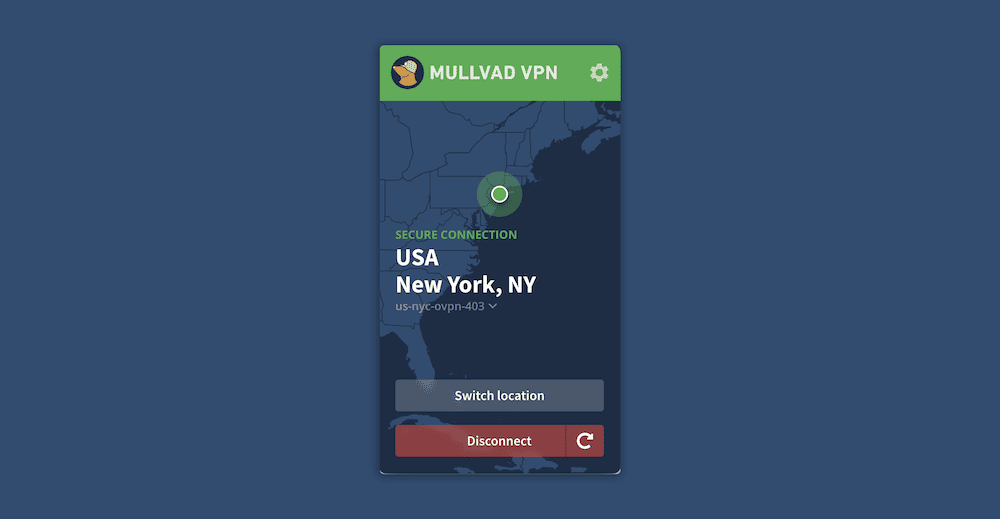
Mullvad enhances anonymity, allowing you to access the dark web safely.
Mullvad places a high premium on anonymity, which is indispensable when accessing the dark web. Its unique account setup doesn’t require a name or an email address: When you sign up, you get a randomly generated number for login purposes. The provider also lets you pay via cash or cryptocurrency, so no identifying details are attached to your account.
In addition to the solid protocols and encryption standards, Mullvad has a feature called “lockdown mode.” This lockdown feature blocks your internet connection when you manually disconnect or quit the Mullvad app. This ensures that you access the dark web only when the VPN is on to enhance your security and privacy. You can read more on how Mullvad protects privacy when compared to our top pick in our Mullvad vs NordVPN comparison.
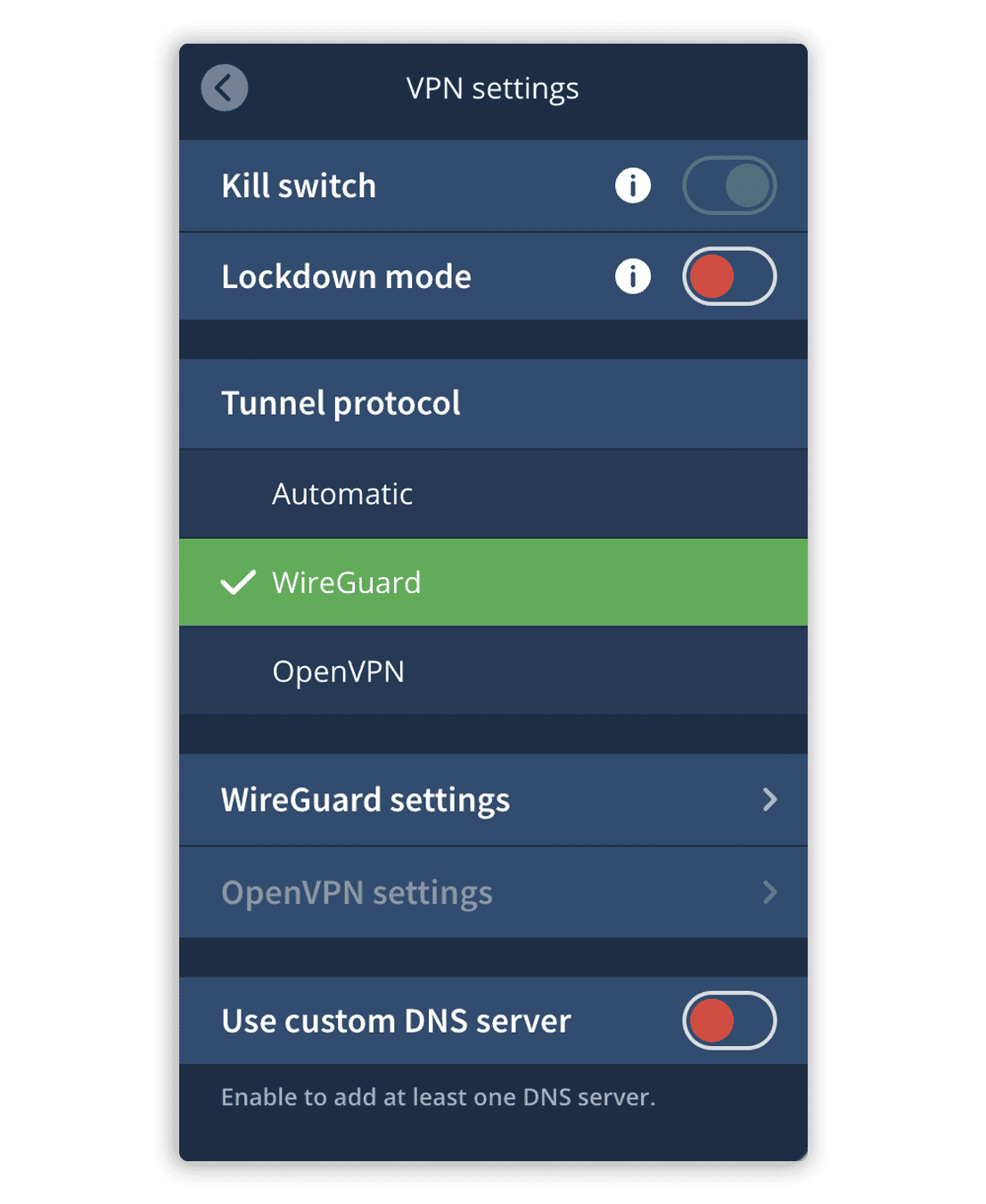
Mullvad has a few advanced security features.
Mullvad is easy to use partly because of its simplistic design and partly because the features are a bit bare. The features are well organized in the settings menu for easy access and come with descriptions of how they work to guide new users.
Mullvad is fast enough for casual browsing on the dark web. However, since it has inconsistent download speeds, it might not be the best for downloading files on the dark web. The upload speeds are more consistent and may suit users looking to upload files to dark websites.
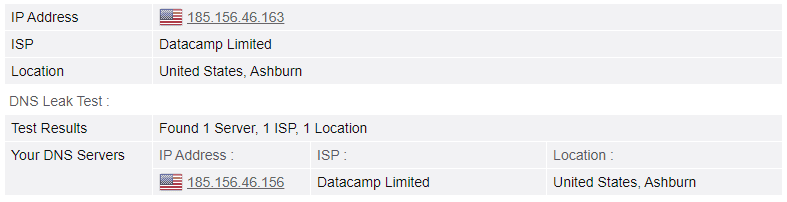
Mullvad doesn’t leak your traffic.
Unlike other VPN services, Mullvad’s kill switch is built in, meaning you can’t turn it off. The provider supports two VPN protocols:
| Protocol | Encryption | Devices |
|---|---|---|
| OpenVPN | AES 256-bit | Windows Mac Android iOS |
| WireGuard | ChaCha20 | Windows Linux Mac Android iOS |
Mullvad offers a flat monthly rate of about $5 regardless of whether you sign up for a monthly, yearly or decade-long plan. You get a discount if you pay with cryptocurrency.
Mullvad is one of the cheapest options on a monthly scale, but extended plans are comparatively pricey. Mullvad doesn’t do a great job in terms of value for money due to its lack of features. Learn more in our full Mullvad review.
Mullvad
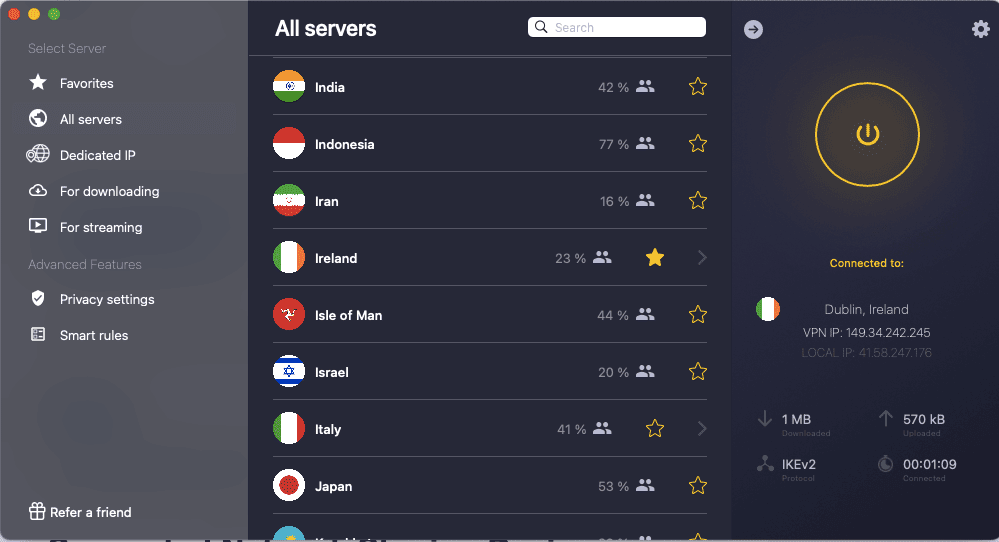
CyberGhost has one of the largest server networks.
CyberGhost has been knocked down to sixth place, not because its performance has deteriorated but because the rest of the pack has improved significantly. It’s still the best VPN for the dark web if you like VPN automation.
With “smart rules,” you can configure CyberGhost to connect to a predefined server on device startup. You can create another rule to have the VPN open your Tor browser — for example, when it establishes a connection. This prevents you from accessing the dark web without VPN protection.
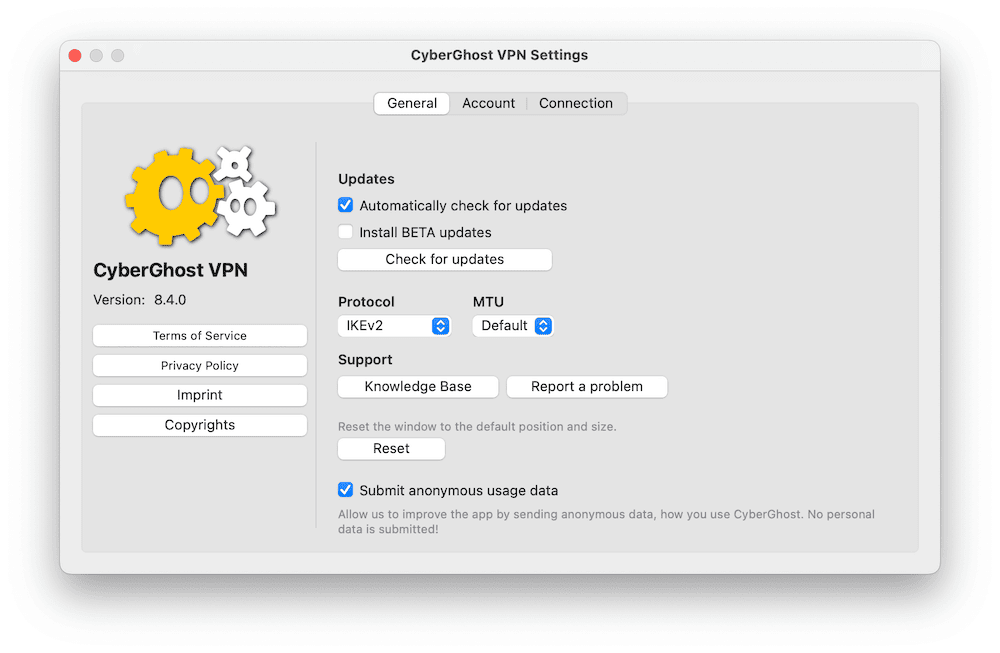
CyberGhost offers advanced VPN automation features.
CyberGhost’s UI may take new users some getting used to because some features are tucked away in unintuitive places. For example, smart rules and privacy options aren’t on the settings page — you have to click the CyberGhost icon to find them at the bottom left.
Though CyberGhost is fast, it’s one of the most inconsistent performers. It can reach over 90% of unprotected speeds on near-distance connections, but the speeds can fall below 20% on its slowest days.
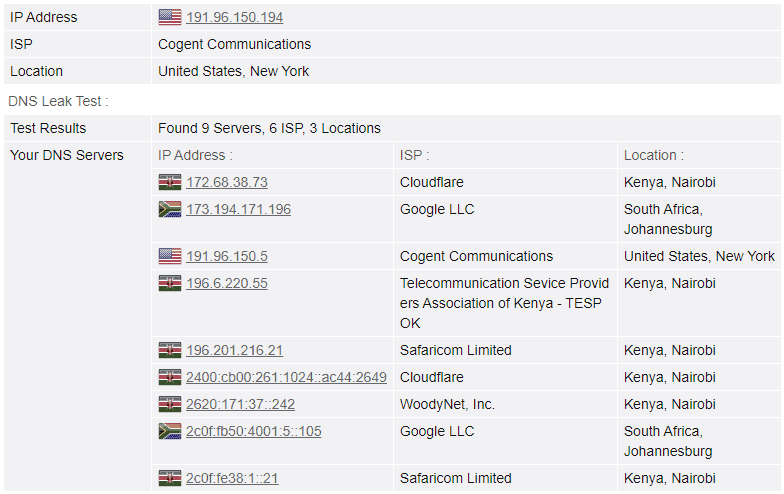
CyberGhost failed our DNS leak test.
CyberGhost’s automatic kill switch blocks internet traffic when you experience internet connectivity issues. The provider also supports solid protocols and is mostly secure and private. Sadly, we’ve had rare cases where it failed our DNS leak tests.
| Protocol | Encryption | Devices |
|---|---|---|
| OpenVPN | AES 256-bit | Windows Linux Android |
| WireGuard | ChaCha20 | Windows Linux Mac Android iOS |
| IKEv2 | AES 256-bit | Windows Mac iOS |
CyberGhost offers excellent value for your money, especially with long-term plans. Its two-year plan costs $2.19 per month, making it one of the best deals. There’s a one-day free trial on desktop and a seven-day free trial on mobile devices.
The monthly plan has a 14-day money-back guarantee, and long-term plans offer a generous 45-day money-back guarantee. Learn more in our full CyberGhost review.
CyberGhost Plans
When choosing a VPN for the dark web, pick one that prioritizes security and privacy. Other features such as speed and unlimited data may be important, especially if you want to engage in speed-intensive activity on the dark web. Here are some simple selection criteria:
You can use a free version as long as it’s from a reliable VPN provider. Remember that many free VPNs on mobile app stores aren’t designed with security and privacy in mind.
They don’t encrypt your traffic properly, leaving you exposed to threats such as malware, identity leaks and hacking. However, there are exceptions, such as Proton VPN, TunnelBear and Windscribe.
If you have to use a free VPN to access the dark web, we recommend using the free version of Proton VPN. It’s the best free VPN, with a kill switch, robust VPN protocols, AES 256-bit encryption and a no-logs policy. It also offers unlimited data, which is perfect for large files and torrent downloads.
Before we get started, install the VPN and Tor browser on your device.
Browse to nordvpn.com and grab a 76% discounted plan. You can claim a refund within 30 days so trying it out is risk-free.
Download and install the VPN client for your platform. Connect the VPN to a server and run a DNS leak test to confirm that you have the right IP address and that the provider isn’t leaking your traffic.
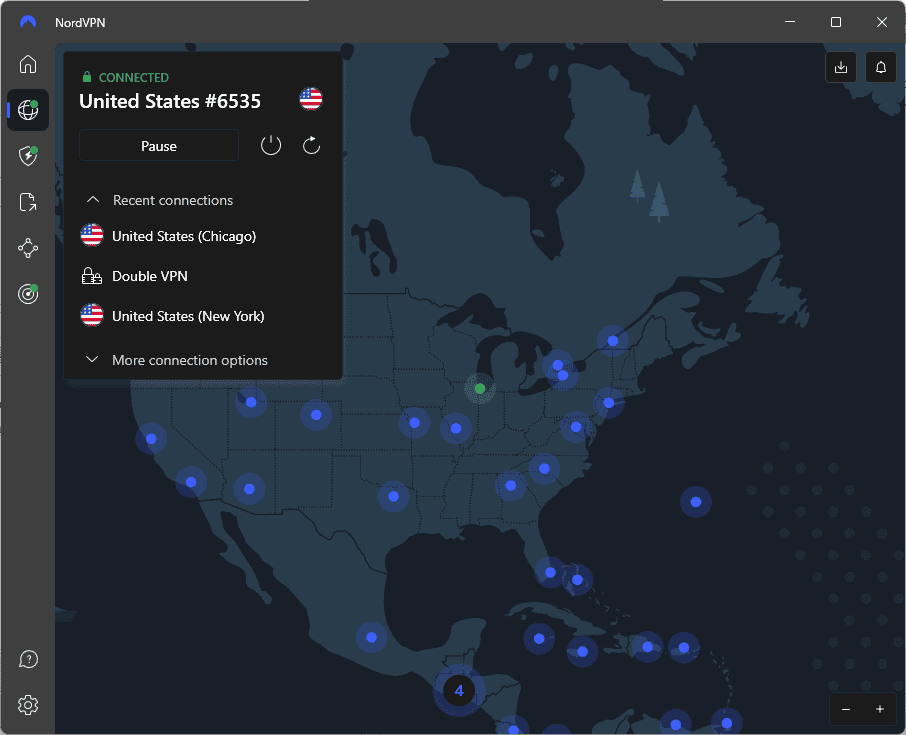
Open the Tor browser and connect to the Tor network to activate the first layer of protection. Click the shield icon at the top right of the browser and configure the Tor browser security level to suit your needs.
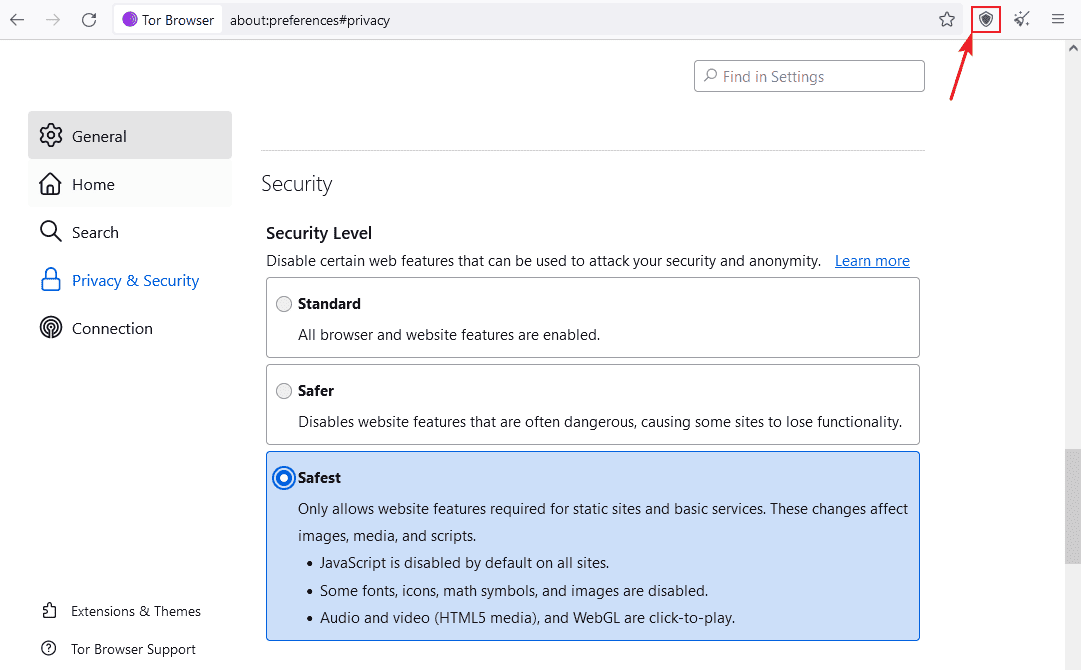
With the VPN and Tor browser, safely access any onion site.
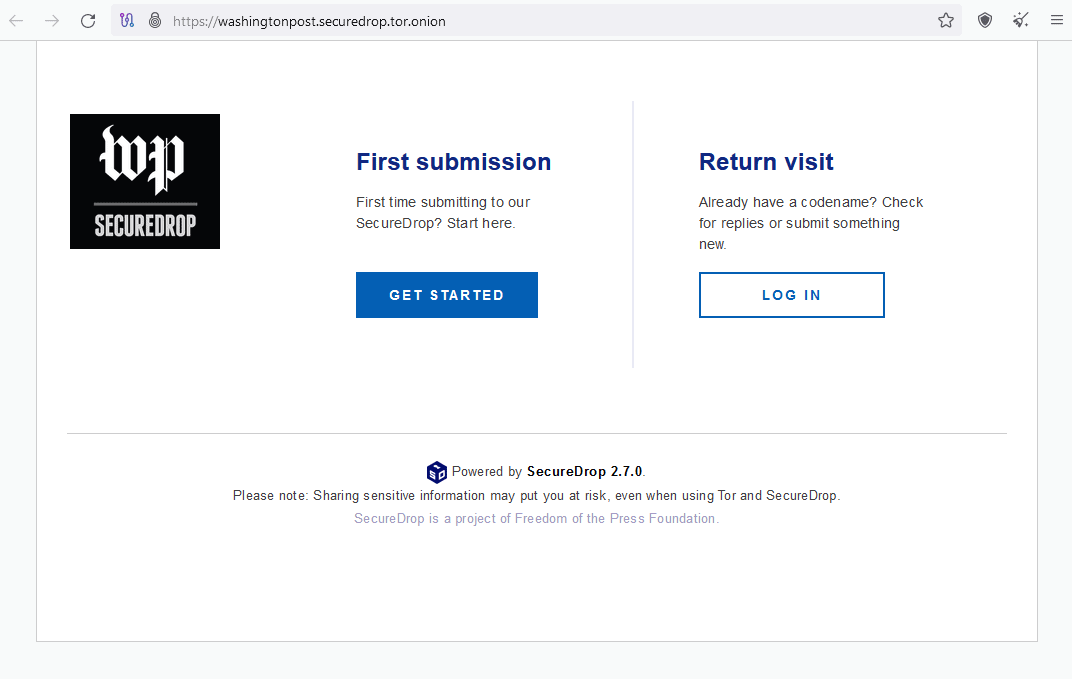
There are several reasons why you need a VPN for the dark web:
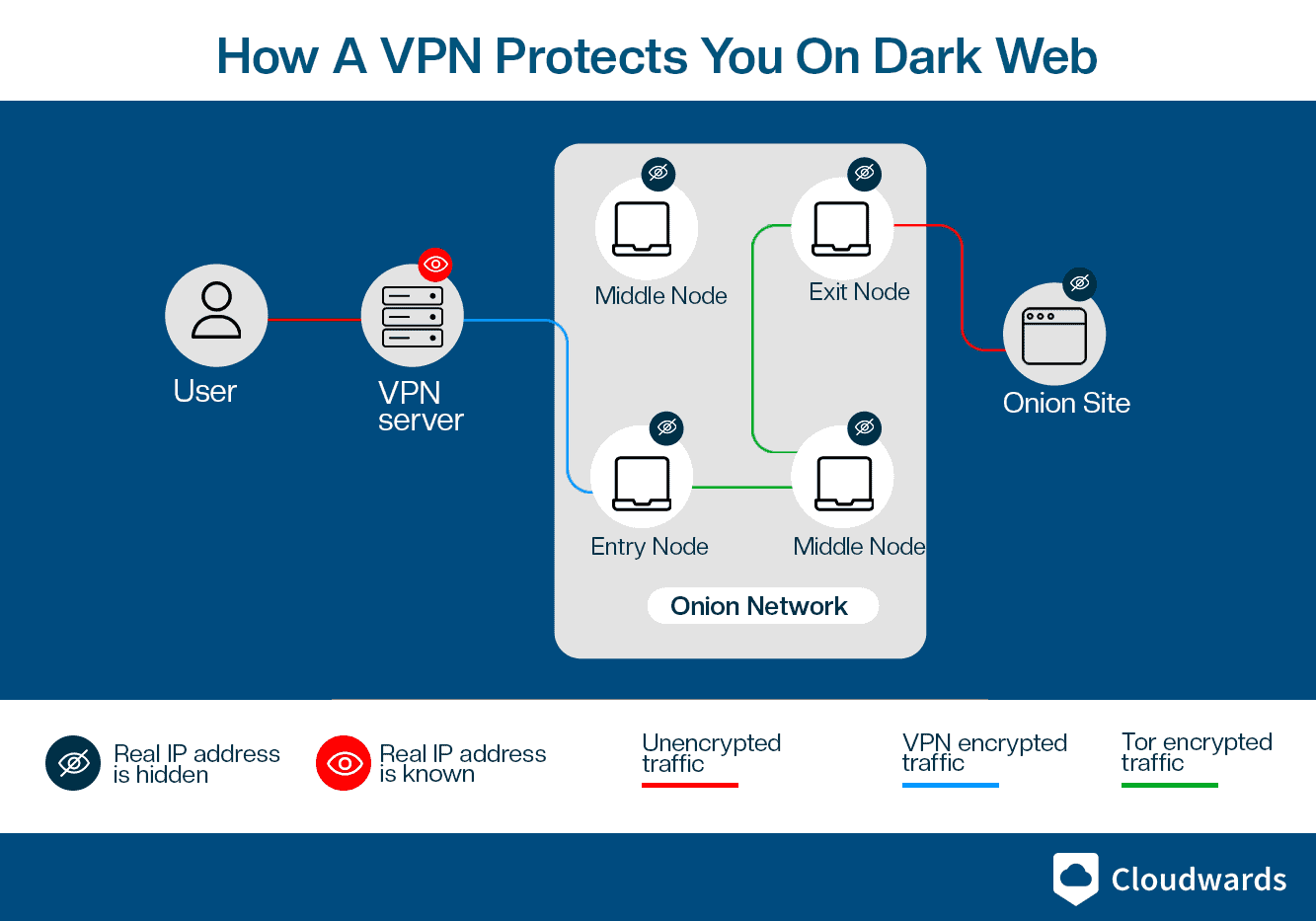
A VPN hides your real IP address before the traffic enters the Tor network.
A VPN encrypts your traffic, hiding your real IP address before it enters the entry node to boost your privacy.
Remember that the Tor browser sends your traffic through a maze of volunteer-run nodes (servers). Though the onion websites you visit don’t receive any details about who you are, the Tor entry node does. If a bad actor or an authority figure is running the entry node, they can easily trace dark web activity back to you.
A Tor browser provides good levels of security, but bad actors can exploit its loopholes to trace dark web activity back to you. To be on the safe side, we recommend using a secure VPN in unison with the Tor browser. Also, make sure you’re aware of the difference between the dark web and the deep web.
NordVPN is the best dark web VPN, but if you need a cheaper option, Surfshark will suffice. Experience the power of NordVPN yourself, risk-free, with the assurance that you can get your money back within 30 days if you’re not completely satisfied.
Have you used a VPN for the dark web? Which VPN did you use? Which feature of the dark web VPN appealed to you the most? We’d like to hear about it, and as always, thank you for reading.
It’s not safe to browse the dark web without a VPN because your ISP can see your digital trail and may share the information if coerced or subpoenaed by authorities.
Onion routing isn’t better than a VPN because the Tor network comprises volunteer-run servers, and not all volunteers can be trusted.
Without a VPN, your ISP can see that you are browsing the dark web, though not necessarily exactly what you’re looking at.
Click Here For The Original Source.