To help organizations minimize the impact of malware attacks on personal computers, Google launched ransomware detection and file restoration in beta in September 2025. These features are now generally available.
End user alert in Drive for desktop when ransomware is detected (Source: Google)
“Compared to the beta version, we can now detect more types of ransomware encryption and do so faster. Our latest AI model detects 14× more infections, providing broader protection,” the company said in a blog.
Ransomware detection in Google Drive
On Google Drive for desktop, users can be warned of potential ransomware activity before all of their files are affected. When ransomware detection is enabled, files are scanned during synchronization to the cloud.
If ransomware-encrypted files are detected, syncing is paused automatically. The affected user is notified in Drive and via email. At the same time, admins receive alerts in the Admin console Security Center and by email.
File restoration and recovery
If ransomware encrypts files on a user’s computer, previous unencrypted versions can be restored from Google Drive. Users are informed when the suspicious activity started and receive guidance on how to recover their files.
Admins and users can restore files in bulk to a previous state. Files modified within the past 25 days can be restored, including content in My Drive, Shared with me, and internal and external shared drives.
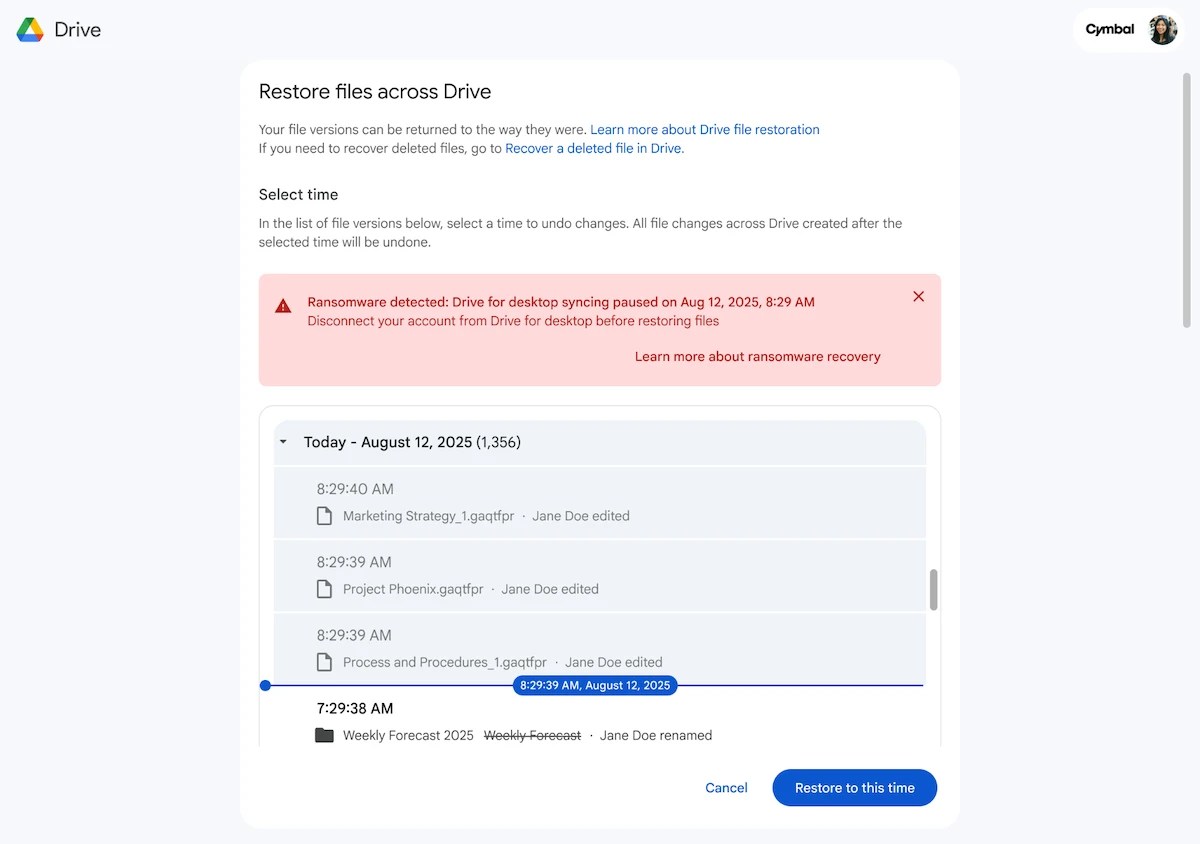
Interface to assist with file recovery (Source: Google)
Both ransomware detection and file restoration are enabled by default for organizations. Admins can turn these features on or off at the organizational unit (OU) level in the Admin console.
For end users, availability depends on their admin’s configuration.
Click Here For The Original Source.